
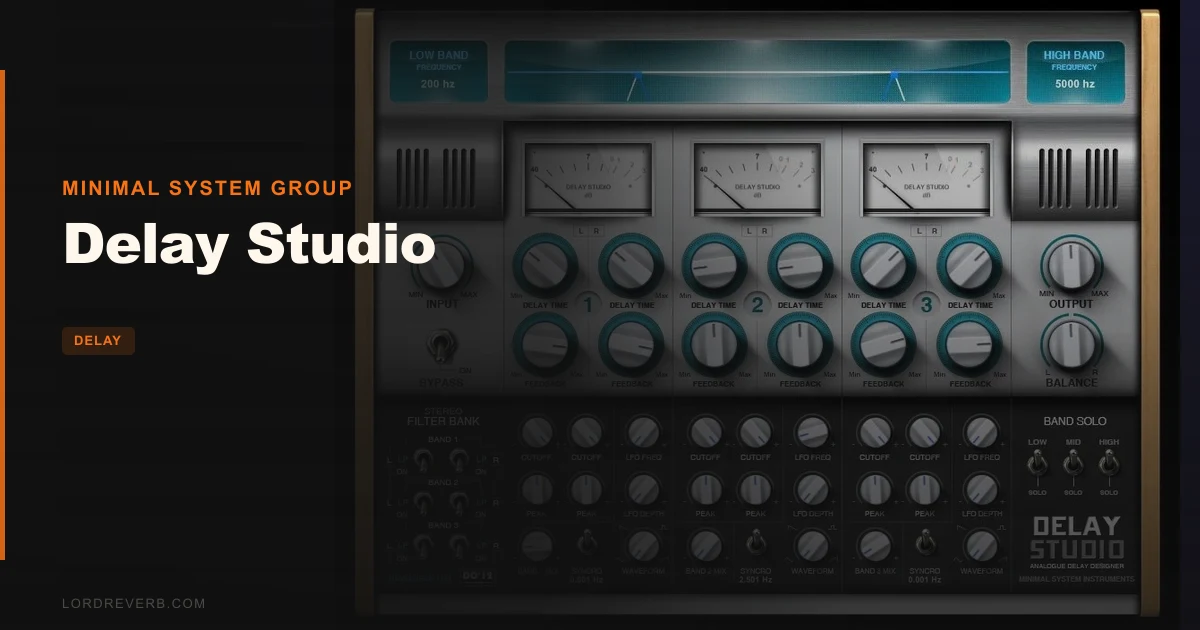
Delay Studio by Minimal System Group is a free Windows VST multiband delay plugin that splits your signal into three frequency bands and gives each one independent stereo delay, filter, and LFO control. You're browsing free plugins at 1am, trying to make a mono synth pad sound like it was recorded in a room bigger than your bedroom. You've stacked chorus, you've tried widening tricks, nothing's clicking. That's exactly the situation where something like this earns its place. It's built for Windows producers who want spatial depth and filter movement without spending anything, and for sound designers who like turning a simple patch into something that breathes. It's not for Mac users, and Ableton Live users should check compatibility first due to 32-bit recognition issues.
What It Actually Is (And Where It Stops)
Delay Studio splits your audio into Low, Mid, and Hi bands, each spanning the full 0Hz to 20,000Hz range. Each band has its own left and right delay times, feedback controls, and a filter with Low Pass, High Pass, Band Pass, Peaking, and Band Reject options. Six LFOs sit across the whole unit, each one able to run free or lock to tempo.
What it's not: a multi-tap delay. Each band gives you one delay per side, and that's it. If you're chasing the kind of rhythmic complexity you'd get from a tap sequence designer, this won't get you there. It's also not a finishing tool for a mastered mix. The plugin is 32-bit, Windows-only, and doesn't run natively in 64-bit hosts without bridging software.
Think of it as a creative effect for sound design and pad work, not a utility delay for clean slapback on vocals or surgical echo on a lead guitar.
Where It Fits in a Session
Drop Delay Studio on a dry synth pad.
The VU meters on each band are genuinely useful here. You can watch the energy moving between frequencies as the LFOs modulate the filters, which helps you catch runaway feedback before it clips your bus.
Where you'll feel the limits: if you're on a 64-bit host that isn't one of the tested DAWs listed by the developer, you'll want to confirm it bridges cleanly before building a session around it. Ableton Live users should honestly just walk away now. The 32-bit incompatibility makes recognition unreliable, and that's a frustrating dead end mid-project.
The Trade-Offs
The warmth owners describe isn't just marketing. The analogue hardware modeling gives the filters a character that sits differently from a clinically clean digital delay. Push the feedback on the Mid band and there's a texture there, a slight softness in the repeats that sounds closer to a tape echo unit than a sample-accurate plugin. That's satisfying in a way that a lot of free plugins simply aren't.
But the 32-bit architecture is a real cost, even if the plugin itself costs nothing. Running 32-bit plugins in a 64-bit session adds overhead through bridging, and in some hosts it adds instability. It's annoying to love the sound of something and then have to debug why your session crashed.
The interface is big and readable, all controls upfront with nothing buried. That's a genuinely clever design decision for a creative effect. When you're modulating multiple parameters live, you don't want to be hunting through sub-menus.
The three-band structure is both the concept and the ceiling. For wide, evolving pad design it's brilliant. For producers who want rhythmic multi-tap patterns, it's going to feel shallow quickly.
Against the Field
Fruity Delay Bank is the most direct comparison. Owners who've used both say Delay Studio has warmer character and better-sounding filters. If tone is the priority and you're already in FL Studio, Delay Studio is the stronger creative choice.
Timeless 3 sits in a different tier of complexity. It's a paid plugin with far more modulation depth and routing options. If your budget is zero, Delay Studio wins by default, but Timeless 3 is in a different conversation.
Minimal Audio's Cluster Delay is a modern alternative with a tap sequence designer built in. That's the tool to reach for when you need rhythmic complexity and pattern-based delay design. Delay Studio doesn't compete there.
Who Should Get It (And Who Should Skip It)
The Windows sound designer. You're building pads, drones, or textural loops and you want filter movement and stereo depth without opening your wallet. Buy it. It's free, the filters sound good, and the LFO section gives you plenty of modulation range. Worth every penny, which is none.
The FL Studio producer. If Fruity Delay Bank is already in your chain and you're curious whether there's something warmer, yes. Download this and compare them back to back. Owners consistently say the character is better here.
The Ableton Live producer. Skip it. The 32-bit recognition issue is a real problem, not a minor footnote. Your time debugging a bridge workaround isn't worth it when other free options run natively.
The Mac user. Hard pass. There's no macOS version, full stop.
The working mixer who wants clean, rhythmic echo. Wait. This plugin is built for creative sound design, not utility delay. If you need reliable slapback or tempo-synced multi-tap for a lead vocal, look elsewhere. The three-band structure and the analogue flavor will get in the way more than they help in a mixing context.
Specs & Technical Details
| Developer | Minimal System Group |
| Price | Free |
| Plugin Format | VST (32-bit) |
| OS Support | Windows only |
| Activation | N/A |
| CPU Usage | Light (developer-optimized code) |
| Trial Available | N/A (free) |
| Version Reviewed | N/A |
Score Breakdown
| Category | Score | Notes |
|---|---|---|
| Sound Quality | 4.0/5 | Warm filter character with analogue-modeled repeats; holds up well for pads and textures |
| Value for Money | 5.0/5 | It's free; there's no argument here |
| Ease of Use | 4.0/5 | Big, readable GUI with all controls upfront; bridging setup adds friction for some DAWs |
| Features | 3.0/5 | Six filters and six LFOs is solid; no extra taps and no macOS support hold it back |
| CPU Efficiency | 4.0/5 | Light load reported by the developer; bridging may add overhead depending on host |
| Overall | 3.5/5 | A clever, free multiband delay with real tonal character, limited by its 32-bit Windows-only build |
Alternatives to Consider
Fruity Delay Bank is the closest free alternative and already built into FL Studio. It's simpler but runs natively without bridging. If you're already in FL, it's worth comparing the two directly. Owners lean toward Delay Studio for filter tone, but Fruity Delay Bank wins on compatibility.
Minimal Audio's Cluster Delay is the upgrade path for anyone who loves the multiband concept but wants more rhythmic complexity. It includes a tap sequence designer that Delay Studio can't match. If you've outgrown three bands and want to build intricate delay patterns, this is the direction to go.
Timeless 3 by FabFilter is a paid plugin in a different league for modulation depth and routing flexibility. It's mentioned alongside Delay Studio in comparisons only because they both cover creative, filtered delay territory. If budget opens up and your sound design work gets more complex, Timeless 3 is worth the conversation.
Delay Studio is free, sounds warmer than you'd expect, and does exactly one thing well: making mono sources wide and alive through filtered multiband delays. If you're on Windows and you work in a compatible host, there's genuinely no reason not to have it in your toolkit. If you're on a Mac or you live in Ableton, it's not for you, and no amount of clever LFO routing will change that.
Frequently Asked Questions
Does Delay Studio work on macOS?
No. Delay Studio is Windows-only. There's no macOS version available, so Mac users will need to look at other options. This is a hard limit, not a workaround situation.
Will Delay Studio run in Ableton Live?
It may not be recognised at all. The plugin is 32-bit, and Ableton Live's 64-bit architecture doesn't bridge 32-bit plugins natively. Owners have reported recognition issues. If Ableton is your main DAW, this is a plugin to skip rather than debug.
How many delay taps does Delay Studio have?
Three. Each of the Low, Mid, and Hi bands provides one delay per side, giving you left and right delay times per band. There are no additional tap options beyond this structure. If you need multi-tap rhythmic patterns, you'll want to look at something like Minimal Audio's Cluster Delay instead.