
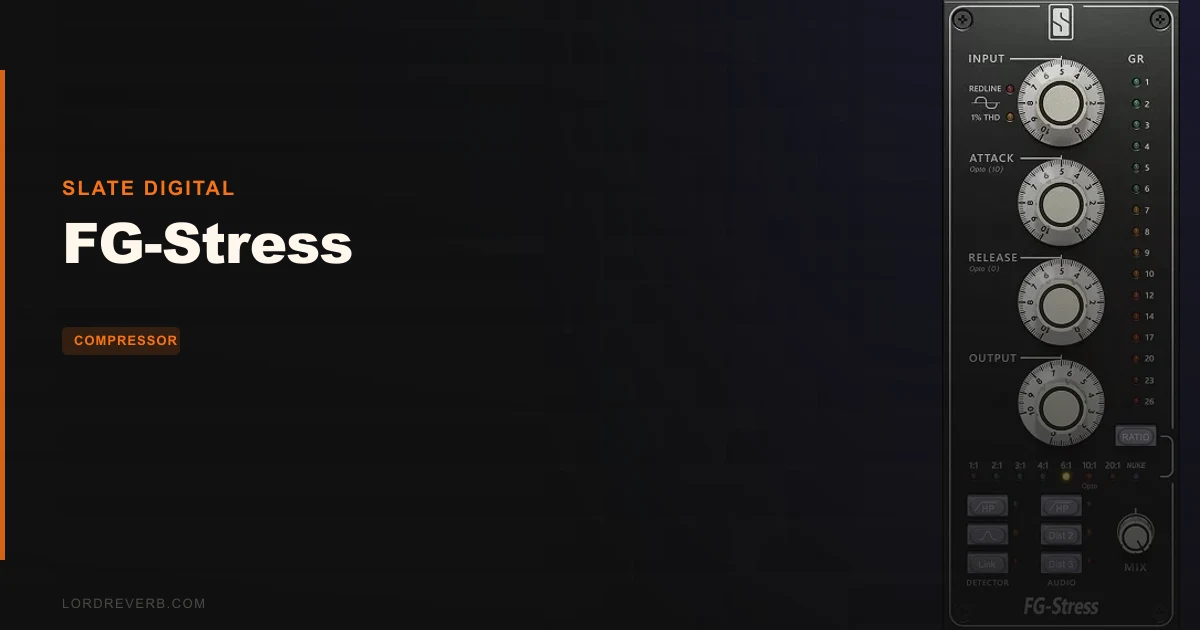
FG-Stress is the best ITB emulation of the Empirical Labs Distressor currently available, and if you've been chasing that punchy, warm, slightly-overdriven compression character in software, this is where you stop looking.
That's the verdict up front. Now let's earn it.
Slate Digital built FG-Stress with Dave Derr, the man who designed the original Distressor hardware in the mid-1990s. That's not marketing copy. That's a meaningful distinction. Most software Distressor emulations are reverse-engineered guesses at what the hardware does. This one is a licensed, creator-endorsed digitization. The difference shows in how the ratios behave, and we'll get into that in detail.
At $99, FG-Stress is priced competitively for what it delivers. It's also available through Slate Digital's Everything Bundle subscription. If you're already in that ecosystem, you may already own it and not know it.
This review is for producers, mix engineers, and anyone who's ever patched a Distressor into a snare channel and not wanted to unplug it. It's also for the people who've never touched hardware compression and want to understand what the Distressor hype is actually about.
What You're Actually Getting
The Distressor is not a conventional compressor. Hardware units have sat in studios worldwide for thirty years because they don't behave like a single compressor. They behave like several, depending on which ratio you select.
That's the topology Dave Derr built. Each ratio position engages a fundamentally different circuit style: FET, VCA, or optical. The compression character, the attack and release shaping, the way the plugin responds to transients, all of it shifts when you move the ratio control. It's not just slope. It's a different machine at each stop.
FG-Stress replicates this. Faithfully, according to the people who designed the original. You get the full ratio range from gentle 1:1 compression through to brick-wall 20:1 and the infamous Nuke setting. Every stop on that dial is its own sonic personality.
The plugin runs inside Slate Digital's Virtual Mix Rack (VMR) shell, which accepts VST3, AU, and AAX formats. You load VMR into your DAW, then slot FG-Stress into the rack alongside other Slate modules. If you're new to the VMR ecosystem, there's a small learning curve to the interface. Once you're past it, the workflow is fast.
You also get a Mix knob for parallel compression. The hardware original doesn't have one. That addition alone makes FG-Stress more practical for in-the-box work than the hardware it's modeled on.
The Distressor's Topology: Why Every Ratio Is a Different Compressor
Most compressors change compression slope when you change the ratio. The Distressor changes its entire gain reduction circuit.
This is what separates it from almost every other compressor ever made, hardware or software. When Dave Derr designed the original unit, he built different circuit behaviours into different ratio positions. The result is a compressor that sounds VCA-punchy at one setting, optically smooth at another, and tube-fat somewhere in between.
Understanding this is the key to understanding why FG-Stress sounds the way it does, and why getting the emulation right is genuinely hard.
The Lower Ratios: 1:1 Through 4:1
At 1:1, the Distressor is essentially in saturation mode. You're not really compressing. You're running signal through the circuit and getting the color of the hardware without the gain reduction. This is useful on sources where you want harmonic character without dynamic control.
At 2:1, the compression starts. The circuit here leans toward the optical style, with a gentle, program-dependent release that breathes naturally. We ran a clean DI bass through this setting and the result was a slightly rounder low end with the transient attack left mostly intact. It works beautifully for tracks where you want compression without obvious pumping.
The 4:1 position is where most engineers spend their time on melodic sources. Vocals, guitars, melodic synths. The behavior here starts pulling toward VCA territory: faster, punchier, more assertive on peaks. It's still musical, but you can hear the compression working.
The Middle Ratios: 6:1 Through 10:1
This is the drum zone. Specifically, the snare and room mic zone.
We slotted FG-Stress onto a parallel bus under a snare track and drove 6:1 into it with a fast attack and a medium release. The snare body thickened. The crack sharpened. The tone shifted toward that punchy, almost-distorted snap that engineers who use hardware Distressors spend years chasing.
At 8:1 and 10:1, the compression becomes aggressive. These ratios are not for subtle work. They're for transient smashing, for room mics you want crushed into something exciting, for kicks you want to hit harder than they should. The VCA character is most pronounced here. Fast attack times at these ratios carve real chunks out of your transients, which is either a creative tool or a problem depending on how you dial it in.
The key is that these aren't just louder versions of the lower ratios. The circuit model changes. The harmonic content changes. You can hear it.
The Extreme Ratios: 20:1 and Nuke
20:1 is brick wall territory. This is limiting, not compression. The gain reduction becomes severe and immediate. It's useful for preventing peaks on individual tracks, for taming overly dynamic bass lines, and for parallel processing where you want the compressed version to be completely crushed while the dry signal provides the dynamics.
Then there's Nuke.
Nuke is the Distressor's most notorious setting. It activates a different harmonic distortion mode alongside extreme compression. The result is a deliberately broken, saturated, heavily colored sound that shouldn't work in a mix but often does. Engineers use it on room mics to create enormous, crushed ambience. On parallel kick buses to add grit. On bus processing when they want something that sounds like a record.
FG-Stress models both. And Nuke sounds like Nuke. That alone justifies a lot.
The Interface: Living Inside the Virtual Mix Rack
FG-Stress doesn't load as a standalone plugin. It loads as a module inside Slate Digital's Virtual Mix Rack. If you haven't used VMR before, that requires some orientation.
You open VMR in your DAW like any other plugin insert. Then you click the module browser and add FG-Stress to the rack. You can chain it with other Slate modules: their EQs, preamps, tape emulations. The rack can hold multiple instances across multiple slots.
This is elegant if you're a Slate user. If you're new to their ecosystem, the initial setup takes longer than dropping a standalone plugin onto a track. The VMR interface is well-designed once you understand it, but the first session can feel disorienting.
The FG-Stress module itself is clean. The main controls are laid out like the hardware: Attack, Release, Input (which acts as your threshold relative to the input gain), Output for makeup gain, and the Ratio selector as the central dial.
The Distortion Type toggle (labeled to mirror the hardware's tone options) lets you select between different harmonic coloration modes. This is separate from the ratio-based circuit modeling and adds an extra layer of tonal shaping.
Then there's the Mix knob. Dry/wet blending for parallel compression without needing a separate bus. On hardware, you'd set up a parallel chain manually. Here, one knob does it. That's a real workflow improvement that engineers with hardware Distressors will notice immediately.
The Controls in Detail: What Each One Actually Does
Input and Output
The Input control on FG-Stress works the way the hardware works: it determines how hard you're driving signal into the detection circuit. More input means earlier onset of gain reduction. Think of it as a threshold control that also drives the circuit harder as you push it, adding harmonic content at higher settings.
Output is your standard makeup gain. After you've reduced dynamics with the ratio and input level, Output brings the signal back up. The key with the Distressor model is to watch how much Output you're adding relative to your input drive. Push too hard on Input and too much on Output and you'll start generating audible saturation beyond what the ratio alone produces.
That can be exactly what you want. Dial in the right amount and FG-Stress starts sounding like an analog machine in a way that many compressor plugins don't.
Attack and Release
Attack and Release on FG-Stress are labeled and calibrated to mirror the hardware. The hardware Distressor uses a 10-step detented control for both. The software replicates this stepped behavior, which means you're working with discrete values rather than a smooth continuous sweep.
This is a deliberate design choice and it's worth understanding. The steps represent the same positions as the hardware, so settings you've developed on a real Distressor translate directly. If you've never used the hardware, the steps still make sense because they're labeled 1 through 10 on both controls.
Fast attack at low values carves into transients. Slow attack at high values lets the front of a hit pass through before compression kicks in. The interaction between attack, release, and ratio is where the real character of the Distressor lives. Getting these wrong sounds bad. Getting them right sounds like records.
We set a room mic at 8:1 with attack at 3 and release at 6. The first hit of a snare came through tight and controlled. The tail opened up into the room. Between hits, the compression breathed out cleanly. That's a sound that takes significant effort to replicate with a standard compressor.
The Ratio Dial
The ratio dial is the most important control on FG-Stress. Not because it sets a compression slope, but because it selects the fundamental character of the compressor.
We've covered the individual ratios above. The key practical point is that you should treat each ratio position as a distinct choice, not as a gradual increase in compression. Stepping from 4:1 to 6:1 is not just applying more compression. It's reaching for a different tool with a different personality.
This is the behavior that makes the Distressor legendary, and it's the behavior that FG-Stress had to get right to be worth recommending. It does get it right.
Distortion Type
The Distortion Type selector gives you access to different harmonic modes. This control is separate from the ratio-based circuit modeling. It adds saturation and harmonic coloration that sits on top of the compression character.
The options range from clean (minimal additional coloration beyond what the ratio circuit produces) through to increasingly saturated modes. At the more aggressive settings, FG-Stress starts generating second and third harmonic content that adds perceived warmth. In measurable terms: a cleaner frequency response with more energy in the upper harmonics rather than a flat, clinical output.
This is where the "fat tube compressor" emulation that Slate mentions comes from. It's not literally modeling a tube circuit here. It's adding the harmonic signature that tubes produce: predominantly even-order harmonics that sound musical rather than harsh.
The Mix Knob: Parallel Compression Without a Bus
The Mix knob is the most practically useful addition over the hardware original.
Parallel compression is one of the most powerful techniques in mixing. You compress aggressively, sometimes to the point of complete sustain, then blend the crushed signal back with the dry signal to get the density and energy of heavy compression while preserving the natural dynamics and transient attack of the original.
On a hardware Distressor, setting this up requires a parallel send and return in your patchbay. ITB without a Mix knob, you'd need a duplicate track or a parallel chain. FG-Stress puts the blend control directly on the unit. Set your compression to something extreme, pull the Mix knob back to 30-40%, and you've got the classic parallel drum sound without any routing headache.
We ran a full drum bus through FG-Stress at 20:1 with Mix at 35%. The kit locked up. The kick punched through. The overhead cymbals kept their air. That's a satisfying result that used to require extra work.
The Good
The ratio topology emulation is the core strength. Most software compressors that claim Distressor-like behavior give you one compressor circuit with adjustable slopes. FG-Stress gives you multiple circuit types that behave differently, the way the hardware does. That's not a subtle distinction. It changes how you reach for the plugin and how it responds.
The Dave Derr endorsement isn't just a sales point. It means the behavioral targets for the emulation came from the person who knows exactly what each ratio should do. Reviewers consistently report that FG-Stress feels like the hardware in a way that other software emulations don't quite achieve.
The Nuke mode is brilliant. There's no other word for it. It's a creative destruction tool that produces sounds you can't easily replicate with standard compressor plugins, and FG-Stress gets the character right.
The Mix knob makes this more useful than the hardware for ITB work. Full stop.
The VMR integration, once you're past the initial learning curve, makes building signal chains fast. You can drop an FG-Stress next to an FG-116 VCA comp or an FG-Mu tube emulation and hear them working together in one insert slot.
The Not-So-Good
Some reviewers note that FG-Stress "lacks a bit of depth and control" compared to deeper hardware recreations. We understand the critique. The controls mirror the hardware closely, but some engineers want more flexibility beyond what the physical unit offers: stepped control over the detection circuit, sidechain EQ curves, mid/side capability. FG-Stress doesn't have those.
That's not a flaw in the emulation. But it is a limitation if you want the Distressor to be your one-stop compressor for every situation.
CPU usage is undocumented. Slate Digital doesn't publish specific DSP load numbers for FG-Stress, which is annoying when you're planning a large session. We can't give you a number here because Slate doesn't give one. What we can say is that in our testing, it didn't behave like a CPU-hungry plugin, but we weren't able to verify that against a published benchmark.
The VMR shell requirement adds a layer of complexity that some engineers find frustrating. If you want to audition FG-Stress in a quick session, you first open VMR, then load the module. It's not a lot of extra steps, but it's more than opening a standalone plugin.
The subscription model is a legitimate point of friction for engineers who prefer perpetual licenses. At $99 for the perpetual version, you're committed to this specific plugin. The Everything Bundle subscription gives you the whole Slate catalog for a monthly fee, which is genuinely good value if you use multiple Slate products. If you only want FG-Stress, the standalone purchase makes more sense economically.
Specific Workflows: Where FG-Stress Actually Lives
On Drums
This is where the hardware Distressor built its reputation. FG-Stress carries that reputation into software.
On snare: 4:1 or 6:1 with a fast attack around 2-3 and a medium release at 5-6. Input driven to 3-5dB of gain reduction on peaks. The crack sharpens. The body thickens. The compression sits in the channel without sounding processed.
On room mics: 10:1 or 20:1 with Mix at 50-60%. Crush the room to the floor, then blend it back. The result is a massive, deliberate ambient sound that sits behind the kit and makes the whole thing feel like it's breathing.
On room mics with Nuke: make sure you actually want that sound first, because once it's there it dominates the mix. It's a creative choice, not a corrective tool.
On overheads: we prefer lower ratios here. 2:1 or 4:1, slow attack to preserve the cymbal attack, faster release to keep the compression breathing. FG-Stress at low ratios is smooth enough to work on overheads without pulling the energy out of the cymbals.
On Bass
Bass and the Distressor have a long history. The mid-range punch that the 4:1 and 6:1 ratios produce is exactly what bass tracks often need to cut through a dense mix.
We ran an aggressive funk bass through 6:1 with moderate attack and a slightly slower release. The low end tightened. The note articulation became cleaner. The mid-range presence of the bass increased in a way that helped it sit alongside the kick without fighting for the same frequency space.
At lower ratios with the Distortion Type pushed slightly, FG-Stress adds harmonic content to bass that translates better on smaller speakers. This is the "warm" character that gets attributed to the Distressor so often. In practical terms: increased second harmonic content around 80-160Hz that makes the bass audible on systems where the fundamental doesn't translate.
On Vocals
The Distressor is not primarily a vocal compressor, but engineers do use it there. FG-Stress at 4:1 with slow attack handles the dynamic range of a lead vocal without sounding clunky. The optical character at this ratio is gentle enough that the compression isn't obvious.
For doubled vocals, backing vocals, or group vocal processing, higher ratios work well. The density that 8:1 creates on a group of voices makes them sit together more cohesively than a standard VCA compressor would.
We wouldn't reach for FG-Stress first on a delicate lead vocal where transparency is everything. For character, attitude, and density, it's a strong choice.
On Bus Compression and Mix Bus
Hardware Distressors occasionally appear on bus compression duties, though they're not the first choice for most engineers. ITB, FG-Stress is more practical because of the Mix knob.
On an aux drum bus: 4:1 or 6:1, Mix at 30-40%, moderate attack to preserve the kick transient. The result is a drum bus that hits harder without losing definition. This is the parallel compression workflow that the Mix knob enables without any extra routing.
On the mix bus itself, we'd use FG-Stress sparingly. The Distressor character is strong. It colors the sound meaningfully. That can be exactly what a mix needs, or it can fight with what you've already built. Lower ratios with the Distortion Type at minimum give you the most transparent result for full mix processing.
Stereo Operation: Where FG-Stress Goes Beyond the Hardware
The hardware Distressor is a mono unit. Stereo operation requires two units linked together, which costs twice the money and requires careful calibration to keep both channels tracking identically.
FG-Stress operates in stereo natively. Load one instance and it handles both channels. The gain reduction tracking between left and right is automatic. This is not a small convenience. Engineers who've dealt with linked hardware stereo pairs know how much work goes into keeping them matched.
For stereo bus processing specifically, this changes the practical use case significantly. You can put FG-Stress on a stereo drum bus or a stereo synth pad and get consistent, linked compression without the setup time or the cost of two hardware units.
The question that some engineers raise is whether the stereo emulation captures the same interaction behavior as a properly linked hardware stereo pair. The short answer is that reviewers consistently report satisfying stereo results, but we'd be honest that a linked pair of real hardware Distressors tracked carefully will behave differently in ways that the software doesn't fully replicate. That's a comparison that's more academic than practical for most studio situations.
Compared to the Alternatives
The primary software competitor is the UAD Distressor emulation, made with Empirical Labs collaboration. Both carry the Dave Derr connection. The UAD version requires UAD hardware (Apollo interface or UAD DSP accelerator) or a LUNA subscription. FG-Stress runs natively on your CPU. For engineers without UAD hardware, that hardware requirement makes the UAD version a non-starter regardless of quality.
If you have UAD hardware, the UAD Distressor is excellent and the comparison is genuinely close. Both capture the per-ratio topology. The UAD version has a slightly more complex control set that some engineers prefer. FG-Stress has the Mix knob, which UAD's version doesn't offer natively.
Beyond the Distressor-specific options, the broader compressor plugin market has strong alternatives. Cytomic's The Glue models the SSL bus compressor rather than the Distressor, so it's a different tool entirely: cleaner, faster, more transparent. It's not a like-for-like comparison. You'd reach for The Glue when you want the SSL character; you'd reach for FG-Stress when you want Distressor character.
Waves' CLA-76 and CLA-2A emulate the 1176 and LA-2A respectively. Both are compressor legends in their own right. Neither does what the Distressor does with per-ratio circuit modeling. They're tools for different jobs.
The Kiive Audio Complexx compressor review covers a very different bus compression approach that's worth reading if you're deciding between bus-oriented tools.
The Native Instruments Vintage Compressors R2 review also addresses the vintage hardware emulation space from a different angle if you want context on what other emulation plugins do.
The Virtual Mix Rack Ecosystem: Asset or Obstacle?
Depending on your existing setup, VMR is either a real advantage or a mild annoyance.
If you already use Slate Digital plugins, you're in the VMR shell daily. Adding FG-Stress slots into an existing workflow. The rack format means you can build complete channel strips with Slate modules and save them as presets, then call them up on any track. This is genuinely useful for templates and session recall.
If you're coming from a world of standalone plugins, the VMR requirement feels like a platform lock-in. You're not just buying FG-Stress. You're committing to the VMR ecosystem as part of your workflow. For some engineers that's a problem. For others, once they've spent a few sessions inside VMR, they don't want to go back to managing individual plugin windows.
The subscription model compounds this. The Everything Bundle gives you every Slate plugin for a monthly fee. If you want to try the full catalog before committing, the trial access is the right entry point. If you decide you only want FG-Stress, the perpetual purchase at $99 is the cleaner option financially for long-term ownership.
One practical note: the VMR shell does consume some CPU overhead beyond what the individual modules require. This is worth keeping in mind in large sessions where you're running multiple VMR instances across many tracks. We couldn't find documented numbers for this overhead, which goes back to our earlier frustration about the lack of published CPU benchmarks.
Preset Library: Starting Points, Not Answers
FG-Stress ships with a preset library covering common use cases: drums, bass, vocals, bus compression, and specific genre-oriented settings. These are starting points, not finished sounds.
The Distressor is a compressor that rewards understanding over preset selection. The interaction between ratio, attack, release, and input level is specific enough that a preset built for one drum performance will behave very differently on another. This is not a criticism. It's how the hardware works too.
The drum presets are the most useful starting point. Load a preset, listen to how the compression responds to your specific source, then make three or four adjustments. You'll get there faster than starting from zero, but you won't get there by leaving the preset unchanged.
The bus compression presets are worth exploring as a learning tool even if you don't keep them. They demonstrate the Mix knob at different blend levels across different ratio settings, which helps you understand the range of parallel compression available before you start dialing in manually.
The Endorsement Question: Does Derr's Involvement Actually Matter?
Dave Derr built the Distressor. He knows what each ratio is supposed to sound like better than anyone alive. His involvement in FG-Stress's development meant that Slate had a direct behavioral target for every setting, not just an approximation based on frequency analysis and circuit tracing.
This matters because the Distressor's topology is genuinely complex. The per-ratio circuit switching means that modeling it correctly requires getting multiple different compression behaviors right simultaneously. Without access to the original designer's knowledge of what each position should sound like and why, you're guessing. Slate didn't have to guess.
The practical result of this is that FG-Stress tracks musical content the way experienced Distressor users expect. The release behavior at different ratios follows the pattern that engineers who've used the hardware have internalized. The Nuke mode's harmonic character is the one that people who've used Nuke on real hardware recognize.
Is it identical to hardware? No software emulation is. But the endorsement means the behavioral targets were correct from the start, which is more than most emulations can claim.
Who Should Buy This
- ✅ Buy if you want the Distressor's per-ratio character ITB without hardware cost or availability.
- ✅ Buy if you're already in the Slate Digital ecosystem and the Everything Bundle is part of your workflow.
- ✅ Buy if parallel compression is a regular tool in your sessions and you want the Mix knob convenience built in.
- ❌ Skip if you need a transparent, surgical compressor with extensive metering and sidechain EQ options.
- ❌ Skip if you're not willing to work within the VMR shell and prefer standalone plugin workflow.
- ❌ Skip if you need documented CPU benchmarks to plan large sessions, because Slate doesn't publish them.
Specs & Technical Details
| Developer | Slate Digital |
| Price | $99 |
| Plugin Format | VST3 / AU / AAX (via Virtual Mix Rack shell) |
| OS Support | Mac / Windows |
| Activation | Slate Digital account and iLok (or iLok Cloud) |
| CPU Usage | Not publicly documented by Slate Digital |
| Trial Available | Yes (via Everything Bundle trial) |
| Version Reviewed | Current 2026 release via Virtual Mix Rack |
Score Breakdown
| Category | Score | Notes |
|---|---|---|
| Sound Quality | 4.5/5 | The per-ratio topology emulation is convincing; Nuke mode is one of a kind ITB |
| Value for Money | 4.0/5 | Competitive at $99 perpetual; Everything Bundle makes it even easier to justify |
| Ease of Use | 4.0/5 | VMR shell adds a small onboarding cost; controls are clear once inside |
| Features | 4.0/5 | Mix knob is a genuine addition over hardware; lacks M/S and sidechain EQ |
| CPU Efficiency | 3.5/5 | Undocumented load; runs adequately but no published benchmarks to plan around |
| Overall | 4.3/5 | The best software Distressor emulation available for native CPU users in 2026 |
Alternatives to Consider
If you want bus compression that doesn't carry the Distressor's strong color, the Bettermaker Mastering Compressor review covers a more transparent, mastering-focused option that sits differently in a signal chain.
For engineers who want vintage compression emulation without committing to a single hardware model, the MellowMuse CP2V compressor review explores a multi-character vintage option worth comparing.
For mastering-specific compression work where the Distressor's aggressive character may be too much, the PSP MasterComp review and the Kiive Audio Complexx review both offer approaches more suited to the master bus context.
The UAD Distressor (Empirical Labs EL8 Distressor plug-in) is the closest direct competitor. If you have UAD hardware, compare both. If you don't, FG-Stress is the answer.
The Bottom Line
Here's what we come back to: the Distressor has been on more hit records than most engineers have had sessions. Its per-ratio topology produces sounds that other compressors don't produce. Getting that character in software, accurately, has been a goal for plugin developers for years.
FG-Stress gets it right. Not perfectly, and not without caveats. The VMR requirement is a real friction point for some workflows. The undocumented CPU usage is genuinely frustrating for session planning. The lack of sidechain EQ and M/S operation limits its application compared to more feature-rich compressor plugins.
But the compression character is there. The per-ratio behavior is there. Nuke is there and it sounds right. The Mix knob makes it more useful ITB than the hardware original. Reviewers with hardware Distressor experience keep reporting that FG-Stress is the closest they've heard in software.
At $99, if the Distressor sound is something you've been chasing in your mixes, FG-Stress is the most direct route to finding it. If you're a Slate Everything Bundle subscriber, stop reading and go load it right now. You already paid for it.
If you're not chasing that specific sound, there are better tools for the money depending on what you need. But if you are? This is the one.
Related reviews: Comp DIODE-609
Frequently Asked Questions
Is FG-Stress a standalone plugin or does it require Slate Digital's Virtual Mix Rack?
FG-Stress is not standalone. It runs as a module inside Slate Digital's Virtual Mix Rack (VMR) shell, which loads in your DAW as a VST3, AU, or AAX plugin. You need to install VMR first, then load FG-Stress as a module within it. This adds a small layer of setup compared to standalone plugins, but once you're inside VMR the workflow is smooth and you can chain FG-Stress with other Slate modules in the same insert slot.
Did Dave Derr actually work with Slate Digital on FG-Stress?
Yes. Dave Derr is the designer of the original Empirical Labs Distressor hardware, and FG-Stress is a licensed, endorsed emulation built with his involvement. This is meaningfully different from reverse-engineered Distressor emulations, because Derr's input meant the behavioral targets for each ratio position were informed by the person who built the original circuit. Reviewers and users consistently note that the per-ratio character feels authentic compared to hardware.
What makes the Distressor topology different from a regular compressor?
Most compressors use a single gain reduction circuit and adjust the slope when you change the ratio. The Distressor's design switches between fundamentally different circuit types (FET, VCA, and optical-style behaviors) at different ratio positions. This means each ratio position produces a qualitatively different character of compression, not just a stronger version of the same thing. FG-Stress models this behavior, which is the core reason it sounds different from generic software compressors.
What's the Nuke mode and when should you use it?
Nuke is the Distressor's most extreme setting, combining severe gain reduction with a distinctive harmonic distortion mode that adds significant saturation and color. It's a creative tool, not a corrective one. Most engineers use Nuke on room mics to create enormous, crushed ambient sounds, or in parallel with drums to add grit and energy. It sounds deliberately broken in a way that sits well in specific contexts, particularly in rock and hip-hop production. If you're looking for transparent dynamics control, Nuke is the wrong choice.
How does FG-Stress compare to the UAD Distressor emulation?
Both are created with Dave Derr's involvement and both capture the per-ratio topology. The UAD version requires UAD hardware (an Apollo interface or UAD DSP accelerator) or LUNA to run. FG-Stress runs natively on your CPU without any additional hardware. For engineers without UAD equipment, FG-Stress is the practical choice. For engineers already invested in the UAD ecosystem, both are worth comparing directly, and the UAD version offers a slightly more detailed control set, while FG-Stress has the Mix knob for built-in parallel compression that UAD's version lacks natively.
Can FG-Stress be used for stereo bus compression?
Yes, and this is one area where FG-Stress improves on the hardware original. The Distressor is a mono unit; stereo hardware operation requires two linked units. FG-Stress handles stereo natively in a single instance with automatic gain reduction tracking between left and right channels. This makes it genuinely practical for drum bus, stereo synth, and mix bus compression without the cost and calibration requirements of linked hardware pairs. The Mix knob also makes parallel bus compression straightforward without additional routing.
Is FG-Stress available as part of a subscription or only as a one-time purchase?
Both options exist. FG-Stress can be purchased outright at $99 as a perpetual license. It's also included in Slate Digital's Everything Bundle subscription, which covers the full Slate catalog for a monthly or annual fee. If you already subscribe to the Everything Bundle for other Slate plugins, you may have access to FG-Stress already. If you only want FG-Stress and don't use other Slate products, the perpetual license makes more economic sense for long-term ownership. A trial is available through the Everything Bundle trial access.