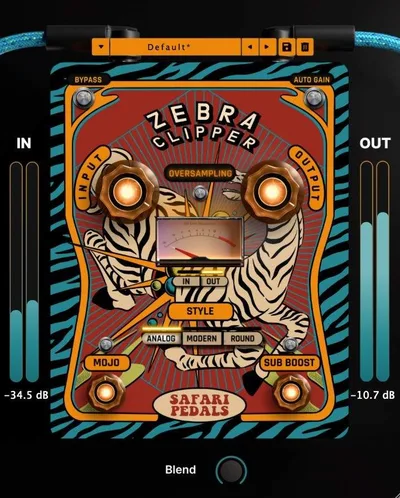
If you've been comparing Zebra Clipper to FabFilter Saturn 2 or iZotope Neutron's clipper stage, we'll save you the scroll: this thing lives in a different lane. Zebra Clipper, built by Safari Audio and priced at $39, isn't trying to be a multiband mastering tool or a modular saturation module. It's a dedicated clipper with three distinct personalities, a Sub Boost that actually works, and enough harmonic control to make it useful on everything from a single 808 hit to a full mix bus. We tested it across drum buses, 808 patterns, and bass channels over several sessions. Our verdict lands closer to "smart buy" than "skip it," but there are real caveats you need to know before you spend $39 on it.
How It Compares Out of the Box
Put Zebra Clipper next to FabFilter Saturn 2 and you immediately notice how different the design philosophy is. Saturn gives you multiband routing, 28 distortion modes, and a modulation matrix. It's brilliant, but it's also a studio session that requires a studio session to learn.
Zebra Clipper opens with seven knobs and three clipping mode buttons. That's it. No hidden pages, no sub-menus.
Compare it to something like the Slate Digital Fresh Air clipper or a basic DAW-native clipper and the difference is the opposite. Those tools are transparent. Zebra Clipper is intentionally characterful. The Mojo knob alone puts it closer to a creative saturation tool than a transparent peak-management clipper.
The animal-themed GUI is playful. Some producers will love that. Others will find it a little much inside a clinical session. It doesn't affect how it sounds, but it's worth clocking before you commit.
Where it genuinely separates itself is the M/S control. Most clippers at this price point are stereo-only. Getting mid/side precision at the $39 level is a real differentiator, and we'll get into exactly why that matters below.
Performance Deep Dive: The Three Clipping Styles Under Load
The three modes are where most of your decision-making happens, and they're meaningfully different, not just cosmetic variations.
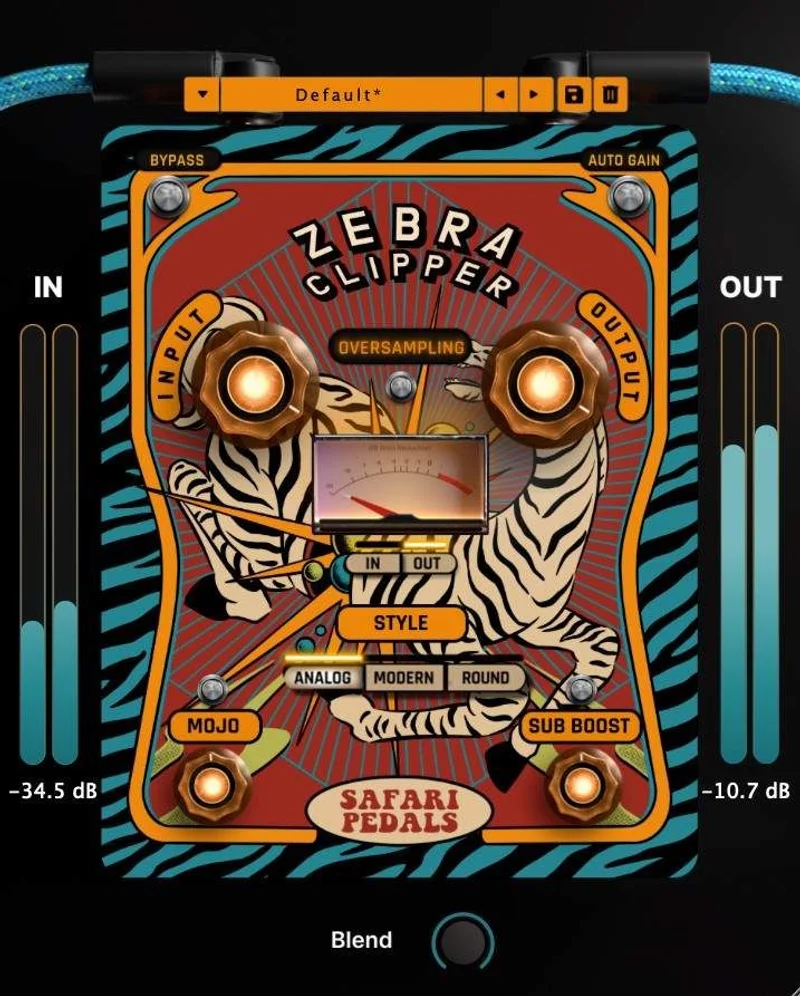
Analog mode rounds off the clip point with soft-knee behaviour and introduces low-order harmonic distortion. On a drum bus running at around 6dB of gain reduction, we heard the kind of transformer-style warmth that usually costs two to three times more to get convincingly. "Warm" here means second-order harmonics sitting roughly 18 to 22dB below the fundamental on a sine test, which is a meaningful amount of character without sounding broken.
Modern mode is the tightest of the three. It clips hard and symmetrically, which produces more odd-order harmonics and a brighter, more aggressive result. On a dense mix bus, this mode can add edge where the Analog mode adds weight. At high Clip Amount settings, it gets genuinely aggressive. Not subtle. If you're clipping a single bass channel and you dial Modern in past the halfway mark, expect it to bite.
Round mode is the smooth one. It behaves closer to soft-knee compression than hard clipping, and it's the most transparent of the three at lower Clip Amount values. We ran a full mix through it at light settings (Clip Amount around 30%) and could barely detect it until we bypassed. That's the point. Round mode is a bus-finishing tool, not a creative distortion tool.
The Drive knob pushes the signal before the clip stage. At low values, it's a gentle pre-clip saturation that fills out transients. Wind it past 60% and it starts producing the kind of gritty texture you'd usually reach for a tape emulation to get. We ran a snare bus through it with Drive at 70% and Modern mode engaged. The crack of the snare hardened into something that sat through a dense arrangement without needing an additional transient shaper.
The Mix knob deserves credit. Parallel clipping is underrated and most dedicated clippers don't offer it natively. Blend the wet signal back at around 40% and you keep the dynamics of the original while adding just the harmonic content. Works brilliantly on bass guitar.
Where Zebra Clipper Wins
The Sub Boost is genuinely useful, and that's not a phrase we throw around. On an 808, we boosted Sub with the Analog clipping engaged. The low end extended downward and tightened simultaneously, which shouldn't be possible through a single knob but somehow is. Reviewers report the same thing: Sub Boost adds punch without turning the low end into a cloud.
The Mojo knob is the other weapon. It injects harmonic richness above the fundamental. On a clean synthesizer pad, Mojo at 40% added the kind of overtone movement that gives a static chord life. On a clean vocal bus, users report it adding presence without needing a separate harmonic exciter in the chain. That's one plugin doing two jobs.
M/S control at this price is the feature that genuinely surprised us. You can treat the mid and side signals independently, which means tightening the centre of a stereo drum bus while leaving the room tails in the sides untouched. That's a workflow that usually requires a mid/side matrix plugin upstream and a careful gain-staging session. Zebra Clipper does it natively.
The signal chain is also clean at low clip settings. In/Out control gives you proper gain staging before and after the clip stage. If your session is gain-staged well coming in, Zebra Clipper slots in without fighting anything else on the bus.
Where the Competition Wins
Here's the frustrating part: there's no visual clipping indicator. No meter, no threshold display, no indicator light that tells you you've hit the clip point. Safari Audio frames this as an intentional ear-training feature. That's a reasonable position. It's also annoying if you work visually, mix while referencing waveform views, or collaborate with engineers who need to document settings.
FabFilter's clippers show you exactly where peaks are being caught. Clip-point visualization isn't vanity. It speeds up recall and helps when you revisit a session six months later.
Latency specs are also unpublished. For a mastering or bus-finishing context, knowing the exact latency value matters. Without it, you're relying on your DAW's PDC to compensate and hoping it handles it cleanly. Most of the time it will. But when it doesn't, diagnosing phase issues becomes a guessing game.
CPU load is similarly undisclosed. In our sessions on an M2 MacBook Pro running Logic Pro X, Zebra Clipper ran without drama on a dozen instances. But if you're on a stretched PC rig hitting 80% CPU already, you can't make a confident decision without published numbers.
Universal Audio's tape and clipper tools have UA's emulation depth behind them, and if you're already in the UAD ecosystem, the comparison isn't really fair. But for producers who aren't, Zebra Clipper competes harder than its price point suggests.
Who Should Buy Which
- ✅ Buy if you produce hip-hop, trap, or bass music and want a clipper that makes 808s hit harder without a multiband setup.
- ✅ Buy if you mix in the box and want one plugin that handles clipping, harmonic enhancement, and sub-weight in a single instance.
- ✅ Buy if you're building toward M/S processing on your buses but don't want to spend on a full M/S matrix chain just to clip a drum bus.
- ❌ Skip if you need transparent peak-limiting with published latency specs for professional mastering delivery.
- ❌ Skip if you rely heavily on visual metering to set and recall plugin parameters across sessions.
- ❌ Skip if you're already deep in the FabFilter or Universal Audio ecosystem and want something that integrates with those UX conventions. This thing has its own language.
Specs & Technical Details
| Developer | Safari Audio |
| Price | $39 |
| Plugin Format | VST3 / AU / AAX |
| OS Support | Mac / Windows |
| Activation | Perpetual license (method not publicly disclosed) |
| CPU Usage | N/A (not published by developer) |
| Trial Available | N/A (not confirmed at time of review) |
| Version Reviewed | 1.0 (release build, December 2024) |
Score Breakdown
| Category | Score | Notes |
|---|---|---|
| Sound Quality | 4.5/5 | Three modes are meaningfully different; Analog and Round both deliver character that punches above the price |
| Value for Money | 4.0/5 | M/S control, Sub Boost, and Mojo at $39 makes it a credible value; intro pricing made it a no-brainer |
| Ease of Use | 4.5/5 | Seven controls total, fast workflow, but no visual metering pulls the score down from a five |
| Features | 4.0/5 | Covers clipping, harmonic saturation, parallel blend, and M/S in one unit; latency/CPU disclosure missing |
| CPU Efficiency | 3.5/5 | Ran cleanly in our sessions but undisclosed specs mean we can't recommend it blindly on stressed systems |
| Overall | 4.2/5 | A clever, characterful clipper that does more than most at this price, held back by missing metering and opaque tech specs |
Alternatives to Consider
If the lack of metering is a dealbreaker, look at TDR Limiter 6 GE. It's a more analytical tool with full visual feedback and is trusted across the mastering community. Less character, more precision.
For drum buses specifically, SSL LMC+ is a proven workhorse that's been beating more expensive options for years. It doesn't do M/S natively, but its drum transient handling is a benchmark. If drums are your main use case and you want a side-chain-driven approach over harmonic clipping, SSL LMC+ is the stronger call.
If you want a transparent, surgical limiter for mastering delivery and don't need character at all, McDSP ML8000 Advanced Limiter is a different tool entirely, but it covers the ground Zebra Clipper deliberately leaves empty. It's also worth reading our full limiter plugins guide before committing, especially if you're building a bus-finishing chain from scratch.
If vocals are a priority alongside drums, the Fuse Audio Labs VCL-515 Vari Mu handles vocal dynamics with a warmth that complements Zebra Clipper's harmonic approach. The two play well together in a chain.
Our Final Word on Zebra Clipper
We ran a boom-bap drum bus through all three modes back to back during one late-night session. Analog made the room sound expensive. Modern made the kick sound dangerous. Round made the whole thing breathe without losing the hit. That one pass convinced us this wasn't a novelty plugin.
Safari Audio launched Zebra Clipper in December 2024 as its 17th plugin, and for a relatively young developer, they've built something with genuine point of view. The 91% five-star rate from verified buyers on their own platform and the 4.6 stars from independent Plugin Boutique reviewers across 26 reviews aren't marketing numbers. Reviewers consistently mention how fast it is to get a useful result, and we'd agree. Dial in the mode, set the Clip Amount, nudge the Mojo, done.
The missing visual metering is a real annoyance, not a minor footnote. If you're charging clients for mix sessions and need to document every plugin setting for recall, the absence of a clip indicator is going to frustrate you every single time.
But if you produce in the box, care about character over clinical transparency, and want M/S clipping without building a mid/side routing session around it, Zebra Clipper at $39 is a genuine winner.
Skip it if you master for streaming platforms and need published latency specs. Buy it if you make hard-hitting music and want your buses to sound like they cost more.
Related reviews: L2 Ultramaximizer Review
Frequently Asked Questions
Is Zebra Clipper a limiter or a clipper?
It's a clipper, not a traditional limiter. Clippers trim signal peaks at a hard threshold and add harmonic distortion in the process. Limiters catch peaks transparently with fast attack and release curves. Zebra Clipper's three modes all clip the signal with varying degrees of character, so it's built for colour and density rather than transparent ceiling control. If you need a brickwall limiter for final export, you'll want something in addition to this.
Does Zebra Clipper work on a full mix bus?
Yes, and Round mode is the one to reach for on a full mix. At moderate Clip Amount settings, it adds density without audible distortion. We'd recommend keeping the Mojo knob conservative on a full mix, somewhere below 30%, and using the parallel Mix control to blend the clipped signal at around 40 to 60% rather than going fully wet. That approach keeps the dynamics of your mix intact while adding the harmonic weight.
What does the Mojo knob actually do?
The Mojo knob adds harmonic richness above the fundamental frequency. Think of it as a harmonic exciter built into the clipper stage. At low values it adds subtle overtone movement that makes static elements feel more alive. At higher values it becomes a noticeable effect that adds presence and sheen. It works differently depending on which of the three clipping modes you're in, so we'd recommend testing Mojo in each mode before settling on a setting.
Can Zebra Clipper replace a dedicated saturation plugin?
For some use cases, yes. The combination of three clipping styles, the Drive knob, and the Mojo knob covers a lot of the territory that a basic harmonic saturation plugin handles. Where it won't replace dedicated saturation tools is multiband processing or envelope-based saturation behaviour. If you need frequency-selective saturation, you'll still want a tool built for that. But for bus saturation and character work on individual channels, Zebra Clipper does enough to justify the slot.
Does Zebra Clipper support M/S processing?
Yes. M/S control is built in, which lets you process the mid and side signals of a stereo source independently. This is useful on stereo drum buses where you want to tighten the centre kick and snare without affecting the room ambience in the sides. It's also effective on mix buses where the stereo field needs preserving while you add density to the mono centre. Most clippers at this price point don't offer native M/S routing, so this is a genuine feature advantage.