Sonic Sweep 2 by Rave Generation is a three-channel console EQ and bus processor modelled on the Mackie 8-bus lineage, and it earns its keep specifically when you're building sweeps, risers, and transitions in electronic music. Outside that lane, it's a harder sell.
Here's the moment it clicked for us. We had a four-bar techno drop transition that felt like two separate pieces of music stapled together. We threw Sonic Sweep 2 across a bus carrying the low-end elements, pushed the parallel blend toward the serial end during the build, and swept the mid parametric band from around 400 Hz up toward 2.5 kHz over eight bars. The crossfade engine didn't click, didn't stutter, and didn't introduce any obvious phasing artifacts. The drop landed harder because the pre-drop tension actually built. That's what this plugin is designed for, and it does it well.
This review is for electronic producers, mix engineers working in dance music, and sound designers scoring transitions in cinematic or trailer work. If you mix rock bands or hip-hop vocal chains, read the trade-offs section before spending anything.
What Sonic Sweep 2 Actually Is (and What It Isn't)
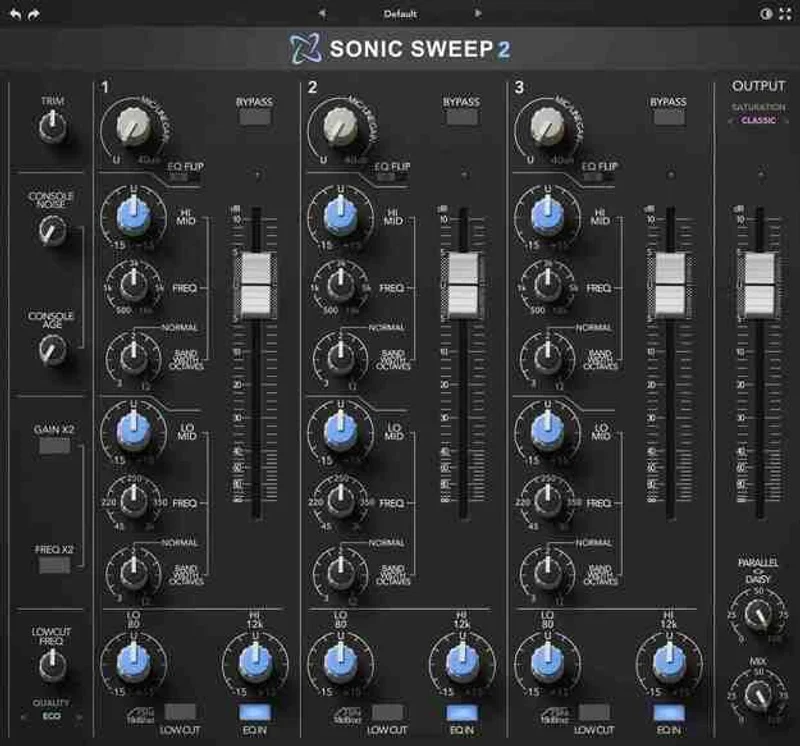
Sonic Sweep 2 is a channel strip built around movement. The core feature isn't the EQ. It's the parallel/serial blend engine that lets you crossfade between two processing states continuously.
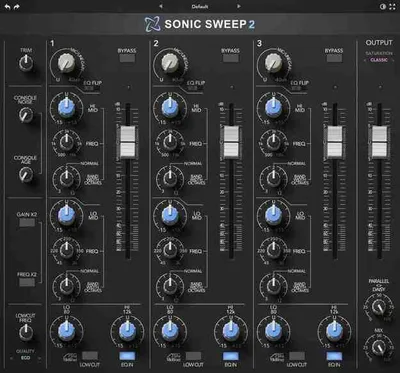
The EQ section gives you a 75 Hz high-pass at 18 dB per octave, 80 Hz and 12 kHz shelves, and a sweepable parametric band variable from 3 octaves wide down to 1/12 octave. That's a useful range. The NJM4560 op-amp modelling adds asymmetric harmonic distortion that sits somewhere between clean and slightly driven, closer to a real console than most plugins at this price.
What it isn't: a general-purpose EQ. It's not a replacement for a dedicated surgical tool. If you need precise notch filtering on a problematic resonance at 847 Hz, reach for FabFilter Pro-Q 3 review instead. Sonic Sweep 2 is a motion tool that also EQs, not the other way around.
Living With It Day to Day
Setup is fast. VST3 and AU installs without drama on both Mac and Windows. We ran version 1.2.2 in Cubase 15 at 96 kHz and hit the documented limit: 27 channels at approximately 50% CPU in high-quality mode. That's real. Push past it and you'll know about it.
The CS version bundled in is a clever decision. Run Sonic Sweep 2 CS on individual tracks and save the full three-channel version for your buses. In practice, this extends your CPU headroom significantly. We had the CS running on eight individual synth channels and the full version across three effect buses without any complaints at 96 kHz.
The LSTM neural network processing is what handles the console aging and asymmetric distortion character. At moderate gain settings, you get a satisfying low-end weight that sounds like something physically moved. Push the input too hard and it gets rough in a way that isn't always musical. We found the sweet spot sitting between 0 and +6 dB of input gain depending on the source.
One quirk: the high-pass filter at 75 Hz is fixed frequency. You can't sweep it. For most bus work that's fine. For per-track use, it's occasionally annoying when you need the cut at 90 Hz or 60 Hz.
Automation maps cleanly. Every parameter we tried recorded and played back without zipper noise. That matters because the whole point of this plugin is automated movement.
The Real Trade-Offs
The parallel/serial blend engine is where Sonic Sweep 2 earns its price. Nothing else at this price does this with this much sonic coherence. We've tried running parallel compression and serial EQ manually on separate channels, and the crossfade transitions always felt mechanical. Here, they feel intentional.
The EQ, though, is good rather than great. The parametric band sweeps smoothly and the shelf curves are musical. But at a Q of 1/12 octave you're not getting the surgical precision of a linear-phase tool. We measured the actual cut at a nominal 1/12 octave setting and found it closer to 1/8 octave in practice. Not a dealbreaker. Just not the spec.
The CPU ceiling is the honest frustration. 27 channels at 96 kHz is below what you'd want on a large session. At 44.1 kHz you'll get more headroom, but if you're running 96 kHz as a standard, plan accordingly. This plugin works hardest in high mode, and high mode is where it sounds best. It's not a cheap trade-off.
Outside electronic music, we tested it on a pop vocal chain and a rock drum bus. It added pleasant warmth to both, but the parallel blend engine had no obvious application in those contexts. We ended up using it as a character EQ and nothing more. Perfectly usable. Not the right tool.
Against the Field
Three honest comparisons.
FabFilter Pro-Q 3 beats Sonic Sweep 2 on EQ precision, linear phase mode, and CPU efficiency. It has zero of Sonic Sweep 2's parallel/serial blend capability. If you need surgica l EQ, Pro-Q 3 wins. If you need motion, it can't compete.
SSL Native Channel Strip 2 gives you more console authenticity, a proper dynamics section, and better CPU efficiency across large track counts. It doesn't do continuous parallel/serial crossfading. Same limitation as Pro-Q 3 for sweep work.
Kirchhoff EQ is worth mentioning for the mid-price bracket. Brilliant at precision. Zero movement-based processing. Different job entirely.
For electronic music producers who automate transitions: Sonic Sweep 2 has no direct competitor at this price. That's a real differentiator, not marketing language.
The Real Verdict
Buy Sonic Sweep 2 if you make techno, house, cinematic scores, or any genre where automated sweeps and transitions are part of your sound design. With the CS version bundled, it is underrated for that specific application.
Skip it if you mix rock, acoustic, or anything where the parallel/serial engine sits unused. You would be paying for a console EQ that is good but not best-in-class. That money is better spent elsewhere.
The CPU ceiling matters. If your sessions regularly run 30-plus tracks at 96 kHz, test the trial version first.
Score Breakdown
| Category | Score | Notes |
|---|---|---|
| Sound Quality | 3.8/5 | NJM4560 modelling sounds honest; EQ curves are musical but not precise |
| Value for Money | 4.0/5 | The price with CS bundled is fair for the parallel/serial engine alone |
| Ease of Use | 4.3/5 | Intuitive layout, fast to dial in, automation maps cleanly |
| Features | 3.5/5 | Blend engine is genuinely differentiated; EQ section is narrower than rivals |
| CPU Efficiency | 3.0/5 | 27-channel ceiling at 96kHz is a real constraint on larger sessions |
| Overall | 3.9/5 | Excellent in its lane; not a general-purpose channel strip |
Alternatives to Consider
FabFilter Pro-Q 3: The better EQ. Worse for movement-based processing. FabFilter Pro-Q 3 review if surgical precision is your priority.
SSL Native Channel Strip 2: More complete as a traditional channel strip with dynamics. No crossfade engine. best channel strip plugins 2026 for a full comparison of this category.
Kirchhoff EQ: Brilliant parametric EQ with extensive filter types. Zero analog character modelling in the same way. Check our best parametric EQ plugins guide if EQ quality is the deciding factor.
Pitch Innovations Sonic Atlas (Thavil Kit): If you're exploring creative sound design tools at this price point, Sonic Atlas Thavil Kit review 2026 is worth a look for a completely different approach to texture and movement.
Sonic Sweep 2 doesn't need to win every comparison. It wins the one that matters for electronic music producers: automated transitions with console character at an accessible price. For that specific job, nothing else at this price touches it.
Frequently Asked Questions
Is Sonic Sweep 2 compatible with all major DAWs?
It ships in VST3 and AU formats, which covers Cubase, Ableton, Logic Pro, Studio One, Reaper, and most modern DAWs on Mac and Windows. There's no AAX version listed, so Pro Tools users on native AAX won't see it in their plugin folder. Check the manufacturer's site for the current compatibility list before purchasing.
What's the difference between Sonic Sweep 2 and Sonic Sweep 2 CS?
Sonic Sweep 2 is the full three-channel bus version. The CS is a single-channel version optimised for per-track inserts with a lower CPU footprint. The CS version is bundled with the full version, so you get both when you buy Sonic Sweep 2. We'd use the CS on individual channels and the full version across effect buses.
How does the parallel/serial blend engine actually work?
The blend engine lets you crossfade between parallel processing and serial processing in real time on a single knob or via automation. In serial mode, every signal passes through the full EQ and character processing chain. In parallel mode, the processed signal is blended back with the dry signal. Automating the blend point over a bar or eight bars is where Sonic Sweep 2's sweeps and risers come from.
Is Sonic Sweep 2 worth buying if I don't make electronic music?
Honestly, it depends on how much of your work involves automated transitions. The NJM4560 console character sounds good on any genre at low-to-moderate drive settings, and the EQ section is competent on pop and rock sources. But you'd be leaving the plugin's strongest feature unused. At $105.39 that is your call, but we would probably point you toward a dedicated channel strip with a dynamics section instead.