
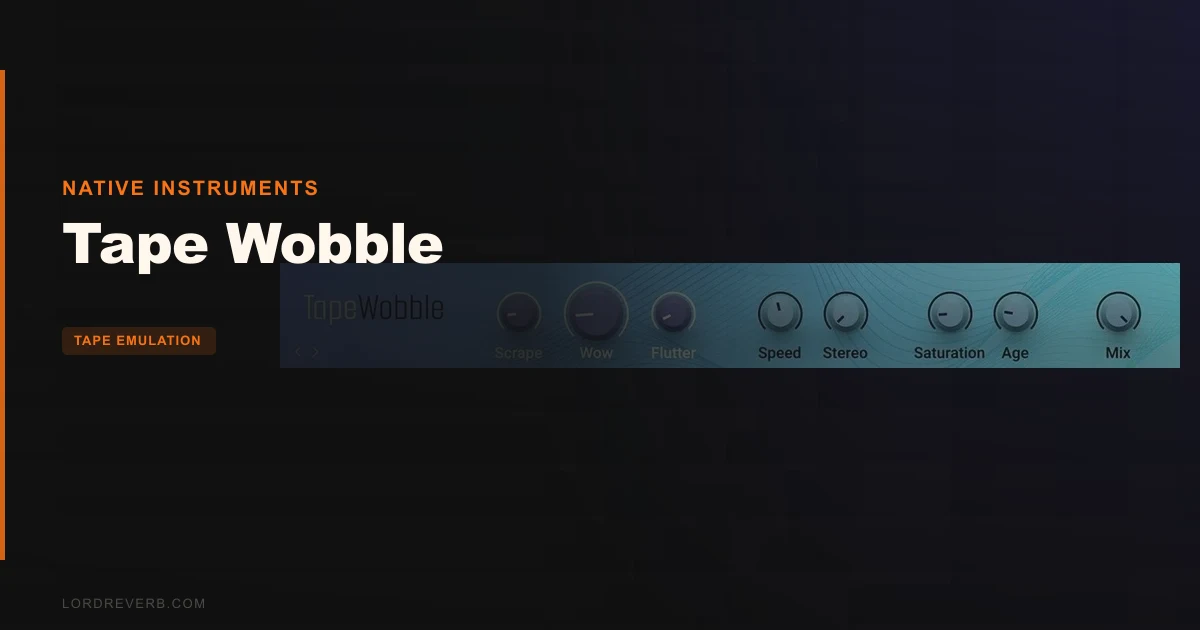
We were halfway through a lo-fi hip-hop mix, and the sample flip we’d built around a dusty soul record was too clean. The drums sat perfectly, the chops were balanced, but the whole thing felt like it was shot in 4K when it needed to look like a VHS dub. We dropped Tape Wobble across the drum bus. Pushed the wow up, let the flutter breathe at a low rate, pulled the highs down with the natural roll-off. Twenty seconds. Done.
Tape Wobble is Native Instruments’ standalone lo-fi tape effect, extracted from Guitar Rig 7 Pro. It’s built for producers who need vintage tape character fast: wow and flutter pitch drift, saturation, noise, and high-frequency roll-off in a single interface. If you already own Guitar Rig 7 Pro, you have this. If you don’t, it’s worth knowing it exists as a separate component.
First Impressions: Small Panel, Obvious Intent
Opening Tape Wobble the first time, you get a compact UI with no clutter. The controls are grouped logically: pitch instability (wow and flutter), harmonic colour (saturation), noise floor, and the HF roll-off that gives tape its characteristic dull, pressed quality.
There’s no modulation visualiser, no moving tape reel graphic. It’s functional. We appreciated that. Some tape plugins spend half their GUI real estate on animations that tell you nothing. Tape Wobble just shows you the knobs.
Installation through Native Access was clean. No activation drama. It appeared in our DAW’s plugin list immediately. First load was light on CPU even with multiple instances running across a session.
Getting It Into a Real Workflow
Tape Wobble drops onto a track and works in about 30 seconds. That’s the honest pitch for it.
We used it three ways: as an insert on individual melodic elements, as a bus effect on drum groups, and as a send for parallel tape colour. All three work. The insert approach gives you the most control over individual textures. The bus approach is where we got the most satisfying results: a subtle 20-30% of saturation with low flutter depth on a full beat gives that cohesive, pressed-to-tape feeling.
The friction point is depth. If you want to push the wow hard for an obvious warped-tape effect, you’ll hit the ceiling of what this plugin offers before you hit the ceiling of your creativity. The Tape Wobbler from Kilohearts, for comparison, goes to a maximum depth of 15% of a half step and 7Hz rate. Tape Wobble doesn’t publish exact Hz values for its controls, which is frustrating. You have to work by ear, which is fine for experienced producers but annoying when you want repeatability.
There’s no tempo sync for the flutter rate. On rhythmic material, free-running flutter can phase awkwardly against the grid. lo-fi plugin workflow tips We worked around it by keeping the rate very low or very high, avoiding the range where it competed with the tempo.
What It's Genuinely Good At
The saturation algorithm is the strongest part of the plugin. Push it to around 40-50% and you get harmonic content that makes digital sources feel analogue without turning them muddy. On a clean electric piano sample, that saturation added second and third-order harmonics that pushed the note sustain forward in the mix in a way that EQ alone can’t replicate.
The HF roll-off is properly musical. It’s not a harsh low-pass filter. It behaves more like tape oxide saturation: the air frequencies reduce smoothly, and the midrange gets a slight lift in perceived presence as a result. On synth pads that were too bright and cutting, we cut the high end with Tape Wobble and got the same result we’d usually reach for with a gentle shelving EQ plus a saturation plugin. One step instead of two. That’s a real workflow win.
The noise floor option is light. It’s not going to replace a dedicated vinyl or tape noise plugin, but for adding just enough texture to make a clean sample sit next to lo-fi material, it’s enough.
best free tape emulation plugin 2026
The Rough Edges
The parameter depth is the honest limitation. Dedicated tape emulators like CHOW Tape Model give you head bump frequency, bias, and flutter type control. Tape Wobble gives you four macros. That’s fine for speed. It’s limiting for precision.
We wish there was a bias control. Bias level changes how a tape machine handles transients and distortion character. Without it, the saturation has one flavour. It’s a good flavour. But it’s one.
No tempo sync is the other miss. For rhythmic use, it matters.
There’s also no published technical spec sheet from NI. We don’t know the oversampling rate, the noise floor algorithm type, or the exact range of the wow and flutter parameters in measurable units. That makes it harder to match settings between sessions or communicate them to collaborators. Annoying when you’re trying to replicate a sound six months later.
tape saturation plugin comparison
Who This Is Really For
- ✅ Buy if you produce lo-fi, bedroom pop, or vintage soul and want a tape chain in one plugin with zero setup time.
- ✅ Buy if you already own Guitar Rig 7 Pro and want to use this component as a standalone insert.
- ✅ Buy if you want subtle tape colour on stems without committing to a deep emulation workflow.
- ❌ Skip if you need per-parameter precision: head bump, bias, individual wow and flutter curve control.
- ❌ Skip if you need tempo-synced flutter for rhythmic production. It doesn't have it.
- ❌ Skip if you're looking for a full tape machine emulation with transport, delay, and multi-head modes. That's a different tool entirely. full tape machine plugin options
Score Breakdown
| Category | Score | Notes |
|---|---|---|
| Sound Quality | 4.0/5 | Saturation and HF roll-off are genuinely musical; noise is thin |
| Value for Money | 3.5/5 | Fair if bought standalone; brilliant if you already have Guitar Rig 7 Pro |
| Ease of Use | 4.5/5 | Four macro controls, instant results, no learning curve |
| Features | 2.5/5 | Missing bias control, tempo sync, and published parameter ranges |
| CPU Efficiency | 4.5/5 | Multiple instances across a session with no measurable slowdown |
| Overall | 3.5/5 | Clever and fast, held back by shallow parameter depth |
Alternatives Worth Comparing
CHOW Tape Model (ChowDSP) is free and gives you significantly more under the hood: head bump, bias, oversampling, and flutter type. If you want to understand what tape emulation actually does to audio, start here. CHOW Tape Model full review
TAPED: Blooming Vibes (Klang) is a cheaper option that targets a similar lo-fi aesthetic. It’s built specifically for Ableton Live’s Max for Live environment, so DAW compatibility is narrower, but the character is different: bloom-forward, dreamier. TAPED Blooming Vibes review
IK Multimedia T-RackS Tape Machine Collection is the serious option. It models specific tape machines and gives you full transport emulation at a higher price point. That’s a different budget, a different depth. If you need machine-accurate emulation, go there. If you need fast macro-level tape colour, Tape Wobble is easier to live with daily.
The Honest Call
We’d buy Tape Wobble for one reason: speed. The saturation sounds good, the HF roll-off is musical, and you can get a convincing lo-fi texture on a track in under a minute.
We’d skip it if we needed precision. There’s no bias control, no tempo sync, and no published specs. For that work, CHOW Tape Model does more for less money.
If you already own Guitar Rig 7 Pro, you already have this. Use it. It earns its place in the chain.
If you’re buying it standalone, check the current price at Native Instruments before committing. The value equation shifts depending on what’s in your existing plugin folder.
It’s not the tape emulator that does everything. It’s the one you’ll actually use on a deadline.
Related reviews: Reelight PRO Review 2026
Frequently Asked Questions
Is Tape Wobble the same as the effect inside Guitar Rig 7 Pro?
Yes. Tape Wobble is extracted from Guitar Rig 7 Pro as a standalone component. If you already own Guitar Rig 7 Pro, you have access to the same DSP. Native Instruments made it available separately so producers who don't need a full multi-effects rack aren't forced to buy one to get this specific effect.
Does Tape Wobble sync its flutter to DAW tempo?
No. The flutter rate is a free-running control with no BPM sync. On rhythmic material this can cause the modulation to phase against your grid. Keep the rate very low for subtle organic drift or very high to blur the effect into texture. The mid-range rates are where it gets awkward on beat-driven tracks.
How does Tape Wobble compare to free tape emulation plugins?
CHOW Tape Model from ChowDSP is free and offers more parameter control: bias, head bump frequency, and oversampling settings that Tape Wobble doesn't expose. Tape Wobble wins on speed and integration within the Native Instruments ecosystem. If you want to learn tape emulation properly, start with CHOW. If you want to dial in character fast, Tape Wobble is easier.
Can Tape Wobble handle heavy lo-fi effects, or is it just subtle?
It handles both. Push the wow depth and saturation to their upper range and you get a clearly degraded, warped-tape sound. Pull them back to 15-25% and it reads as subtle analogue warmth. The control range is wide enough for most lo-fi applications. Where it falls short is in parameter precision: you can't dial in an exact Hz value for flutter rate, which makes detailed sound design harder to repeat.