
Reels gets compared to Softube Tape constantly, and that comparison mostly misses the point: Softube Tape is trying to be your studio's invisible tape machine, while AudioThing Reels is trying to destroy your signal in the most satisfying way possible. At $19, this review lands firmly in Reels' favour for lo-fi work, sound design, and any session where you want tape to feel like a character, not a process. If you need clean, mastering-grade saturation, that's where it loses the argument.
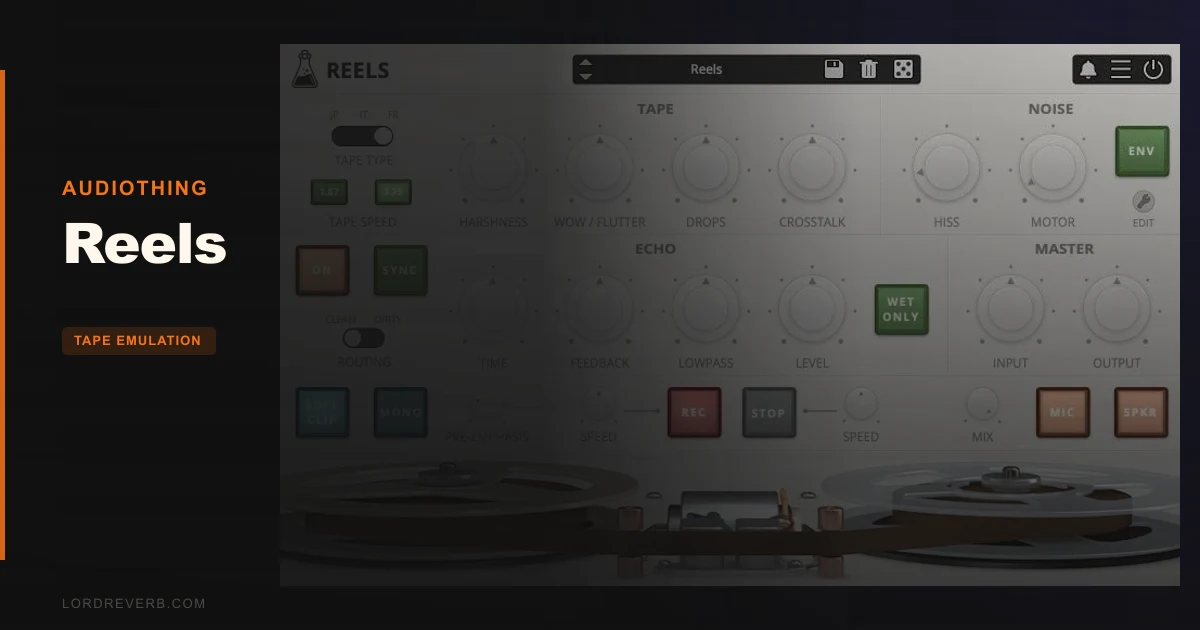
Reels is a tape emulation plugin built around a vintage Japanese reel-to-reel recorder AudioThing found at a flea market. It models three different 1/4" tape types with distinct frequency responses and saturation characters, pairs them with a tape echo section and a tape-stop effect, and adds a full suite of imperfection controls: wow/flutter, ducking, crosstalk, hiss, and motor noise. It's not subtle. It's not meant to be.
This review is for the producer who keeps reaching for lo-fi tools and wondering which one to actually commit to. The answer, at $19, is usually this one.
How It Compares Out of the Box
Stack Reels next to Softube Tape and the difference is obvious from the first preset. Softube Tape is smooth. Reels is abrasive by design. AudioThing makes no apology for it: the developer's own description calls the result "a very rough retro analogue sound" and explicitly says this is not a hi-fi mastering tool.
ReelBus sits closer in spirit but pulls from an 80s cassette character. Reels comes from a portable Japanese reel-to-reel, which puts it in a different sonic neighbourhood: thinner, more unstable, with motor noise that bleeds into the signal in a way cassette emulations don't typically reproduce.
Magnetite offers magnetic tape vibes but lands in a different tonal zone. It's less aggressively lo-fi than Reels. If you need something between Magnetite's warmth and Reels' chaos, you're probably layering both rather than choosing one.
RC-20 is the most common plugin Reels gets stacked with, not compared against. Owners report pairing the two for enhanced warble and coloration: RC-20 handles some artifacts, Reels handles others. That tells you something important. Reels is modular-thinking territory, not a one-stop transparent tape solution.
The tape echo here is what surprises people. Owners describe it as among the better delay sections they've encountered in any plugin. That's a strong statement for something that ships inside a $19 lo-fi tool.
The Three Tape Types: JP, IT, and FR
This is where the character splits. AudioThing models three distinct 1/4" tape frequency responses and saturations, and each one behaves differently enough to feel like a different piece of hardware.
JP: The Usable One
JP is used tape but with a better overall frequency response than the other two. This is the tape type you reach for when you want coloration without punishment. The saturation sits in a range that feels analogue rather than broken. Push it on a drum bus and the top end softens without getting harsh. The mid-range stays readable.
If you're new to Reels, JP is where you start. It gives you the character without demanding that you manage the damage.
IT: The Dull One (In a Good Way)
IT is new old stock tape but with a limited frequency response. That limitation is the whole point. High frequencies roll off earlier than you'd expect from new tape, giving a kind of blanket-over-the-speakers quality that works brilliantly on anything that's too bright or too digital-sounding.
Throw IT on a harsh synth pad and the result is something that sounds like it was recorded in 1974 and left on a shelf. For ambient work, that's exactly what you want.
The frequency limitation does mean you're giving up presence on anything that needs to cut through. Know what you're doing before you commit IT to a lead vocal or a snare top.
FR: The Broken One
FR is overused and badly stored tape in very bad shape. The developer isn't kidding. This tape type produces harshness as harmonic distortion with genuine loss of clarity in the mid-range. Owners note the harshness control can tip into excessive, and FR is the reason why.
FR is a sound design tool, not a mix tool. Run a field recording through it and it sounds like a cassette found in a car that burned down. Run synth pads through it and they come apart in a satisfying, ugly way.
The honest note: used carelessly, FR sounds like a plugin that's broken, not a tape that's broken. The difference matters. Keep the harshness dialled back to where you can still hear the source underneath, and FR opens up. Push past that point and it becomes noise.
Imperfection Controls: The Real Selling Point
The tape type sets the foundation. The imperfection section is where Reels actually earns its keep.
Wow and Flutter
Wow/flutter in Reels emulates pitch instabilities caused by recording and playback mechanism issues. This isn't a simple chorus-style modulation. The pitch movement is irregular and subtly timed in a way that reads as mechanical rather than musical.
Use it at a low setting on a vocal bus. You'll hear the pitch breathing in a way that sounds human even when it isn't. Automate the depth across a track and the instability feels like it's coming from the medium rather than from the DAW.
Push it hard and held notes start to wobble visibly. That's where it crosses from subtle analogue movement into deliberate lo-fi effect. Both are legitimate uses. The control range covers both.
Ducking
Ducking in Reels creates random volume loss from tape or recording/playback head imperfections. This one is underrated. It's not sidechain ducking in the traditional sense; it's unpredictable, non-musical volume dips that read as physical rather than electronic.
Put it on a guitar loop and the hits lose a few dB at random intervals. The result sounds like the tape is slipping against the head. Use it gently on a full mix stem and suddenly everything sounds less like it was made on a computer.
The randomness is what makes it work. A predictable volume dip would just sound like a tremolo. This doesn't.
Crosstalk
Crosstalk simulates channel bleed between left and right in a stereo signal. Owners specifically call this out as a potent sound design tool, particularly on pads. That's accurate. The stereo image starts to collapse in a way that feels analogue and roomy rather than narrow and broken.
If you're making ambient music and you want your pads to sound like they were recorded somewhere physical rather than rendered in a DAW, crosstalk is the control that gets you there. It creates a lovely, messy stereo effect that mono-compatible tools can't replicate.
Annoyingly, there's no way to use crosstalk alone or bypass the other sections to run only crosstalk.
Hiss and Motor Noise
Hiss is the high-frequency noise that comes from magnetic particles in the tape. Motor noise is mid-frequency noise from the reel motor, and AudioThing notes it bleeds into the signal during both recording and playback on the original unit. Both have envelope controls in Reels, which makes them usable rather than decorative.
Being able to shape the envelope on hiss means you can have it swell in and out with the music rather than sit as a static layer underneath everything. That's a genuinely clever bit of design. Hiss with envelope movement sounds like tape breathing. Hiss without it sounds like a noise floor.
Motor noise is subtle at low settings and audibly intrusive at high ones. The sweet spot is usually lower than you think. Dial in just enough to make the silence between sounds feel organic rather than digital-black.
The Echo Section
This gets its own heading because it deserves one.
Tape echo in Reels is what owners keep talking about unprompted. They describe it as among the better echo sections they've heard in any plugin. For something bundled into a $19 lo-fi tool rather than sold as a dedicated effect, that's a remarkable piece of design to find buried inside a broader toolkit.
The echo is tape-influenced in character: it smears, it colours, and the repeats degrade in a way that sounds mechanical rather than digital. Use it on a snare room return and the decay takes on a physical quality that sends from a standard reverb plugin don't replicate.
The frustrating part: you can't isolate the echo section. If you want clean signal running through just the echo, that's not how Reels works. You're always running through the tape coloration as well. For some workflows that's fine, but for others it's annoying enough to push you toward a dedicated echo plugin instead.
The echo also has a low-pass filter but no high-pass filter. Users have asked for one. If your echo repeats are getting muddy in the low end, you're stuck managing that at the channel level rather than inside the plugin. It's not a dealbreaker, but it's a gap.
Tape Start and Stop Effects
The tape-stop effect is what gets the strongest owner reactions. Multiple reviewers describe it as the best-sounding tape stop they've heard.
Tape stop in Reels gradually slows down playback, creating a pitch-down and fade-out effect. Tape start does the reverse: speed gradually increases, pitch rises, and the signal fades in. You can adjust the speed of both effects, which gives you control over whether the stop feels like a gradual mechanical wind-down or a sudden near-instantaneous cut.
Use this on a vocal chop mid-track and the stop effect sounds physical rather than algorithmic. The pitch behaviour during the slowdown matches how real tape machines lose speed: not linearly, not cleanly. It has a slight organic quality that most other implementations flatten out into something that sounds like a pitched plug-in effect rather than actual tape mechanics.
If you've tried tape-stop effects before and they always sounded slightly fake, this is the one that changes that opinion.
Speaker and Microphone Emulation
Reels includes speaker and microphone emulation features. These add further tonal shaping beyond the tape saturation itself, running the signal through simulated playback and capture characteristics.
Speaker emulation adds the resonance and frequency colouring of a physical speaker being used to monitor or broadcast the tape signal. Microphone emulation captures the characteristics of a mic placed in front of that speaker.
Together, they can push Reels from "lo-fi tape plugin" into genuinely lo-fi recording simulation territory. It's the difference between a signal that was recorded to tape and a signal that was played back through a speaker and re-recorded with a microphone. The second option loses more information and gains more character.
Use this combination on synth leads when you want them to sound genuinely degraded, not just filtered or saturated. The result sits in a mix as if it was sampled from vinyl rather than rendered in software.
Presets and the Randomizer
Fifty presets ship with Reels. That's a solid starting library for a plugin in this price range, and they cover enough ground to show what each tape type and imperfection combination can do.
The randomizer is worth using even if you normally ignore preset randomizers. Because Reels' character comes from combinations of analogue imperfections rather than a single primary effect, random combinations frequently land somewhere interesting rather than somewhere chaotic. It's good for creative sessions when you want a tape texture you haven't dialled in yourself.
The window is resizable, which sounds minor but matters when you're working on small screens or trying to read fine control positions. It's the kind of practical detail that shows up in a plugin that's been thought about rather than just shipped.
Format Support and iOS
Reels runs in VST2, VST3, AU, AAX, and CLAP on desktop. It's also available as an iOS AUv3 and standalone iOS application.
The CLAP format support provides modern host compatibility. AAX means Pro Tools users are covered without workarounds.
iOS performance is reported as very stable, with users rating it worth every cent on mobile. If you're producing on an iPad and want tape character in a mobile session, Reels works in that environment without the complaints that follow some desktop plugin ports to iOS.
Playback speed options include 1.87 and 3.75 ips. These affect how the tape coloration and saturation behaviour scales, with slower speeds typically introducing more compression and noise characteristics.
Where It Wins
The tape-stop effect. Full stop. Owners are consistent on this. It's the best-sounding implementation they've heard, and it's the reason people who try Reels often stick with it even if they had a competing plugin already installed.
The echo section is the other standout. It's warm in a way that means the repeats have harmonic content rather than just being copies of the dry signal. That translates to echo repeats that sit in a mix rather than fighting with it.
Crosstalk as a stereo tool is underrated. If you work with pads, ambient beds, or any source where you want the stereo image to feel physically recorded rather than panned, crosstalk gives you something that most other tape emulations skip entirely.
The hiss and motor noise envelope controls are a thoughtful design choice. They make noise feel musical rather than static. That distinction matters more than it sounds like it should.
At $19, the feature density is hard to argue with. You're getting three distinct tape characters, a full imperfection suite, speaker and mic emulation, tape echo, and tape start/stop. Each of those is a separate tool in someone else's plugin folder.
Where the Competition Wins
Softube Tape is considered more of a true tape emulation plugin, offering greater transparency and control. If you're running tape emulation on a mix bus and you need the colouration to be subtle and predictable, Reels' character is too aggressive and too hard to dial back cleanly. Softube Tape is built for professional mix contexts where the tape should work without being noticed.
The section-bypass issue is a real win for competitors. Reels doesn't let you isolate the echo or any other single section. If you love the echo but hate what the tape saturation is doing to your signal chain, you're in a compromised position. A dedicated tape echo plugin doesn't have that problem.
The missing high-pass filter on the echo section is a limitation users have noted. It's frustrating because it's such a small addition that would meaningfully expand how the echo can be used.
FR tape's harshness ceiling is a limitation in mix contexts. When the harshness tips into excessive, it goes there fast. That's not an issue for sound design, but it makes FR unreliable for anything requiring consistent treatment across multiple tracks.
Who Should Buy Which
- ✅ Buy Reels if you produce lo-fi, ambient, or experimental music and want tape coloration that sounds actively degraded rather than tastefully aged.
- ✅ Buy Reels if you're after the tape-stop effect specifically. Nothing else at this price point sounds this good doing it.
- ✅ Buy Reels if you use an iPad for production. The iOS AUv3 implementation is stable and rated highly by mobile users.
- ❌ Skip Reels if you need mastering-grade or mix-bus tape emulation that stays transparent and predictable. AudioThing says so themselves.
- ❌ Skip Reels if you want the echo section but need to run it without the tape saturation. The plugin doesn't support section isolation.
- ❌ Skip Reels if FR tape is your primary target and you need harshness to stay controlled across a full mix. It can be a lot to manage.
Reels Across Different Producer Types
The Bedroom Lo-Fi Producer
You're chopping samples, running beats through vintage chains, and reaching for anything that makes a clean synth sound like it was found on a cassette tape. Reels is the plugin this workflow is built for. The JP tape handles the coloration, the wow/flutter adds the pitch movement, and the echo section turns a dry loop into something that sounds like it was recorded in a room rather than rendered at a desk.
Buy it. Use JP and IT primarily. Leave FR for specific sound design moments rather than as a default tape character.
The Sound Designer
You need tools that do things other tools don't. Crosstalk as a stereo width modifier with an analogue collapse character. FR tape for deliberate signal degradation. Tape stop for transitions that sound mechanical rather than digital. Motor noise with envelope control for textures that breathe.
Buy it. This one is a natural fit. The randomizer helps when you want to find combinations you wouldn't have dialled in manually.
The Working Mix Engineer
You're asking: can this sit on a vocal bus and add warmth without creating problems? Honestly, with care. JP tape at conservative settings adds harmonic content without the aggression that IT and FR introduce. But if your mix needs to stay clean and controlled, Reels is at the edge of what you'd want to push through a mix bus.
Wait. Try it on individual sends and stems before committing to a broader mix chain role. It's brilliant on specific elements. It's harder to use transparently across full mixes.
The iPad Producer
iOS AUv3 performance is reported as stable and worth the price by users who've run it in mobile sessions. If you're building a production chain on iPad and want tape character without having to manage desktop plugin ports that behave badly on mobile, Reels seems to handle it cleanly.
Buy it. iOS support at this quality level for a plugin with this feature set is worth noting without qualification.
Specific Workflow Scenarios
You're working a late-night ambient session. You've got synth pads that sound too clean, too digital, too present. Load IT tape on the pad bus. Its limited frequency response softens the highs. Bring in just enough motor noise to make the silence between notes feel like it has texture. Add crosstalk at a low setting and the stereo image starts to breathe. What was digital now sounds like it came from a tape archive.
Different scene: you're finishing a lo-fi hip-hop track and you need a tape-stop transition between sections. You've tried other plugins and the pitch-down sounds like a pitch-shifting algorithm rather than tape mechanics. Load Reels, set the stop speed to something between fast and slow, and trigger it at the transition. The pitch-down has a physical quality. The fade-out follows the slowing as it should. It sounds like a machine stopping, not a computer effect.
Third scenario: you've got a guitar loop that's too clean. It was recorded well, which is the problem. Put Reels on the channel with JP tape, dial the wow and flutter up to where the notes just start to waver, bring in ducking at a low setting to create random volume dips, and add hiss with the envelope shaped to swell during held notes. The guitar starts to sound like a sample rather than a recording. That's the tool doing what it's designed to do.
Specs & Technical Details
| Developer | AudioThing |
| Price | $19 |
| Plugin Format | VST2 / VST3 / AU / AAX / CLAP / iOS AUv3 / Standalone |
| OS Support | Mac / Windows / iOS |
| Activation | N/A |
| CPU Usage | N/A |
| Trial Available | N/A |
| Version Reviewed | N/A |
Score Breakdown
| Category | Score | Notes |
|---|---|---|
| Sound Quality | 4.5/5 | Three tape characters with real tonal distinctions; FR can tip into harsh territory but that's partly by design |
| Value for Money | 4.5/5 | Echo, tape stop, imperfection suite, mic and speaker emulation in one plugin at this price is hard to beat |
| Ease of Use | 3.5/5 | No section bypass creates workflow limitations; FR tape requires management to avoid excessive harshness |
| Features | 4.5/5 | Wow/flutter, ducking, crosstalk, hiss, motor noise, echo, tape stop, speaker/mic emulation: genuinely broad |
| CPU Efficiency | N/A | N/A |
| Overall | 4.2/5 | A clever, opinionated lo-fi tool that does several things brilliantly and a few things frustratingly |
Alternatives to Consider
Softube Tape is the choice when you need tape emulation that disappears into a professional mix. It's positioned as a true tape emulation rather than a creative effect, which makes it the right tool when transparency matters more than character. If your sessions run on mix-bus tape processing that clients can't hear but would miss, Softube Tape is built for that role. Reels is not.
ReelBus pulls from an 80s cassette character rather than a portable Japanese reel-to-reel. The sonic result is different in a specific, genre-relevant way. If your music sits in an 80s-influenced aesthetic and you want tape coloration that reflects that period's format, ReelBus is worth hearing before committing to Reels. The two are similar in spirit but cover different decades of degradation.
RC-20 is worth mentioning not as a direct replacement but as a companion. Users layer Reels and RC-20 together specifically to combine their different warp and coloration characteristics. If you already own RC-20 and you're asking whether Reels adds anything, the answer from the community is: yes, they complement rather than duplicate each other. If you own neither, Reels at this price is the first purchase. Add RC-20 when you want more warble depth.
The Verdict
Reels is an honest piece of work. AudioThing knew exactly what they were building: a lo-fi creative tool that sounds like a machine that's been through some things, not a pristine tape simulator trying to flatter your mix. That clarity of purpose is what makes it work.
The tape-stop effect is a genuine standout in its price range. The echo section surprises everyone who comes to it expecting a secondary feature. The imperfection suite, hiss envelopes included, is more thoughtfully designed than most of its competition at three times the price. And crosstalk on pads is the kind of tool you use once and then wonder why you didn't have it earlier.
The complaints are real but contained. No section bypass is frustrating. The echo needs a high-pass filter and doesn't have one. FR tape is aggressive enough that it needs careful handling. These are the kinds of limitations that matter when they affect your specific workflow and don't when they don't.
If you make lo-fi music, ambient music, experimental music, or any genre where tape degradation is a creative choice rather than an accident to be avoided, Reels at $19 is an easy call. If you're a mix engineer looking for subtle, controlled tape sheen on a full mix, it's the wrong tool and AudioThing has told you that themselves.
The wrong person for Reels is easy to identify. The right person probably already has the checkout tab open.
Frequently Asked Questions
Is Reels suitable for mastering or mix-bus processing?
No, and AudioThing is direct about this. Reels is built for a rough, retro, analogue sound that the developer explicitly describes as the opposite of hi-fi mastering. The JP tape is the most controlled of the three, but even at conservative settings the character is active rather than transparent. Use it on stems, specific channels, or as a creative effect rather than a mix-bus finisher.
Can you use the echo section on its own without the tape saturation?
No. There's no way to bypass individual sections in Reels, which means the signal always runs through the tape colouration alongside the echo. This is the most common workflow complaint owners raise. If you need a tape echo that runs clean without additional saturation, you'll need a separate dedicated echo plugin for that specific use case.
What's the difference between the JP, IT, and FR tape types?
JP is used tape with a relatively good frequency response: the most versatile of the three. IT is new old stock with a limited high-frequency response, giving a naturally dull, archived quality that works well on bright or digital-sounding sources. FR is overused and badly stored tape in very bad condition, introducing harsh harmonic distortion and mid-range clarity loss. FR is a sound design tool, not a mix tool.
How does Reels compare to RC-20?
They're complementary rather than competitive. Users frequently run both in the same session, using RC-20 for one set of artifacts and Reels for another, with the combination producing more warble and coloration than either achieves alone. If you own one and are asking about the other, the community consensus is that they don't duplicate each other's character enough to make one redundant.
Does Reels work well on iOS?
iOS users report very stable operation in AUv3 hosts and rate it worth the price on mobile. The plugin runs as both AUv3 and standalone on iOS, which gives you flexibility whether you're using it inside a DAW on iPad or as a standalone processor. Mobile plugin ports sometimes behave poorly compared to their desktop counterparts, but Reels doesn't appear to be one of those cases based on owner reports.