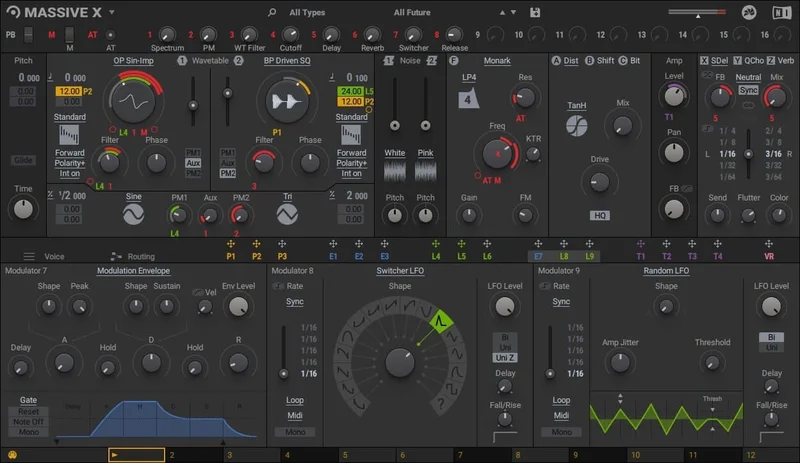
The real question about MASSIVE X isn't whether it sounds good. It absolutely does. The question is whether Native Instruments' long-awaited sequel can justify its $49 price tag when Serum exists, when Pigments exists, and when the original Massive still ships presets people actually use in 2026. Our answer: yes, but only for a specific kind of producer, and definitely not for everyone.
MASSIVE X launched in 2019, a full decade after the original became the sound of dubstep, bass music, and a hundred subgenres nobody had named yet. That gap created enormous expectations. What arrived was a synth that could do more than its predecessor in nearly every measurable way, but felt less finished, less intuitive, and harder to love on first contact.
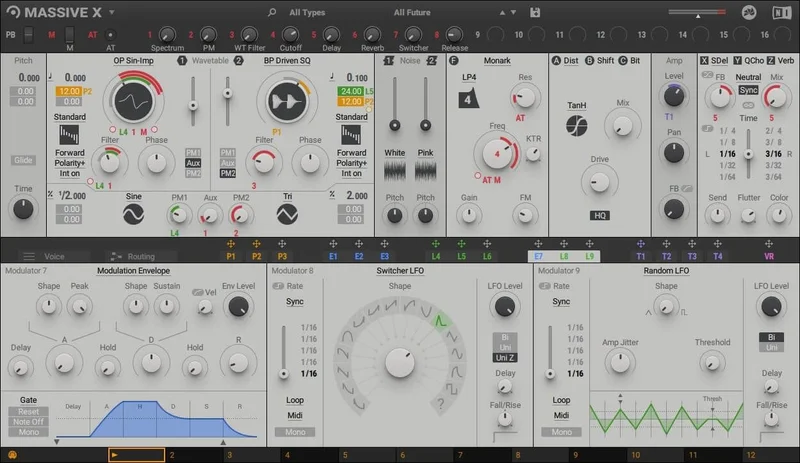
We've spent serious time with this synth. We've bounced presets, built patches from scratch, routed audio through feedback loops that probably shouldn't work, and sat with the frustration when the UI pushed back. Here's the honest picture.
Does MASSIVE X Actually Deliver on the Promise?
Native Instruments promised a complete rethink of a synth that helped birth entire genres. That's a bold claim. They delivered it, mostly.
MASSIVE X is a wavetable synthesizer with semi-modular routing, built on the same DNA as the original but redesigned for contemporary sound design. The oscillator section alone is more capable than the entire architecture of many competing synths. Two main oscillators with 170+ wavetables, two sub and noise oscillators, two phase-modulation oscillators, nine multimode filter types, three stereo effects, and a drag-and-drop routing system that lets you connect outputs to inputs in ways the original never allowed.
On paper, this is a monster. In practice, it delivers on sonic capability while stumbling on workflow. The original Massive felt immediate. MASSIVE X feels like it's asking you to learn it before it'll cooperate. That's a real tradeoff, and it's one you need to decide whether you can live with before spending $49.
The synth has received updates since its 2019 launch, including a global multiband compressor, fully automatable UI, and expanded preset libraries. Version 1.4.1 was current as of mid-2022. NKS support makes it play nicely with NKS-equipped MIDI controllers.
It's not broken. It's not unfinished in the sense of being unusable. But reviewers consistently note it doesn't have the snappy, pick-up-and-play quality of competitors. We agree with that read.
Where MASSIVE X Genuinely Shines
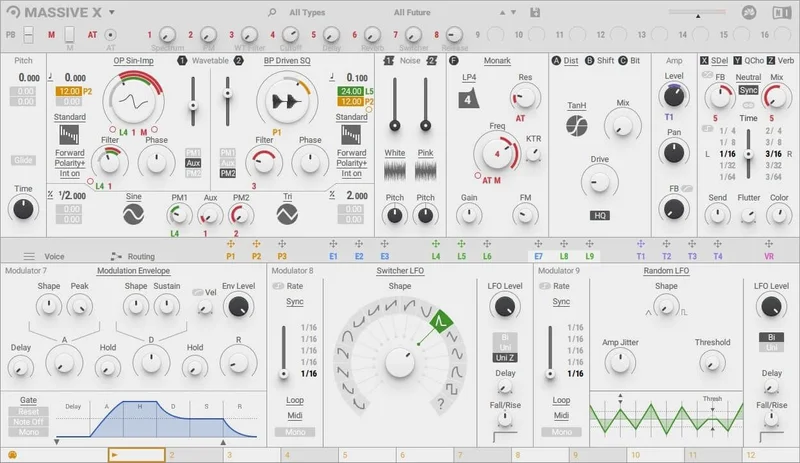
The Oscillator Section Is Legitimately Different
170+ wavetables sounds like a marketing bullet point. It matters more than you'd think, because it's the combination with 10 different reading modes that makes the real difference. You're not just scrolling through a list and picking a waveform shape. You're choosing how the oscillator reads the wavetable: standard scanning, Hardsync, Formant modes, wavetable-bending modes, and the Gorilla family.
Each reading mode has its own sub-modes and additional controls. This means a single wavetable can sound like several different instruments depending on how you read it. That's not a feature most synths can match, including Serum.
We loaded a basic saw-adjacent wavetable into King mode (one of the Gorilla sub-modes) and pulled the low-end control hard. The result was immediate: thick, asymmetric, seismic. It sat below 80Hz with harmonic content that rattled without going undefined. Not "warm" in a vague sense. Physically thick, with clear fundamental weight and odd-order harmonics climbing into the 200-400Hz range that gave it body without mud. Serum can do fat bass. It can't do that particular texture.
The Gorilla Gang: King, Kang, and Kong
These three sub-modes deserve their own section because they're the most distinctive thing about MASSIVE X. Native Instruments built them specifically for aggressive, extreme bass tones. They deliver.
King runs warmer with more controllable low-end weight. Kang adds aggression through a different harmonic shaping approach. Kong pushes into genuinely harsh territory. Feed any of the 170+ wavetables through them and you get tones that growl, rasp, and grunt in ways that sit differently in a mix than anything Xfer or Arturia can produce at equivalent settings.
For bass music producers, this is the actual reason to buy MASSIVE X. Not the preset library. Not the brand. These three modes.
Semi-Modular Routing with Real Flexibility
The routing system in MASSIVE X is its second major differentiator. You can connect any output to any input. That includes routing modulators as audio sources to drive filters, feeding oscillator outputs back on themselves, bypassing signal chain elements, or sending audio through feedback paths that create sounds you genuinely couldn't plan in advance.
We routed the LFO output as an audio-rate signal into the comb filter input. What came out was a metallic, self-modulating texture that shifted with LFO rate changes in a way that felt alive, not static. It took about four minutes to set up. Dialling it in from there took another twenty. But the starting point was something we couldn't have reached in Serum without significantly more work.
The drag-and-drop routing interface is mostly intuitive once you understand the model. The key conceptual shift is thinking about MASSIVE X like a modular system with guardrails rather than a synth with fixed signal paths. That shift takes time. Worth it if you put in the hours.
The Performer Section
Performers are programmable modulation patterns you assign to parameters and trigger from your keyboard using the Remote Octave control. This isn't an arpeggiator or a simple LFO. You draw precise automation curves and then fire them on note events.
The practical result is a single patch that can behave differently depending on which octave you play. A bass sound can have a tight, snappy modulation shape at one octave, a slow filter sweep at another. It makes MASSIVE X genuinely playable in a live context, not just a preset-recall synth.
Reviewers call this feature underrated. We agree. It's one of the most musically interesting elements in the synth and gets almost no attention compared to the oscillators.
16 Macro Controls and DAW Integration
Sixteen assignable macros is twice what most synths offer. You can assign pitch bend, modwheel, and aftertouch to any parameter independently, then stack macros on top. The full DAW automation introduced in later updates means every MASSIVE X parameter is now automatable from your timeline.
This matters for sound design workflows where you want a patch to evolve over time without manually programming every change. Set up your macros once, automate them in your DAW, and the synth becomes a different instrument for every bar of your arrangement.
NKS support extends this to hardware control surfaces. If you run Maschine or a Komplete Kontrol keyboard, MASSIVE X integrates cleanly with parameter display and hardware knob mapping.
The Filter Bank
Nine multimode filter types. That's more variety than most competing wavetable synths. The filters cover standard lowpass and highpass territory, but the more interesting work happens in the comb filter and the modes built for formant shaping. Combine those with the flexible routing (filters can sit in series, parallel, or receive unusual audio sources) and you have a processing stage that's as expressive as the oscillator section.
We ran white noise through the comb filter with feedback pushed to around 75% and modulated the comb frequency with a Performer pattern. What came out sounded like a tuned resonator with rhythmic pitch movement. The tail on each note was musical. That's a specific trick that MASSIVE X enables with no additional processing or plugins required.
Effects Section
Three master stereo effects with dedicated routing options. The effects aren't the star of this synth and they're not trying to be. They're serviceable: they do what you need to finish a sound without leaving the instrument. A global multiband compressor, added in a later update, gives you dynamic control over the final output so you can push harmonic density without the signal becoming unruly at high settings.
We'd prefer more effects slots, but we understand the design philosophy. MASSIVE X is a sound-design instrument first. Effects live downstream in your DAW chain.
Where MASSIVE X Falls Short
The UI Is Genuinely Frustrating
Let's be direct. Reviewers consistently report that navigating MASSIVE X is harder than it should be in 2026. We found the same thing. Preset browsing lacks the fluid, on-the-fly scrolling that Serum and Pigments handle without friction. Finding specific sounds in the 1,500+ preset library involves more clicks than it should, and the preset tagging and categorization system doesn't match what contemporary producers expect.
The synth came with scalable graphics and skinning options, including stripped-back flat modes that save CPU. Good. But a resizable UI and pretty skins don't fix the organizational logic underneath them.
This isn't a dealbreaker for someone building patches from scratch. It's annoying as a daily-driver patch explorer. If you're the type of producer who loads fifty presets before committing to one, MASSIVE X will wear on you fast.
The Learning Curve Is Real and Steep
The original Massive had a learning curve. MASSIVE X has a different, longer one. The semi-modular routing model requires a conceptual shift that many producers familiar with Serum or Massive V1 will find disorienting at first.
The tutorial and documentation ecosystem around MASSIVE X is thinner than its market position would suggest. There are tutorials. There are fewer of them than Serum, which has had years of community content built up around it. For a synth that costs $49 and requires real investment to master, that gap matters.
Beginners should not start here. That's not a knock. It's honest product guidance. Start with MiniFreak V for flexible synthesis without the complexity if you're newer to sound design.
It Never Became the Cultural Force It Should Have
The original Massive shipped sounds that defined eras. Skrillex. Nero. Chase and Status. Those sounds came from that synth, and the community built outward from them. MASSIVE X hasn't achieved the same cultural gravity despite being more capable in nearly every technical dimension.
That matters for a different reason than sonic quality. It means fewer community presets, fewer genre-specific sound packs in the wild, and less collective knowledge about what the synth does best. The official expansions fill some of that gap. They don't fill all of it.
Preset Management Needs Work
Users keep running into the same wall: 1,500+ presets is an impressive library until you can't find what you need quickly. The search and filtering tools haven't kept pace with how producers actually browse sounds. You want to type "aggressive sub" and get fifteen options. MASSIVE X makes that harder than Serum does.
This is a fixable software problem. As of our current testing, it hasn't been fixed to a satisfying degree.
How It Stacks Up Against Serum and Pigments
These are the three names that come up in every discussion. Here's where each one wins.
Serum wins on workflow. It's faster to navigate, has a larger community preset library, and the visual wavetable editor is still the best in class. If you want to build wavetables from scratch with a clear visual interface and get results quickly, Serum is the easier choice. It's been around longer and has the tutorial content to prove it.
Pigments wins on modulation architecture and visual clarity. Arturia built an interface that makes complex modulation feel approachable. The color-coded routing and clear mod source display means you can see exactly what's happening to your signal at any moment. For producers who want visual feedback as a core part of their workflow, Pigments is more comfortable to work in.
MASSIVE X wins on raw sonic character and routing flexibility. Nothing in the Serum or Pigments engine produces exactly the textures that the Gorilla modes generate. The feedback routing possibilities create sounds that the linear architectures of competing synths can't replicate without external processing. For producers who know what they want sonically and are willing to dig for it, MASSIVE X rewards the effort in ways neither competitor matches.
The brutal summary: if you're choosing between these three, pick Serum if workflow matters most, Pigments if visual modulation matters most, and MASSIVE X if you specifically want those aggressive, shifting bass textures and are prepared to invest the learning time.
Is the Price Fair?
At $49, MASSIVE X sits in the premium tier of software synthesizers. That's the same neighborhood as Serum and Pigments, so the comparison is apples-to-apples.
The value case is real if you're a bass music producer, experimental sound designer, or anyone who builds patches rather than browses presets. The oscillator section and routing capabilities justify the cost for that use case.
The value case weakens considerably if you're buying this as a primary workhorse synth for quick, varied sound design across genres. Serum does that job with less friction at a comparable price.
We'd call it fair, not generous. You're paying for genuine sonic capability, not polish or ease of use. Know which one you need before buying.
Specs & Technical Details
| Developer | Native Instruments |
| Price | $49 |
| Plugin Format | Standalone / VST / VST3 / AU / AAX |
| OS Support | Mac (macOS 12, 13, 14) / Windows 10, 11 (64-bit only) |
| Apple Silicon | Native mode + Rosetta 2 supported |
| Activation | Native Access (online required for initial activation; offline use after) |
| CPU Usage | Medium to Heavy (flat UI skin reduces GPU/CPU overhead) |
| Minimum CPU | Intel Core i5 or equivalent AMD, 4 GB RAM |
| GPU Requirement | OpenGL 2.1 or higher |
| Trial Available | No (check Native Instruments site for current offers) |
| Version Reviewed | 1.4.1 |
| NKS Supported | Yes |
| Preset Library | 1,500+ |
| Wavetables | 170+ |
| Filters | 9 multimode filter types |
| Macros | 16 assignable macro controls |
Score Breakdown
| Category | Score | Notes |
|---|---|---|
| Sound Quality | 4.5/5 | Gorilla modes and flexible routing produce genuinely distinctive tones; few competitors match the bass character |
| Value for Money | 3.5/5 | Fair at $49 for dedicated sound designers; harder to justify as a general-purpose synth at this cost |
| Ease of Use | 2.5/5 | Preset navigation is frustrating; semi-modular routing requires real investment before it clicks |
| Features | 4.5/5 | 170+ wavetables, 10 reading modes, 9 filters, 16 macros, Performer section, semi-modular routing: genuinely feature-rich |
| CPU Efficiency | 3.5/5 | Medium-to-heavy load; flat UI skin helps; not the lightest option in this category |
| Overall | 4.0/5 | A sonic powerhouse held back by friction; brilliant for the right producer, wrong choice as a first or only synth |
Going Deeper: The Features That Define the Workflow
Two Main Oscillators and Two Phase Oscillators: How They Interact
MASSIVE X runs two main oscillators, two sub and noise oscillators, and two phase-modulation oscillators. The phase oscillators don't produce sound you hear directly. They inject movement and instability into the main oscillators, creating subtle pitch deviations, phase smearing, and animation that static wavetable playback can't generate.
In practice, this means patches have a kind of organic drift built in at the oscillator level. You're not adding a chorus or vibrato after the fact. The motion is baked into the source. That's a meaningful tonal difference on sustained pads and evolving leads, where the sound shifts slightly on every note rather than repeating identically.
We built a lead patch using a formant-mode reading on the first oscillator and a Hardsync mode on the second, with both phase oscillators modulating at different rates. The result had a vocal, unstable quality that sat in a mix without competing with other melodic elements because it kept shifting slightly in harmonic content. Satisfying to build. Took about forty minutes to dial in.
The Routing System: Freedom With a Learning Tax
The drag-and-drop routing in MASSIVE X is where the semi-modular promise lives. Any output connects to any input. You can bypass the filter entirely, put the effects before the filter, route oscillator 1's output through the noise oscillator's position, or feed the LFO into a filter input as an audio-rate modulator.
The system is more flexible than Serum's fixed architecture and roughly comparable to what you'd build manually in a modular system, without the physical patching. That's genuinely powerful. It's also where the learning curve concentrates.
Understanding what's possible requires either systematic experimentation or someone who already knows the system showing you the paths worth exploring. The documentation covers the mechanics. It doesn't do a great job of showing you which unconventional routings produce the most interesting results. That knowledge lives in the community, and the MASSIVE X community is smaller than it should be for a synth this capable.
The Modulation Architecture
Modulation in MASSIVE X works through a drag-and-drop assignment system similar to the original but expanded. Envelope generators, LFOs, Performers, and macro controls all operate as modulation sources. You drag a source to a destination, set depth, and the routing is done.
The Performer section extends this with drawable modulation patterns that trigger on keyboard input. Eight Performer slots, each with its own pattern, each assignable to any parameter. This is where MASSIVE X gets genuinely expressive in a way that static LFO modulation doesn't allow.
Playing a bass patch with different Performer patterns triggered from different keyboard octaves produces something that feels like playing multiple instruments within one preset. Clever design. Underrated by most reviewers who lead with the oscillators.
Skins, UI Scaling, and the CPU-Light Mode
MASSIVE X ships with multiple visual skins, including stripped-back flat modes that reduce the GPU and CPU overhead from the default interface. This isn't cosmetic. On older systems, the visual rendering of the full interface adds measurable processing load. Switching to a flat skin recovers headroom.
The synth is also resizable. This matters on high-DPI displays where default sizing can make controls feel cramped. Scale it up, spread out, and the UI becomes more navigable. It still doesn't fix the preset management logic, but it makes the sound design workflow less visually stressful.
Expansions: Curated Content vs. the Preset Library
Native Instruments sells genre-specific expansion packs alongside MASSIVE X, each containing 150 presets from specialist sound designers. The base library has 1,500+ presets covering leads, pads, basses, soundscapes, and more. Free library updates have added to this since launch.
The presets are good. Some are brilliant. The problem isn't the quality. The problem is finding the right ones quickly enough that they serve your session rather than interrupting it. Users keep running into this wall: you know what you want sonically, you suspect a preset exists that's close to it, and the search tools make finding it slower than just building the patch yourself.
For producers who treat presets as starting points rather than finished sounds, this matters less. For producers who want to audition fifty options in five minutes, it's genuinely frustrating.
The Global Multiband Compressor
Added as a later update, the global multiband compressor sits at the output stage and gives you dynamic control over the final signal. This is more useful than it might sound for a synth whose oscillator modes can push into aggressive, heavily saturated territory.
At high Gorilla mode settings with feedback routing active, MASSIVE X patches can become dynamically unpredictable. The multiband compressor lets you control different frequency bands independently at the output, keeping the low end tight and the high-frequency harmonic content from spiking unpredictably. Practical, not glamorous. But it means you can push the synth harder without managing every peak downstream in your DAW chain.
Where the 9 Filters Actually Get Used
Nine multimode filter types sounds generous. Most synths offer two or three. The practical value depends on which types you actually reach for. In MASSIVE X, the most useful filters beyond standard lowpass and highpass are the comb filter (particularly with routing the LFO as an audio source into it), the bandpass modes for carving frequency windows in dense, complex patches, and the formant-adjacent modes for vowel-like character.
We ran a noise oscillator through the comb filter with the resonance at 60% and the filter frequency mapped to key tracking. On a chromatic run, each note produced a distinct pitched resonance from the noise source. Add a slow Performer sweep on the comb frequency and the result is a pitched noise instrument with movement. Not a typical use case. Completely achievable in MASSIVE X with no additional processing.
Alternatives to Consider
Xfer Serum: Still the most widely used wavetable synth in the market. Better preset management, stronger tutorial ecosystem, faster for quick sound design across genres. If workflow speed matters more than the specific textural character MASSIVE X offers, Serum is the more practical choice.
Arturia Pigments: More approachable modulation architecture with visual routing that shows you what's happening in real time. The wavetable engine is solid and the hybrid architecture adds analog, granular, and sample oscillator options. Better for producers who want variety in synthesis types within one instrument.
AudioThing SX1000: If you want something more focused and less expensive with a specific sonic character, worth a look. Not in the same category as MASSIVE X in scope, but the SX1000 review covers what it does differently for producers who want a more specialist instrument.
The Bottom Line on MASSIVE X
MASSIVE X is a brilliant synth that still hasn't become the obvious choice it should be. That's not a contradiction. It's the actual situation.
The Gorilla oscillator modes produce textures that Serum and Pigments can't replicate without significant additional processing. The semi-modular routing creates sounds that a fixed architecture simply can't reach. The Performer section makes individual patches more expressive than most instruments at any price point. The 16 macros and full DAW automation make it genuinely playable, not just programmable.
And then you try to find a preset quickly and hit the wall. And then you try to route something unconventional and spend twenty minutes figuring out a workflow that should take five. And then you compare it to how quickly you can dial in a Serum patch and feel the gap.
At $49, it earns its place in a serious producer's arsenal, but as a specialist instrument. Not a starter synth. Not a general-purpose workhorse. A dedicated bass music tool or experimental sound design weapon for producers who know what they're after and are willing to invest the time to reach it.
If that's you: buy it. You'll love what it does that nothing else can.
If you're not sure that's you: start with Serum, learn sound design there, and come back to MASSIVE X when you know exactly which wall you're trying to break through. It'll still be here. And it'll make more sense when you know what you need from it.
The synth that growls and rasps and grunts when everything else is playing it safe is worth the friction. Just make sure you want the friction before you pay for it.
Related reviews: DSK Ethereal Padz 2 Review
Frequently Asked Questions
Is MASSIVE X good for beginners?
No. MASSIVE X has a steep learning curve that assumes familiarity with synthesis concepts, signal routing, and modulation architecture. The semi-modular routing model is particularly disorienting if you haven't worked with modular or semi-modular systems before. Beginners will get more value from a synth with a clearer visual workflow, like Serum or Pigments, and can return to MASSIVE X after building foundational skills.
How does MASSIVE X compare to the original Massive?
MASSIVE X is more capable in nearly every technical dimension: more wavetables, more routing flexibility, more modulation options, better audio quality. What it lost is the immediacy and intuitiveness of the original. The original Massive had a shorter path from opening the synth to getting a usable sound. MASSIVE X asks more of you before it gives back. Sonically, MASSIVE X wins. For daily workflow convenience, many producers still prefer the original.
Can MASSIVE X run on Apple Silicon Macs?
Yes. MASSIVE X supports Apple Silicon in native mode as well as via Rosetta 2. It requires macOS 12, 13, or 14 (latest update) and supports M1 and later chips. Initial activation requires an internet connection through Native Access. After activation, the synth runs offline.
Is MASSIVE X worth it for bass music producers specifically?
Yes, and more clearly than for any other genre. The Gorilla sub-modes (King, Kang, and Kong) produce bass textures that competing wavetable synths genuinely can't replicate at equivalent settings. If aggressive bass sound design is the core of your production work, MASSIVE X earns its $49 more clearly than it does for producers who work across multiple genres and styles.
What plugin formats does MASSIVE X support?
MASSIVE X runs as a Standalone application, VST, VST3, AU (Mac only), and AAX. It supports 64-bit operation on both Mac and Windows. It requires an Intel Core i5 or equivalent AMD processor with 4 GB RAM minimum, and a graphics card supporting OpenGL 2.1 or higher. Full system requirements are available on the Native Instruments website.
Are the MASSIVE X expansions worth buying separately?
It depends on how you use presets. Each expansion contains 150 genre-specific presets from specialist sound designers and they're genuinely well-made. If you work heavily in a specific genre and want a curated library that pushes the synth in that direction, expansions add real value. If you build patches from scratch or the base 1,500+ presets cover your needs, they're not necessary. The preset management friction applies to expansion content as well, so bear that in mind before buying a large library you'll struggle to navigate.