
You're three hours into a track, the arrangement is locked, and the drop feels empty. Not wrong, just thin. You need pads. Big, breathing, atmospheric pads that sit under everything without eating the mix. But you've already burned your plugin budget this month, and the paid options start at prices that sting. That's the exact problem DSK Ethereal Padz 2 was built to solve.
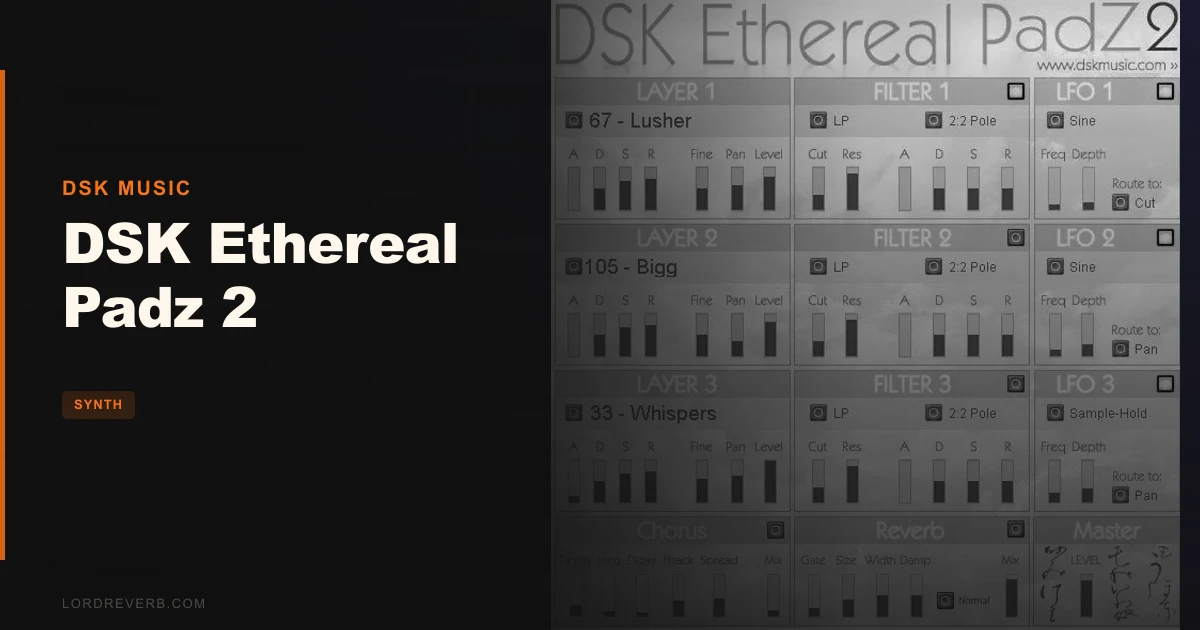
DSK Music is a one-man operation that has been releasing free VST instruments since the early 2000s. Ethereal Padz 2 is their dedicated pad synth: 111 sounds, 3 layers, 3 filters, 3 LFOs, plus chorus and reverb onboard. It costs nothing. Not "free trial with a paywall at the end." Zero. Free forever.
But free comes with conditions. This is a 32-bit Windows-only .dll file. In 2026. We're going to talk about what that means for your workflow before we talk about how it sounds, because compatibility is the first thing you'll hit.
The Problem This Solves: Pad Sounds Without the Invoice
Pad synthesis is one of those areas where the paid tools genuinely dominate. Omnisphere costs what it costs. Pigments, Diva, Alchemy: all brilliant, all priced accordingly. If you're producing ambient, trance, lo-fi, or cinematic music on a tight budget, you're often making do with thin stock presets that don't breathe the way you need them to.
DSK Ethereal Padz 2 exists in that gap. It's not competing with Omnisphere. It's not trying to. It's asking a simpler question: can we give a bedroom producer 111 usable pad sounds with real modulation depth, at no cost?
For atmospheric textures, slowly evolving drones, and the kind of lush background pads that hold a mix together without demanding attention, it largely delivers. That's the honest answer before we get into the caveats.
The target user is someone making ambient, trance, lo-fi, or cinematic music in a Windows-based DAW who doesn't have the budget or the need for a full modular-style pad workstation. If that's you, keep reading.
What You're Actually Working With: The Feature Set
Let's go through the architecture the way you'd meet it when you first open the plugin. DSK keeps the UI dense but readable. Everything is visible at once, which is either a feature or a flaw depending on how you like to work.
The 111 Pads and the Three-Layer System
The core of the instrument is a three-layer sound engine. Each layer has its own sound slot, and you can load any of the 111 pad sounds independently per layer. This isn't a simple unison voice. You can stack three completely different pads, detune them against each other, pan them separately, and shape the dynamics of each with its own ADSR envelope.
That's where the real sound design potential lives. We loaded a slow-attack string pad on layer one, a shimmer texture on layer two, and a subtle choir wash on layer three. Dialling layer two down to about 40% volume and panning it slightly right gave us a width that a single patch can't produce. It's a simple idea executed cleanly.
The 111 sounds themselves cover a lot of ground: strings, choirs, synth sweeps, ethnic textures, sci-fi drones, orchestral pads. Not all 111 are gems. Some are thin. Some are redundant. But reviewers consistently report that around 60 to 70 of the patches are genuinely usable in a mix context, which is a better hit rate than many paid libraries we've tested.
ADSR controls per layer let you set attack, decay, sustain, and release independently. This matters a lot for pads. A slow attack on all three layers avoids that plucked, immediate response that kills atmospheric textures. You can also fine-tune the pitch per layer and set the pan position, so the stereo image is controllable at the source.
The Three Advanced Filters
Each layer gets its own filter. DSK calls them "Advanced Filters," and the spec includes a Poles selector, which determines the filter slope. More poles means steeper rolloff: 2-pole at 12dB per octave, 4-pole at 24dB per octave. Steeper filters cut harder and change the character of a pad more dramatically.
The ADSR on the filter section is separate from the amplitude ADSR. This is the right way to do it. You can set the filter to open slowly while the amplitude hits its sustain immediately, or vice versa. That second approach, a slow filter opening on a pad that's already at full volume, creates that classic sweeping pad character you hear in 90s trance and modern synthwave.
We ran a bright choir patch through a 4-pole low-pass, dropped the cutoff to around 40%, set the filter attack to a long value, and let it breathe open over eight bars. It sounded like something from a Klaus Schulze record. Not a criticism. That's exactly what you want from a pad synth.
The filter is functional and musical. It's not surgical. Don't expect the precision of a Moog-style ladder filter emulation. But for pad work, you rarely need surgical. You need expressive, and this delivers that.
LFO Routing: Three Sources, Four Destinations
This is where DSK Ethereal Padz 2 earns more respect than its free status might suggest. There are three LFOs, and each can route to four destinations: Cut (filter cutoff), Pan, Level, and Pitch.
Routing LFO 1 to Pan at a slow rate gives you automatic stereo movement. Set it to a triangle wave at 0.1Hz and a pad starts to breathe side to side. It's subtle, but it adds life to static patches without needing to automate anything manually.
Routing an LFO to Pitch at very low depth and a slow rate creates vibrato that sounds natural on choir and string pads. Routing to Level at a slightly faster rate adds a tremolo effect that works well on synth sweeps.
Three LFOs with four destinations each means you're looking at up to 12 simultaneous modulation paths across the three layers. Whether each LFO is shared across layers or operates per-layer is something to test in your session, but the modulation architecture is deeper than most free instruments offer.
Annoying omission: there's no sync-to-host tempo on the LFOs. You set the rate manually in Hz. If you want panning that pulses in time with your track at 128 BPM, you'll need to work out the math (0.5Hz for quarter-note panning at 120 BPM, for example) and dial it in by ear. It's solvable, but it's a workflow friction point that paid synths solved a long time ago.
Velocity Response and MIDI Automation
Velocity response is listed as a feature, and it's meaningful for pads. Playing harder opens the sound up, makes it brighter or louder depending on how the velocity is routed. For live MIDI performance or humanising a programmed pad part, this matters. A pad that doesn't respond to velocity feels lifeless and static.
MIDI automation support means your DAW can record and play back knob movements. That's not a given in free plugins from this era. Being able to automate the filter cutoff or reverb wet level means your pad evolves over the course of a track without you having to freeze and reprint it every time you tweak something.
The Chorus Effect
The onboard chorus is a single-knob implementation in practice. Chorus on pads is one of those things where less is more: you want widening and shimmer, not the seasick wobble of over-chorused synth brass from a 1987 keyboard.
We ran a dry string pad through the chorus at a medium setting. The sound widened convincingly, adding that slight detuned shimmer that makes pads feel expensive. Push it too far and the modulation becomes audible and distracting. Stay in the lower half of the range. The chorus doesn't have separate rate and depth controls exposed, which limits fine-tuning, but what's there works for its intended purpose.
On a sci-fi drone patch, the chorus added movement that would have otherwise required an external modulation plugin. For a free instrument, building this in is clever.
The Reverb Effect
The reverb is the other half of the onboard effects chain. Pad sounds almost always need some reverb to sit in a mix. DSK including one here means you don't have to reach for a send channel just to get the sound to breathe.
Reviewers report the reverb is usable but basic. It's not a convolution reverb. It doesn't have the density or the true-to-life room character of something like Valhalla Room or even the stock reverbs in Ableton and Logic. But for thickening a pad and pushing it back in the mix, it does the job.
We used the reverb as a pre-mixing tool, getting the pad to a workable shape inside the plugin, then treating the stereo output with a send to a better reverb on the bus. That's our recommended workflow. Use the onboard reverb for character, not as your final space.
The reverb and chorus together do enough that you can get a pad from the plugin that works in context without external processing. That's the real value here for quick sketching.
How It Performs in a Real Session
The 84.2 MB file size is small by modern standards. Load times are fast. On a mid-range Windows machine, we saw no CPU spikes during normal playback, even with all three layers active and both effects running. DSK Ethereal Padz 2 is light on resources by modern standards, which matters if you're running a dense arrangement.
Compare that to something like Omnisphere, which can hit 15 to 20% CPU on a single instance with complex patches. DSK barely registers. You could run four or five instances without breaking a sweat on anything built in the last five years.
The 111 patches load quickly. Browsing through them is simple: click the patch name, scroll through the list. There's no tag system, no favouriting, no category filtering. You browse linearly. With 111 sounds, that's manageable but slower than modern browser UIs.
We spent one session doing nothing but stacking patches across the three layers to find combinations that worked. Some of the best results came from pairing obvious mismatches: a sci-fi texture on layer one, a choir wash on layer two, a slow string pad on layer three. The filter per layer meant we could roll off the high end of the sci-fi texture so it sat under the choir without competing. That kind of layering control is genuinely satisfying to work with.
The MIDI automation worked cleanly in FL Studio. Recording filter cutoff sweeps as automation data and playing them back was accurate. No drift, no latency on playback.
The Compatibility Problem You Need to Know About
Here's the honest, non-negotiable issue with DSK Ethereal Padz 2 in 2026. It's a 32-bit Windows VST. That's it. No 64-bit version. No Mac. No AU. No AAX. No VST3.
Most modern DAWs are 64-bit native. Ableton Live 11 and 12 dropped 32-bit plugin support entirely. That means if you're running Ableton on a modern Windows machine, you cannot load this plugin without a bridge like jBridge or 32 Lives. Users keep running into this problem, and it's the most common complaint in every forum thread about DSK Ethereal Padz 2.
jBridge costs a small amount and works, but it adds complexity. It introduces slight latency, and it can cause stability issues in dense sessions. You're adding a wrapper just to load a free plugin, which feels like a tax on something that's supposed to cost nothing.
FL Studio handles 32-bit plugins natively via its own bridging, and most users report it runs without issues there. Studio One and Reaper also handle 32-bit bridging reasonably well. If you're a Cubase, Ableton, or Pro Tools user, you're going to hit friction.
This is the gap in most DSK Ethereal Padz 2 coverage: the compatibility situation isn't just "check your DAW." It's a real workflow decision. If your primary DAW doesn't support 32-bit plugins natively, this tool might cost you more time in setup than it saves in plugin budget.
We'd love to see DSK Music release a 64-bit version. But DSK is a solo developer releasing tools for free, so we're not going to be harsh about it. We're just being straight with you about what you're signing up for.
Strengths and Weaknesses
The strengths are real. 111 sounds across three stackable layers with independent ADSR, filter, and LFO per layer is a legitimate modulation architecture. Most free pad plugins give you a single layer with a global filter. This goes deeper than that, and the creative ceiling reflects it.
The onboard effects are good enough for sketching. The CPU footprint is tiny. The file size is 84.2 MB, and once it's installed, it doesn't phone home, doesn't require activation, and doesn't nag you. It just works, within the 32-bit constraint.
The weaknesses are equally real. The 32-bit only architecture is a genuine problem in 2026. The LFOs don't sync to host tempo. The effects chain is basic. There's no Mac support. The patch browser is linear with no search or filtering. And the UI, while functional, feels about fifteen years old because it is.
The sound quality on the best patches is genuinely good for a free instrument. String textures sit in a mix without excessive mud. Choir patches have body. Synth sweeps have movement. But some patches are thin, and you'll need the three-layer stacking to bring them to life. Treating individual patches as finished sounds is sometimes disappointing. Treating them as building blocks is satisfying.
Value for the Price
It's free. That changes the value calculation completely.
The question isn't whether it's worth the price. The question is whether it's worth the time investment to get it running in your DAW. If you're on FL Studio or another 32-bit-friendly host, the time cost is near zero. Download, install, load, play. That's an easy yes.
If you're on Ableton and need to bridge it, weigh that setup time against the alternative of downloading a different free pad plugin that runs natively in 64-bit. There are options. We'll name some in the alternatives section.
The 111 sounds at zero cost, with three-layer architecture and real LFO modulation, represents genuine value. It's underrated in the free plugin conversation, especially for producers who are willing to dig into the layering system rather than just browsing presets.
Who Should (and Shouldn't) Buy This
Buy and download are the same thing here. But the logic still applies.
- ✅ Buy if you use FL Studio, Reaper, or Studio One on Windows and want a free pad library with real modulation depth.
- ✅ Buy if you make ambient, trance, synthwave, or cinematic music and need atmospheric texture without paid plugin costs.
- ✅ Buy if you're building a budget studio and want to understand pad synthesis through a hands-on, low-stakes instrument.
- ❌ Skip if you're on Ableton Live 11 or 12 and don't want to deal with 32-bit bridging setup.
- ❌ Skip if you're on Mac. There is no Mac version. Full stop.
- ❌ Skip if you need tempo-synced LFOs for rhythmic pad movement and don't want to calculate rates manually.
Specs and Technical Details
| Developer | DSK Music |
| Price | Free |
| Plugin Format | VST (32-bit .dll only) |
| OS Support | Windows only |
| Activation | None required |
| CPU Usage | Light |
| Trial Available | N/A (fully free) |
| File Size | 84.2 MB |
| Sounds Included | 111 pad sounds |
| Layers | 3 |
| Filters | 3 (one per layer, with ADSR and Poles selector) |
| LFOs | 3 (routable to Cut, Pan, Level, Pitch) |
| Effects | Chorus, Reverb |
| MIDI Automation | Yes |
| Velocity Response | Yes |
| Version Reviewed | 2 (Ethereal Padz 2) |
Score Breakdown
| Category | Score | Notes |
|---|---|---|
| Sound Quality | 3.5/5 | Best patches are genuinely good; weakest patches need layering to compete |
| Value for Money | 5.0/5 | It's free. Three-layer architecture at zero cost is hard to argue against |
| Ease of Use | 3.0/5 | Intuitive once loaded, but 32-bit bridging setup adds friction for many DAWs |
| Features | 3.5/5 | Three independent filters and LFOs is strong; no tempo sync and no Mac support hurts |
| CPU Efficiency | 4.5/5 | Tiny footprint; runs multiple instances without strain on any modern Windows machine |
| Overall | 3.5/5 | A genuinely useful free pad synth held back by 32-bit-only architecture in 2026 |
The Three-Layer Workflow in Practice: A Deeper Look
Most producers who download DSK Ethereal Padz 2 and scroll through 20 patches before closing it are missing what the instrument is actually for. The single-layer experience is underwhelming. The three-layer experience is where this becomes a legitimate creative tool.
Here's a workflow we came back to repeatedly. Load a long-release string pad on layer one. Set the amplitude ADSR to slow attack (maximum or close to it), long decay, full sustain, long release. Filter it down to around 60% cutoff with a 4-pole low-pass and let the filter ADSR open slowly from there.
Layer two: load a shimmer or choir texture. Same slow attack, but pan it 15 to 20 percent opposite to layer one. This creates early width before any effects processing.
Layer three: a drone or sustained synth texture at maybe 30% volume. Low in the mix, just adding harmonic support. Roll off everything above 2kHz with the filter so it doesn't compete with layers one and two.
Route LFO 1 to Cut on layer two at around 0.08Hz with a sine wave. The filter on that shimmer texture will breathe open and closed very slowly. Barely perceptible, but it keeps the sound alive over long passages.
Route LFO 2 to Pan on layer three at around 0.12Hz. The drone slowly shifts across the field. Again, subtle. But it adds the organic movement that makes a pad feel recorded rather than programmed.
The result sounds expensive. Not because any individual element is impressive, but because the layering and modulation create complexity that single-patch pad sounds can't match. We sat this under an ambient track at low volume, and it held together across eight minutes without sounding repetitive or static.
That's the promise of this plugin, and it's real. But it requires that you engage with the layering system. Treat it as a preset browser and you'll be disappointed. Treat it as a sound design tool built around pad synthesis and it earns its place in the chain.
Comparing the LFO Architecture Against What Else Is Free
In the free synth space, LFO implementation varies enormously. Some free instruments give you one global LFO with two or three destinations and a rate knob. DSK Ethereal Padz 2 gives you three LFOs, each routeable to Cut, Pan, Level, or Pitch. That's twelve possible modulation paths if you route all three to different destinations.
The absence of LFO waveform selection is a real limitation, though. Sine wave LFOs give you smooth, rounded modulation. Square waves give you stepped jumps. Saw waves give you asymmetric rises or falls. Whether DSK gives you a choice of waveforms or locks you to sine is something you discover on first use. Most reviewers don't mention it, which suggests the options may be limited.
For pad movement, sine waves are usually what you want anyway. Slow, smooth, organic. The frustration is when you want a slow tremolo with a square wave character or a saw-wave pitch sweep. Those uses exist, and not having them means reaching for an external LFO tool or automation.
The rate range on the LFOs appears to go slow enough for true ambient drift, which is the most important thing for this category. A pad LFO that bottoms out at 0.5Hz is useless for the kind of slow, almost imperceptible movement that makes ambient music feel alive. DSK goes slower than that, which is the right call.
Where the Sound Design Ceiling Actually Is
Let's be honest about the limits. DSK Ethereal Padz 2 is a sample-based pad engine with modulation. It's not a full subtractive synthesiser. You're not designing sounds from oscillators. You're shaping pre-recorded pad textures with filters, LFOs, and effects. The ceiling is defined by what the 111 samples contain.
That ceiling is meaningful. You can't synthesise a pad sound that isn't already in the sample library. If none of the 111 patches have the spectral character you're looking for, you're stuck. The filters and LFOs can reshape and animate, but they can't add harmonic content that isn't there.
For comparison, a full subtractive synth like the Arturia MiniFreak V, which you can read about in our MiniFreak V review, lets you build pad sounds from scratch. The tonal range is unlimited because you're working from oscillators. DSK Ethereal Padz 2 doesn't compete with that. It's a different tool for a different moment in the workflow.
Where DSK wins is speed. Opening MiniFreak V and dialling in a complex pad from scratch takes time and skill. Opening DSK Ethereal Padz 2, stacking three patches, setting the LFOs, and having something in the mix takes five minutes. For sketching, for demo production, for "I just need something in this space while I focus on the arrangement," that speed is the point.
The Onboard Effects as a Workflow Decision
Chorus and reverb built into a pad synth is a production decision, not a bonus. Having them onboard means you can hear the pad in context immediately. No routing to sends, no setting up a return channel, no matching the reverb to the session before you know if the patch even works.
For producers who work from rough sketches and refine later, this is genuinely useful. Load the patch, add a touch of chorus, push some reverb, and the pad is immediately sitting in the approximate space it'll occupy in the final mix. You can decide whether the sound works before you invest time in detailed processing.
The honest limitation is that both effects are basic. The reverb doesn't have the density or the pre-delay control you'd want for placing a pad precisely in a mix. The chorus doesn't have the rate and depth independence that lets you separate the modulation speed from the modulation depth.
Our workflow: use the onboard effects to sketch, then bypass them when mixing and replace with proper reverb and modulation on the bus. If you're using something like Arturia SEM V for comparison alongside DSK, the contrast in effects quality becomes obvious. But DSK isn't priced like SEM V, so the comparison only goes so far.
Alternatives to Consider
If DSK Ethereal Padz 2's 32-bit limitation is a dealbreaker, a few alternatives are worth your time.
Surge XT is a free, open-source synthesiser with serious pad synthesis capability. It's 64-bit, cross-platform, and actively maintained. The learning curve is steeper than DSK, but the modulation architecture is deeper and the output quality is higher. It doesn't hand you 111 pad presets upfront, but the Surge community has built extensive patch libraries. For a producer willing to invest some time, it's the better free option for sound design depth.
TAL-NoiseMaker is another free VST that handles atmospheric pads well. It's a classic virtual analogue architecture, 64-bit compatible, and has a solid pad preset library. It lacks the sample-based warmth of DSK's choir and string textures, but it's more flexible for synthesis-based pad design and runs cleanly in Ableton.
If you have any budget at all and want to understand what dedicated pad synthesis can do at a higher level, the Arturia MiniFreak V is worth exploring. Our full MiniFreak V review covers how it handles atmospheric textures. It's a genuinely different class of tool, but the comparison shows you where DSK's ceiling sits.
For producers interested in acoustic and physical modelling-based textures in their pad sounds, Applied Acoustics Systems' work in Chromaphone 3 offers something no sample-based free plugin can match.
On the budget synthesis side, if you're looking for something with acid-style textures to layer under atmospheric pads, Audio Blast ABX3 is a different flavour worth knowing about.
The Honest Recommendation
DSK Ethereal Padz 2 is a legitimately useful free pad synth that most people will either love or quietly abandon, depending entirely on which DAW they open it in.
If you're on FL Studio and you've never used it, download it tonight. Spend an hour with the three-layer system. Don't browse presets. Stack them. Set the LFOs to slow rates on Pan and Cut. Let the sound evolve. You'll find something that works in your next track, and you'll have spent zero.
If you're on Ableton Live 11 or 12 on a 64-bit Windows machine, the bridging situation is a real friction point. It's solvable, but you'll spend time solving it. At that point, TAL-NoiseMaker or Surge XT are faster paths to a working pad sound in your session.
If you're on Mac, there's no version for you. That's a hard no, not a soft maybe.
The lasting value of DSK Ethereal Padz 2 is in teaching you what layered pad synthesis actually sounds like when you control it. It's not a polished instrument. It's a toolbox with a learning curve hidden inside what looks like a simple preset browser. The producers who get the most out of it are the ones who stop treating the 111 patches as finished sounds and start treating them as ingredients.
That's an underrated skill. And DSK Ethereal Padz 2, for all its age and its 32-bit limitations, is a free classroom for learning it.
Related reviews: Blocks Primes
Frequently Asked Questions
Does DSK Ethereal Padz 2 work on Mac?
No. DSK Ethereal Padz 2 is a Windows-only VST plugin supplied as a 32-bit .dll file. There is no Mac version, no AU format, and no AAX version. Mac users will need to look at alternatives like Surge XT or TAL-NoiseMaker, both of which are free and cross-platform.
Will DSK Ethereal Padz 2 work in Ableton Live?
Not natively in Ableton Live 11 or 12, which dropped 32-bit plugin support. To use it in Ableton, you'd need a 32-bit bridge utility like jBridge. Users keep running into this problem. The bridge approach works but adds complexity and occasional stability issues. If Ableton is your main DAW, a 64-bit native alternative may be the more practical choice.
How many pad sounds does DSK Ethereal Padz 2 include?
The plugin includes 111 pad sounds. These cover strings, choirs, synth sweeps, drones, ethnic textures, sci-fi pads, and orchestral textures. The sounds can be loaded individually or stacked across the three layers simultaneously, with each layer having its own ADSR, filter, and LFO settings. Reviewers report roughly 60 to 70 of the 111 patches are directly usable in a mix context.
Do you need to register or activate DSK Ethereal Padz 2?
No. The plugin requires no registration, no account, and no activation. Download the .dll file, place it in your VST folder, scan your DAW, and load it. There's no licence key, no online check, and no subscription. It's free in the most straightforward sense of the word.
Can the LFOs in DSK Ethereal Padz 2 sync to host tempo?
No. The LFOs are set by manual rate in Hz and do not sync to your DAW's BPM. This is a real limitation for rhythmic pad movement. If you want LFO movement that pulses in time with your track, you'll need to calculate the correct Hz value for your tempo or use a separate MIDI LFO tool. For ambient and atmospheric work where precision timing isn't critical, it's less of an issue.
Is DSK Ethereal Padz 2 suitable for professional productions?
It depends on how you use it. The best patches, especially when layered across all three layers with LFO modulation, can produce atmospheric textures that sit convincingly in professional mixes. The CPU footprint is minimal and the sound quality on stronger patches is genuinely competitive with paid alternatives in the atmospheric pad category. The 32-bit architecture and basic effects chain are real constraints, but producers who treat them as known limitations rather than dealbreakers have used DSK Ethereal Padz 2 in released work.