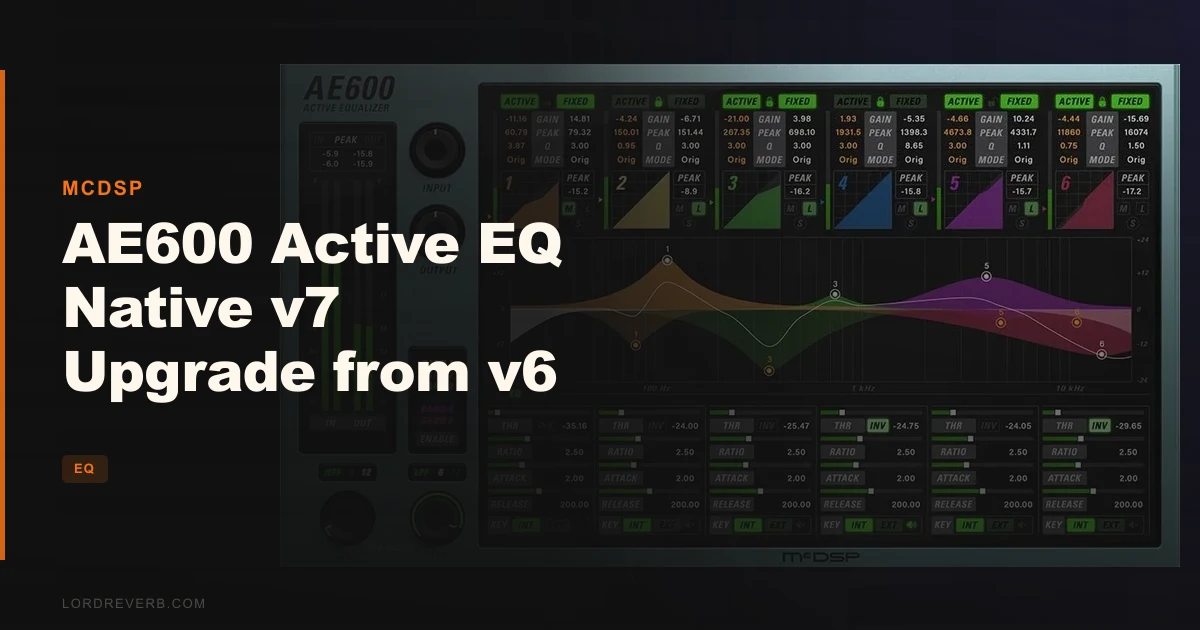
The AE600 Active EQ Native v7 upgrade from v6 is worth buying if you're on an M1 Mac, need VST3 support, or want 1,500 more presets to work from, but if you're on an Intel Windows machine running v6 without complaints, there's a real case for sitting this one out at $29. That's the honest answer. The rest of this review is about whether your situation lands on one side of that line or the other.
McDSP built AE600 as a dynamic equalizer that reacts to signal level rather than just sitting at a fixed boost or cut. That's the whole premise. Each of the six bands can listen to the input signal or a sidechain source, then push or pull based on what it hears, using threshold, attack, release, and ratio controls to decide how hard to react. It's a more surgical tool than a static EQ and more transparent than a multiband compressor.
The v7 upgrade brings M1 native support, a refreshed UI, real-time analyzers, and a large preset library expansion. What it doesn't bring is any change to how the plugin actually sounds. Owners report v6 and v7 are sonically identical. At $29, you're paying for compatibility and usability improvements, not a new processing engine.
That framing should govern every decision you make here. Know what you're buying. Know what you're not.
What You Are Actually Upgrading To
The AE600 hasn't changed in terms of its core EQ architecture between v6 and v7. You still get six fully overlapping bands, each with independent gain, frequency, Q, and mode controls. The mode list is long: parametric, proportional Q parametric, 5x Q parametric, Baxandall shelving EQ, vintage styled EQ, X-style shelving EQ, Baxandall shelving plus filtering, and high/low pass filtering. That's eight modes per band, and all six bands can run any of those modes simultaneously.
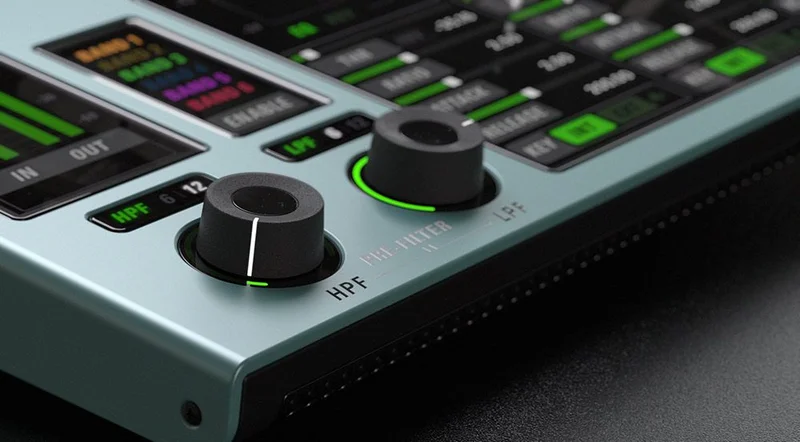
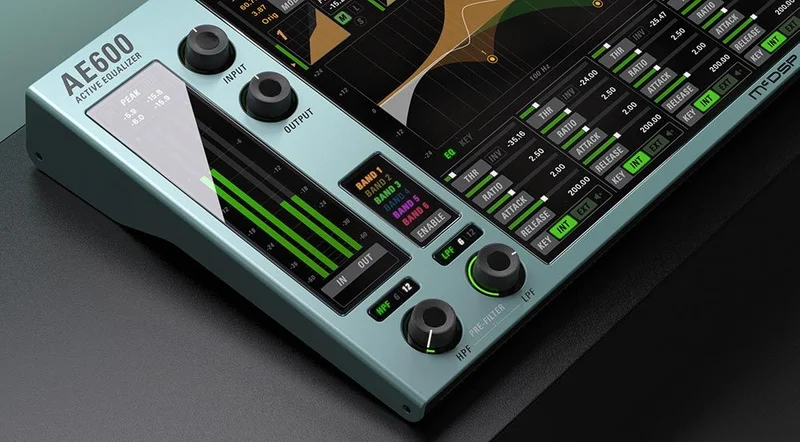
What changed in v7 is the platform and the surface. The plugin now runs natively on M1 Apple Silicon, which matters if you've been running it under Rosetta 2 or skipping it entirely because of compatibility concerns. The GUI has been updated with higher definition elements, and real-time analyzers have been added so you can see what the EQ is actually doing to the signal in motion. There's also a preset library that's 1,500 entries larger than v6's.
The processing engine underneath is unchanged. Double precision algorithms, zero latency operation, the ratio control that McDSP says is unique to its AE-series active equalizers. Those aren't new. They came from v6.
So think of v7 as a maintenance and access upgrade. The house is the same. They replaced the windows and added better lighting.
One feature that didn't make it into v7 despite being an obvious request: M/S processing. Mid-side EQ is a standard expectation at this plugin's tier. Its absence in a version upgrade is frustrating, full stop.
Who Qualifies for This Upgrade
You need an existing AE600 Native v6 license to be eligible. That's the base condition.
Beyond eligibility, you need an iLok account for activation. AE600 uses iLok2 or iLok3 USB hardware keys, or iLok License Manager with iLok Cloud. Each v7 license includes two activations per authorization. The iLok Cloud option works, but owners report it requires constant internet connectivity. If you work offline, that's a real workflow problem, not a minor inconvenience. There's no offline machine authorization support.
System requirements: macOS 10.13 or higher, 64-bit only, or Windows 7, 8, or 10, 64-bit only. M1 Apple Silicon is supported natively. Intel Macs and Intel-based Windows machines are both fine.
One thing to flag for Windows users: v6 owners on Ableton for Windows have reported recall issues. That's a known problem. If your sessions are built around Ableton on Windows and you've been running v6 without trouble, check whether that issue has been resolved before upgrading, because it could affect project continuity.
Also: v7 drops legacy VST format entirely. If your DAW doesn't support AAX, AU, or VST3, you can't run v7. Full stop.
The Six-Band Architecture: What It Means in Practice
Six active EQ bands sounds like a lot. And it is. But what makes AE600 different from a static six-band EQ isn't the count. It's that every one of those bands can behave dynamically, responding to the signal level in real time rather than sitting fixed at a chosen gain value.
Picture a vocal that gets boxy whenever the singer pushes into the chorus. With a static EQ, you cut a few dB at around 350Hz with a medium Q, and that cut is always there, even in the verses where the boxiness isn't a problem. With AE600, you set band three to cut at 350Hz, dial in a threshold, and the cut only activates when the signal level trips that threshold. Quiet verses stay untouched. Loud choruses get corrected. That's the core value proposition.
All six bands can run this way simultaneously, and they can each listen to different input sources. A band can key off the full input signal or a selected sidechain input. That opens up frequency-specific sidechain processing that you'd otherwise have to build with multiple plugins and careful routing.
The fact that the bands fully overlap is worth pausing on. In many dynamic EQ tools, the bands are fixed in ranges: lows, low-mids, mids, high-mids, highs. You can't have two bands working in the same frequency area. AE600 drops that restriction. You can stack two bands at 2kHz with different Q shapes and threshold settings and they'll both operate without fighting each other. That flexibility is real and it's one of the things owners consistently praise.
The Eight EQ Modes: What Each One Actually Does
This is where AE600 earns a lot of its complexity. Most dynamic EQs give you a bell and a shelf and call it done. AE600 gives every band a choice of eight modes, and they're genuinely different in character.
Standard parametric is what you'd expect. Set a frequency, a Q, and a gain. When the signal crosses threshold, the band responds proportionally to that gain. This is your workhorse setting for surgical work.
Proportional Q parametric changes the Q width based on the amount of gain applied. Push harder and the band narrows. Pull softer and it widens. This mimics certain hardware EQ behaviors where the filter character changes with the amount of boost or cut, not just the frequency. It tends to feel more musical on program material.
5x Q parametric is a narrower, more surgical version. When you need to find and kill a resonance without touching much else, this is the mode to reach for. It's not a "polish the mix" setting. It's a problem-solver.
Baxandall shelving is the classic topology. Baxandall shelves have a broad, gradual curve that adds or removes energy across a wide range of frequencies without sounding forced. If you're doing tonal shaping on a full mix or a bus, this mode sounds natural with moderate gain.
Vintage styled EQ gives you a character shift in filter behavior. The curve shape changes in a way that reflects older hardware EQ design, where the filter didn't have a perfectly clean symmetrical shape.
X-style shelving is another shelving variant with a different rolloff characteristic, sitting between the Baxandall and something with more pronounced peak behavior around the shelf corner frequency.
Baxandall shelving plus filtering adds a filtering stage to the shelf. So instead of just a gradual tonal lift or cut, you're also introducing a filter slope at the high or low end. This gets complex fast, but it's useful when you need a combined shelf-and-roll behavior in a single band.
High and low pass filtering rounds out the list. These are your clean-up tools: roll off the rumble below 80Hz, clean up the air above 18kHz, or use them dynamically to open and close filtering behavior based on signal level. Dynamic high-pass filtering on a vocal, for instance, can automatically suppress low-end buildup during louder passages without touching the character during quieter moments.
Eight modes across six bands gives you 48 possible band configurations in a single instance. Whether you need all of that depends entirely on what you're working on. For most sessions, you'll settle into two or three modes and stay there. But the range means you're not reaching for a second plugin when you need something the first mode can't do.
Threshold, Attack, Release, and Ratio: The Dynamic Engine
The dynamic behavior in each band is shaped by four parameters: threshold, attack, release, and ratio.
Threshold sets the signal level at which the band becomes active. Below the threshold, the band is passive. The EQ sits at unity and does nothing. Above it, the band starts working. That transition point is where most of the craft is in using AE600 well.
Set the threshold too low and the band is active most of the time, which makes it behave closer to a static EQ. Set it too high and you lose the responsiveness that makes dynamic EQ useful. Finding the right threshold for a specific problem takes ears and patience.
Attack determines how fast the band responds when the signal crosses threshold. A fast attack catches transients. A slow attack lets them through before the EQ engages, which can preserve the natural punch of a sound while still managing the sustained frequencies. This is especially relevant on drums. If you're dynamically cutting a harsh frequency range on a snare, a slow attack might let the initial crack through before the cut kicks in, keeping the snap while taming the ring.
Release controls how quickly the band returns to its passive state after the signal drops below threshold. Too fast and you get audible pumping. Too slow and the EQ stays active longer than the problem exists, coloring parts of the signal that didn't need treatment.
The ratio control is what McDSP describes as unique to the AE-series equalizers. It determines the input signal level sensitivity for how the active EQ articulates. A low ratio means the band responds gently to level differences. A high ratio means it responds more aggressively. Think of it as the intensity of the relationship between signal level and EQ movement. Low ratio gives you subtle dynamic shaping. High ratio gives you something more reactive and pronounced.
These four parameters working together across six independent bands is where AE600 shows its real depth. And it's also where the risk of overuse lives. Owners specifically flag that overworking AE600 on vocals produces results that sound processed and unnatural. The tool is transparent enough that heavy-handed settings don't obviously announce themselves as artifacts the way a compressor might. They just make things sound wrong in a way that takes a while to diagnose. Trust the threshold and use restraint.
Sidechain Input and Signal Monitoring
Every band in AE600 can be triggered by either the input signal or a selected sidechain input. This isn't a global setting. It's per band, which makes it genuinely useful rather than just a feature checkbox.
The practical application: imagine you're mixing a guitar track and a vocal that share frequency space around 1-3kHz. You can set a band on the guitar to cut in that range, keyed by the vocal's sidechain signal, so the guitar ducks just enough in that region whenever the vocal appears. That's basic dynamic sidechain EQ. But with six independent bands each capable of their own keying source, you can build increasingly specific frequency relationships between tracks without stacking plugins or building complex routing trees.
The monitoring side is well thought out. AE600 displays peak signal text readouts for each active EQ band's key signal, shown underneath the band dynamics plots. So you can see what the sidechain signal is doing to each band's behavior in real time. That's not decoration. It's diagnostic information that helps you set thresholds correctly and understand why a band is or isn't engaging when you expect it to.
The real-time analyzers added in v7 extend this further. You can see the full frequency picture moving as the signal passes through. Owners report the Real Time Analyzer addition and improved GUI are easier on the eyes. It makes the plugin more readable, especially when you're trying to verify that your dynamic EQ is actually doing what you set it up to do rather than sitting passive because the threshold is too high.
Response Plot and Text Readouts: How You Control AE600
AE600's active EQ response is displayed and controlled via two methods: the response plot and text readouts. You can work from either.
The response plot is the visual display of the EQ curve in its current state, updated in real time as the signal drives the bands. You can grab band handles on the plot and drag them to set frequency and gain. This is the intuitive, visual-first way to work. It's fast for broad decisions and good for getting in the right ballpark on a frequency quickly.
Text readouts give you the same parameters as numeric values you can type into directly. For precision work, threshold calibration, or when you're trying to match a setting you dialed in on a previous session, text entry is cleaner. You're not hunting for the exact point on a plot. You type 350Hz, 2.1dB, done.
The combination of both is well implemented. The issue, flagged consistently by owners, is scale. UI elements are reported as too small to read and navigate comfortably on modern high-resolution screens. The text readouts are hard to read. The band handles on the response plot are easy to miss. This isn't a subtle complaint; it comes up repeatedly. It's genuinely annoying when you're working fast in a session and have to squint at a parameter to confirm what it's set to.
McDSP updated the GUI in v7 with higher definition elements, and owners acknowledge the improvement. But the fundamental problem of small UI elements on high-DPI screens hasn't been fully resolved. That's a valid frustration in 2026, when high-resolution monitors are the norm in most studios.
Input, Output, Bypass, and Linking Controls
AE600 includes Input and Output level controls for gain staging across the plugin. That's good practice for any dynamic processor, because the amount of signal hitting the plugin's input affects how the threshold settings behave. If your input gain staging is inconsistent between sessions, your thresholds will behave differently even with identical settings.
Individual band bypass is included for each of the six bands. This lets you solo the effect of a single band by toggling it in and out while the rest of the chain continues running. It's the fastest way to verify whether a specific band is doing what you think it is, or whether it's contributing to a problem you're trying to solve.
Band control linking lets you group band parameters together so changes to one band mirror across linked bands. This is useful when you're running matched EQ moves across a stereo bus or building symmetric curves across frequency ranges. Without it, matching settings manually between bands is tedious. With it, you can lock two bands into the same behavior and adjust them as a unit.
Band key signal monitoring lets you listen to the sidechain signal driving each band independently. If a band isn't responding the way you expect, monitoring the key signal tells you whether the problem is the sidechain source or the band's own settings. It removes the guesswork.
Zero Latency and Double Precision: What That Means for Your Session
Zero latency is the right choice for a dynamic EQ. Any processing latency in a dynamic processor creates phase issues between the processed signal and anything else running in the mix. It also makes real-time performance monitoring unreliable. AE600's zero latency algorithms mean you're hearing what the plugin is doing as it's doing it, without the plugin looking ahead or introducing delay compensation issues.
Double precision processing means AE600 runs its calculations at 64-bit depth rather than 32-bit. The practical result is better numerical accuracy in the math happening inside the plugin, which matters most in extreme settings or long processing chains where rounding errors in lower precision processing accumulate. For most moderate EQ moves, the difference isn't audible. For high-gain boosts, very narrow Q settings, or multiple instances running in series, it's a safeguard against artifacts.
Owners consistently report AE600 is the most CPU-efficient dynamic EQ available. That's a meaningful claim. CPU-hungry dynamic processors are a real problem in complex sessions. If you're running a template with 40 tracks and a dozen buses, a heavy dynamic EQ plugin can cost you two or three instances before you feel the session start to slow. AE600 reportedly doesn't do that. You can stack instances without watching your CPU meter climb.
That's one area where v6 and v7 owners agree completely: the efficiency is good, and it hasn't changed between versions.
The Preset Library: 1,500 More Starting Points
V7 ships with 1,500 more presets than v6. That's a large number, and it's one of the clearest functional differences between the two versions if you work preset-first.
How much that matters depends entirely on how you use presets. Some producers treat them as finished solutions. Most experienced engineers treat them as calibrated starting points. For learning how AE600's six EQ modes behave in different applications, the expanded library has real value. Load a preset, run a signal through it, watch the response plot move, and you understand what that mode does faster than reading about it.
For production, you'll want to spend time building a shortlist of four or five presets that fit your most common scenarios: vocal dynamic control, low-mid management on acoustic instruments, high-end air on a mix bus. The library gives you more candidates to audition from. Whether the upgrade to v7 is justified by presets alone depends on how heavily you rely on them. For most experienced users, probably not. For producers who are still learning the tool, it's a more compelling reason.
The iLok Situation
This needs its own section because it's genuinely a deciding factor for some workflows.
AE600 v7 uses iLok for activation. You can use an iLok2 or iLok3 USB key, or iLok License Manager with iLok Cloud. Two activations per license. That part is fine and standard for professional plugin licensing.
The problem is iLok Cloud. Owners report that using iLok Cloud without a hardware key requires constant internet connectivity. There's no offline machine authorization. If your studio doesn't have a reliable internet connection, or if you work on location with a laptop, iLok Cloud is a liability. You lose access to the plugin if the connection drops.
The fix is simple in theory: buy an iLok USB key and store your license there. Then you don't need internet. But if you don't already own one, that's an additional cost on top of the upgrade. And if you're upgrading from v6 and your v6 license was stored on a hardware key, you're probably fine. If you relied on iLok Cloud for v6, the same limitation carries into v7.
This isn't a McDSP-specific problem. iLok Cloud connectivity requirements are consistent across the platform. But it's worth flagging because "iLok required" and "iLok Cloud works fine offline" are different things, and AE600 v7 falls into the former camp.
Who This Upgrade Is Built For: By User Type
M1 Mac Users Running v6 Under Rosetta 2
This is the clearest case for upgrading. If you're on an M1 Mac and your v6 installation has been running under Rosetta 2, you're taking a performance and stability hit that v7 fixes with native Apple Silicon support. The plugin runs as designed, integrates properly with your session, and you stop worrying about Rosetta compatibility edge cases.
Buy it. At $29, the native M1 performance improvement is worth it on its own.
Working Producers on Windows Intel Machines
If you're on Windows with a stable v6 install that's working correctly in your DAW, the upgrade case is weak. The sonics are identical. Your DAW already supports whatever format you're running. The presets are welcome but not transformative. The GUI is better, but the small UI element problem isn't fully solved.
Wait. Unless the VST3 migration or the real-time analyzer specifically addresses a problem you're having, there's no urgency here.
Ableton on Windows Users
Owners have flagged recall issues with v6 in Ableton on Windows. If that's your setup and you've been hitting that problem, v7 is worth looking at as a potential fix. But verify before upgrading that the recall issue is actually resolved in v7. Owners have been vocal about the problem; there's less clarity on whether the upgrade addressed it or not.
Proceed with caution. Check the forums or reach out to McDSP directly before committing.
Mixing Engineers Who Want M/S Processing
Skip it. V7 doesn't add M/S capability, and if you need mid-side EQ as part of your dynamic processing workflow, AE600 v7 won't deliver it.
Hard pass on this upgrade for that specific need.
Producers Learning Dynamic EQ for the First Time
If you're learning dynamic EQ from scratch and don't own any version of AE600, v7 is a solid place to start. The expanded preset library gives you more examples to learn from. The real-time analyzers help you see what the EQ is doing in a way that makes the threshold and ratio behavior easier to understand. The CPU efficiency means you can run multiple instances in a learning session without hitting performance limits.
Buy it, but build patience into your process. AE600's flexibility is real, but the learning curve on eight EQ modes with four dynamic parameters per band is steep. Vocal overprocessing is an easy mistake. Set conservative thresholds early and add intensity only when you hear a reason to.
DAW Format Migrators Moving to VST3
V7 drops legacy VST support entirely. If you've been using AE600 v6 in VST2 format and your DAW is moving to VST3-only, v7 is mandatory rather than optional. This isn't really an upgrade decision; it's a compatibility requirement.
Buy it. You don't have a choice here if you want to continue using the plugin.
Who Should Skip It
If you're on a stable Intel Windows system with a working v6 install, you're running in a DAW that supports your current plugin format, and you don't use presets heavily, there's not much here for you at the upgrade price. The sonics haven't changed. Owners are unanimous on that point.
If M/S processing is on your list of needs, v7 doesn't have it. That feature didn't come in this upgrade cycle, and buying in hoping it shows up later isn't a plan.
If you work offline and don't own an iLok hardware key, the iLok Cloud connectivity requirement is a workflow problem that the upgrade price doesn't solve. You'd need to factor in a hardware key to make it reliable, which adds to the total cost.
If you're on Windows in Ableton and your v6 sessions are recalling reliably, don't risk disrupting something that's working. The Ableton recall issue is real but inconsistently reported, which makes it harder to predict how upgrading will affect your specific setup.
And honestly? If the small UI problem is your primary frustration with v6, v7 improves it but doesn't solve it. That's an annoying outcome for an upgrade that's supposed to bring a "high definition updated user interface."
AE600 on Vocals: The Most Common Use Case and Its Pitfalls
Vocals are where most people reach for a dynamic EQ first. The sibilance that only bites on certain words. The box that shows up when the singer leans into a phrase. The 3kHz presence that honks on pushed notes. Static EQ forces you to compromise: you either cut the problem frequency all the time and lose some life in the quieter passages, or you don't cut enough and the problem persists through the louder ones.
AE600 handles this well in concept. Set a band at the frequency that bothers you, dial in a threshold that only engages when the signal is loud enough for the problem to be audible, set the attack and release to follow the vocal's natural movement, and the cut follows the performance. The low-ratio setting keeps it gentle. The result is a vocal that sounds consistently balanced without sounding processed.
The trap is in the ratio and the threshold. Push the ratio too high and the EQ starts reacting to the shape of every phrase, cutting and releasing with enough energy that the vocal starts to feel restless. Set the threshold too low and the band is always on, which is just a static EQ with extra steps. The sweet spot requires careful listening, and it's narrower than you'd expect.
Owners flag this explicitly: overuse of AE600 on vocals produces unnatural results. The plugin is smooth enough that heavy settings don't immediately announce themselves as obvious processing artifacts. They just make the vocal sound slightly wrong in a way that takes three listens to identify. The discipline is to trust your thresholds and audit each band's actual engagement rate by watching the response plot. If a band is active 90% of the time, your threshold is probably too low.
Use AE600 on a vocal bus, not just on individual vocal tracks. The bus-level view often reveals frequency buildup that individual track settings miss. Set one band at 250-350Hz with a moderate cut, threshold set to trigger only during the loudest double-stacked moments, and you'll often find the mix breathes better without touching any individual track settings.
AE600 on Mix Buses and Full Program Material
The zero latency and CPU efficiency make AE600 a viable option on the mix bus or the master bus. That's a context where many dynamic EQs fail either because of latency-induced phase problems or because they eat too much CPU when you can least afford it.
On a full mix, the Baxandall shelving mode earns its keep. It has the kind of broad, natural curve that lifts or drops tonal mass across the mix without introducing audible filter character at the shelf corner. If your mix consistently reads too bright at high volumes or loses clarity in the low-mids at high output levels, a band in Baxandall shelving mode with a low threshold and very low ratio can apply gentle correction that adapts to program level rather than sitting at a fixed gain.
The 5x Q parametric mode has a different character here. On full program material, narrow high-Q cuts can address resonances that build up in complex arrangements but aren't audible on individual tracks. A resonance at 160Hz that sits 6dB below noise on individual tracks can add up to a problem across 30 channels. A single narrow band on the bus, set to cut dynamically when the low-mid energy crosses a threshold, is cleaner than trying to fix it at the source.
The key signal monitoring feature earns its value most on bus applications. When a band is keying off the full mix signal and responding to program level, the peak signal readouts tell you whether the band is doing meaningful work or just hovering near the threshold without engaging. It stops you from leaving bands active on a bus that aren't actually contributing anything.
The Value Case at $29
At $29, the upgrade price is accessible. This isn't a "think hard about whether you can afford it" decision for most working producers. The question is whether the changes justify any cost at all when the sonics haven't changed.
For M1 Mac users, the native support alone covers the price. You're not running in Rosetta 2 anymore. That has real implications for session performance, stability, and DAW integration. Straightforward.
For VST3 migrators, the upgrade is a necessity rather than an option. The price is the price.
For everyone else, the value case rests on the GUI improvements, the real-time analyzers, and the preset library. Those are real improvements. Owners acknowledge the analyzer and GUI updates make the plugin easier to work with. But "easier to work with" at a tool that worked fine in v6 is a moderate justification, not a strong one.
What undermines the value case is the M/S omission. For a v7 upgrade at this tier, in 2026, mid-side processing should have been in the feature set. Its absence signals that this upgrade cycle was about platform compatibility and polish, not feature expansion. That's a legitimate upgrade to ship. It's a less compelling one to pay for if you don't need the compatibility fixes.
The Verdict
The AE600 Active EQ Native v7 upgrade from v6 is a clean, necessary update if you're on an M1 Mac or moving to VST3. For everyone else, it's a low-stakes optional upgrade with honest improvements to the surface and nothing new underneath.
The core plugin remains what it was: one of the most flexible and CPU-efficient dynamic equalizers available, with six overlapping bands, eight EQ modes per band, and a ratio control that gives you a level of sensitivity tuning most competitors don't match. Those things didn't change because they didn't need to.
What we wish had changed: the M/S gap, the small UI elements, and the iLok Cloud connectivity dependency. Three real issues. None of them are deal-breakers for most users, but all of them are frustrations that a v7 upgrade cycle had the opportunity to address and didn't.
If your situation qualifies, buy it. If it doesn't, v6 is running fine.
Specs & Technical Details
| Developer | McDSP |
| Price | $29 |
| Plugin Format | VST3 / AU / AAX Native / AAX DSP |
| OS Support | macOS 10.13 or higher (64-bit) / Windows 7, 8, 10 (64-bit) |
| Activation | iLok2 or iLok3 USB key, or iLok License Manager with iLok Cloud; 2 activations per license |
| CPU Usage | Light (owners report most CPU-efficient dynamic EQ available) |
| Trial Available | N/A |
| Version Reviewed | v7 |
Score Breakdown
| Category | Score | Notes |
|---|---|---|
| Sound Quality | 4.5/5 | Identical to v6 per owners; zero latency and double precision processing hold up well |
| Value for Money | 3.0/5 | Strong for M1 Mac and VST3 migrators; weak for everyone else given no sonic change |
| Ease of Use | 3.0/5 | Real-time analyzers and GUI refresh help, but small UI elements on high-DPI screens remain an issue |
| Features | 3.5/5 | Eight modes per band and six overlapping bands is excellent; M/S omission drags this down |
| CPU Efficiency | 4.5/5 | Owners consistently report best-in-class CPU efficiency among dynamic EQ plugins |
| Overall | 3.5/5 | A solid plugin in a maintenance upgrade cycle; worth buying for the right user, skippable for many v6 owners |
Alternatives to Consider
McDSP AE400
The AE400 is the four-band version of the same active EQ architecture. It has a narrower selection of EQ modes than the AE600 and four bands instead of six, but if you're evaluating the AE-series for the first time and four bands fits your workflow, the AE400 is the faster migration path. The overlapping band design and the same ratio control concept carry over.
McDSP ML8000 Multiband Limiter
The ML8000 is a different tool for a different job. It's a multiband limiter, not a dynamic EQ. Where AE600 can leave frequencies untouched below the threshold and act as an upward expander, the ML8000 can't replicate that behavior. If you're deciding between limiting and dynamic EQ as your primary dynamic frequency control tool, AE600 gives you more surgical options. The ML8000 is a ceiling tool; AE600 is a shape tool.
Beyond the McDSP catalog, if M/S dynamic EQ processing is on your requirement list, look elsewhere before committing to AE600 v7. That's the clearest gap in the current version and a legitimate reason to research alternatives in that specific capability area.
AE600 v7 is a plugin we respect even when we're recommending patience over enthusiasm. If you're on M1, the upgrade pays for itself. If you're not, v6 is still doing the job it was always doing, and there's no dishonor in staying there.
Related reviews: VMEQ-5
Frequently Asked Questions
Is the AE600 Active EQ Native v7 upgrade worth it if I'm on an Intel Windows machine?
Honestly, probably not unless you have a specific reason: VST3 migration, Ableton recall issues you're trying to resolve, or a strong desire for the real-time analyzers and expanded preset library. The processing engine is identical to v6. If your v6 install is stable and your DAW supports your current plugin format, there's nothing forcing your hand.
Does v7 add M/S (mid-side) processing?
No. Mid-side processing is not included in the v7 upgrade. That's a genuine omission at this tier in 2026. If M/S EQ is part of your mixing workflow, AE600 v7 won't deliver it and you should look elsewhere for that specific capability.
Can I use AE600 v7 without an iLok USB key?
Yes, via iLok License Manager with iLok Cloud. But owners report that iLok Cloud requires constant internet connectivity. Without a stable connection, you can't authorize the plugin. If you work offline or on location without reliable internet, an iLok2 or iLok3 USB hardware key is the more reliable option.
Does v7 drop legacy VST support?
Yes. V7 no longer supports the legacy VST format. If your DAW uses VST2 and doesn't support VST3, you can't run v7. The plugin supports VST3, AAX Native, AAX DSP, and Audio Units (AU) in v7.
How many bands does AE600 have, and do they overlap?
AE600 has six active EQ bands and they fully overlap, which means you can place multiple bands at the same frequency without restriction.
What DAWs are compatible with AE600 v7?
AE600 v7 works with Pro Tools, Logic Pro, Cubase, Nuendo, Ableton Live, LUNA, Reaper, Sonar, Studio One, and any other DAW that supports AAX, AU, or VST3 plugin formats. It also supports VENUE S6L live systems via a specific VENUE installer.
What is the ratio control in AE600 and why does it matter?
The ratio control determines how sensitive the active EQ bands are to input signal level changes. McDSP describes it as unique to the AE-series equalizers. A low ratio gives you subtle, gradual dynamic response; a high ratio makes the bands react more aggressively to level differences above the threshold. It's the parameter that lets you tune how intensely the dynamic EQ behavior expresses itself, independent of the gain amount set on the band.
Are there any known issues with AE600 v6 or v7 in specific DAWs?
Owners have reported recall issues with v6 in Ableton on Windows. If you're in that setup and have experienced this problem, v7 may be worth evaluating. That said, there's limited owner reporting on whether v7 definitively resolves the issue, so check with McDSP support or current user forums before upgrading if Ableton on Windows is your primary environment.