
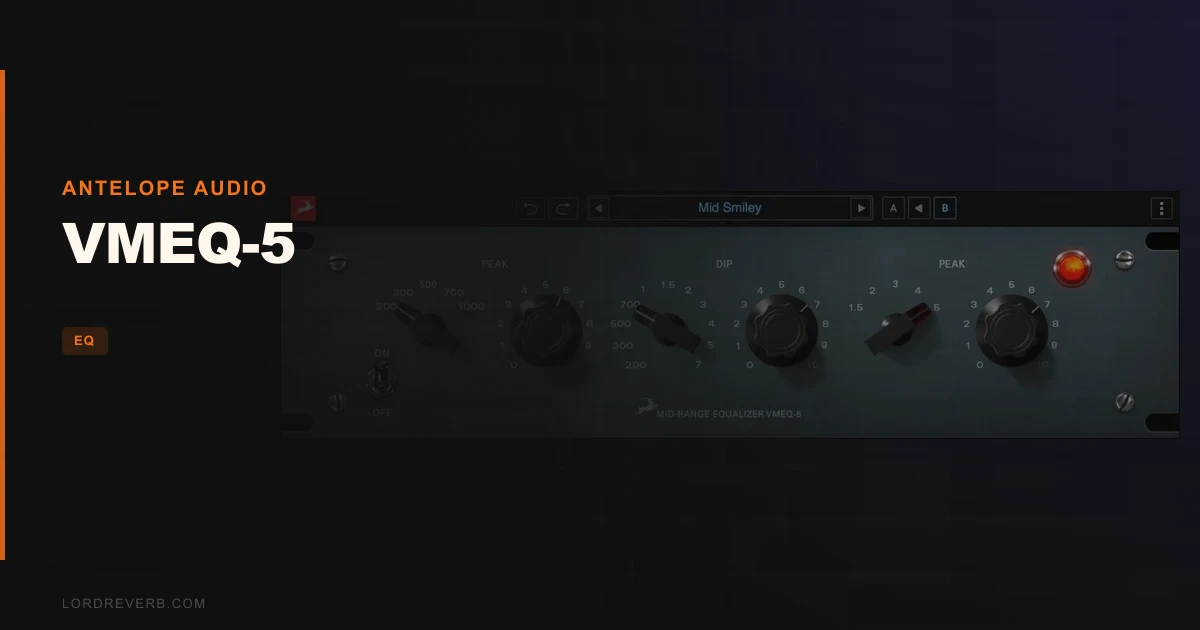
The VMEQ-5 review answer is this: it's a mid-range EQ plugin built for vocals, guitars, and woodwinds that live and die in the 300-5000 Hz band, and at $99 it's aimed at producers who want a vintage-flavored tool for exactly that job. No more, no less.
If your sessions are full of tracks where the mud lives around 400 Hz and the presence you're chasing sits somewhere around 2-3 kHz, the VMEQ-5 has a clear point of view. It doesn't try to do everything. That's either its strength or its dealbreaker, depending on what you're trying to fix.
Antelope Audio built it in two versions: a Native plugin that runs on Mac or PC without any extra hardware, and a Synergy Core version that runs in real time on compatible Synergy Core devices. Both versions model hardware that reportedly dates back to 1955, refined in 1961 and used in studios for over six decades after that.
What follows is a breakdown of who this actually suits, who it doesn't, and whether $99 is the right spend for your specific situation.
Where It Belongs
You're mixing a folk record. The acoustic guitar is fighting the lead vocal for the same 800-1200 Hz space, and your full-band EQ keeps making things worse everywhere else when you try to fix the problem area. That's exactly the scenario the VMEQ-5 is built for.
Its three-band design, two peak bands and one dip band, keeps your focus locked between 300 and 5000 Hz. You can boost where the vocal needs presence, cut where the guitar is getting boxy, and move on. Satisfying, clean, done.
Woodwind producers and engineers tracking saxophone or clarinet will feel the same pull. Those instruments generate most of their character in this exact frequency window. Having a dedicated tool that doesn't drag bass shelf or air band decisions into the picture can actually speed up your decision-making.
It also works as a mid-range treatment on a full mix bus, clearing up congestion without touching the low end or the top end that you've already dialed in. That's a clever use case for a mastering pass where you need surgical mid control and nothing else.
Where It Doesn't
If your problem is below 300 Hz, stop reading. The VMEQ-5 will not help you. Kick drum rumble, bass guitar weight, low-end buildup on room mics, none of that is in this plugin's scope.
Same goes for air and brightness. You won't find a high-shelf here. If your vocal sounds dull above 5 kHz or your mix needs top-end open space, you'll need a different tool for that job.
Electronic music producers and beatmakers will likely find it frustrating. When your whole session is built around sub frequencies and high-hat sparkle, a mid-only EQ becomes an oddly specific purchase. It's not wrong for that world, it's just rarely the right tool first.
Who It's Actually For
The Singer-Songwriter Producer
You're recording vocals and acoustic guitar at home and mixing it yourself. The midrange congestion is your biggest problem, and you know it. The VMEQ-5's focused range means every knob you touch is relevant to exactly that problem.
At $99, it's a reasonable investment if mid-range tone-shaping is something you're doing every session. Buy it.
The Working Mixing Engineer
You've got a full plugin chain already. You have something for low end, something for air, and three different full-band EQs. What you're missing is a dedicated mid-range shaping tool modeled on a studio-proven hardware unit.
The VMEQ-5 fits that gap. It won't replace your main EQ, but as a secondary stage on vocals or woodwinds it makes sense. The vintage character Antelope describes could add texture a clean digital EQ won't. For the working engineer who already knows what they need: worth a look, cautiously.
The Synergy Core Hardware Owner
If you already own a compatible Antelope device, the Synergy Core version running in real time is a genuinely interesting addition. You get the vintage mid-range processing with the hardware running it, keeping your computer's CPU free for other work. That's a real workflow benefit. Buy it.
The Beatmaker Who Stumbled Here
You produce trap, house, or anything bass-driven and high-energy. The VMEQ-5's frequency range covers maybe 15% of what your sessions actually need fixed. Skip it.
How To Use It Well
Place it after your gain staging is sorted. Bring your vocal or guitar into the VMEQ-5 at a healthy level, not buried, not clipping. The mid-range is unforgiving when input levels are inconsistent.
Use the dip band to find and cut the frequency where the track starts to sound boxy or nasal. For vocals, that's often somewhere between 400 and 600 Hz. Pull back a few dB, listen, then move on. Don't over-cut.
Then reach for the peak bands to add presence. Acoustic guitar can open up around 1-1.5 kHz with a narrow boost. Apply it and check how it sits against the other elements, not just in solo.
On a full mix bus, be conservative. A 1-2 dB cut at the problem frequency with a moderate Q is usually enough. Push further and you'll hear the mid-range pull away from the rest of the spectrum.
If you're on the Synergy Core version, run it in real time during tracking. Hearing the mid-range shaping on the way in can help performers adjust their delivery in the moment.
The Verdict
The VMEQ-5 is a focused, honest tool for a specific problem. It doesn't oversell what it is. Three bands, one frequency window, vintage modeling from hardware that earned its place in studios over 60 years. If your work lives in that 300-5000 Hz band, $99 buys you something with real purpose.
We'd call it underrated in concept, underexposed in practice. The right engineer will love it. Everyone else will wish they'd checked their session's actual frequency problems first.
Specs & Technical Details
| Developer | Antelope Audio |
| Price | $99 |
| Plugin Format | N/A |
| OS Support | Mac / Windows |
| Activation | N/A |
| CPU Usage | N/A |
| Trial Available | N/A |
| Version Reviewed | N/A |
Score Breakdown
| Category | Score | Notes |
|---|---|---|
| Sound Quality | 4.0/5 | Vintage modeling from a 60-year studio pedigree carries real credibility |
| Value for Money | 3.5/5 | Focused range limits versatility; fair if mid-range work is your daily task |
| Ease of Use | 4.0/5 | Three bands, one job: the focused design keeps decisions simple |
| Features | 3.0/5 | Two peak bands and one dip band covers the basics; nothing beyond the core spec |
| CPU Efficiency | N/A | No data available; Synergy Core version offloads to hardware |
| Overall | 3.5/5 | A clever, narrow tool that earns its place in the right hands |
Frequently Asked Questions
What frequency range does the VMEQ-5 cover?
The VMEQ-5 operates between 300 Hz and 5000 Hz. That's the mid-range only. It has no low-shelf, no high-shelf, and no control below or above those points. If your problem is in the sub, the low-mid mud below 300 Hz, or the air above 5 kHz, you'll need a different tool for those jobs.
Do I need Antelope hardware to run the VMEQ-5?
No. The Native Plugin version runs on Mac or PC without any additional hardware. The Synergy Core Real-Time version requires a compatible Antelope Synergy Core device, which lets the hardware handle the processing rather than your computer. Both are separate purchases and serve different workflows.
Is the VMEQ-5 suitable for mastering?
It can be used on a full mix to address mid-range congestion during a mastering pass. Because it touches only the 300-5000 Hz band, it won't disrupt the low end or top end you've already balanced.