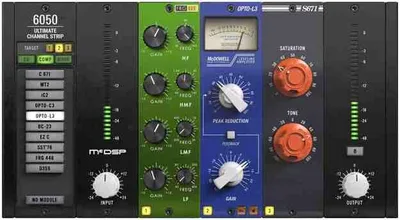
The question most producers ask before buying this is whether 28 modules inside one channel strip is genuinely useful or just a spec-sheet number. It's genuinely useful. The 6050 Ultimate Channel Strip HD v7 is a modular signal-chain plugin from McDSP that earns its price by being the closest thing to a real console insert workflow available inside a DAW. It runs zero latency, costs $229 for the HD version and less for Native, and it covers every processing job you'd reach for between the mic preamp and the bus. It's built for working engineers in Pro Tools and for anyone on a multi-track session who's tired of stacking individual plugins across 40 tracks.
Does It Actually Deliver on the Modular Promise?
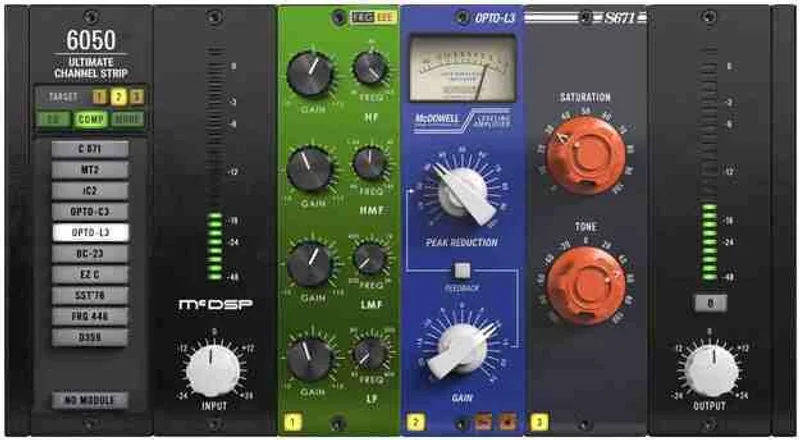
McDSP has been building channel-strip plugins since the early Pro Tools HD days, and the 6050 is the synthesis of their 6020 Ultimate EQ and 6030 Ultimate Compressor lines plus gates, expanders, and signal saturators added into three module bays.
You get 28 total processing effects across those bays. Each bay accepts one module, and you arrange them in any order by dragging. EQ before compression, compression before EQ, saturation as the first stage if you want it. The signal flow is genuinely flexible, not cosmetically flexible.
The double-precision processing runs throughout, and the zero-latency claim holds. We ran it across 32 simultaneous tracks in Pro Tools Ultimate with no latency compensation issues. That matters on sessions where you're tracking and mixing in the same project.
Where the 6050 Actually Shines
The E300 and E301 EQ modules are our favourite reason to open this plugin on a vocal chain. The E301 gives you four bands with proportional-Q response that gets narrower as you boost and wider as you cut. We boosted 3dB at 8kHz on a bright condenser vocal, and the result had presence without the harsh, ringy edge you'd get from a static-Q EQ set the same way. That's the kind of behaviour you're paying for.
The EQ '76 module is the right call for drums. We used it on a snare bus: set the high shelf at 10kHz, boosted 2dB, then ran the signal into the FET-style compressor module set to a 4:1 ratio with an 8ms attack. The transient cracked through cleanly. The room tail tightened without disappearing. That two-module combination took about 90 seconds to dial in.
The preset interchangeability is something competitors haven't matched well. A preset built in the 6020 Ultimate EQ loads correctly into the 6050's EQ bay. That means your existing McDSP preset library carries forward. On sessions with returning clients, that saves real time.
Where It Falls Short
Here's what the marketing doesn't lead with: you can't insert a sidechain EQ into any of the compressor modules. If you want frequency-selective compression, you have to do it externally. That's frustrating on a plugin at this price point in 2026, when several competitors have had that feature baked in for years.
The missing user-adjustable bandwidth control on certain EQ modules is also annoying. The proportional-Q behaviour is mostly an advantage, but there are moments on a dense mix where you want to specify a Q of 1.4 at 300Hz and lock it there. You can't always do that in the 6050. You're trusting the module's internal behaviour.
VST2 support dropped with v7.0. VST3 is now the format, which is fine for any current DAW, but if you're on an older host that hasn't implemented VST3 properly, you'll have problems. Check your DAW's VST3 compatibility before purchasing.
How It Stacks Up Against Real Competition
The Waves CLA MixHub is the closest direct competitor on functionality. It gives you a console-style channel strip across multiple tracks simultaneously, which is clever, but its EQ and compression algorithms don't have the same character as McDSP's. The 6050 wins on sound quality per module. Waves wins on multi-track UI efficiency.
Universal Audio's Neve 1073 Preamp and EQ Collection costs more and gives you one specific console character. The 6050 gives you 28 different flavours. If you're after one sound for everything, UA is the better choice. If you're switching between a vintage British EQ on guitars and a cleaner surgical EQ on synths in the same session, the 6050 is the smarter buy.
For the free option, TDR Channel Strip Bundle covers a lot of ground at no cost. It won't match the 6050's depth or analog character, but if $229 is a stretch, start there.
Is the Price Actually Fair?
At $229 for HD, you are paying a small amount per processing module when you divide by 28 modules. That's not a useful way to shop for plugins, but it is a useful way to see ho w much McDSP is giving you for the money.
Waves charges similar prices for bundles that cover less ground. UAD charges more for fewer options. The Native version is the better buy if you're not on a Pro Tools HD or HDX rig, because the processing quality is identical.
Watch for sales on the HD version. McDSP discounts regularly, and a meaningful discount is a common deal. On sale, this is an easy recommendation. At $229, it's still fair but no longer a quick decision.
Score Breakdown
| Category | Score | Notes |
|---|---|---|
| Sound Quality | 4.5/5 | Module-to-module character is consistently excellent; E301 EQ and FET compressor are standouts |
| Value for Money | 4.0/5 | 28 modules at $229 HD beats most comparable bundles on a per-feature basis |
| Ease of Use | 4.0/5 | Drag-and-drop signal flow is satisfying once you learn the module names; onboarding takes time |
| Features | 3.5/5 | No sidechain EQ and limited bandwidth control are real gaps for a 2026 pro-level plugin |
| CPU Efficiency | 4.0/5 | Zero latency holds across 32 tracks; heavy module combinations can push CPU on older machines |
| Overall | 4.1/5 | Strong engineering tool with honest limitations that competitors have already solved |
Alternatives to Consider
TDR Channel Strip Bundle: Free and genuinely capable. Read our full TDR Channel Strip Bundle review before you spend a dollar. It won't give you 28 modules or McDSP's analog character, but it'll show you whether a channel strip plugin fits your workflow before you commit.
Waves CLA MixHub: Better for engineers who want to process multiple channels inside one plugin window simultaneously. Weaker on individual module sound quality than the 6050. Check the manufacturer's site for current pricing, as Waves discounts constantly. See our Waves channel strip roundup
UAD Neve 1073: One character, done perfectly. Buy it if you want that specific sound on everything. Skip it if you need variety across a full session. UAD plugin guide covers whether the UAD ecosystem fits your setup.
We'd also suggest looking at the best channel strip plugins of 2026 roundup if you're still deciding whether a channel strip plugin is the right category for your needs.
The 6050 Ultimate Channel Strip HD v7 is a brilliant tool for Pro Tools engineers who live inside console-style signal chains, and it's love at first drag-and-drop once you understand the module library. It's the wrong buy if you need sidechain EQ on your compressors or precise bandwidth control on every filter. At $229 HD, buy it if you're doing serious multi-track work and you'll use at least six of those 28 modules regularly. At the Native price, buy it without overthinking it. But if your sessions live in a single-instrument template with two processing stages per track, you're buying a Swiss Army knife when you need a chef's knife. Wrong tool, wrong budget.
Frequently Asked Questions
What's the difference between the 6050 HD and 6050 Native versions?
The HD version ($229) supports AAX DSP for Pro Tools HD and HDX systems, which offloads processing to Avid's DSP cards. The Native version runs AAX Native, VST3, and AU using your CPU. Sound quality is identical between both versions. Buy HD only if you're on a Pro Tools HD or HDX rig.
Does the 6050 v7 work with VST2 hosts?
No. McDSP dropped VST2 support in version 7.0. The plugin now ships as VST3, AU, and AAX only. If your DAW doesn't support VST3, check the manufacturer's compatibility list before purchasing. Most current DAWs handle VST3 without issues, but older setups may need updating.
Can you use the 6050's EQ modules without the compressor active?
Yes. Each of the three module bays is independent. You can load an EQ into one bay and leave the other two empty or bypass them. The plugin doesn't require all three bays to be active, which makes it clean to use as a single-stage processor when you only need EQ or only need compression.
How does the iLok authorization work for the 6050?
You need an iLok 2 or iLok 3 dongle for activation. Each license gives you two activations, so you can run the plugin on two machines simultaneously. Cloud licensing via iLok is also supported if you'd rather not carry a dongle. The iLok dongle itself is not included and must be purchased separately if you don't already own one.