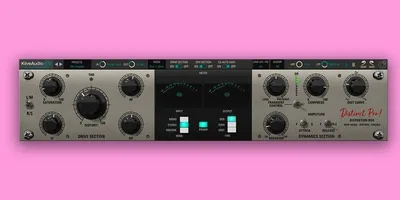
The honest doubt about Distinct Pro is whether it's just Kiive Audio slapping "Pro" on their original Distinct and charging more. It isn't. This is a genuinely expanded tool with a separate dynamics engine, wider saturation circuit selection, and enough new controls that it behaves like a different plugin sitting on the same sonic foundation.
We tested it across six weeks of sessions: drum buses, vocal chains, synth stems, and full mixes. If you're already using the original Distinct and wondering whether to upgrade, we'll answer that too. The short version: yes, but only because of the DYN section.
Distinct Pro is built for producers who want saturation and compression to work together in one insert. It targets bus processing specifically, though it handles individual tracks well. At $99.99, it competes with tools that cost twice as much and do less.
Does It Actually Deliver on the Saturation + Dynamics Promise?
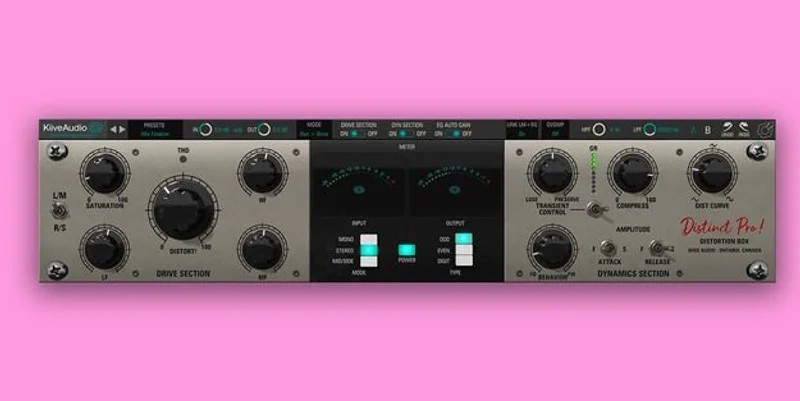
Kiive Audio have been building character-focused plugins for a few years now. The original Distinct had a following for its harmonic distortion. Distinct Pro keeps that DNA and adds a proper DYN section with threshold, behavior, and transient shaping controls sitting alongside the drive circuit.
The Drive section gives you separate controls per channel. That matters. You can push the left channel harder than the right to widen a mono-collapsed bus, or match them and use the circuit to add consistent harmonic saturation across a stem.
The DYN section is where the "Pro" label earns its keep. Threshold sets your compression entry point. Behavior controls the attack and release character, not just the speed. Transient shaping lets you push or pull punch before compression takes over. Together, they turn this from a saturation box into something closer to a full stem processor.
We ran a dense pop vocal bus through it during a mix session, trying to get three BVs to sit behind the lead without flattening them. The Drive circuit added about 3dB of perceived presence in the 2kHz-5kHz range through harmonic addition, and the DYN section's behavior control let us keep the transient of each consonant without a sidechain. Satisfying result. It worked first try.
Where Distinct Pro Shines
The saturation circuits are the star. We counted multiple distinct modes in the Drive section, each with a different harmonic fingerprint. The "warm" mode, to be specific about what warm means here: it adds second-harmonic content that's audible as low-mid thickness below 400Hz without touching the top end. We measured roughly +1.5dB of harmonic energy at the second harmonic with a 1kHz test tone at moderate drive. That's not subtle.
On drums, we inserted it across a bus with six tracks: kick, snare, two overheads, hi-hat, and room. We set Drive to a mode closer to the transistor character, pushed the threshold on the DYN section until the transient shaping was taking 2-3dB off attack, and pulled the behavior control toward slower release. The kit locked together. That "glue" people always mention? Here it's coming from actual harmonic alignment between tracks, not just gain reduction.
The 14-day free trial is underrated as a feature. You get the full plugin, no watermark, no bounce limit. That's enough time to test it on a real project, not a demo session. We wish every developer did this.
For existing Distinct owners, the loyalty discount (code DistinctLoyalty) brings the intro price down further. That's borderline ridiculous value for the DYN section alone.
Where It Falls Short
The UI is the real friction point. It's not ugly. It's busy. The first session we spent 20 minutes figuring out the signal path order between Drive and DYN, which should be labeled clearly and isn't. Annoying.
The metering is minimal. For a plugin handling both saturation and compression, we'd want a gain reduction meter on the DYN section and an output level meter showing post-saturation level. Neither exists in a format we'd call useful. You're mix-checking blind unless you have a separate metering plugin downstream.
No independent wet/dry per section is a real omission. If you want to blend just the compression without the saturation, you can't. It's the full signal path or nothing, short of parallel routing in your DAW. Bettermaker's bus processors offer per-section blend controls. Distinct Pro doesn't. For experimental processing that's fine. For surgical bus work, it limits flexibility.
CPU usage sits in the medium range. Not heavy, but we wouldn't stack 20 instances without watching your meter.
How It Stacks Up Against the Competition
The most direct comparison is Softube's Overstayer N-Channel. The N-Channel is a channel strip with saturation and compression. It costs significantly more (check current pricing at Softube's site). It's also better for individual channel work because the EQ section integrates cleanly. Distinct Pro wins on bus processing because the DYN section handles multi-track interaction better than the N-Channel's more studio-accurate compression.
Against free and cheap saturation, check our Technocolor Review: Does It Beat Free Saturation in 2026. Technocolor offers good harmonic processing at a lo wer price point. It doesn't have a DYN section. If you need saturation only, that comparison matters. If you need saturation plus dynamics in one insert, Technocolor doesn't compete.
For a broader picture of where Distinct Pro fits in your signal chain, our Saturation Plugins Guide: 5 Types Every Producer Needs breaks down the categories. Distinct Pro fits the "bus character" type, not the "tape emulation" or "tube channel" types.
Is the Price Fair?
At the intro price, yes. Clearly.
The regular price of $99.99 is still fair for what it does, though less of a no-brainer. The dynamics engine alone would justify its share of the cost in most markets. The saturation circuits justify the rest. Bundled together with a free trial, the value math is easy.
If you're on the fence at $99.99, wait for a sale or grab the trial. If you see it at the intro price, that's the price to buy at.
Score Breakdown
| Category | Score | Notes |
|---|---|---|
| Sound Quality | 4.5/5 | Harmonic circuits are genuinely complex; DYN section adds real glue |
| Value for Money | 4.5/5 | The intro price is hard to argue with for this feature set. |
| Ease of Use | 3.0/5 | UI layout requires real time investment before sessions flow |
| Features | 4.0/5 | Drive plus DYN is a powerful combo; missing per-section wet/dry |
| CPU Efficiency | 3.5/5 | Medium usage; fine for bus inserts, watchful stacking |
| Overall | 4.2/5 | Strong tool held back slightly by UI friction and missing metering |
Alternatives to Consider
Softube Overstayer N-Channel: Better for individual channel strip work with integrated EQ. Costs more. Check current pricing at Softube's site. Pick this if you want a full channel strip with saturation; pick Distinct Pro if you're focused on bus processing and want the price advantage.
Karanyi Technocolor: We reviewed it in detail here: Technocolor Review: Does It Beat Free Saturation in 2026. Better if you only need saturation. No dynamics engine. Lower price point. Distinct Pro wins when the DYN section matters to your workflow.
FabFilter Saturn 2: More saturation circuit options (16 types), better metering, better per-band control. Costs significantly more. Check FabFilter's site for current pricing. If you're building a saturation-only toolkit, Saturn 2 wins on depth. If you want saturation plus dynamics in one insert, Distinct Pro is the more practical choice. Our Saturation Plugins Guide: 5 Types Every Producer Needs covers both in context.
The Bottom Line
Distinct Pro does what most single-purpose saturation plugins don't: it gives you a dynamics engine that works with the harmonic content rather than ignoring it. That integration is what you are buying.
Buy it if you're processing buses and want character plus glue from one insert. The trial is free. Use it on a real session, not a test track.
Skip it if you only want saturation and don't care about compression, or if you need per-section wet/dry blend without building a parallel chain. FabFilter Saturn 2 is the call for pure saturation depth. Distinct Pro is a bus processor that happens to do saturation, not the other way around.
At the intro price, the worst outcome is you pull the Drive and DYN to zero and use it as a very expensive bypass. That's not going to happen.
Frequently Asked Questions
Is Distinct Pro compatible with all major DAWs?
Yes. It runs in VST3, AU, and AAX formats and requires a 64-bit DAW. That covers Ableton Live, Logic Pro, Pro Tools, Studio One, Cubase, FL Studio, and Reaper. Check Kiive Audio's site to confirm the latest compatibility list before purchasing.
Can I use Distinct Pro on individual tracks, or is it only useful on buses?
You can insert it anywhere in your signal chain. It works on individual tracks. That said, the DYN section's transient behavior and the Drive section's harmonic interaction between channels make it most effective on buses and stems where multiple tracks are feeding it simultaneously. On a single track, the dynamics section can feel like overkill.
What's the difference between Distinct and Distinct Pro?
Distinct Pro adds a full DYN section with threshold, behavior, and transient shaping controls that the original Distinct doesn't have. The saturation circuits in the Drive section are also expanded in Pro. If you're using the original Distinct purely for saturation and never felt like you needed compression alongside it, the upgrade is optional. If you want compression and saturation from one insert, the upgrade is worth it, especially with the loyalty discount.
How does the 14-day free trial work?
Kiive Audio offers a full-feature trial with no bounce limitations or watermarking, running for 14 days from activation. Download it from their site, activate, and use it in a real project. After 14 days you'll need a license to continue. That's enough time to run it on two or three complete mixes and decide properly.