
Will a plugin priced at $25.99 really cover everything from a whisper of drum warmth to full fuzz bass? Mostly, yes, as long as you don’t expect it to out-meat a premium emulation, and that’s the doubt we kept circling while writing this Distinct! review.
Distinct! is Kiive Audio’s saturation and distortion plugin for Mac and Windows. It has seven knobs, three distortion modes, and a harmonic character borrowed from Overstayer: Modular Channel.
It’s built for producers who want one plugin on the drum bus, the vocal and the synth without opening a mega-suite. Beginners will like it. Mixers who already own three saturators will ask whether they need a fourth.
We think many of them do, and the rest of this review explains why.
Does It Actually Deliver?
Kiive Audio pitches Distinct! as a tool for subtle saturation that warms drums, vocals and the mix bus. The same plugin can also push into fuzz bass tones, distorted vocal effects and synth abuse.
That’s a wide claim. Plenty of saturators are great at one end and clumsy at the other.
Owners say this one stretches from something like an SSL-style saturator at gentle settings all the way to extreme saturation. That range is the whole pitch.
The harmonic behaviour is based on the saturation found in Overstayer: Modular Channel. So this isn’t a random distortion algorithm with a friendly skin on top.
Does it live up to the promise? The reports say yes for range and ease of use, with one caveat about tonal depth that we’ll get to.
How Does the Seven-Knob Layout Work?
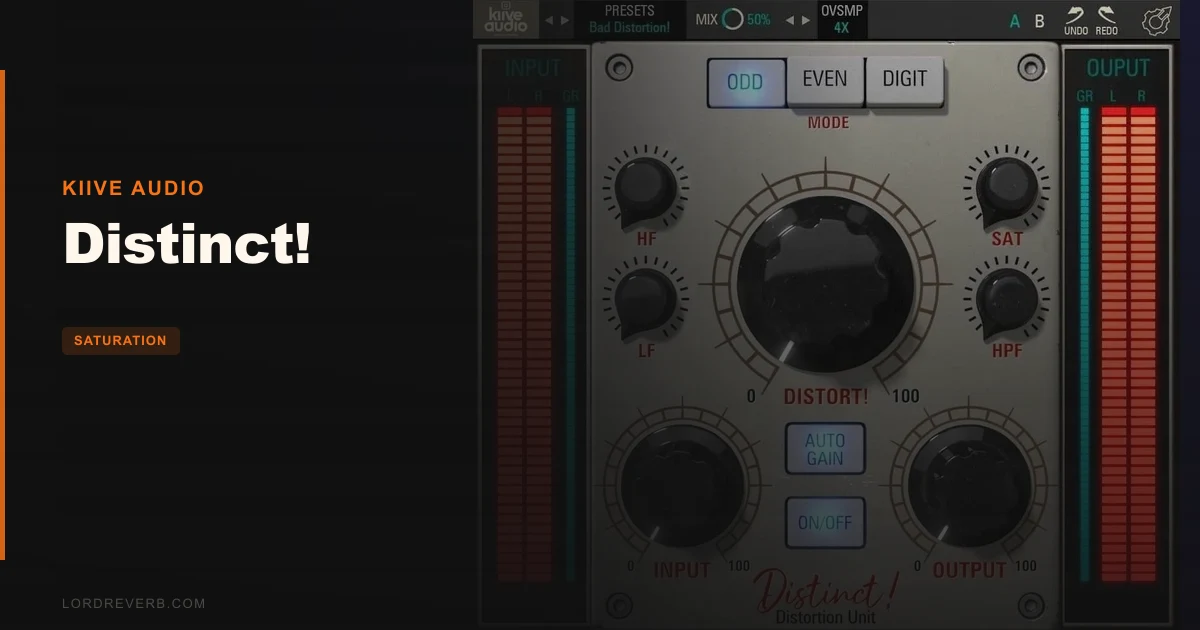
The knobs are Distort, HF, LF, HPF, SAT, Input and Output. That’s it.
No tabs. No hidden pages. No menu diving to find the one setting that matters.
Owners consistently call the interface very easy to use, and the layout backs that up. Every control is on the face of the plugin, and every control does something you can hear.
We love that restraint. A saturator with forty parameters sounds impressive in a screenshot and wastes your afternoon in a session.
Distort and Input
Distort sets how hard the selected mode works the signal. Input sets the level feeding the whole thing.
These two interact. Push Input and the same Distort setting bites harder, because there’s more level hitting the saturation stage.
Gain stage deliberately. Set Input so the signal is already hot enough to react, then use Distort to decide how much grit you want. Trim with Output afterwards so you’re not judging louder as better.
Louder always wins a quick A/B. Don’t fall for it.
The SAT Knob
SAT uses a non-linear algorithm, and here’s the part that matters: the Distort and Input values change how SAT sounds.
So SAT isn’t a standalone dial you can park at noon and forget. Move Input and the character of SAT shifts with it.
That’s clever, and it’s slightly annoying. A control that responds to its neighbours rewards experimenting and punishes anyone who wants repeatable, labelled settings.
If you’re the type who writes down settings, expect to keep nudging SAT after you touch anything upstream of it.
What Do the ODD, EVEN and DIGT Modes Sound Like?
Three modes, three clear jobs. This is the heart of the plugin.
ODD Mode
ODD generates third-order harmonics. The result is edgy, gritty distortion.
Reach for it when something needs teeth. A bass that disappears on a phone speaker, a synth lead that’s too polite, a vocal that needs to sound like it’s coming through a broken radio.
Third-order harmonics tend to read as aggressive and hollow-ish rather than thick. That’s the point. Use it when you want attitude.
EVEN Mode
EVEN generates second-order harmonics. This is the pleasing saturation and rich tone mode.
It’s where the subtle warmth lives. Put it on a vocal, a drum bus or the full mix and bring Distort up slowly until the source feels a bit fuller without announcing itself.
Second-order content is the friendly kind. You can leave it on and not get tired of it.
If you only ever use one mode, you’ll probably end up here.
DIGT Mode
DIGT is a digital soft clipper with added high mids. Kiive Audio calls it perfect for drums or mastering.
A soft clipper rounds off peaks rather than shaving them flat, and the added high mids give the result some bite and presence. That makes it a natural choice on a snare or a loud drum bus.
For mastering, go gently. A soft clipper can buy you a little level, but push it and the high mids get shouty.
Where Does the Tone Shaping Happen?
Three controls shape the signal before it hits the distortion: HF, LF and HPF. The order matters more than people realise.
HF and LF
HF adds up to 12dB of presence and sheen. LF adds up to 12dB of low end thump and thickness.
Both operate pre-distortion. So you’re not EQing the finished sound. You’re changing what the saturation stage sees.
Boost HF and the distortion generates harmonics from that brighter input, so the added sheen gets multiplied rather than just sitting on top. Boost LF and the low end drives the distortion harder, which can thicken a kick or turn a thin 808 into something with weight.
Here’s a scene you’ll hit quickly. You’ve got a drum loop that sounds flat, so you push LF to the max. It gets muddy and the distortion goes woolly. Pull LF back to a few dB, lean on the HPF to keep the bottom tidy, and it tightens up.
Twelve dB is a lot. Most good settings sit well below it.
The HPF
The HPF is a highpass filter that works up to 420Hz.
Use it to stop low end from smashing the distortion. Bass-heavy signals tend to make saturation sound farty and unfocused, because the biggest energy in the signal dominates what the distortion reacts to.
Roll the HPF up on a full drum bus and the distortion stops chasing the kick. The grit lands on snares and hats instead.
Because it sits ahead of the saturation, it changes the sound, not just the final balance. That’s more useful than a post-filter, and also easier to forget you’ve engaged. Check it when something sounds thin.
How Does It Handle Drums, Vocals and the Mix Bus?
Drum bus is where this plugin has built its reputation. Owners say it’s popular for parallel drum bus processing.
One reviewer reports it brought out quality in EZ Drummer 3 samples on the drum bus. That’s a believable use case, since sampled drums often need a bit of life added after the fact.
The reason it works for parallel is the dynamics point. Owners report you can saturate while keeping dynamics intact.
That matters. Heavy saturation usually flattens transients, and flat transients kill a drum bus. If Distinct! really keeps the punch while adding harmonics, it’s a strong parallel tool.
A Parallel Drum Bus Starting Point
Send your drums to a bus. Put Distinct! on the bus in DIGT mode, or EVEN for something softer.
Push Distort until it sounds slightly too much, then blend it back underneath the dry signal. If the blend is wrong, don’t touch Distort first. Check Input, because that’s what’s driving the character.
You’ll get density without losing the hit. That’s the goal.
Vocals
On a vocal, go EVEN and keep Distort low. You want the voice a little closer and a little richer, not obviously processed.
If the sibilance gets harsh, that’s the HF knob working pre-distortion and multiplying brightness. Bring HF down a couple of dB rather than reaching for a de-esser straight away.
For a lo-fi or aggressive vocal effect, switch to ODD and crank it. That’s the fun end.
Mix Bus
Subtle is the word. Kiive Audio specifically lists mix bus warmth as a use, and EVEN mode at low Distort is the way in.
Barely-there settings are right here. If you can clearly hear it working on the stereo bus, you’ve gone too far.
Where Does It Fall Short?
Time to be straight with you.
First, tonal depth. Owners report strong high-end presence, but some say it might not deliver the depth they expect.
That lines up with the comparison people draw to Softube emulation, where Distinct! gets described as having less meat in its tonal profile. If you want that thick, heavy, console-in-a-box low-mid weight, you may find this plugin a bit lean.
It’s not a flaw if you’re after clarity and bite. It’s a real limit if you want body.
Second, the interface looks. Some users report the GUI causes visual discomfort because of the convex knob shadows.
That’s subjective, and plenty of people won’t care. But if you stare at plugins for ten hours a day, a design that bothers you is annoying every single session.
Third, coverage. There are few independent editorial reviews of Distinct!. Most opinions come from the manufacturer’s site and user forums.
We can’t point you to a stack of third-party measurements, because they don’t appear to exist. Treat the owner reports as useful but not lab-verified.
How Does It Stack Up Against the Alternatives?
The comparison owners actually make is against Softube emulation, and Distinct! comes off second on tonal weight. Softube-style tools are the ones people reach for when they want meat. Distinct! is the one you reach for when you want flexibility and a clean, fast interface.
| Plugin | Strongest point | Weakest point |
|---|---|---|
| Distinct! (Kiive Audio) | Three modes plus pre-distortion HF/LF in a seven-knob layout, with dynamics kept intact | Owners report less depth in the tonal profile |
| Softube emulation | Tonal profile with more meat, per owner comparisons | Different focus: character over flexible range |
Which wins when? Pick Distinct! when you need one plugin that goes from gentle to filthy and stays easy to drive. Pick the Softube approach when body and weight matter more than range.
We’d happily own both. They don’t do the same job.
Is the Price Fair?
At $25.99, yes.
You get three distinct harmonic modes, pre-distortion tone shaping up to 12dB on both ends, a highpass up to 420Hz and a set of presets. That covers drum bus, vocal, synth and bass duty.
The catch is depth. If body is your top priority, you’ll want something pricier next to it.
For everyone else, it’s an easy trial-or-buy. Cheap enough that a mild disappointment costs you very little.
Specs & Technical Details
| Spec | Detail |
|---|---|
| Developer | Kiive Audio |
| Price | $25.99 |
| Plugin Format | VST, AU (Mac only), AAX |
| OS Support | Mac (macOS 10.7+, 10.14+ recommended, 64-bit) / Windows (Windows 7+, 64-bit) |
| Activation | N/A |
| CPU Usage | N/A |
| Trial Available | N/A |
| Version Reviewed | N/A |
System needs are a 1 GHz Intel Dual Core processor or higher on Mac, or the AMD equivalent on Windows. Screen resolution should be 1024 x 768 or higher on both. Windows supports VST and AAX only, so no AU there.
Score Breakdown
| Category | Score | Notes |
|---|---|---|
| Sound Quality | 4.0/5 | Strong presence and range, but owners report less depth than Softube-style tools |
| Value for Money | 4.5/5 | Three modes and full tone shaping at a low price |
| Ease of Use | 4.5/5 | Seven knobs, everything on one screen, owners call it very easy |
| Features | 4.0/5 | ODD, EVEN, DIGT, pre-distortion HF/LF and HPF, plus presets |
| CPU Efficiency | N/A | Not enough verified data to score |
| Overall | 4.3/5 | A flexible, easy saturator that's lean on tonal weight |
Alternatives to Consider
Softube emulations
The pick if you want more meat in the tonal profile. Owners who compare the two say this is where Distinct! gives ground, so it’s the natural second opinion for anyone who finds Distinct! too lean.
SSL-style saturators
Owners describe Distinct! at gentle settings as sitting in the range of an SSL x saturator. If all you want is clean, subtle console-style warmth and nothing more, a dedicated tool in that vein does the one job without the extra modes.
Overstayer: Modular Channel
This is where the harmonic character of Distinct! comes from. If you want the source of that saturation sound rather than a simplified take on it, that’s the place to look.
Should You Buy It?
Buy it. At $25.99, Distinct! gives you subtle warmth, grit and soft clipping in one plugin that you’ll understand in ten minutes.
It’s best on drum bus, parallel chains and anything that needs flexible range without menu diving.
It’s wrong for you if tonal body is the whole point, or if those convex knobs would drive you up the wall. Then spend more or try a different design.
For most producers, it’s a cheap, fast way to add character without flattening your mix.
Frequently Asked Questions
What does Distinct! do?
It's a saturation and distortion plugin with three modes: ODD for gritty third-order harmonics, EVEN for warm second-order saturation, and DIGT for digital soft clipping. It covers everything from subtle warmth to fuzz bass and distorted vocals.
Is Distinct! good for a drum bus?
Owners say yes. It's popular for parallel drum bus processing, and owners report it brought out quality in EZ Drummer 3 samples. DIGT mode is the one Kiive Audio recommends for drums.
What plugin formats and systems does it support?
Mac gets VST, AU and AAX on macOS 10.7 or higher, with 10.14 or higher recommended. Windows gets VST and AAX on Windows 7 and above. Both are 64-bit only.
How does it compare to Softube emulations?
Owners compare it unfavorably on tonal profile, saying it has less meat and depth. It has strong high-end presence and a more flexible, easier layout, so the choice comes down to range versus weight.
What do the HF, LF and HPF controls do?
HF adds up to 12dB of presence and sheen, and LF adds up to 12dB of low end thump. Both work before the distortion. The HPF filters signal up to 420Hz so bass doesn't overload the saturation.