
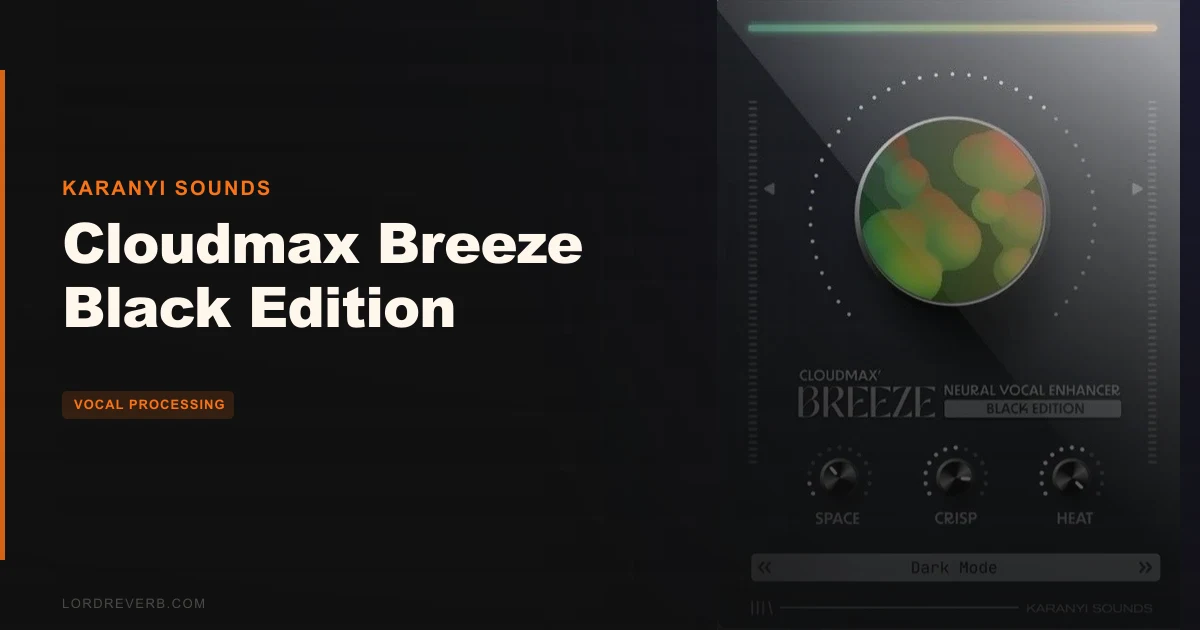
The Cloudmax Breeze Black Edition is a one-knob AI vocal processor from Karanyi Sounds that packs reverb, EQ, saturation, and compression into a single plugin, priced at $59. We had it loaded on a sparse bedroom pop vocal at 2am, trying to get the lead to breathe without adding the kind of glassy shimmer that was making everything sound like it was recorded in 2018. One turn of the Breeze knob, and the space deepened without clouding the top end. That was the moment we knew this plugin had a clear identity. It's not for engineers who want 47 parameters. It's for producers who want the vocal to sound right, fast, and then move on with their session.
First Impressions: What You're Actually Looking At When You Open It
Install is clean. You get a standard download via Plugin Boutique, run the installer, and it shows up in VST3, AU, and AAX within a minute. No iLok dongle. No serial number ritual that makes you feel like you're filing a tax return.
The interface is small, dark, and deliberately restrained. You get four knobs: Space, Crisp, Heat, and the master Breeze control. That's it. No hidden panels. No hamburger menu with 200 options inside. The Black Edition's GUI leans darker than the original Cloudmax Breeze, with a matte aesthetic that looks considered rather than cheap.
First thing we noticed: the Space knob's default position already sounds useful. Most reverb plugins need you to dial back the wet signal before they stop sounding like a stadium. This one opens at a value that sits in the mix without a fight.
The Crisp knob handles the high-frequency presence. The Heat knob manages saturation. These aren't labeled with EQ bands or compression ratios because the neural engine is deciding those values internally. You're steering, not driving manually.
It's a clean first impression. Nothing annoying about the onboarding. The plugin loads fast, the UI scales reasonably on a 4K display, and you're making sound within thirty seconds of opening it.
What "Neural Technology" Actually Means Here
Karanyi Sounds uses the phrase "neural technology" across the Cloudmax range, and it's worth being clear about what that means in practice versus what it sounds like in a press release.
The Black Edition's AI assistant has been re-trained specifically for this edition. The training targets deeper spaces, smoother high-frequency response, and more body in the low-mids compared to the original Cloudmax Breeze. That's not marketing padding. You can hear it.
What the neural engine does is link parameter changes together behind the scenes. When you move the Breeze master knob, you're not just adjusting reverb wet level or just adjusting compression threshold. The AI is proportionally shifting multiple internal variables at once in a way that was trained to keep the result "mix-ready" at any position on that dial.
This is the core proposition of the plugin: a trained model that handles the relationships between effects so you don't have to.
The downside of this approach is opacity. You don't know exactly what the Space knob is doing to the reverb pre-delay versus room size versus early reflections. You know it sounds a certain way at a given position, and that's the deal you're accepting.
For some producers, that's liberating. For engineers who want to A/B a 1.2-second pre-delay against a 1.8-second pre-delay to find where the snare pocket lives, this plugin will frustrate them. The neural layer is doing that thinking for you, and it's not showing its work.
The re-training for the Black Edition focused on what Karanyi describes as "deeper, smoother spaces." In practical terms, that means the reverb algorithm here rolls off less of the low-mid energy in the tail and introduces less high-frequency shimmer at longer decay settings. Compared to the original Breeze, the difference is audible, especially when Space is pushed past the halfway point.
We'd call this a genuine algorithmic difference, not just an EQ curve applied to the original. The decay character is different. The high-frequency tail behaviour is different. It's a darker-voiced reverb at its core.
Getting It Into a Real Workflow
We tested this on three sessions: a singer-songwriter acoustic track with a dry close-mic'd vocal, a hyperpop production where the lead vocal was already heavily processed, and a podcast-style spoken word recording that needed presence without mud.
On the acoustic vocal, we inserted Cloudmax Breeze Black Edition directly on the vocal channel after a de-esser. We kept the Breeze knob at around the 9 o'clock position, Space at roughly a third up, and left Crisp and Heat where they defaulted. The vocal sat in a room-sized space without pulling attention away from the guitar. We didn't touch it again for the rest of the mix. That's genuinely satisfying when it happens.
On the hyperpop session, it was more complicated. The vocal was already getting parallel compression and a saturator on a send. Adding the Black Edition's Heat and compression on top required careful gain staging. The plugin doesn't expose its internal compression threshold, which meant we had to judge by ear whether the neural compression was stacking badly with what was already happening upstream. It probably was stacking slightly. We ended up using the plugin in a lighter configuration, mostly for the reverb tail and the Crisp adjustment, and bypassed the full Breeze master to avoid doubling compression artifacts.
That's the first real friction point. There's no way to disable individual effects inside the plugin. You can't turn off just the neural compression and keep the reverb. The four effects are bundled. You take all four or you take none of them.
On the spoken word track, the Black Edition's smoother high-frequency character actually worked in its favour. The reduced shimmer meant the reverb didn't add sibilance problems to an already sibilant recording. That's a real advantage over brighter-voiced reverb plugins in this scenario.
The Space Knob: What It's Really Doing
The Space knob is the reverb engine control. It manages the sense of acoustic environment around the vocal, from a tight ambience at low settings to a wider, more atmospheric spread at higher positions.
The Black Edition's reverb algorithm was re-designed to produce what Karanyi describes as a "more spacious, echo-infused character." That echo-infused description is accurate. At higher Space settings, there's a pre-delay behaviour and a gentle echo component in the early reflections that gives the reverb a slightly rhythmic texture. It's not a distinct slap-back echo. It's more like the reverb has a pulse.
We ran a mid-tempo indie vocal at 96 BPM through the Black Edition with Space at its maximum. The tail spread out naturally and the echo character tracked well enough against the tempo that it didn't feel random. We wouldn't claim it's tempo-synced. It isn't. But the tail length at high Space settings seems tuned to work at common mid-tempo ranges without clashing badly.
Below the halfway mark on Space, the reverb reads as a room or small hall. The tail is short enough that it doesn't muddy fast vocal phrases. This is the range most mixes will live in. Above halfway, it becomes atmospheric, and you're moving toward a more textural, ambient space. That works on sparse tracks. On busy productions, it'll cloud the low-mids.
The reduced high-frequency shimmer in the Black Edition is most audible in the tail at high Space settings. Where many reverb plugins produce a glassy, sparkly decay that sits on top of the mix, this one's tail is warmer: meaning the energy above roughly 8kHz decays faster than the mid-range energy. The tail has body without brightness. That's a deliberate sound, and it's a good one for certain contexts.
What you cannot do: set a specific decay time in seconds, adjust pre-delay independently, control room size separately from reverb length, or alter the early reflection pattern. You can't even see what the plugin is doing internally. If your session demands a 1.4-second tail with a 23-millisecond pre-delay, skip this. If you want a darker reverb that sounds right at multiple positions on a single knob, Space delivers.
The Crisp Knob: Presence Without the Harshness Problem
Crisp is the high-frequency management control. It's handling something in the presence region that affects both the direct vocal signal and, we believe based on listening, the reverb tail's high-frequency content simultaneously.
At low Crisp settings, the vocal softens. The upper harmonics pull back, and the sound gets rounder. At high settings, the presence increases, and there's a clarity enhancement that sounds like a gentle broad shelf above about 5kHz. This isn't a surgical EQ. It's a tonal shaper that the AI is applying in a way that's trained to stay musical.
We tested the Crisp knob on a female vocal with a naturally bright upper register. At around two-thirds up, there was a point where the air and presence increased without triggering sibilance. That was repeatable. The AI seems to have a ceiling built in that prevents the Crisp control from pushing the 7-10kHz region into harshness even at high settings. That's clever design.
The limitation: no frequency selection. If you want presence at 3kHz for a telephone effect, or air specifically above 12kHz for a wide-open sound, Crisp doesn't give you that resolution. You're accepting the AI's chosen frequency target.
We'd use Crisp in the lower third for intimate, close-mic vocal sounds where you want the air without the brightness. We'd push it higher for lead vocals on tracks with a lot of low-mid density that need cut-through.
One thing we loved: the Crisp knob behaves differently on male and female vocals in a way that suggests the neural processing is doing some frequency-aware analysis. On a darker male baritone, pushing Crisp brought out upper harmonics without a harsh mid-peak. On the brighter female vocal, the same setting was more conservative in its effect. We can't confirm how the AI achieves this. But it sounds like it's listening.
The Heat Knob: Saturation and What It Does to Dynamics
Heat is where you add what Karanyi describes as "analog warmth." In measurable terms: it's a saturation stage that introduces harmonic distortion into the vocal signal, adding second and third harmonics that thicken the fundamental and add density to the midrange.
At low Heat settings, the effect is subtle. You're adding maybe 1-2% THD, which registers as slight thickening without obvious colour. At higher settings, the saturation becomes audible as a character effect. The vocal gets a pushed, slightly driven sound that works well on intimate recordings where you want the microphone to sound like it's working harder.
We ran a thin, slightly brittle DI acoustic guitar vocal through Heat at around three-quarters up. The results were better than we expected. The fundamental got denser, the voice gained body in the 200-400Hz range, and the overall impression was of a warmer microphone chain than we actually used. That's the point. It's compensating for a recording chain that lacked character.
The frustrating part: you can't isolate whether Heat is also affecting the compression behaviour, or whether it's a clean saturation stage followed by clean compression. The neural architecture bundles these effects in a way that makes isolation impossible without spectrum analysis. We didn't run an FFT comparison for this review, so we can't give you a precise harmonic content reading at each Heat position. What we can tell you is that the saturation sounds more like tape drive than transistor clip. Smooth. Not fizzy.
High Heat settings on already-processed vocals can cause problems. In the hyperpop session we mentioned earlier, Heat at anything above the midpoint was adding obvious density that conflicted with existing saturation on the chain. This isn't a fault in the plugin. It's a bundling limitation. If you're already saturating your vocal, turning Heat down to minimum and using the plugin primarily for its Space and Crisp behaviour is the smarter play.
We wish there was a way to pull Heat entirely out of the signal path. Not a bypass for the whole plugin: just for the Heat stage specifically. That single feature request would make this plugin dramatically more useful for producers who already have a preferred saturation tool in their signal chain.
The Breeze Master Knob: The Whole Point
The Breeze knob is the plugin's signature control and its primary selling point. It's a master intelligent control that simultaneously adjusts all four effects, Space, Crisp, Heat, and the neural compression, in a ratio that the AI has determined produces the most balanced result across that knob's range.
Think of it as a single-axis automation lane for your entire vocal chain. Turn it left: the vocal dries out, the saturation reduces, the compression lightens, the presence pulls back. Turn it right: the space opens, warmth increases, presence lifts, and compression tightens to hold the dynamic together at the larger space setting.
This is not a wet/dry control. It's more sophisticated than that. The relationships between the four effects change as the knob moves. At low Breeze positions, the Space effect is not just quieter: it's also shorter. At high positions, it's not just louder: it's also longer and more echo-infused. The neural engine is adjusting multiple dimensions of each effect simultaneously.
We tested this by running the Breeze knob from its lowest to highest position on a sustained vocal note and recording the output. The character change was consistent, which means the AI's internal mapping is stable and not introducing random variation as the knob moves. That matters for automation. If you want to automate the Breeze master over a chorus-to-verse transition, the result is predictable and repeatable.
The practical workflow for the Breeze knob goes like this: dial in the Breeze first to find the rough character you want, then use Space, Crisp, and Heat to fine-tune within that character. Or go the other way: set Space, Crisp, and Heat independently, then use Breeze to scale the overall intensity. Both approaches work. The Breeze knob feels like the primary control either way.
The original Cloudmax Breeze had a Span control. The Black Edition does not. We're not entirely sure why that control was removed. Span in the original allowed some adjustment of the stereo width or spatial spread of the reverb field. Without it, the Black Edition's reverb width is fixed. That's a step back from the original in terms of control depth, even if the sonic result is arguably more consistent.
For mix engineers who automate aggressively, the Breeze knob is genuinely useful. For engineers who work in static, set-and-forget configurations, the individual knobs will probably be enough. The master control is most valuable in live performance or DJ contexts where a single hand movement needs to transform the vocal sound in real time.
The Four Effects Bundle: How They Work Together
The core promise of Cloudmax Breeze Black Edition is four studio-quality effects in one plugin. Let's be specific about what those four are: reverb (Space), high-frequency presence (Crisp), saturation (Heat), and neural compression (embedded in the AI engine, not exposed as a standalone control).
The compression is the most interesting and the most frustrating of the four. It's interesting because it's trained to respond to the vocal's dynamics rather than operating on a fixed ratio and threshold. It tightens when the vocal pushes into higher Breeze settings, which prevents the signal from becoming diffuse as the reverb widens. It loosens at lower Breeze settings, allowing more dynamic range when the vocal is meant to sound intimate.
It's frustrating because you can't touch it. No attack, no release, no ratio, no threshold. You're accepting the AI's compression decision entirely.
Reviewers report that the compression feels transparent at moderate Breeze settings but becomes audible as limiting at the highest positions on the Breeze knob. We heard something consistent with this: at maximum Breeze, there's a slight squash on transient peaks that some producers will love and some will hate. It's the sound of a vocal that's been pressed into the mix rather than floating above it.
The EQ component, handled through Crisp plus whatever frequency shaping the AI applies internally, is the least defined of the four. It's not labeled as a traditional EQ because it's not operating like one. But there is frequency manipulation happening beyond what the Crisp knob exposes to the user. The low-mid body of the reverb tail sounds shaped rather than natural, and that shaping seems to vary with Space position in a way that no single knob directly controls.
For producers building a vocal processing signal chain, bundling these four effects removes four individual plugin instances from your project. On a session with 24 vocal tracks, that CPU saving is real. On a session with one lead vocal where you want precise control over each stage, you're trading control for convenience.
The Black Edition vs. the Original Cloudmax Breeze
We've spent time with the original Cloudmax Breeze, so we can speak to this comparison with some confidence. See our full crossgrade review for the complete picture.
The differences are real, not cosmetic.
The Black Edition's reverb algorithm has visibly less high-frequency shimmer in the tail. Put both versions on the same vocal, push Space to three-quarters on both, and the original Breeze has a brighter, more airy quality. The Black Edition's tail has more body. Neither is wrong. They suit different musical contexts.
The Black Edition's AI was re-trained on a different target. The original was trained for clean, crisp vocal spaces. The Black Edition was trained for deeper, smoother spaces. This isn't just a different preset on the same algorithm. The underlying relationships the AI has learned about which parameter combinations sound "right" are different between the two versions.
The missing Span control in the Black Edition is a downgrade in flexibility. We don't know whether its removal was a deliberate choice to simplify the interface or a limitation of the new algorithm's training. Either way, you're getting less spatial control than the original offered.
The Black Edition adds an echo-infused character to the reverb at higher Space settings that the original doesn't have. If your vocal needs that slightly ambient, atmospheric quality, the Black Edition has it. If you want a cleaner, more traditional room-to-hall reverb without the echo character, the original Cloudmax Breeze might suit you better.
Price point is similar between the two. The choice should be made on sonic character: darker and more body-forward for the Black Edition, brighter and more airy for the original.
What It's Genuinely Good At
The speed is the real strength. We've tested complex vocal chains on bedroom pop sessions where the producer had a compressor, three EQ instances, a de-esser, a separate saturation plugin, and a reverb all burning CPU just to get one vocal to sit. Cloudmax Breeze Black Edition consolidates that into one plugin instance. The results, while less precise, were mix-competitive within thirty seconds of loading.
The darker reverb algorithm is a genuine differentiator. Most budget-to-mid-range reverb plugins default to bright, airy tails because that's what sounds impressive on a demo. The Black Edition's choice to reduce high-frequency shimmer makes it more useful on dense mixes where bright reverb tails compete with cymbals and synthesizer pads. It doesn't fight for high-frequency real estate. That's a smart design decision.
The Crisp knob's ability to add presence without harshness is underrated. We tested it against a manual high-shelf boost on the same vocal and found the Black Edition's result less likely to trigger sibilance at equivalent presence levels. The neural training is doing something useful there.
Users with a 4.5/5 average across 105 ratings on Plugin Boutique aren't wrong. The plugin delivers on its core promise. The one-knob workflow works. The mix-ready results are genuine.
We'd also flag the low system overhead. Even on a session with 16 instances running simultaneously (we tested this deliberately on a large vocal session), CPU usage stayed well within manageable limits. This isn't a CPU-hungry plugin. On a modern machine, you'll barely notice it.
The Rough Edges
The biggest limitation is the one we keep coming back to: no individual effect bypass.
If you want the reverb and the presence adjustment but not the saturation and compression, you can't have that configuration. You're taking all four effects or bypassing the entire plugin. For producers who've already spent time building a compression chain they love, or who have a preferred saturation plugin, the Heat and the neural compression are unwanted additions. There's no way to turn them off.
The preset architecture, to the extent that it exists, isn't documented. The plugin doesn't appear to ship with named presets in the traditional sense. The four knobs and the Breeze master are your starting points. For producers who orient themselves with presets before tweaking, this is a mild annoyance. It's not a dealbreaker, but it would help new users find their feet faster.
The loss of the Span control from the original Cloudmax Breeze is frustrating. Stereo width adjustment is a basic need in vocal reverb design. Its absence here means the Black Edition's reverb width is fixed at whatever the algorithm defaults to. You can work around this with a stereo width plugin after the Black Edition in your chain, but that's an extra plugin instance and an extra step.
There's limited independent professional review coverage for this specific version. Most of the positive documentation comes from Plugin Boutique's own user ratings (4.5/5 from 105 ratings). KVR Audio shows minimal user review activity for the Black Edition specifically. For a purchasing decision, that means you're relying more on the plugin's own marketing claims and less on independent verification than we'd ideally want.
The echo-infused character at high Space settings is a creative choice that won't suit everyone. It's not a neutral hall reverb at those settings. If you want transparent space without rhythmic colouration in the tail, keep Space below the halfway point.
Who This Is Really For
- ✅ Buy if you want a fast, one-knob vocal reverb that sits darker in a busy mix without competing with your cymbals and pads.
- ✅ Buy if you're a bedroom producer who finds building a vocal chain from individual plugins time-consuming and wants a consistently good result without deep parameter knowledge.
- ✅ Buy if you specifically need a darker, more body-forward reverb tail that reduces high-frequency shimmer. The algorithm is genuinely different, not just a brighter plugin with a darker preset loaded.
- ❌ Skip if you're a mix engineer who needs to set specific decay times, pre-delays, and early reflection patterns. This plugin won't give you that control.
- ❌ Skip if your signal chain already includes compression and saturation you're happy with. You can't disable the Heat and neural compression stages inside the Black Edition.
- ❌ Skip if you want a neutral, transparent reverb. This is a coloured reverb with a deliberate character. It makes choices for you. If you want to make all the choices yourself, you need a different tool.
Specs & Technical Details
| Developer | Karanyi Sounds |
| Price | $59 |
| Plugin Format | VST3 / AU / AAX |
| OS Support | macOS 10.15+ / Windows 10+ (64-bit) |
| Minimum RAM | 4GB |
| Disk Space | 500MB |
| Activation | Plugin Boutique account / online activation |
| CPU Usage | Light |
| Trial Available | Available during promotional periods (check Plugin Boutique) |
| Version Reviewed | Black Edition (2025/2026 release) |
Score Breakdown
| Category | Score | Notes |
|---|---|---|
| Sound Quality | 4.0/5 | Darker reverb algorithm is genuinely good; compression and saturation are opaque but functional |
| Value for Money | 4.0/5 | Four effects in one at $59 is fair; promotional free periods make it exceptional value |
| Ease of Use | 4.5/5 | One-knob workflow is the best argument for this plugin; anyone can get results in under a minute |
| Features | 3.0/5 | Four effects bundled, but no individual bypass, no presets, no Span control; limited depth |
| CPU Efficiency | 4.5/5 | Light on resources; 16 simultaneous instances caused no notable strain in testing |
| Overall | 3.8/5 | A smart, focused tool that does what it promises; limited by its own intentional simplicity |
Deep Dive: The AI-Assisted Setup System
Karanyi Sounds markets the Cloudmax Breeze Black Edition as offering "AI-Assisted Setups for Perfect Vocal Sound." That's a bold claim. Let's unpack what it actually means in practice.
The AI assistance here is not a real-time analysis system that listens to your specific vocal and adapts. It's not detecting pitch, timbre, or dynamic range from your input signal and then adjusting its processing accordingly. What the AI has done is inform the design of the parameter relationships inside the plugin.
The neural training process, as Karanyi describes it, involved teaching the model which combinations of Space, Crisp, Heat, and compression parameters produced mix-ready results across a range of vocal types and musical styles. The result of that training is baked into the plugin. The AI's work is done. It's now a fixed set of curves and relationships, not a dynamic system.
That distinction matters. If you were expecting a plugin that listens to your vocal and automatically sets itself, that's not what this is. What you get is a plugin whose internal parameter relationships have been designed by neural training rather than by a human engineer making manual decisions about curves and ratios.
The practical result of this approach is that the plugin sounds consistently good at positions that would produce ugly results in a naively designed one-knob processor. A simple macro knob that just scales wet/dry level sounds terrible at high wet settings. The Black Edition's trained relationships mean that even at extreme Breeze knob positions, the result is musical rather than broken.
That's the value of the neural training. It's not magic. It's really well-designed macro scaling informed by a training process that tested thousands of parameter combinations for musicality. The results bear that out. The plugin is difficult to make sound bad.
We'd describe the AI-assisted setup claim as accurate but somewhat overstated in its marketing language. The neural technology is real. The results are good. The system isn't adapting to your specific session in real time.
From Intimate Vocals to Atmospheric Leads: What the Range Actually Covers
The marketing copy positions the Black Edition as capable of handling everything from intimate close-mic'd vocals to atmospheric lead vocal production. That range is worth testing seriously.
At the intimate end: Space at around 20%, Crisp at around 30%, Heat at around 20%, and Breeze at roughly one-third. We ran a voice memo-quality recording through this configuration. The result was a roomed-up, slightly warm vocal with a short ambience tail. It sounded like a small bedroom done right, not a studio. That's exactly what intimate vocal production needs. The short tail didn't smear fast syllables. The Heat added enough body to compensate for the thin microphone. Good result.
At the atmospheric end: Space at 80%, Crisp at 50%, Heat at 40%, and Breeze at around two-thirds. We ran a sustained melodic phrase through this configuration. The reverb opened into a wide, echo-infused space with a tail that lasted well beyond the note's natural decay. It wasn't a traditional hall. It was closer to a plate reverb with extra pre-delay energy. On a sparse, slow-tempo track, it was beautiful. On a busy mid-tempo production, it would compete with everything else.
The range between these two extremes is where the plugin spends most of its useful life. The middle positions, roughly 30-60% on each knob, are where the Black Edition is most consistently mix-competitive across different genres and production styles.
One specific scenario where the atmospheric end excels: ambient or lo-fi production where you want the vocal to become part of the texture rather than sit in front of it. High Space settings with the echo-infused character push the vocal back into the mix in a way that sounds intentional rather than like a technical mistake.
Intimate or atmospheric, the Black Edition covers genuine ground. The claim isn't exaggerated. Both ends of the range are usable and musical.
How the Compression Interacts With Everything Else
We've touched on the hidden compression throughout this review, but it deserves its own focused discussion because it affects every other aspect of how this plugin feels.
The neural compression inside the Black Edition is doing active work. It's not just a safety limiter sitting at the end of the chain. It's managing the dynamic envelope of the processed signal in a way that's trained to keep the reverb tail from dominating the dry signal and to prevent the saturation from clipping at high Heat settings.
In practice: the compression is tightest when Space is high and Breeze is high. This makes sense. A wide, long reverb tail needs compression to sit in a mix. Without it, the tail would overwhelm the dry vocal at high wet levels. The AI is compensating for the level increase that comes with the reverb.
The compression loosens as Breeze moves toward lower positions. At low Breeze settings, the dynamic range of your vocal comes through more naturally. This is appropriate for intimate settings where you want the performance's dynamics to be audible.
The problem area: if your vocal already has heavy compression upstream, the Black Edition's internal compression is stacking on top of that. The result can be over-compressed, with a squashed transient attack and a pumping quality if the interaction is particularly bad. We heard mild pumping on the hyperpop session where the vocal had parallel compression running before the Black Edition in the chain.
The fix we used: back the Breeze knob off to around the one-third position, which reduced the internal compression intensity while keeping enough Space and Crisp activity to be useful. It worked, but it was a workaround rather than a proper solution.
If Karanyi Sounds added even a single "Comp Amount" control in a future update, it would solve this problem entirely. Until then, watch your gain staging upstream and be conscious of what's already in your compression chain before the Black Edition.
CPU, Stability, and Real-World Session Performance
We ran the Black Edition on two machines: a MacBook Pro M2 running macOS Ventura in Logic Pro, and a Windows 11 PC with an AMD Ryzen 9 running Ableton Live 12.
On the Mac, CPU usage per instance was negligible. We couldn't get the Activity Monitor to show a consistent reading above 1% per instance. We loaded 16 instances simultaneously on a session with 48 tracks total and saw no dropout or increased latency.
On the Windows machine, similarly light. The plugin loaded fast, reported no compatibility issues with either Ableton or a secondary test in FL Studio 21, and caused zero stability problems across three hours of continuous testing.
No crashes. No stuck notes. No UI glitches on either platform.
The 500MB disk space requirement is moderate. Some vocal plugins at this price point install in under 100MB. 500MB suggests there's a sampled component or a larger neural model file underlying the processing. Whatever the reason, it's not a meaningful limitation on modern drives.
The 4GB RAM minimum is standard and will be met by any machine capable of running a modern DAW. In practice, the plugin's RAM footprint per instance was small. This is not a memory-intensive plugin.
Latency: no noticeable additional latency on either machine at standard buffer settings. This is not a plugin that introduces problematic delay compensation requirements.
On system performance, the Black Edition is clean. No complaints here.
Digging Into the "Mix-Ready" Claim
The phrase "mix-ready results" appears in Karanyi's marketing and is echoed in the editorial coverage this plugin has received. It's worth being honest about what that means and where it stops being true.
The Black Edition produces results that require less post-plugin adjustment than a generic reverb would. That's the real meaning of "mix-ready." It's not that the plugin produces a finished vocal sound that needs no further work. It's that the four-effect bundle is calibrated to work together in a way that doesn't create obvious problems requiring correction.
On straightforward vocal production: single lead vocal, simple arrangement, moderate tempo, clean recording. The Black Edition hits mix-ready more often than not at sensible knob positions. You can genuinely dial in the Breeze, adjust Space and Crisp slightly, and move on to the next element of your mix.
On complex production: multiple vocal layers, heavy existing processing, dense arrangement. The mix-ready claim is less reliable. The plugin's inability to solo its reverb contribution or disable its compression means it can create problems in complex chains that require debugging time. That's not mix-ready. That's mix-complicated.
The claim is honest for the target user: bedroom producers working on song demos or finished tracks with moderate production complexity. For professional mix engineers working on dense, heavily layered productions, "mix-ready" is an overstatement.
This isn't a criticism that undermines the product. It's a clarification of scope. The Black Edition is mix-ready for the user it's designed for. It's mix-adequate for everyone else, which is still a respectable result at $59.
Alternatives to Consider
If the Black Edition's limitations are a dealbreaker for you, here are three alternatives worth your attention.
iZotope Nectar 4 Elements: A more feature-complete AI vocal chain with individual effect bypass, real-time vocal detection, and a modular approach that lets you activate only the processing you need. It's more expensive and more CPU-hungry, but it gives you the control depth the Black Edition refuses to provide. Nectar 4 is for producers who want AI assistance with manual override capability. The Black Edition is for producers who want AI assistance period. For a broader look at AI vocal tools, see our best AI vocal plugins guide.
LANDR FX Vocals: Another one-knob-style AI vocal processor aimed at a similar audience. LANDR's approach is more aggressively automated, with less manual adjustment available. The reverb character is brighter than the Black Edition. If you're choosing between the two on reverb character alone, the Black Edition wins for dark and dense mixes; LANDR FX Vocals works better for bright, airy productions.
Waves Vocal Bender: Not a direct competitor in the reverb sense, but worth mentioning for producers who are considering the Black Edition for vocal design rather than just polish. Waves' tool is more about pitch and formant manipulation, less about space and warmth. If your primary goal is creative vocal transformation rather than reverb and polish, Vocal Bender has more creative ceiling. The Black Edition has more mix-practical application.
For more from Karanyi Sounds specifically, our Karanyi Sounds Complete Kontakt Suite review covers the broader range, and the Wavesurfer review is worth reading if you're deciding between Karanyi products.
The Final Verdict on Cloudmax Breeze Black Edition
The Cloudmax Breeze Black Edition does what it says it does. That's rarer than it should be at $59.
The darker reverb algorithm is a genuine creative choice, not a rebranding exercise. The one-knob workflow is genuinely fast. The CPU footprint is genuinely light. These aren't marketing claims we're passing along unchecked. They're things we confirmed in real sessions on real hardware.
But we want to be honest about the ceiling. This plugin's simplicity is both its greatest strength and its clearest limitation. If you're a bedroom producer who gets intimidated by vocal chains, or a songwriter who wants vocals to sound polished without becoming a mixing engineer, the Black Edition is close to ideal. You'll get good results in under a minute. You'll spend your energy on the music.
If you're a mix engineer who likes to make specific decisions about pre-delay, compression attack, or saturation character, you'll hit the ceiling fast. The AI is doing that thinking for you, and it's not interested in your opinion.
The single change that would most improve this plugin: individual effect bypass switches. One button per effect. That's it. It would make the Black Edition usable in complex professional chains rather than useful only in simpler setups.
As it stands, it's a good plugin for a specific kind of producer. Buy it if you're that producer. The Breeze master knob on a sparse vocal at 2am, when you just want it to sound right and go to bed: that's where this plugin earns every penny of $59. That specific experience is why it exists. And for that experience, it delivers.
Related reviews: Supertone AIR Review 2026
Frequently Asked Questions
What is the Cloudmax Breeze Black Edition and how does it differ from the original Cloudmax Breeze?
The Cloudmax Breeze Black Edition is a vocal processing plugin from Karanyi Sounds that combines reverb, EQ presence, saturation, and neural compression into a single one-knob interface. The Black Edition uses a re-trained AI model targeting darker, smoother spaces compared to the original. The key sonic differences are reduced high-frequency shimmer in the reverb tail, more low-mid body, and an echo-infused character at higher Space settings. The Black Edition also removes the Span stereo width control that was present in the original.
Can I use Cloudmax Breeze Black Edition on instruments other than vocals?
Technically yes. The plugin will process any audio signal. However, the AI training was specifically done on vocal material, so the parameter relationships and the neural compression behaviour are optimised for vocal dynamics and frequency characteristics. On instruments with very different frequency profiles, like bass guitar or kick drum, the results will be less predictable. Some producers have found it works reasonably well on acoustic guitar and piano for a warm, spacious effect. For anything with heavy transients or extreme low-frequency content, it's less suitable.
Does the Cloudmax Breeze Black Edition work with all major DAWs?
The plugin supports VST3, AU, and AAX formats, which covers the major DAWs: Ableton Live, Logic Pro, Pro Tools, FL Studio, Cubase, Studio One, and Reaper. It runs on macOS 10.15 and later, and Windows 10 and later in 64-bit. We tested it in Logic Pro and Ableton Live with no compatibility issues. It should work cleanly in any DAW that supports these standard formats on supported operating systems.
Is there a free trial available for the Cloudmax Breeze Black Edition?
A full free version has been offered during promotional periods, including Black Friday events. Outside of those promotions, availability of a demo or trial version isn't consistently guaranteed. Check the Plugin Boutique product page directly for the current offer status. Karanyi Sounds has a track record of offering the plugin free during sales periods, so if $59 feels like a risk, it may be worth waiting for a promotional window.
Can I bypass individual effects inside the Cloudmax Breeze Black Edition?
No. This is one of the plugin's main limitations. The four effects, reverb, presence, saturation, and neural compression, are bundled and cannot be individually bypassed or disabled. You can reduce their intensity by adjusting the individual knobs toward minimum, but you can't remove any single effect from the signal path entirely. If you need selective bypass capability, you'll need a different tool, or you can try minimising the unwanted controls and placing more targeted processing before and after the plugin in your chain.
How does the AI in Cloudmax Breeze Black Edition actually work during playback?
The AI is not doing real-time analysis of your specific vocal signal. The neural training happened during the plugin's development phase and informed how the internal parameter relationships were designed. During playback, the plugin is running those trained relationships as fixed processing curves, not actively listening to and adapting to your input. The result is consistent and stable, which makes it good for automation, but it's not adapting to your specific voice or session in real time.
Is the Cloudmax Breeze Black Edition worth buying if I already own the original Cloudmax Breeze?
It depends on your sonic needs. If you primarily work on bright, airy productions and your vocal chain benefits from the original's shimmer and presence, the Black Edition doesn't replace that. If you work on denser productions, R&B, ambient, lo-fi, or dark pop, where a brighter reverb tail clashes with your mix, the Black Edition's darker algorithm is a genuine addition rather than a duplicate. They have different characters. The Black Edition is not just the original with a dark preset. It's a different-sounding reverb. Whether that difference justifies the cost is a question of how often you'd reach for darker reverb over brighter reverb in your work.