Your vocal sounds fine dry, then you add reverb and it disappears behind the guitars, or the reverb mud builds up in the low mids and you spend an hour with an EQ chasing it. That loop is the problem Neoverb Educational Version exists to break, and at $124.50 it's the full plugin for students and teachers, not a cut-down teaching edition.
We'd point it at anyone learning to mix who keeps getting reverb wrong. We'd also point it at working producers who qualify for the education discount and want a reverb that listens before it suggests.
It isn't perfect. The AI is smart and occasionally dumb. Here's the full picture.
The Problem This Solves
Reverb is where mixes go to get muddy. You add a plate to a vocal, the vocal sinks. You pull the dry/wet back, the space vanishes. You reach for a high-pass on the return, then a dip somewhere around the low mids, then a second guess.
That's a lot of manual work for something that should take thirty seconds.
Neoverb attacks the problem from two sides. First, it lets you build a space by blending reverb types instead of picking one and living with it. Second, it listens to your audio and helps you carve the reverb so it doesn't fight the dry signal.
The developer calls it the most intelligent reverb plug-in for music producers. That's marketing. The useful part is what's under it: Exponential Audio's reverb engines, which have a reputation for realistic room sounds.
If you've ever wished a reverb would just get out of the way of the vocal, this is the pitch.
How It Performs
The short version: it's quick to a usable sound, strong on vocals and drums, and unpredictable when you lean on the automatic assistant without checking it.
Owners report that Reverb Assistant gets you very close to a finished result in seconds, especially on vocals. They also report it adds depth without pushing the vocal too far back, with Unmask keeping the voice clear.
On drums, owners single out the early reflections engine. It gives you a sense of room without washing out transients.
Orchestral instruments get praise too. One owner called it a fantastic reverb, especially the AI feature.
Now the other side. Some users say the AI assistant can remove bass indiscriminately and leave you with a lifeless, thin sound. Others report heavy CPU use that can crash a session.
Both complaints are real, and we'd weigh them before you commit to a big project.
Where Do the Reverb Engines Come From?
Neoverb runs on Exponential Audio's reverb engines. The developer says those reverbs are beloved for high quality algorithms and realistic room sounds.
That matters because the engine is the part you can't fix later. Presets, assistants and pretty graphics sit on top. If the tail sounds wrong, nothing rescues it.
The Violet and Orange engines are capable of decays up to 24 seconds. That's cathedral territory, and plenty long enough for ambient washes and sound design.
The Blue engine takes a different route. It exposes five parameters: time, space, diffusion, angle and a low-pass filter. That's a compact, readable set of controls for shaping a tail without drowning in menus.
If you know Exponential Audio's R4 or the discontinued PhoenixVerb, the style will feel familiar. If you know Exponential Audio's R4 or the discontinued PhoenixVerb, the style will feel familiar, they share the same reverb style and engines as Neoverb.
What Is Blend Pad and Why Does It Matter?
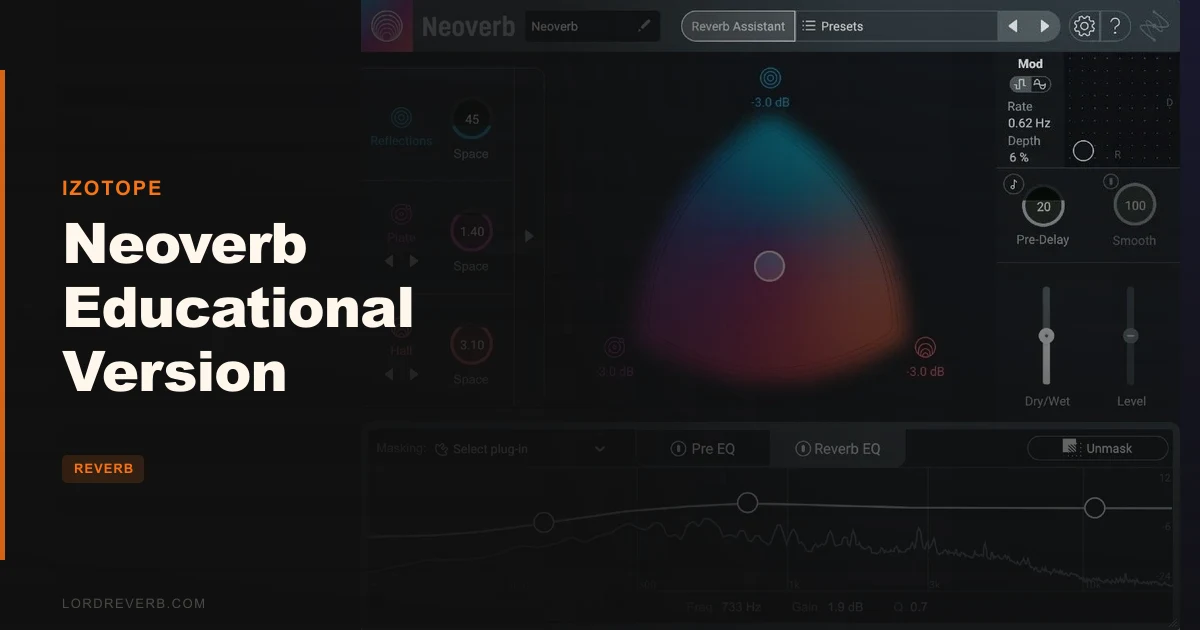
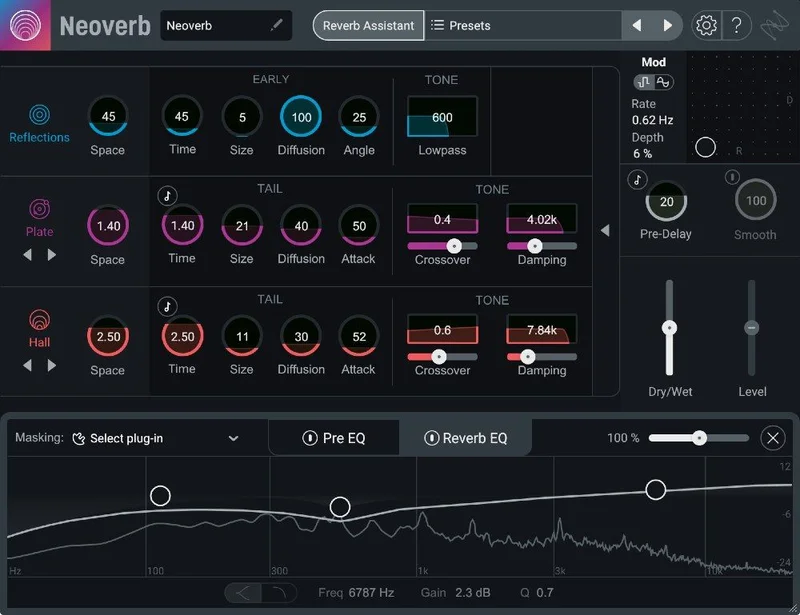
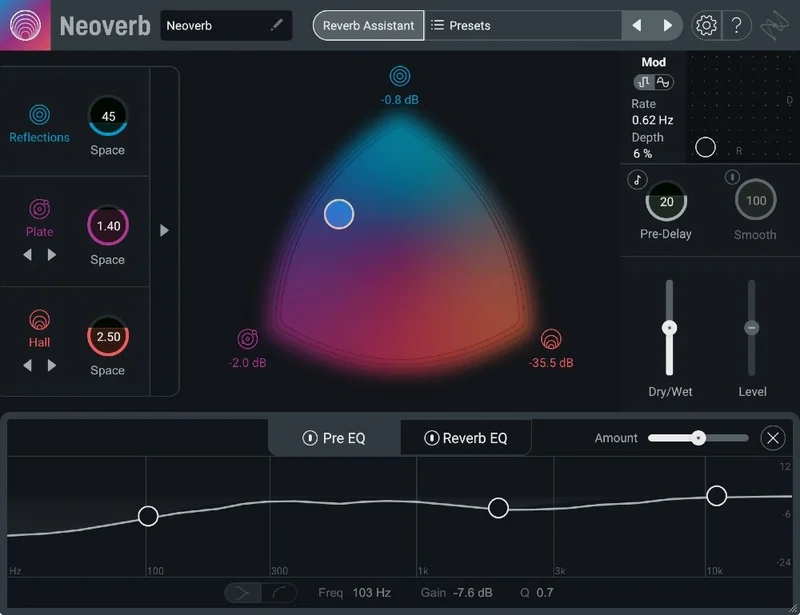
Blend Pad is the headline control. It lets you mix up to three different reverbs at once: Reflections, Plate and Hall.
Think of it as an XY-style space for building a room. Instead of choosing a plate or a hall, you slide between them and keep what you like from each.
Each reverb type has its own Size control. So you can keep the plate tight and the hall large in the same patch.
Picture a snare that needs snap and a little air. Pull the Reflections up for the early bounce, bring a touch of Plate for sizzle, and keep Hall low so it doesn't bloom into the next hit. That's three spaces in one plugin, no extra instances.
Blend Pad is automatable, which opens up transitions. Move from a dry, tight verse space to a wide chorus hall by drawing automation on the pad. That's a clever way to make a reverb part of the arrangement instead of a static bus.
One warning. Users report that Blend Pad automation works inconsistently in Pro Tools. If that's your DAW, test it before you build a mix around it.
Reflections, Plate and Hall in practice
Reflections is the early reflection engine. It gives you the sense of a physical room, the first bounces off the walls before the tail starts.
Plate is the classic smooth, dense wash. Hall is the big, long space.
Blending them is the whole idea. You aren't locked into one character, and you can move the balance as the song changes.
How Does Reverb Assistant Work?
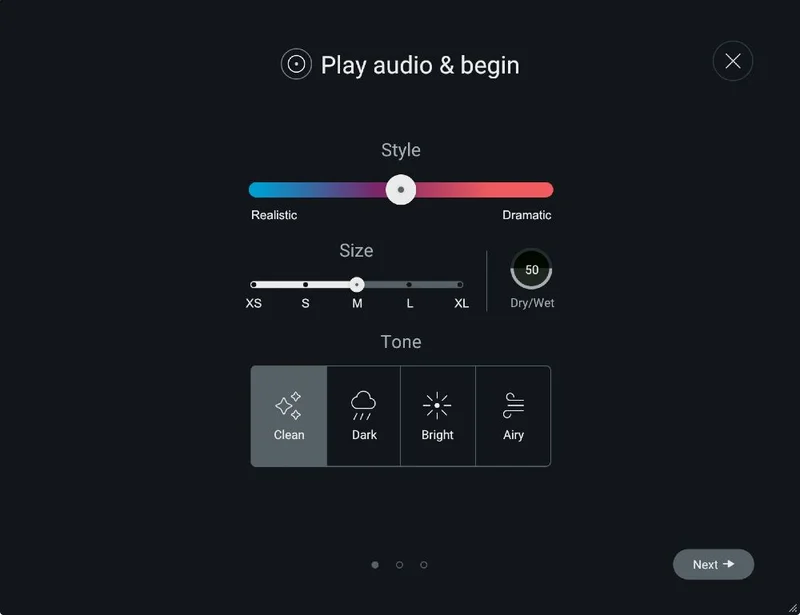
Reverb Assistant is a four-step guided workflow that adjusts settings in real time. You play audio through it, and it listens.
It also offers four Tone selections, covering dark, airy and bright sounds. Pick the mood you want and the assistant steers toward it.
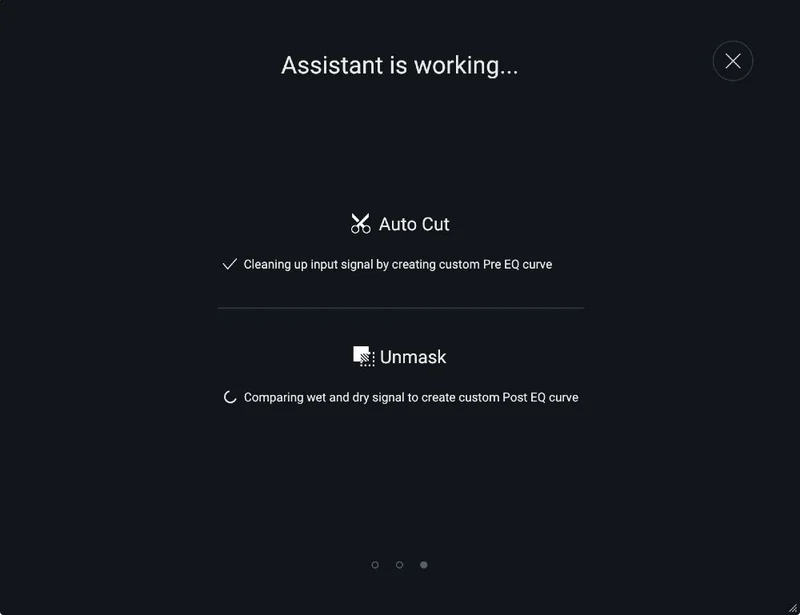
The assistant listens to your audio and makes EQ suggestions. That's the part that saves time. It's doing the high-pass and low-mid cleanup you'd normally do by hand.
Here's the catch. Because it makes EQ decisions automatically, it can go too far. Some users report it removing bass indiscriminately, and the result can sound lifeless.
Our advice: treat it as a first draft. Let it get you 80 percent of the way, then check the low end yourself. If your vocal suddenly sounds thin or your kick-friendly bus feels hollow, pull the cuts back.
Used that way, it's a real time saver. Used blindly, it's a trap.
What Does the Reverb EQ and Unmasking Do?
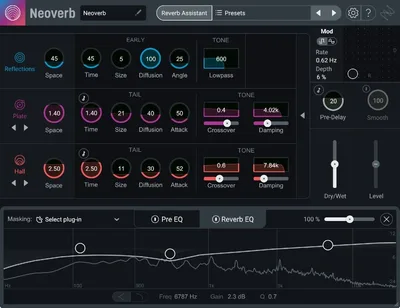
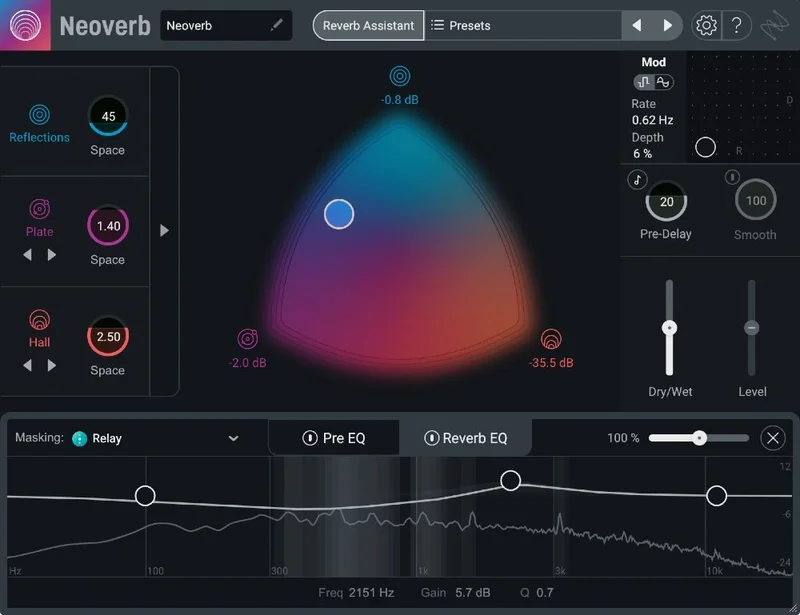
Reverb EQ includes AI-powered Unmasking. It listens to the dry signal and carves space in the reverb so the two don't collide.
The developer says this helps you avoid artifacts, mud and masking. Owners back that up on vocals, where Unmask keeps the voice clear.
That's the single most useful idea in the plugin. Masking is the reason reverb makes things vanish. Fix masking and a vocal can sit in a deep space without getting buried.
Pre EQ and Auto Cut
Pre EQ is a 3-band EQ with shelving and band-filter customization. It shapes the signal before it hits the reverb.
Pre-EQ matters because it's cleaner to stop mud going in than to scoop it out afterward. A high-pass on the way in keeps the reverb from stacking up low-end rumble.
Auto Cut suggests areas to cut automatically. It's a nice shortcut for learners who don't yet know where the problem frequencies live.
It's the same caution as the assistant, though. Look at what it cut and listen to whether you miss it.
What Is the Masking Meter?
The Masking Meter shows how much the reverb is masking the dry track. It also works with other compatible iZotope plug-ins through Inter-Plugin Communication.
Compatible plug-ins include Neutron 3, Nectar 3 Plus, VocalSynth 2 and Relay.
If you already own those, the meter becomes a conversation between plugins. You can see where your reverb is stepping on the vocal chain and fix it at the source.
If you don't own them, the meter still earns its place inside Neoverb. It gives you a visual cue for what your ears may already suspect.
For a student, that's educational in the best sense. You see masking, then you hear it, then you learn to fix it.
What Can the Advanced Panel Change?
The Advanced Panel opens up individual reverb engine parameters. That includes Attack, Crossover and Damping.
This is where you leave the assistant behind and sculpt. Attack shapes how the reverb onset behaves. Crossover splits the reverb for different treatment of low and high content. Damping controls how the tail loses energy over time.
It's the depth you want once you stop trusting presets. And it's welcome, because many one-knob reverbs hide everything.
The window is also resizable, so you can fit it to your screen and workflow. A small thing, but anyone who's squinted at a tiny plugin on a laptop will appreciate it.
Smooth, Input Smoothing and Pre-Delay
The Smooth control softens transients to keep the reverb sounding even. Input Smoothing reduces sharp, percussive transients in the reverb.
Both help when the source is spiky. A hard-hit snare or a plucked guitar can make a reverb feel jumpy. Smoothing tames that.
Global Pre-Delay controls the distance of the reverb reflection. More pre-delay pushes the reverb back in time, which keeps the dry signal clear up front.
Pre-delay and reverb time sync to host tempo. That's useful for rhythmic music, where you want the tail to breathe with the groove.
Dry/Wet and Level sliders let you blend the reverb with the dry signal naturally. Simple, and exactly what you want.
Can It Do Weird Things? Mod Pad
Mod Pad has two modes: Pitch and Random. It's adjustable up to 125 percent for creative effects.
Pitch mode creates a subtle pitch shift, similar to a Doppler effect. Random mode produces a randomized modulation, akin to a classic chorus.
On a pad or a synth lead, a little Pitch modulation in the tail gives the space a slow, drifting motion. That's lovely for ambient and cinematic work.
Push Mod Pad hard and the reverb becomes an instrument. It's an underrated corner of the plugin, and the one we'd experiment with first if you're after something odd.
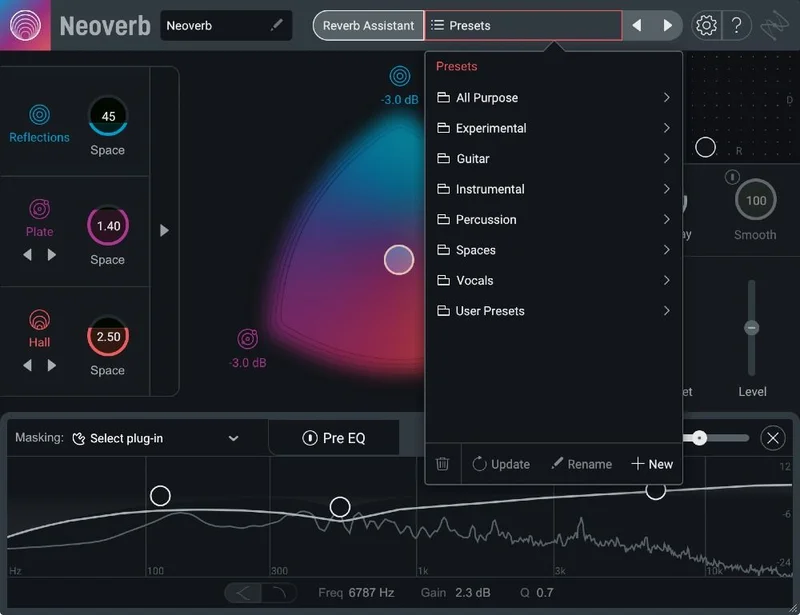
How Big Is the Preset Library?
Neoverb ships with over 100 presets from iZotope's professional sound designers. That's a decent starting pool.
Still, users report the preset library is limited. Over 100 presets across vocal, drum and instrument spaces can run thin once you’ve heard them all.
It also doesn't include spring reverb-style sounds. If you want the boingy, drippy character of a spring on guitar or a dub snare, you'll need another tool.
That's an honest gap. Neoverb is about plates, halls and rooms. It's not trying to be a vintage emulation toolbox.
Strengths and Weaknesses
The strengths are real. Reverb Assistant gets vocals usable fast. Blend Pad gives you three spaces in one instance. The early reflections engine suits drums. Unmask and the Masking Meter attack the actual reason reverb makes mixes muddy.
The weaknesses are real too. The AI can strip bass and leave a sound lifeless. CPU use can run high enough to cause crashes. Blend Pad automation is flaky in Pro Tools. The presets run limited, and there's no spring.
The balance tilts positive if you treat the AI as a collaborator, not a boss.
Our take: the assistant is the best reason to own it and the best reason to double-check your low end.
Value for the Price
At $124.50, the Educational Version gives you the full Neoverb. For students and teachers, that's a strong deal for a reverb with this feature depth.
You get three reverb types, an AI assistant, unmasking EQ, a Mod Pad and an Advanced Panel in one plugin. Doing the same with separate tools would cost more and take more setup.
The catch is eligibility. This is for students and teachers. If you don't qualify, you're looking at the standard version.
For those who do qualify, we'd call it worth it, provided your machine can handle the CPU load.
Neoverb for the Beginner
If you're new to mixing, reverb is probably where you struggle most. Neoverb teaches while it works.
Reverb Assistant walks you through four steps and adjusts in real time. The Masking Meter shows you the problem. Auto Cut points at frequencies to trim.
You learn by watching what it does. That's the right way to build instincts.
The risk is leaning on it forever. Make yourself undo a suggestion now and then and listen to the difference.
Verdict for beginners: buy it. Just don't let it do all your thinking.
Neoverb for the Working Producer
If you're producing and want speed, the assistant and the presets get you to a usable space quickly. Blend Pad lets you design something that sounds like yours.
The value is time. Dialing a vocal space can eat an hour. Here it can take a minute, then you tweak.
The worry is stability. Heavy CPU use and crash reports mean you should bounce or freeze reverb-heavy tracks in big sessions.
Verdict for working producers: buy it if you qualify, and keep your session saves frequent.
Neoverb for the Mixing Engineer
A mixing engineer will likely want more control than the assistant gives. The Advanced Panel, Pre EQ and Unmask supply it.
The Unmask idea is the draw. Carving reverb around a dry vocal automatically is a tidy way to keep a lead clear in a dense mix.
But if you want exhaustive IR-based algorithms and controls, Bricasti M7 offers them as an alternative comparison. It's a different philosophy.
Verdict for mix engineers: wait and audition. It's strong, but check CPU and Pro Tools automation against your own sessions first.
Neoverb for the Sound Designer
Sound designers get the most out of the long decays and the Mod Pad. Violet and Orange stretch to 24 seconds, and Mod Pad up to 125 percent can warp a tail into something strange.
Blend Pad automation lets you morph a space across a scene or a cue. That's the kind of motion a static reverb can't give you.
The lack of spring sounds and the limited presets matter less here. You're building spaces, not browsing them.
Verdict for sound designers: buy it.
Neoverb for the Pro Tools User
Pro Tools 12 through 2022 is on the supported host list, and the AAX format is covered.
Still, users report Blend Pad automation works inconsistently in Pro Tools. For a plugin built around automatable blending, that's a sore spot.
If you automate Blend Pad heavily, test it first.
Verdict for Pro Tools users: wait. Try it on a real session before committing.
Who Should (and Shouldn't) Buy This
- ✅ Buy if you're a student or teacher who wants a full-featured reverb with guided setup.
- ✅ Buy if vocals keep sinking into your mixes and you want unmasking help.
- ✅ Buy if you like building a space by blending Reflections, Plate and Hall.
- ❌ Skip if you need spring reverb-style sounds.
- ❌ Skip if your machine is already CPU-starved.
- ❌ Skip if you rely on Blend Pad automation in Pro Tools.
Specs & Technical Details
| Spec | Detail |
|---|---|
| Developer | iZotope |
| Price | $124.50 |
| Plugin Format | AU / AAX / VST2 / VST3 (64-bit only) |
| OS Support | macOS High Sierra to Monterey (Intel and Apple silicon), Windows 10 and 11 |
| Activation | N/A |
| CPU Usage | Heavy reported by some users |
| Trial Available | N/A |
| Version Reviewed | N/A |
Score Breakdown
| Category | Score | Notes |
|---|---|---|
| Sound Quality | 4.5/5 | Exponential Audio engines with realistic rooms and 24-second decays |
| Value for Money | 4.0/5 | Full plugin at the education price |
| Ease of Use | 4.5/5 | Four-step Reverb Assistant gets you moving fast |
| Features | 4.5/5 | Blend Pad, Unmask, Mod Pad and an Advanced Panel |
| CPU Efficiency | 2.5/5 | High CPU use reported, with crashes for some |
| Overall | 4.0/5 | Excellent on vocals and drums, held back by CPU load and an overeager assistant |
Alternatives to Consider
Exponential Audio R4
Same reverb style and engines as Neoverb. If you like the sound but want a more traditional interface without the AI layer, R4 is the sibling to audition.
Bricasti M7
Offers more exhaustive IR-based algorithms and controls. It's the pick if you want deep, hands-on reverb design rather than guided setup.
Exponential Audio PhoenixVerb
Same reverb style as Neoverb, but now discontinued. Worth knowing about if you find it secondhand, though you can't count on buying it new.
Our Verdict
Neoverb Educational Version is a smart, fast reverb that makes vocals and drums sit better with less fiddling. At $124.50, it's a good buy for students and teachers who qualify.
Buy it if you want guidance and a flexible three-way space. Skip it if you need spring sounds, have a weak CPU, or lean on Pro Tools Blend Pad automation.
Let the assistant draft your reverb. Then use your ears to fix the bass it took.
Frequently Asked Questions
Is Neoverb Educational Version the full plugin?
Yes. It's the full version of Neoverb for students and teachers. You get Blend Pad, Reverb Assistant, Reverb EQ with Unmasking, Mod Pad and the Advanced Panel.
What systems and formats does it support?
It runs on macOS High Sierra to Monterey on Intel and Apple silicon Macs, and on Windows 10 and 11. Formats are AU, AAX, VST2 and VST3, all 64-bit only.
Does it work well on vocals?
Owners say it works exceptionally well on vocals. It adds depth without pushing the voice too far back, and Unmask keeps it clear.
Does Neoverb use a lot of CPU?
Some users report high CPU consumption that can cause crashes. If your system is already stretched, freeze or bounce reverb-heavy tracks.
Does it have spring reverb sounds?
No. The plugin doesn't include spring reverb-style sounds. It focuses on Reflections, Plate and Hall types.