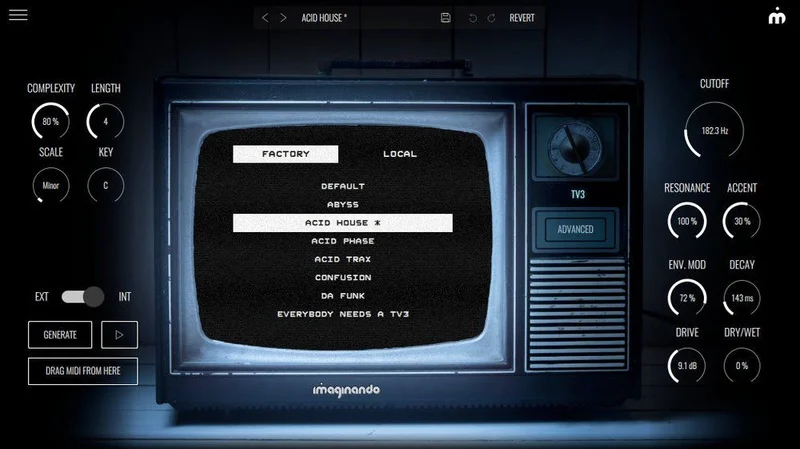
Getting a convincing acid bassline from scratch is one of the most tedious things you can do in a DAW. You're either hunting for the right patch, manually programming 16th-note sequences with pitch and accent toggles, or dropping cash on hardware you'll barely use. That's the exact problem Imaginando's TV3 exists to solve. It's a TB-303 emulation built around speed: one-click patterns, drag-and-drop MIDI export, and a randomize function that can shake loose a usable acid line in under a minute. At $17, it's priced for producers who want the sound without the ceremony.
The Specific Frustration TV3 Is Built Around
Programming a TB-303 is a skill in itself. The original hardware's step-time sequencer is notoriously counterintuitive, and most software emulations faithfully recreate that friction alongside the sound.
That's fine if you're a purist. It's annoying if you just need an acid line for the drop and you've got a session booked in two hours.
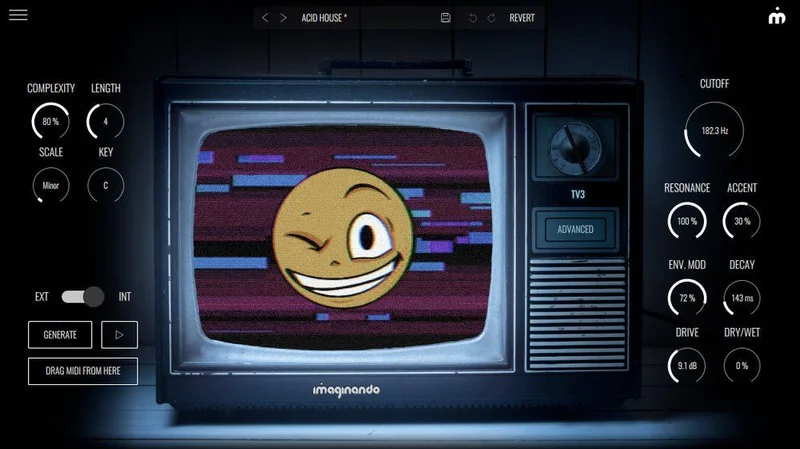
TV3 strips the ceremony out. You pick your key, scale, pattern length, and complexity level. Hit generate. You've got an acid sequence. It's not dumbed down either: the pattern generator produces genuinely varied results, not the same filtered-down loop with different pitches.
For producers who treat the 303 sound as a texture rather than an instrument to master, this workflow makes real sense.
How TV3 Actually Performs
We loaded TV3 into Ableton Live 12 on a session that needed a driving acid hook underneath a 128 BPM techno groove. We hit the pattern generator set to a D minor scale, length 16, complexity at around 70%. Three clicks later we had something that sat.
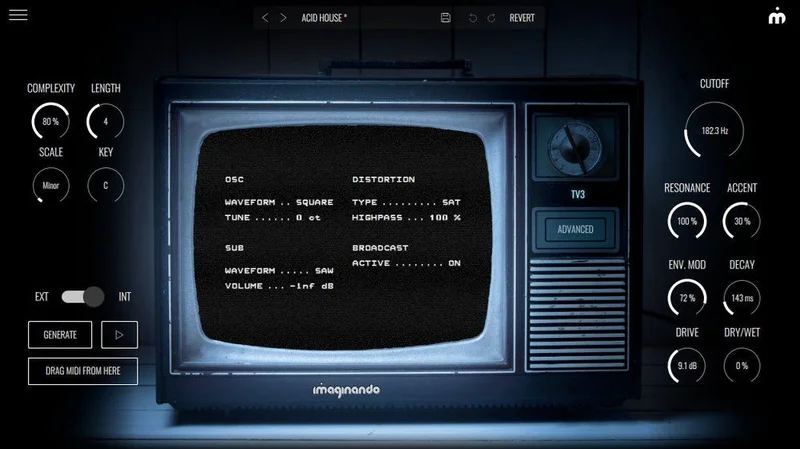
The dual-oscillator engine does the heavy lifting on authenticity. The resonance sweeps have that squelchy, borderline-aggressive character you're after: not a polished soft-synth approximation, but something with a bit of grit. Pull the resonance above two-thirds and it starts to self-oscillate in a usable way, not a broken way.
The distortion module is versatile. We pushed it hard on a bass patch and it moved from light saturation into something closer to fuzz without falling apart. Subtle drive settings add harmonic content that helps the line cut through a dense low-mid mix.
MIDI export is where TV3 earns points other emulations don't. We dragged a generated pattern directly onto an Ableton MIDI track in one move. No bouncing, no copying. That's satisfying in a way that sounds trivial until you've done it fifty times in a session.
Users report the randomize function (clicking the "acid boy" mascot) produces wide variation, though after extended use some report a feeling that patterns start to cluster around similar rhythmic shapes. That's a fair criticism. Complexity settings do shift the results, but it's not infinite.
Strengths and Weaknesses
The sound engine is the clearest strength. It's loyal to the source material without being a museum piece. Resonant sweeps, accent behavior, slide between notes: all present and credible. We'd put it ahead of several pricier 303 emulations on pure character.
The interface is clever. Single-page layout, no hidden menus. You can dial in a sound without reading a manual. That's not a small thing for a synth category famous for opaque workflows.
The weaknesses are real, though. No AAX support means Pro Tools users are locked out entirely. That's not a dealbreaker for most producers in 2026, but it is for some. The pattern generator, brilliant for starting points, does feel limited if you're trying to use TV3 as your primary songwriting tool rather than an idea-starter. And compared to deeper TB-303 emulations like Audio Blast ABX3, the sound-shaping toolkit is relatively shallow.
Wish there was a step-edit view for manually refining generated patterns inside the plugin. Right now you export to MIDI and edit there.
Is the Price Actually Justified?
At $17, the question answers itself quickly. This isn't a prestige purchase. It's a utility tool priced like one.
You're buying speed and a sound engine that holds up. If you use acid textures even twice a month, TV3 pays for itself in time saved. The MIDI export workflow alone removes enough friction to justify the cost.
If you want a deep modular-style TB-303 recreation with every parameter exposed, spend more elsewhere. TV3 knows what it is and prices accordingly. That's honest.
Who Should Buy TV3 (and Who Should Skip It)
- ✅ Buy if you produce techno, house, or any acid-adjacent genre and need quick, credible basslines without deep programming knowledge.
- ✅ Buy if you regularly start with generated MIDI and refine it in your DAW. The export workflow is built for that.
- ✅ Buy if you want a writer's block killer at a price where losing the gamble doesn't hurt.
- ❌ Skip if you're a Pro Tools user. No AAX, no entry.
- ❌ Skip if you want to hand-craft every step of an acid sequence. You'll outgrow the pattern generator fast.
- ❌ Skip if you already own a serious TB-303 emulation and you're happy with your programming workflow.
Specs & Technical Details
| Developer | Imaginando |
| Price | $17 |
| Plugin Format | VST3 / AU (Mac); VST3 (Windows) |
| OS Support | Mac OS 12 or higher / Windows 10 or higher |
| Activation | Online activation required (internet connection needed) |
| CPU Usage | Light |
| Trial Available | N/A |
| Version Reviewed | N/A |
Score Breakdown
| Category | Score | Notes |
|---|---|---|
| Sound Quality | 4.0/5 | Authentic acid character; resonance and slide feel right |
| Value for Money | 4.5/5 | Price point removes almost all risk; solid utility return |
| Ease of Use | 4.5/5 | Single-page UI; zero learning curve; pattern gen is instant |
| Features | 3.5/5 | Pattern generator and MIDI export shine; sound design depth is limited |
| CPU Efficiency | 4.5/5 | Runs light; no issues on dense sessions |
| Overall | 4.0/5 | Exactly what it promises: fast acid basslines at a fair price |
Alternatives to Consider
If you want more sound-design depth in the same TB-303 territory, the Audio Blast ABX3 Bundle gives you more hands-on parameter control. More time investment required, but the ceiling is higher.
For a completely different flavor of analog-adjacent synthesis, AudioThing's SX1000 covers Italian synth emulation territory and rewards producers who like to experiment further outside the acid bassline box.
If you're building out a broader synth toolkit and TV3 has you thinking about pattern-based workflow more generally, check our take on MiniFreak V and whether it can cover more ground in a single plugin slot. And for pure preset variety, Chromaphone 3's Synth City sound bank offers a different kind of instant inspiration.
TV3 doesn't try to be any of those things. It does one thing with minimal friction. At $17, that focus is a feature, not a limitation. But if you've already got a 303 emulation you love, this won't replace it. Buy it for the workflow, not to retire what you already have.
Related reviews: MAP
Frequently Asked Questions
Is TV3 a faithful TB-303 emulation or more of a creative tool?
It's both, but it leans toward creative utility. The dual-oscillator engine and resonance behavior are built around 303 authenticity, and the character holds up under scrutiny. The pattern generator and MIDI export push it into fast-workflow territory that the original hardware never offered. If you need a forensic clone, look elsewhere. If you need convincing acid sound with speed, TV3 delivers.
Does TV3 work with Pro Tools?
No. TV3 supports VST3 and AU formats only. There's no AAX version, which means Pro Tools users are excluded entirely. If Pro Tools is your primary DAW, this is a hard skip regardless of how good the sound is.
Can you edit patterns manually, or is it all generated?
The pattern generator creates sequences inside the plugin, but there's no step-edit view for tweaking individual notes within TV3 itself. The workflow Imaginando intends is: generate a pattern, drag-export the MIDI to your DAW, then edit it there. That's actually a fast workflow once you accept it, but producers who want everything in one place may find it slightly frustrating.
How does TV3's randomize function compare to presets in similar plugins?
The randomize function (clicking the acid boy character) fully randomizes both sound settings and pattern simultaneously. Users report it generates a wide range of results from filtered, subtle resonance to aggressive, distorted acid tones. It's more useful than a preset bank for breaking creative blocks because it creates combinations you wouldn't have dialed in manually. After many sessions it can feel like results start to repeat, but for a quick starting point it's genuinely effective.