
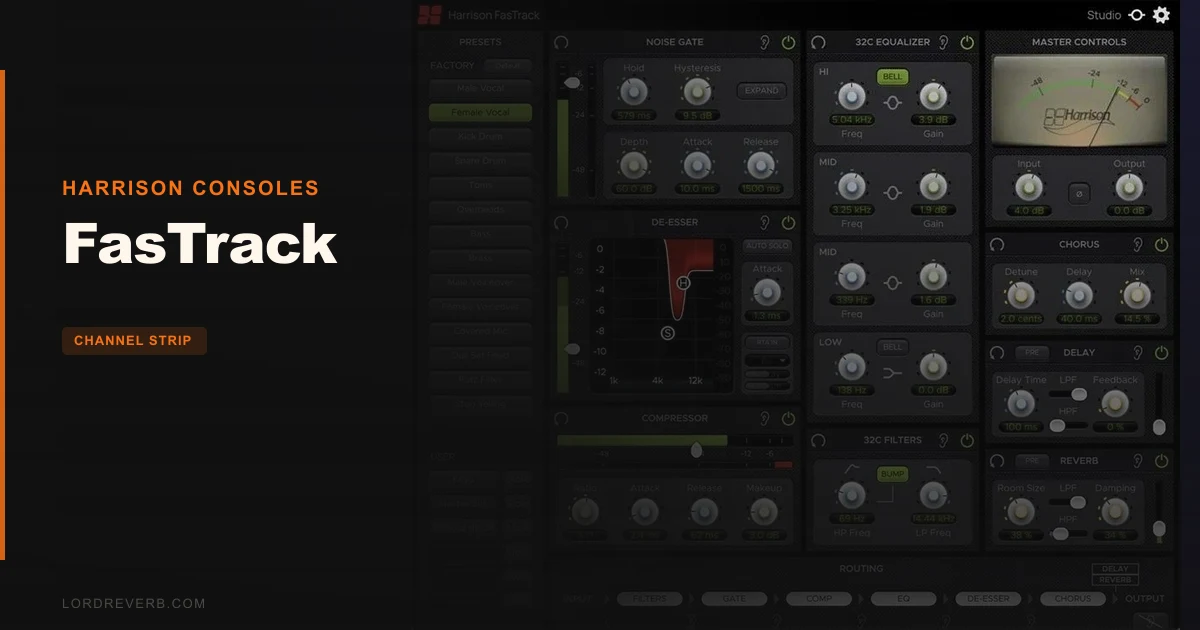
FasTrack gets compared to Waves SSL E-Channel and the UAD API Vision more than anything else, and here's where this review lands: it beats both of them for one specific job, and you'd be foolish to buy it for anything else. This is a live-vocal channel strip built around Harrison's legendary 32C EQ. At $99, it's not trying to be your mixing Swiss Army knife. It's trying to get a voice sounding broadcast-ready before the stream goes live. For that narrow brief, it's brilliant. For everything else, you'll want to keep reading before you click buy.
This review is for podcasters, live streamers, broadcast engineers, and studio producers who process a lot of spoken word or lead vocals fast. If you're building mix templates for full-band records, look elsewhere.
How Does FasTrack Stack Up Out of the Box?
Pull up the Waves SSL E-Channel and FasTrack side by side on a raw vocal recording. The SSL gives you that familiar, slightly cold British console snap. FasTrack goes warmer immediately, which tracks. The 32C EQ has a proportional-Q design, meaning the bandwidth narrows as you push the gain harder. It behaves like a real desk, not a linear parametric.
The UAD API Vision is the other name that comes up constantly in the same conversation. The API Vision has more character, more colour, more of an opinion. FasTrack is cleaner but not sterile. It sits closer to the console-transparent end of the spectrum than the API's signature punch.
What immediately stands out on first load is the routing module at the bottom. You can drag and reorder the six processing blocks in the signal chain. That's not something Waves or UAD offer at this level. It's a small thing that makes a real difference when you want the gate before the compressor but the de-esser after the EQ.
Performance Deep Dive
We loaded FasTrack across 16 vocal tracks in a session to stress-test the CPU claim. Light footprint. No stuttering, no dropouts at 64-sample buffer in Reaper. For a strip that includes dynamics, EQ, filters, and three effects, that's impressive.
The 32C HPF with the BUMP button engaged is where FasTrack earns its keep. We set the HPF corner at 120Hz on a podcast vocal, toggled BUMP on, and got a subtle low-mid body boost right at the cut frequency. Tightened the proximity effect without the usual thinning you get from a hard high-pass. That's a real, specific thing you can't replicate with a standard HPF.
The compressor is transparent rather than characterful. We pushed it hard on a breathy singer at 8:1, 15ms attack, 80ms release, and it controlled dynamics cleanly without audible pumping. Compared to the SSL bus comp character you'd get from the E-Channel, FasTrack's compressor is more utility than vibe. The de-esser is simple: threshold and frequency. No mid-side, no wideband mode. But it works fast and doesn't lisp the vocal when dialed in carefully around 7-8kHz.
The reverb, delay, and chorus run in parallel, routed as send effects. That's the correct approach. It means the dry signal stays untouched and you're blending wet signal back in with the effects return faders. Smart design. The reverb itself is basic, though. It's fine for live use. In the studio, you'd bypass it and use your preferred reverb on a send instead.
Where FasTrack Wins
The 32C EQ is the reason to buy this. We boosted 4dB at 3kHz on a dull podcast mic and it added presence without the harsh edge you get from a surgical digital bell. That warmth is real and measurable: the proportional-Q narrows as gain increases, so you're shaping broader curves at lower gains and more focused boosts at higher ones. It's forgiving. That's the word.
The preset system deserves credit too. Fourteen factory presets load instantly with no menu diving. In a live streaming rig, being able to recall a vocal preset mid-broadcast without hunting through dropdowns is genuinely useful. Not flashy. Just smart.
The routing flexibility is underrated. No other strip at this price lets you restructure your processing order on the fly. Want to run gate-to-EQ-to-comp for a clean signal? Do it. Want EQ before the gate for a tighter noise floor? Drag and drop. That's the kind of thing engineers who've spent time on real consoles will love immediately.
Where the Competition Wins
The Waves SSL E-Channel wins on raw mix character. If you're doing full-band sessions and want a console sound baked into the strip, the E-Channel's high-end air and mid-forward presence suit dense mixes better than FasTrack's cleaner profile.
UAD's API Vision Channel Strip wins on outright sonic personality. It's more expensive, but if colour and punch are what you're after on drums, guitars, and bass, FasTrack isn't the tool.
The effects section is where FasTrack frustrates us. The reverb is adequate. The chorus is thin. The delay does its job. But in 2026, including effects in a channel strip and having them be this basic feels like a missed opportunity. Competing strips from TDR Channel Strip Bundle include significantly more sophisticated dynamics and spectral tools at a comparable price.
The iLok requirement is annoying. A free account, yes, but an extra step that competing plugins from Harrison's own catalogue don't all demand. It adds friction to first-run setup in a product that's supposed to be fast and immediate.
Who Should Buy Which
- ✅ Buy FasTrack if you process live vocals, streams, or podcasts and need low-latency processing that sounds better than a stock DAW strip.
- ✅ Buy FasTrack if you want the 32C EQ without paying for a full Harrison Mixbus licence.
- ✅ Buy FasTrack if you want drag-and-drop signal routing in a fast, no-fuss channel strip.
- ❌ Skip FasTrack if you're mixing full bands ITB and need a strip with real saturation or console-colour character.
- ❌ Skip FasTrack if you want a capable built-in reverb you'd actually use on a record. You won't use this one.
- ❌ Skip FasTrack if iLok friction in a live rig is a dealbreaker for you. It requires account creation even without a dongle.
Specs & Technical Details
| Developer | Harrison Consoles |
| Price | $99 |
| Plugin Format | VST2 / VST3 / AAX Native / AU |
| OS Support | Mac (macOS 11–13, M1 supported) / Windows 10–11 (64-bit only) |
| Activation | iLok account required (no dongle needed) |
| CPU Usage | Light |
| Trial Available | N/A |
| Version Reviewed | N/A |
Score Breakdown
| Category | Score | Notes |
|---|---|---|
| Sound Quality | 4.5/5 | The 32C EQ is the real deal; compressor is clean but not colourful |
| Value for Money | 4.0/5 | Fair price for the EQ quality; effects section lets the value down slightly |
| Ease of Use | 4.5/5 | Preset system and routing UI make fast work genuinely fast |
| Features | 3.5/5 | Routing flexibility is clever; built-in effects are too basic to count on |
| CPU Efficiency | 4.5/5 | 16 instances in a session, 64-sample buffer, no issues |
| Overall | 4.0/5 | A specialist tool that excels at one job and does the rest adequately |
Alternatives to Consider
If you want more mix character and console saturation, the McDSP 6050 Ultimate Channel Strip gives you multiple console models in one plugin. More complex to dial in, but far more versatile for full-band mixing.
For the value-focused producer who needs a strip for everyday mixing, the TDR Channel Strip Bundle is worth serious consideration. TDR's dynamics processing is more sophisticated than FasTrack's compressor, though you lose the 32C EQ magic.
If you're new to channel strips and want to understand what you're buying before committing, our Channel Strip Plugins Guide walks through exactly what to look for. FasTrack fits the "live-use specialist" category we describe there to a tee.
The UAD API Vision Channel Strip is the call if colour matters more than speed. It needs UAD hardware or a Luna rig to run, so it's a different ecosystem entirely. But if you're already in that world, it's the punchier tool for tracking.
FasTrack earns its place in a very specific rig. If you're a podcaster, live streamer, or broadcast engineer who's been making do with a stock DAW EQ on your vocals, this will make your output sound like you know what you're doing. That's not an insult. That's the point of the plugin. At $99, the 32C EQ alone is worth it. Just don't buy it hoping the reverb will replace your favourite plate. It won't. And you'll be annoyed that you expected it to.
Related reviews: Sonic Sweep 2 Review
Frequently Asked Questions
Does FasTrack work without a physical iLok dongle?
Yes. FasTrack requires a free iLok account but does not need a physical iLok USB key. You authorise it through the iLok Licence Manager software on your computer. It's an extra setup step, but it's a one-time process and doesn't affect day-to-day use after that.
Is FasTrack suitable for mixing full-band productions, or just vocals?
It's built for voice. The 32C EQ and de-esser are optimised for speech and vocal frequency ranges, and the factory presets are all voice-focused. You can run other sources through it, but if you're mixing drums, bass, and guitars, you'd get more from a strip with multiple console models like the McDSP 6050. FasTrack won't fight you on non-vocal sources, but it's not designed for that job.
What makes the Harrison 32C EQ different from a standard parametric EQ?
The 32C uses a proportional-Q design. The bandwidth narrows automatically as you increase the gain, which mirrors how a real analogue console EQ behaves. At low gain settings you're making broad, musical curves; at higher gains the boost becomes more focused. This makes it harder to create harsh-sounding boosts accidentally, which is why it sits so well on vocals.
Can I use FasTrack for live stage performance as well as studio work?
The ultra-low latency processing is designed with exactly that in mind. Reviewers using it in live streaming and broadcast contexts report it's stable and responsive at low buffer sizes. For stage use, you'd need a laptop running a compatible host and a reliable audio interface, but the plugin side won't be your bottleneck. The preset recall system was built for live switching, not studio tweaking.