If your drums sound digitally flat and your guitar buses feel thin no matter what you try, McDSP Analog Channel Native v7 is built for exactly that problem. It's a two-plugin bundle: AC101 handles analog channel amplifier emulation, AC202 handles tape machine emulation. At $49, it's aimed squarely at producers and engineers who want controllable analog character without reaching for outboard or burning CPU. Reviewers rate it 4.6 out of 5 from 34 reviews on Plugin Boutique. That score is earned. But there are real caveats we'll get into, and a couple of reasons it might be the wrong call for your setup.
Where Does Analog Channel Native v7 Actually Belong?
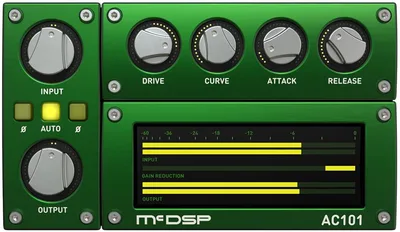
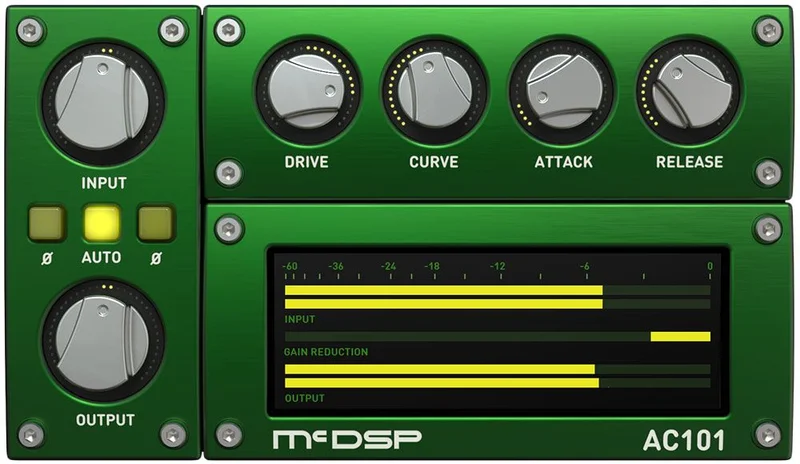
Load AC101 on a drum bus and push the drive until the transients start to compress and thicken. That's the workflow this plugin was built for. Reviewers specifically call out drums and guitars as the sweet spot, and the AC101's drive control makes that credible: it places the audio precisely within the saturation and compression region, then lets you shape the attack and release of the distortion character independently.
That last part matters more than it gets credit for. Most saturation tools give you a single drive knob and call it done. AC101 gives you the transient envelope of the distortion itself. So you can hit a snare hard without smearing the attack, or soften the release on a guitar so the saturation sustains without turning into mush.
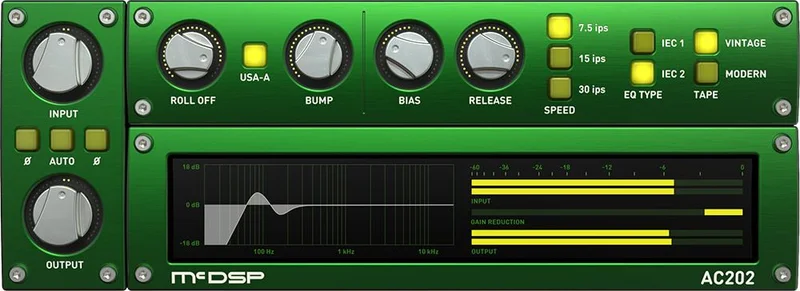
AC202 belongs on individual tracks where you want tape behaviour without the commitment of printing to actual tape. The bias, playback speed, and IEC1/2 EQ parameters are standard tape machine territory. But the independent head bump and low-frequency roll-off controls are where it gets genuinely clever. Pull the head bump up while keeping playback speed fixed and you're adding low-end density that doesn't shift every time you tweak the speed setting. That's not something physical tape machines let you do. It's a satisfying bit of engineering.
Reviewers report AC202 with Japan-S tape selection adds noticeable low-end beef and activates transients in a way that's hard to fake with straight EQ. Bus it on a guitar room or an acoustic track and it adds weight without obvious coloration.
Users also report vocal and acoustic guitar content responds well to Analog Channel compared to competing tools in blind comparisons. The character reads as natural rather than obviously processed.
The real-time saturation curve display and analyzers make it easier to see what's happening at the signal level, which is useful when you're dialling in subtle settings. Many saturation tools work blind. These don't.
Where It Doesn't Fit
Skip this if you need aggressive, obvious harmonic distortion. Analog Channel is about subtle enhancement and analog character. It's not a fuzz box or a hard-clip tool. The developer positions it as emulation of high-end analog equipment, and high-end analog is usually transparent by design.
If you're chasing blown-out lo-fi textures or the kind of saturation that audibly rewrites the sound, this isn't it. That's frustrating if you buy it expecting a colour-everything tool and get something more refined.
It's also a hard sell if you're locked into a VST2 workflow. v7 drops VST2 entirely. No migration path, no legacy fallback. If your DAW doesn't support VST3 or AU or AAX, you're done before you start. And if you already own Analog Channel in a VST2 session template, that template breaks. Annoying. Plan your session rebuild time accordingly.
Electronic music producers chasing aggressive digital-analog hybrids will likely want something with more overt character. This plugin is for engineers who want to stop hearing the digital chain, not for producers who want to hear the saturation itself.
How To Use AC101 and AC202 Well
On drums, put AC101 on the drum bus before your limiter. Set the drive so the saturation region clips the peaks slightly without obvious compression. Then pull the attack time back to let transients breathe through. The release control determines how quickly the saturation settles after each hit. Tighter release on snare. Slower on room mics.
Try AC101 on a guitar bus with moderate drive and a slower attack. That softens the pick noise and pushes the body of the chord into the saturation zone. You'll get sustain without obvious distortion.
With AC202, don't just leave it on the default tape formulation. Work through the available tape formulations and head types for the track you're treating. Low-end heavy sources benefit from the independent head bump control: push it up and check against your sub-bass material to make sure you're adding weight, not masking it.
The IEC1/2 equalization presets inside AC202 give you different high-frequency shelf behaviour. IEC1 rolls off faster in the top end. IEC2 is brighter. On vocals, IEC2 with gentle bias adjustment can add a pleasant presence lift without a separate EQ move.
Use the real-time saturation curve display as a calibration check rather than a target. The curve tells you where you're operating in the saturation region. Keep complex sources like a full mix or a dense bus operating in the early bend of the curve, not the flat top.
The 1,500-plus presets are worth browsing for starting points. The library is organised around analog mixing system emulations, so filtering by console type gets you somewhere fast. Don't live in the presets, though. The controls reward hands-on adjustment.
Is There a Free Trial Worth Taking?
If McDSP offers a trial period for Analog Channel Native v7, check the developer's site before buying. Load it on a drum bus, set AC101 drive to taste, and check the real-time saturation curve at low, medium, and heavy drive settings. Then drop AC202 on a guitar bus and A/B between three tape formulations on the same loop. If those two tests don't give you something you'd keep, the full version probably won't change your mind.
Against the Field: Three Real Competitors
Analog Channel Native v7 doesn't exist in a vacuum. Two tools come up regularly in the same conversations: the SSL Native Channel Strip 2 and the Metric Halo Channel Strip. Here's where each one sits.
| Plugin | Strongest Point | Weakest Point | Best For |
|---|---|---|---|
| McDSP Analog Channel Native v7 | Dual AC101/AC202 engines with independent tape parameter control | iLok required; always-on internet reported by some users | Drums, guitars, bus saturation with subtle tape character |
| SSL Native Channel Strip 2 | Iconic console EQ and dynamics in one plugin, widely trusted in professional environments | Pricier and focused on the SSL sound specifically | Engineers who want SSL console emulation as a primary workflow |
| Metric Halo Channel Strip | Clean, precise processing with strong reputation for transparency | Less obvious analog colour by design | Mixing engineers who want channel control with minimal colouration |
Analog Channel wins when tape emulation with adjustable parameters is the actual goal. SSL Native Channel Strip 2 wins if you want a full mixing console workflow in a single plugin. Metric Halo Channel Strip wins when you want surgical control over a clean signal path.
The McDSP tool is the only one here with dedicated, adjustable tape machine parameters: bias, head type, tape formulation selection, and the independent head bump. For tape character specifically, nothing in that list beats it for parameter depth.
For a broader look at how analog-modelling plugins stack up in 2026, channel strip plugins compared gives you another reference point on the Antelope Audio side of the conversation.
The iLok Situation Is Real
Two activations per license. iLok required. Some users report that the authorization scheme requires always-on internet connectivity rather than machine-locked offline authorization. We can't confirm the exact iLok behavior for this specific version from published specs alone. Check your studio's internet reliability before buying.
If you work in a locked-down studio environment, a remote location, or anywhere with unreliable connectivity, check this directly with McDSP before purchase. It's a legitimate concern, not a forum rumor. Owners flag it.
The GUI loading speed complaints that have hit other McDSP v7 plugins are worth monitoring. Whether they affect Analog Channel v7 specifically isn't confirmed in owner reports, but it's part of the broader v7 picture. That's a fair criticism of the suite, even if it may not apply here.
The Verdict
McDSP Analog Channel Native v7 is a focused, professional saturation and tape emulation tool that earns its price if your work sits in the genres it suits. The AC101's adjustable distortion character envelope is the most underrated feature here. AC202's beyond-hardware tape parameters are the most satisfying. The iLok situation is the biggest reason to pause. If you hate iLok, hate it and move on. This isn't the plugin that changes your mind about that.
For drum-heavy and guitar-heavy production, it's a strong buy at $49. For electronic producers who want aggressive colour, skip it. For anyone on a VST2-only setup, definitely skip it until you've migrated.
Buy it for the tape parameters. Tolerate iLok. Enjoy the drum bus.
Specs & Technical Details
| Spec | Detail |
|---|---|
| Developer | McDSP |
| Price | $49 |
| Plugin Format | VST3 / AU / AAX (VST2 discontinued in v7) |
| OS Support | macOS 10.13+ (High Sierra) / Windows 10 |
| Activation | iLok (2 activations per license) |
| CPU Usage | Light (praised as minimal by users) |
| Trial Available | Check developer site |
| Version Reviewed | v7 |
Score Breakdown
| Category | Score | Notes |
|---|---|---|
| Sound Quality | 4.5/5 | Dual-engine depth with real tape parameter control; users report natural character on mixed content |
| Value for Money | 4.0/5 | Two plugins with deep controls at $49; iLok requirement adds friction that affects perceived value |
| Ease of Use | 4.0/5 | Real-time curve display helps; 1,500+ presets are a useful starting library; AC202 parameter depth has a learning curve |
| Features | 4.5/5 | Independent head bump and LF roll-off in AC202 go beyond hardware; zero latency and double precision are professional-grade |
| CPU Efficiency | 4.5/5 | Users consistently report minimal CPU draw; praised as "beyond belief" efficient in owner feedback |
| Overall | 4.2/5 | Strong professional tool held back only by iLok dependency and VST2 discontinuation |
Alternatives to Consider
If Analog Channel's iLok requirement or its subtle saturation character isn't the right match, here are three real alternatives worth looking at.
Antelope Audio DRM-60: A different approach to analog channel emulation, with hardware-derived modeling built on Antelope's FPGA technology. Antelope Audio DRM-60 review covers it in detail. Works best for engineers who want hardware-authenticated character.
SSL Native Channel Strip 2: The go-to if you want EQ and dynamics in one console-style workflow. Less focused on tape character. Better if your session flow relies on a single channel plugin doing everything. No separate tape engine, but the SSL EQ curve is widely loved and road-tested.
Metric Halo Channel Strip: Cleaner and more transparent by design. Wins when the goal is control without obvious colour. If you find Analog Channel's saturation even slightly too present, Metric Halo probably suits your approach better.
For synthesis-based analog colour rather than emulation, Ultra Analog Session review covers a different kind of analog sound design. Not a direct competitor, but useful context for understanding where emulation ends and synthesis begins.
And if you're building out a broader analog-leaning plugin chain, Ultra Analog VA-3 upgrade review is worth a read for understanding how layered analog tools interact in a signal chain.
None of those alternatives offer AC202's independent head bump control. That remains specific to Analog Channel. If that parameter is why you're here, nothing on that list replaces it.
Analog Channel Native v7 is the right tool for the right engineer. Load it on a drum bus, push AC101 until you feel the transients change, and check whether that's the sound your sessions have been missing. If it is, at $49 it's one of the most cost-efficient ways to get real tape character ITB.
Related reviews: Sonic Sweep 2 Review
Frequently Asked Questions
What's the difference between AC101 and AC202 in Analog Channel Native v7?
AC101 emulates analog channel amplifier circuits and works as a digital pre-amp with adjustable drive and distortion character timing. AC202 emulates analog tape machines with controls for bias, playback speed, IEC equalization, tape formulation, head type, head bump, and low-frequency roll-off. They're separate plugins designed to be used individually or in combination depending on what your track needs.
Does Analog Channel Native v7 work on Apple Silicon Macs?
Yes. v7 is optimized for Apple Silicon and the latest Intel processors. It supports macOS 10.13 (High Sierra) and above. Check the McDSP site to confirm the specific build type for your Mac architecture before purchasing.
Is VST2 still supported in v7?
No. McDSP dropped VST2 support as of v7.0. The supported formats are VST3, AU, and AAX. If you're using VST2-only hosts or have older session templates built around VST2 versions of Analog Channel, those will break. Migrate your templates before upgrading.
What are the iLok requirements for Analog Channel Native v7?
The license includes two activations and requires iLok authorization. Some users report the scheme requires always-on internet connectivity rather than offline machine authorization. If you work in environments with unreliable or restricted internet access, verify the exact authorization behaviour with McDSP before buying.
What genres and instruments is Analog Channel Native v7 best suited to?
Reviewers consistently point to drums and guitars as the strongest use cases, with AC101 adding punch to drum buses and AC202 adding low-end weight and transient character to guitar tracks. Users also report natural-sounding results on vocal and acoustic guitar content. It's less suited to producers who want aggressive, audible saturation or obvious lo-fi coloration.