
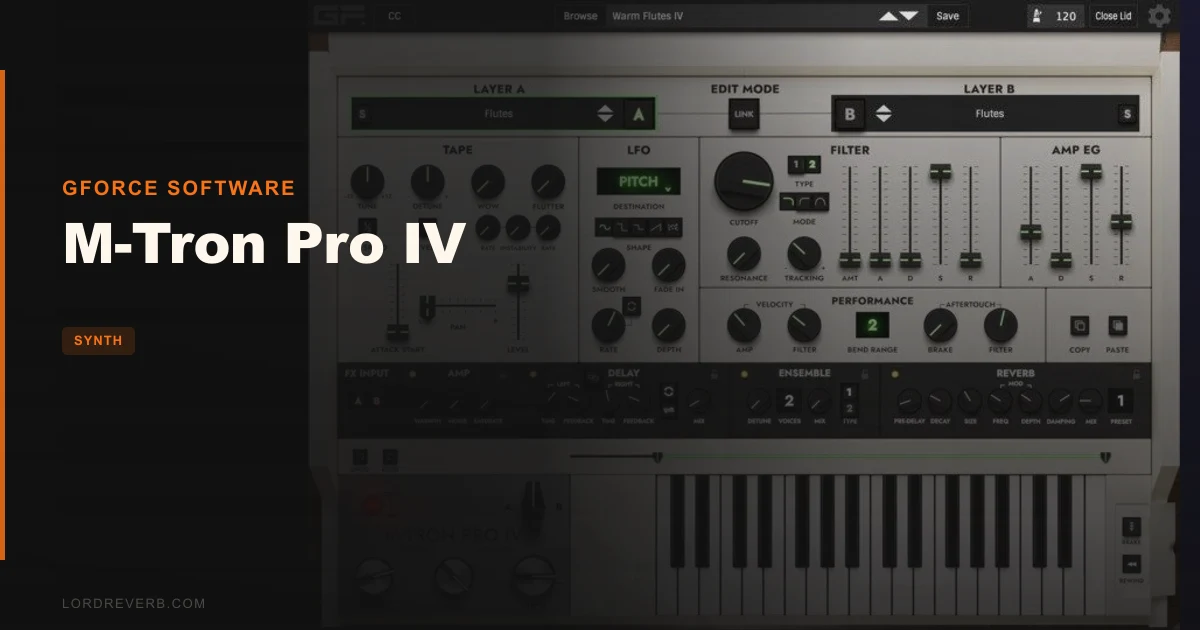
M-Tron Pro IV is GForce Software’s most complete Mellotron M400 emulation yet, and after two weeks of sessions with it, we’re confident it earns that claim.
We loaded it on a neo-soul track in the second hour of a session. The brief was simple: choir pads under a Rhodes, nothing too obvious. We pulled up the 8-Voice Choir bank and played a Cmaj7 voicing. The result stopped the conversation in the room. Not because it was loud. Because it sounded like it had been sitting in a room since 1972, quietly waiting. The tape wobble was there. The slight unevenness across the velocity range was there. And it sat behind the Rhodes without fighting it, because the natural high-frequency roll-off of the samples did the work for us.
This is a plugin for composers, producers, and sound designers who want Mellotron textures that feel lived-in rather than reconstructed. It’s particularly well-suited to cinematic work, indie production, lo-fi, and anything adjacent to progressive rock or art pop.
What a Mellotron Emulation Actually Needs to Get Right
The Mellotron M400 is a tape replay instrument. Each key triggers a strip of tape with a pre-recorded sound. That means every note was sampled individually on the real hardware, and the character comes from the inconsistencies: the tape drag, the slight pitch drift, the way the sound decays because the tape strip simply runs out.
M-Tron Pro IV replicates this by using multi-sampled recordings from actual Mellotrons rather than synthesising the character digitally. GForce recorded 35 individually sampled notes per bank. That matters. A single-sample-stretched approach sounds like a Mellotron impression. This sounds like a Mellotron.
What it’s not: a general-purpose sample player. You can’t load your own audio. You can’t import custom tape banks outside of GForce’s own expansion ecosystem. If you want a Mellotron-style engine running your own samples, look elsewhere.
Living With M-Tron Pro IV Across Real Sessions
Setup is clean. Install, authorise, open. The standalone app works without a DAW, which we used for two live rehearsal sessions with a MIDI controller plugged straight into a laptop.
The new scalable UI is a genuine quality-of-life improvement. On a 27-inch monitor it breathes. On a 13-inch laptop screen it’s still usable. Previous versions of M-Tron Pro felt cramped and oddly proportioned. This version doesn’t.
The Tape Browser and Preset Browser are separate, and that’s the right call. Browsing by tape bank lets you explore raw character. Browsing by preset lets you recall a fully shaped sound. We used both workflows in different sessions and found the split logical after a day of use.
The Wow and Flutter control with instability setting is where we spent the most time. We dialled Wow to around 40% and Flutter to 25% on a violin bank for a film cue. The result had an organic breathiness that would have taken three minutes of automation to fake manually. Satisfying doesn’t cover it.
One frustration: presets are still organised primarily by bank rather than by sonic category. Finding a specific texture means knowing which bank it lives in, or scrolling. A mood-based tagging system would fix this. It’s not there yet. Annoying.
The dual-layer and split-keyboard operation is underrated. We built a patch with cello on the lower register and flute on the upper, tuned slightly apart, with independent LFO rates on each layer. That kind of layered texture is exactly what cinematic composers need, and it works cleanly here.
The Trade-Offs You Should Actually Think About
The 3.5GB library is both the strongest argument for buying this and the sharpest constraint on how you use it. You’re working within GForce’s catalogue. The factory content is excellent, but if you need a sound that isn’t there, you’re buying an expansion pack or you’re stuck.
Expansion packs cover Chamberlin, Optigan, and Orchestron content from Streetly Electronics, sourced from original master tapes. That’s genuinely rare material. But each pack costs extra, and the total spend can climb quickly.
The Matrix Reverb is a smart addition. It’s not a surgical reverb. It adds space and movement in a way that complements the organic character of the samples rather than clashing with it. We wouldn’t use it as our main room reverb on a mix, but for performance and sound design it pulls weight.
CPU usage sits in a comfortable middle range. We ran two instances simultaneously in Logic Pro on an M2 MacBook Air with no performance issues. Three instances with the Matrix Reverb active on each pushed the meter noticeably but didn’t cause dropout. Not CPU-hungry, but not featherweight either.
The Brake control, which progressively slows tape playback speed, is one of those features you’ll use twice and then remember it exists at exactly the right moment in a session. Clever design.
Against the Field: Where M-Tron Pro IV Wins and Where It Doesn't
The main comparison is Arturia Mellotron V, which is included in Arturia’s V Collection. If you already own V Collection, Mellotron V is free. It sounds good. It’s not as deep in sample content, and the tape physics modelling is less convincing under close listening.
M-Tron Pro IV wins on authenticity. The sample library is larger, the tape behaviour is more accurate, and the browser infrastructure for navigating 200+ banks is better built.
Mellotron V wins on price-per-feature if you’re already in the Arturia ecosystem, and on the breadth of the broader V Collection bundle.
Tape Synths Expansion delivers real grit for producers who want lo-fi character without committing to a full instrument
If you’re after one specific vintage texture and not the deep library, something like the Tape Synths Expansion may cover the ground for less spend.
The Real Verdict
M-Tron Pro IV is the best software Mellotron available in 2026. That’s not a close call.
The sample quality, the depth of the library, and the new playability features make a convincing case for the price. The scalable UI and browser improvements mean it’s actually pleasant to work with now, not just impressive to own.
Skip it if you need one Mellotron flute patch for a single project. The price doesn’t make sense for occasional use. Skip it if custom sample loading matters to your workflow.
Buy it if Mellotron sounds are a recurring part of your palette. You’ll stop looking for alternatives.
The current price is shown in the buy box on this page.
Score Breakdown
| Category | Score | Notes |
|---|---|---|
| Sound Quality | 5.0/5 | Multi-sampled from real Mellotrons; tape behaviour is the most convincing we've heard in software |
| Value for Money | 3.5/5 | Hard to justify for occasional use; expansion packs add up fast if you need breadth beyond the factory library |
| Ease of Use | 4.0/5 | Scalable UI and dual browsers are a real improvement; preset organisation by mood is still missing |
| Features | 4.5/5 | Wow/Flutter, Matrix Reverb, dual-layer, Brake, poly aftertouch: a complete toolkit for Mellotron work |
| CPU Efficiency | 4.0/5 | Two instances run clean; Matrix Reverb on multiple instances costs noticeable headroom |
| Overall | 4.4/5 | The most complete and authentic Mellotron plugin available, held back only by the closed sample ecosystem and a price that punishes casual use |
Alternatives to Consider
Arturia Mellotron V: Included in V Collection. Sounds good, lighter on CPU, and if you're already an Arturia user it costs you nothing extra. Sample depth and tape physics don't match M-Tron Pro IV under a critical ear, but for most pop and indie sessions it does the job. How MiniFreak V fits into the Arturia plugin ecosystem in 2026
Tape Synths Expansion (Beat/Zampler): A much lower-cost entry point if you want lo-fi tape character without committing to a dedicated Mellotron instrument. Narrower sonic scope, but it fits neatly into a sampler-based workflow. Tape Synths Expansion review
Chromaphone 3 by Applied Acoustics Systems: Not a Mellotron emulator, but if you're drawn to M-Tron Pro IV for organic, acoustic-character textures in a cinematic context, Chromaphone 3 covers adjacent ground from a synthesis angle rather than a sampling one. Synth City Chromaphone 3 sound bank review
The Mellotron sounds on "Strawberry Fields Forever" have been chased for sixty years. M-Tron Pro IV is the closest anyone's gotten in a plugin. Load the 3 Flutes bank, play an F major with your left hand, and you'll understand immediately why this instrument still matters.
If that moment does nothing for you, save your money. If it stops the room: buy it.
Related reviews: WAVESTATION Review · HALO-2 Lite Review
Frequently Asked Questions
Can you load your own samples into M-Tron Pro IV?
No. M-Tron Pro IV is a closed sample playback instrument built around GForce's own library. You can't import external audio files or custom tape banks. If custom sample loading matters to your workflow, you'll need a different platform. GForce does offer separately purchased expansion packs covering Chamberlin, Optigan, and Orchestron content, which extend the factory library considerably.
How does M-Tron Pro IV compare to Arturia Mellotron V?
M-Tron Pro IV has the deeper sample library: 3.5GB of content across 200+ tape banks versus Arturia's more curated selection. The tape wobble and physical behaviour in M-Tron Pro IV is more convincing under close listening. Mellotron V is the better value if you already own Arturia V Collection, since it's included at no extra cost. For dedicated Mellotron work, M-Tron Pro IV wins on authenticity.
Does M-Tron Pro IV work on Apple Silicon Macs?
Yes. M-Tron Pro IV runs natively on Apple Silicon without Rosetta. It also supports Intel Macs running macOS 10.13 or higher. On Windows, the minimum requirement is a 2GHz CPU with 2GB RAM running Windows 7 or above. The plugin ships in VST2, VST3, AU, and AAX formats, plus a standalone application.
Is M-Tron Pro IV worth the upgrade from M-Tron Pro III?
If you use M-Tron Pro regularly, yes. The scalable UI alone removes a daily frustration. The new Wow/Flutter with instability control, Matrix Reverb, state-variable filter, extended 7-semitone lower keyboard range, and polyphonic aftertouch support are all meaningful additions rather than cosmetic ones. If you only open M-Tron Pro a few times a year for occasional texture work, the upgrade is harder to justify at full price.