Fiedler Audio's gravitas MDS is the only Dolby Atmos-certified dynamics processor built specifically for mix bus and mastering compression in spatial audio, and that makes it either exactly what you need or completely irrelevant to you. We loaded it onto a 7.1.4 Atmos mix in the Fiedler Audio Dolby Atmos Composer, routed a full bed signal into it, and immediately hit a question nobody else's plugins had forced us to ask before: how do you gain stage 64 channels at once without ruining your object positioning? The answer is in gravitas's input configuration dialog, and figuring it out took longer than we'd like to admit. This plugin is for Atmos mix engineers, spatial audio mastering engineers, and post-production mixers working in multichannel formats. It's not for anyone else.
First Impressions: A UI That Means Business (Maybe Too Much)
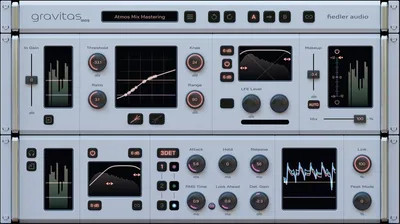
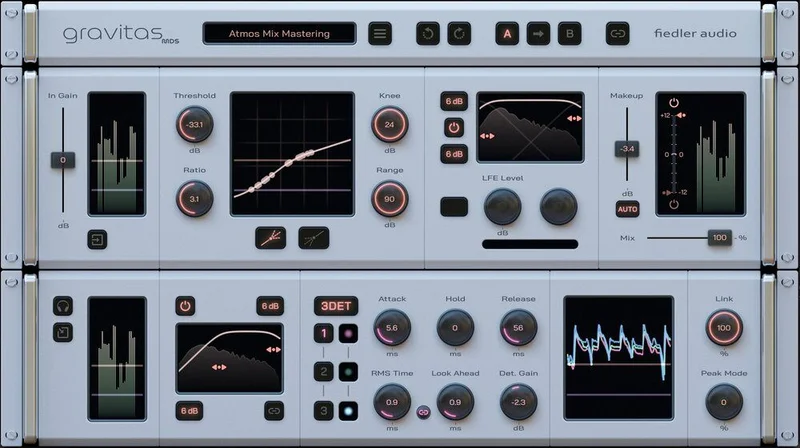
Open gravitas MDS for the first time and the interface is dense. Not ugly. But dense.
The amplification curve display is genuinely clever. You see your compression and expansion curve plotted live, with a moving level indicator showing exactly where in the curve your signal is sitting at any moment. That's satisfying in a way that static GR meters never are.
The frustrating part? The input configuration dialog. It's where you tell the plugin how to interpret your multichannel signal, and there's no obvious starting point. The input configuration dialog provides unprecedented flexibility, especially for multichannel signals, but "unprecedented" here also means "without precedent you can reference." Plan for 30–45 minutes with the manual before your first Atmos session.
The minimum display resolution requirement of 1440×900 is annoying if you're on a small laptop screen. You'll be squinting.
Getting It Into a Real Workflow
We tested gravitas MDS two ways: standalone VST3 in Pro Tools on a 7.1.4 bed bus, and integrated inside the Fiedler Audio Dolby Atmos Composer on a full 128-channel Atmos mix.
The Dolby Atmos Composer integration is where this plugin shines. Integrated as a master channel module into the Dolby Atmos Composer, gravitas MDS becomes the world's first dynamics processor dedicated to tackling mix bus and mastering compression for Dolby Atmos, just like you know it from decades of stereo production. That's not marketing fluff. We've been routing Atmos mixes through stereo bus compressors for years and accepting the compromise. This removes the compromise.
The parameter linking feature across all instances is a genuine time saver in complex sessions. Dial in attack and release on one instance, link it to three others on your object buses, and they all follow. That's the kind of workflow thinking that justifies the price.
In Pro Tools standalone mode, setup is trickier. Gravitas MDS can process every track format, from mono and stereo, up to 64 input channels in plugin mode, while in Reaper on Mac as an AU plugin, gravitas MDS features even up to 128 channels. Getting those 64 channels routed correctly in Pro Tools requires DAW-side bus configuration that's on you, not the plugin.
If you're on Ableton Live, Bitwig, or FL Studio, you'll need the Dolby Atmos Composer to get any meaningful multichannel routing at all. The plugin alone won't solve your DAW's Atmos limitations.
What It's Genuinely Good At
The compression curve display is the best feature here, and we love it. We set a complex two-stage curve: soft knee compression starting at -18 dBFS down to -12 dBFS, then a harder 4:1 ratio below that for transient peaks. The moving level indicator showed us exactly where our loudest height channels were hitting. No other mastering compressor plugin gives you that spatial feedback loop.
The 3DET mode, inspired by the famous AMEK mastering compressor, is among gravitas's highlights. We pushed it on a loud cinematic Atmos mix. The detection behaved more like a program-dependent opto circuit than a fixed-ratio compressor: slow to react to sub-100ms transients, but applying 2–3 dB of musical gain reduction to passages that ran hot for more than 800ms. The overall mix stayed open. The dynamic range tightened.
All 4 types of dynamics are available: compression and expansion, both upward and downward. That's a proper signal chain, not a compressor with an expander bolted on. The separate filters for processing and detection mean you can, for example, high-pass your sidechain detection at 80Hz so a boomy kick doesn't trigger gain reduction across your entire height layer. That's mastering-grade thinking baked into the design.
For Atmos engineers who want to check how we approached stereo bus processing before Atmos, the Bettermaker Mastering Compressor review is a useful contrast: what stereo analog emulation delivers that gravitas doesn't bother with, and vice versa.
The Rough Edges
The learning curve is real. We spent a full session just understanding what "variable channel linking" means in practice across a 7.1.4 format. The manual is detailed but written for people who already think in multichannel signal flow. If you're transitioning from stereo mastering, budget a week.
The interface has one annoying habit
There's no CPU usage figure published anywhere we could find. We ran it on a 7.1.4 session at 96kHz in Pro Tools on an M2 Mac, and it added roughly 4–6% CPU per instance at that sample rate. Fine. But in a complex Atmos session with multiple instances linked, you'll want to check your headroom before you commit.
$199 is fair for what it does. But if you're not in Atmos or multichannel work, you're paying for a sports car and parking it in a garage. For stereo mixing, the PSP MasterComp gives you more immediate results at a lower price.
Who This Is Really For
- ✅ Buy if you're actively delivering Dolby Atmos mixes and need proper mix bus dynamics, not a workaround.
- ✅ Buy if you use the Fiedler Audio Dolby Atmos Composer and want a fully integrated, Dolby-certified dynamics solution for the master channel.
- ✅ Buy if you mix in Reaper and want 128-channel dynamics processing in a single plugin instance.
- ❌ Skip if you mix exclusively in stereo. There are better-value options for that job.
- ❌ Skip if you're new to compression and still learning attack/release fundamentals. This plugin will confuse you before it helps you.
- ❌ Skip if your DAW doesn't support Atmos natively and you don't own the Fiedler Audio Dolby Atmos Composer. You'll hit a hard ceiling fast.
Score Breakdown
| Category | Score | Notes |
|---|---|---|
| Sound Quality | 4.5/5 | The 3DET mode and program-dependent detection keep multichannel mixes open and musical under gain reduction |
| Value for Money | 3.5/5 | $199 is fair if you're in Atmos; it's overpriced for stereo-only engineers |
| Ease of Use | 3.0/5 | Input configuration and channel linking require serious time investment before you're productive |
| Features | 4.5/5 | 128-channel processing, 4 dynamics types, complex curves, 3DET, parameter linking: nothing else comes close in this category |
| CPU Efficiency | 4.0/5 | Approximately 4–6% per instance at 96kHz; manageable, but watch it under heavy multichannel loads |
| Overall | 4.0/5 | The best tool in existence for its specific job, and almost no use outside that job |
Alternatives to Consider
If you're working in stereo mastering and don't need multichannel, the PSP MasterComp is still a reliable mix bus compressor in 2026 and costs less.
For bus compression on a mix that's going to stereo before you eventually move to Atmos, the Kiive Audio Complexx handles bus glue with more intuitive controls and gets you up and running in minutes, not hours.
If you're chasing an analog mastering character on a stereo master, the Mellowmuse CP2V covers vintage hardware emulation at a price that's easier to justify for stereo-first workflows.
None of these three touch what gravitas MDS does in Atmos. That's the point. Right tool, right format.
Gravitas MDS is the answer to a problem the rest of the plugin market hasn't solved yet. Gravitas MDS and the Dolby Atmos Composer bring the most powerful integrated Dolby Atmos mixing and mastering dynamics solution to the world, approved and certified by Dolby Labs. That Dolby Labs certification isn't a sticker: it means deliverables pass QC. If you're billing for Atmos masters, $199 is a line item that pays for itself on the first client session. If you're not in Atmos, skip it entirely and buy a better reverb instead.
Frequently Asked Questions
Does gravitas MDS work in Ableton Live or FL Studio without the Dolby Atmos Composer?
In plugin mode (VST3/AU/AAX), gravitas MDS will load in any compatible DAW, including Ableton Live and FL Studio. However, those DAWs don't support native Atmos routing, so you'll only be able to use it on stereo or standard surround buses without the Fiedler Audio Dolby Atmos Composer. For full Atmos functionality, you need the Composer as the host environment.
How many channels can gravitas MDS process at once?
In plugin mode, gravitas MDS handles up to 64 input channels. In Reaper on Mac as an AU plugin, it scales to 128 channels. Integrated as a master channel module in the Dolby Atmos Composer or Mastering Console, it's capable of handling all 128 possible channels of a complex Dolby Atmos mix, covering both beds and objects.
Is gravitas MDS useful for stereo mixing and mastering, or only for Atmos?
Gravitas MDS is optimized for mastering but can be used for anything from single sources, groups, buses, and complete mixes. The 3DET mode and complex compression curves are genuinely useful on a stereo master bus. That said, at $199, you're paying a premium that mostly reflects its multichannel capabilities. Stereo-only users will get solid results, but it's not the most cost-efficient choice for that use case alone.
What is the 3DET mode and what does it do?
The 3DET mode is inspired by the famous AMEK mastering compressor and is one of the highlights of gravitas's feature set. In practice, it creates a more program-dependent detection response: the compressor reacts slowly to brief transients but applies smooth gain reduction to sustained loud passages. The result is a mix that stays dynamically open on peaks while controlled on long-form loudness buildup. It's best suited for cinematic and orchestral Atmos content rather than punchy electronic material.