The Dolby Atmos Composer & gravitas MDS Bundle review starts with a problem every Atmos mixer runs into eventually: you can't just slap a compressor on your output bus the way you would in a stereo session, because nothing handles all 128 channels at once. Until now.
You're deep into a live eight-piece band recording. The mix sounds immersive in the renderer, but the dynamics are loose. The strings breathe at a different rate to the drums. The room objects are pumping on transients. You reach for your usual mix bus compressor and realise it's sitting on a stereo bus. It's not touching the beds. It's not touching the objects. You've got 128 channels of Atmos content and no master dynamics tool that can see all of them at the same time.
That's the exact gap this bundle fills. The Dolby Atmos Composer handles routing, monitoring and ADM export across any DAW. Gravitas MDS sits inside it as a master channel module and processes every bed and object in one pass. The developer calls it the world's first dynamics processor dedicated to Atmos mix bus mastering. Certified by Dolby Labs. Available now at $349.
Quick verdict: this is a brilliant piece of problem-solving for a real, frustrating workflow gap. At $349, it's not casual-purchase territory, but for anyone doing Atmos mixing and mastering professionally, there's nothing else that does what this does. The learning curve is real. So is the GPU load. But if Atmos is your work, this is the signal chain you've been missing.
What's In The Box
Two plugins, one tightly integrated system. Dolby Atmos Composer is the host environment. It handles routing for immersive audio production across any DAW, removes the manual setup burden the developer describes, and exports finished mixes as ADM/BWF for direct delivery to Apple Music, Amazon Music, Tidal and Netflix.
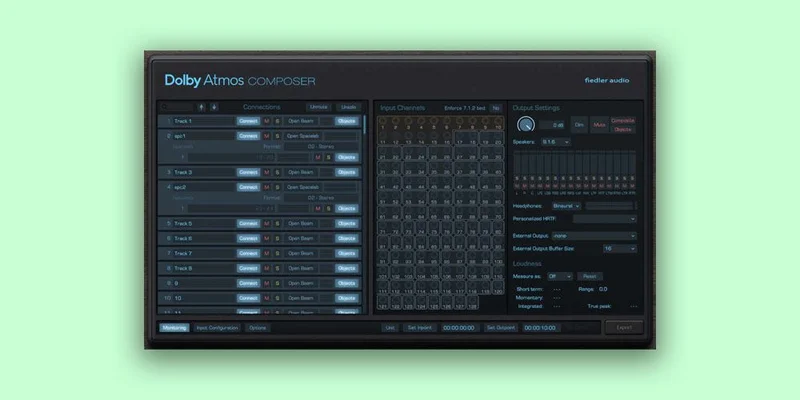
From version 1.5, Dolby Atmos Composer also integrates Spacelab, a 3D reverb that connects with a single click, no complex routing required.
The Dolby Atmos Beam panning plugin comes with Composer. It automates complex spatial movements and gets around DAW limitations on object positioning.
Gravitas MDS is the dynamics engine. It's a compressor and expander built for mastering, covering mono, stereo, and up to 64 channels in standalone plugin mode. Integrated into Dolby Atmos Composer as a master channel module, it handles all 128 possible channels: beds and objects together. AU plugin in Reaper on Mac also reaches 128 channels.
The bundle is approved and certified by Dolby Labs. That's not a marketing line you can fake.
Formats: VST3, AAX, and AU on Mac. VST3 and AAX on Windows. Runs on macOS 10.14 through 14.x and Windows 7 through 11. Requires OpenGL 3.3, minimum 1440 x 900 display, 4 GB RAM, and a 2 GHz x64 processor with SSE3 or Apple Silicon. Supports 48 kHz and 96 kHz sample rates only.
Where It Fits In Your Workflow
Think of Dolby Atmos Composer as the spine. Everything else plugs into it. You work in your DAW of choice, bring Composer into the session, and suddenly you have an Atmos-capable environment without needing Pro Tools Ultimate or a dedicated Dolby renderer machine taking up a rack.
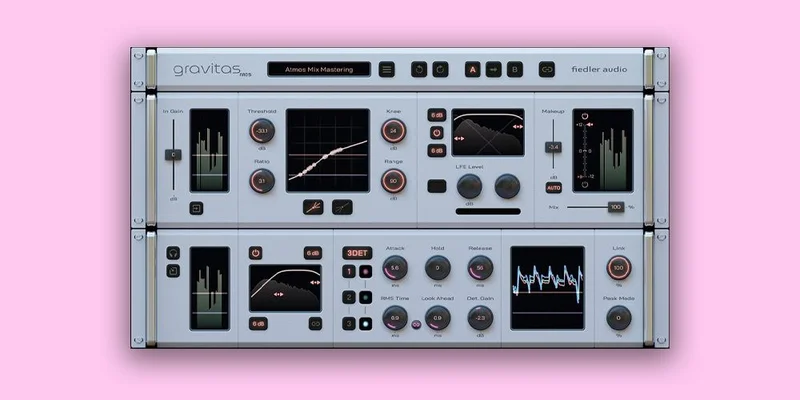
The developer says Composer removes the burden of manual Atmos setup and lets you produce Atmos content on any DAW. That's a significant workflow unlock if you've been locked out of Atmos work by hardware or software cost.
Gravitas MDS then sits at the end of the Composer's master channel. You're processing the entire Atmos mix, not just a stereo downmix. Not just a 7.1 bed. All of it. At the mastering stage, that's the difference between a coherent mix and a collection of independent elements that happen to exist in the same 3D space.
You can also run gravitas in standalone plugin mode on individual tracks, groups and buses, processing anything from a single mono source up to a 64-channel group. The mastering-level integration is the headline, but the plugin is genuinely useful at every stage of a session.
One limit to know before you start: 48 kHz and 96 kHz only. If your session runs at 44.1 kHz, you're converting or you're out. That rules out some common music production workflows without resampling.
Gravitas MDS in Detail: The Dynamics Engine
All Four Dynamics Types
Most compressors give you one thing: downward compression. Gravitas MDS gives you four. Downward compression, upward compression, downward expansion and upward expansion are all available. That means you can push quiet signals up as well as push loud signals down, in the same pass, with the same processor.
For Atmos mastering, this matters. Object-based mixes have wildly variable level behaviour. A single ambient object might sit far below your beds for most of a track, then spike on a transient. Standard downward compression can't fix that without squashing the beds too. Gravitas can build a multi-point curve that handles each region of the dynamic range differently.
The developer describes this as creating complex compression and expansion curves for the entire dynamic range. In practice, that means you're drawing behaviour rather than setting a single threshold.
3DET Mode
This is the one that gets interesting. The 3DET mode is inspired by the AMEK mastering compressor, a reference-level piece of outboard with a specific approach to transient detection. Without going into the full AMEK history: it has a reputation for adding density and punch without sounding like a compressor was involved.
Gravitas borrows that detection approach and offers it as a mode. Reviewers report that, when implemented correctly, it produces clarity and punch with precise dynamic range shaping. That's a fair characterisation for mastering-grade compression that's working as it should.
The developer says you can compress drums to give them a punch never heard before. That's a developer claim, so treat it as aspiration rather than guarantee. But the underlying design reference is real.
Variable Filters for Processing and Detection
Most compressors let you filter the sidechain. Gravitas MDS goes further: separate variable filters for both the processing signal and the level detection signal. That means what the compressor hears as its trigger can be tuned independently from what it actually processes.
On an Atmos mix bus, this is more than useful. Low-frequency bed content can trigger your detector without you wanting it to hammer the high-frequency objects. Set the detection filter to roll off below 80 Hz and your compressor responds to the mid-range energy instead. The mix stays coherent without the bass driving all your gain reduction decisions.
It's a clever design. Annoying that more processors don't do this.
Gradual Channel Linking and Gradual Peak Mode
Standard multichannel compressors link channels at 0% (all independent) or 100% (full stereo-linked behaviour). Gravitas offers gradual channel linking: a continuous control between those two extremes.
In an Atmos context, that means you can choose how much your overhead objects influence the behaviour of your floor-level beds. Full linking keeps everything moving together. Partial linking lets channels breathe slightly independently without losing mix coherence.
Gradual peak mode works similarly. Between pure RMS and pure peak detection, you can dial in where on that spectrum the plugin reacts. More peak sensitivity catches transients faster. More RMS bias responds to programme loudness. Both controls tunable. Neither is binary.
External Sidechain
Gravitas MDS supports an external sidechain with up to 64 channels, depending on DAW. For complex Atmos mastering, this opens some genuinely useful options. You could key your master dynamics processor to a specific stem: have the rhythm bed drive the gain reduction decisions for the whole mix. Or bring in a reference track as the detection source.
The 64-channel limit on the sidechain is worth knowing. It won't cover all 128 channels of an Atmos mix in sidechain mode, though the main processing path handles all 128 when running through Composer.
Parameter Linking Across Instances
If you're running multiple gravitas instances across buses in a session, parameter linking keeps them in sync. Change the threshold on one, the others follow. This is a real time-saver in complex Atmos sessions where you might have the plugin on individual stem buses as well as the master. Adjusting fifteen instances one at a time is nobody's idea of a good afternoon.
Mid/Side Processing
On stereo tracks, gravitas offers optional M/S processing. This is bread-and-butter for stereo mastering: process the centre and sides differently to control width and keep mono compatibility. On Atmos work, the stereo bed can go through M/S processing while object channels handle their own dynamics elsewhere. It's an expected feature at this price. The fact it's there alongside 128-channel support is what makes the plugin genuinely hybrid-capable.
LFE Volume Adjustment
The LFE channel in surround formats is its own problem. It runs at a different level reference, and most dynamics plugins just compress it the same way they compress everything else. Gravitas MDS includes manual LFE volume adjustment for surround formats. That's a small thing that saves a lot of pain when your mix is heading to a cinema or a spatial audio platform that checks LFE compliance.
The Unique Limiter Function
This is worth a separate mention because it works differently to standard limiting. Gravitas MDS has a limiter function that handles both gain reduction and gain increase. You can set a ceiling, but you can also set a floor below which signals get pushed up. It's the compressor's upward dynamics logic applied at the limiter stage. Underrated feature that most reviewers skip over because it sounds complicated. It's not, once you see it in context of the four-quadrant dynamics model the whole plugin uses.
Dolby Atmos Composer in Detail: The Environment
DAW-Agnostic Atmos Production
The developer says Composer lets you produce Dolby Atmos content on any DAW, approved by Dolby Labs. That's the headline. If you're an Ableton or Logic user who's been watching the Atmos conversation from the sidelines because you don't want to move your whole workflow to Pro Tools, this is your on-ramp.
You bring your DAW, your plugins, your instruments. Composer handles the Atmos layer. Record new tracks while actively mixing for Atmos, something the developer says is impossible in certain standard Dolby Atmos workflows, particularly on Pro Tools. That's a pointed comparison, and it's worth noting that Pro Tools Ultimate with native Atmos support carries significant cost and hardware demands. Composer is more affordable and more flexible, though the two tools aren't doing identical jobs.
Dolby Atmos Beam: Panning and Automation
Beam is the panning plugin that comes with Composer. It puts object positioning into a plugin you can automate inside your DAW, getting around whatever spatial positioning limitations your DAW imposes.
Automate complex 3D movements: an overhead object that sweeps from front-left to rear-right over 32 bars. A dialogue element that anchors dead centre through the mix but ducks to the floor during a transition. These are the kinds of movements that Atmos is built for, and Beam is what draws them.
The developer claims it circumvents DAW limitations on automation for Atmos objects. Verify that against your specific DAW by checking the trial against your actual session setup.
Spacelab 3D Reverb Integration
From version 1.5, Spacelab connects to Composer with one click. No manual routing. The 3D reverb fills the spatial environment around your mix without you having to build send routing from scratch in a DAW that wasn't designed for immersive audio.
Reviewers report that the distance binaural render options in the Composer ecosystem are useful for adjusting how Atmos mixes present on headphones, and that these settings are worth revisiting at the mastering stage. That tracks: headphone rendering is one of the less-discussed but genuinely satisfying parts of Atmos delivery, because most of your listeners outside a cinema will be wearing headphones.
If you want Spacelab as part of a larger bundle, see our review of the All Dolby Atmos Bundle with Spacelab Ignition.
ADM/BWF Export and Platform Delivery
Export your finished Atmos mix as ADM/BWF. That's the format Apple Music, Amazon Music, Tidal and Netflix all require for spatial audio delivery. No third-party conversion. No additional delivery tools. The developer says Composer handles it natively.
For a working composer or producer submitting Atmos mixes directly to streaming platforms, that's the last piece of the delivery puzzle. Everything before it is the mix. This is what gets it out the door.
What It's Genuinely Good At
The headline strength is the one that matters: this is the only certified dynamics processor for the Dolby Atmos mix bus. Not "one of a few." Not "one of the better options." The developer says it's the world's first, and nothing in the competitive space contradicts that claim. Pro Tools Ultimate handles Atmos natively but doesn't give you a dedicated mastering compressor across the full 128 channels. The Dolby Atmos Production Suite is post-production-focused and misses music-oriented features. No existing alternative offers comparable threshold and detector settings range across the full channel count.
Reviewers report that the 'Atmos, Organic Glue' preset pulled mix elements together and helped them sit more naturally on a live eight-piece band recording. That's the kind of outcome you expect from a well-designed mastering compressor. The fact it's doing it across an Atmos mix rather than a stereo bus is what makes it satisfying rather than just functional.
The four-type dynamics system (compression, expansion, upward, downward) combined with multi-point curves is genuinely flexible. You're not applying a single characteristic to the whole programme. You're shaping different regions of the dynamic range with different behaviour. At mastering level, across 128 channels, that's not a luxury. It's what the job requires.
Modern DAW computers handle multiple instances on buses and beds without resource problems, reviewers note. The plugin itself is not the CPU problem. The interface is (more on that below).
The ADM/BWF export from Composer removes what has historically been a painful final step in Atmos delivery. One less tool in the chain.
The Rough Edges
High GPU usage when the plugin interfaces are open. That's a reported performance issue, not a fringe case. If you're running a GPU-heavy session with video playback or other OpenGL-dependent plugins, you'll want to close the gravitas interface when you're not actively editing it. The processing continues fine. The open GUI is what costs you.
The plugin requires real dynamics compression knowledge. Not beginner-friendly. If you're fuzzy on the difference between downward expansion and upward compression, or if multi-point threshold curves sound more complex than useful, you'll spend a frustrating amount of time in this interface before anything productive happens. The results, when correctly set up, are clear. Getting there requires knowing what you're doing.
There are isolated reports of stuttering and stability issues with certain DAW configurations. These are not confirmed across multiple independent sources for this bundle specifically, so we're not calling it a systematic problem. But we'd flag it: run the trial in your exact setup before buying at $349. Don't assume it'll be smooth because it's smooth elsewhere.
Long-term user experience data is thin. Most coverage is professional editorial and manufacturer material. There's not a large community of people who've had this running across hundreds of sessions over two or three years. For some buyers, that's fine. For others, it's a reason to wait for the install base to grow.
The 44.1 kHz omission will annoy some music producers. If your template runs at 44.1, you're resampling or you're out. Not a dealbreaker for delivery-focused Atmos work, but worth knowing upfront.
Who This Is Really For
- ✅ Buy if you're mixing and mastering Dolby Atmos content professionally and need a certified dynamics processor across the full 128-channel bus, not just the stereo downmix.
- ✅ Buy if you want to produce Atmos on a DAW that doesn't natively support immersive audio, without moving to Pro Tools Ultimate.
- ✅ Buy if you're delivering spatial audio to Apple Music, Tidal, or Netflix and want ADM/BWF export built into your mixing environment.
- ❌ Skip if you're new to dynamics processing and don't yet have a confident understanding of compression, expansion and sidechain detection.
- ❌ Skip if your sessions run at 44.1 kHz and resampling isn't part of your workflow.
- ❌ Skip if you only dabble in Atmos occasionally and a stereo bus compressor on the downmix is genuinely good enough for what you're doing.
Try It In Your Session First
A trial or demo build may be available. If it is, here's what to check before you buy.
Load gravitas MDS as a master channel module in Composer and pull up an Atmos session with at least a 7.1.4 bed plus objects. Find a passage where the dynamics feel loose across the spatial field. Set the detection filter to roll off your LFE content, pull a moderate ratio into the 3DET mode, and check whether the mix cohesion improves without the objects losing their positional identity. That's the core use case. If it works cleanly in your setup, you know what you're buying.
Also check GPU usage with the interface open in your heaviest session. If it causes issues there, it'll cause issues in production. Better to find that in a trial than after the invoice.
Specs & Technical Details
| Developer | Fiedler Audio |
| Price | $349 |
| Plugin Format | VST3 / AU / AAX |
| OS Support | macOS 10.14–14.x / Windows 7–11 |
| Activation | Online activation (Dolby Labs certified) |
| CPU Usage | Medium (GUI-open GPU load is notable; processing itself runs efficiently on modern systems) |
| Trial Available | Check product page |
| Version Reviewed | 1.0.2 (gravitas MDS) / 1.5 (Dolby Atmos Composer) |
Score Breakdown
| Category | Score | Notes |
|---|---|---|
| Sound Quality | 4.5/5 | Reviewers report genuine clarity and punch; developer's transparency claim aligns with mastering-grade design |
| Value for Money | 4.0/5 | Nothing else certified for this job; $349 is defensible for professional Atmos work, steep for occasional use |
| Ease of Use | 3.5/5 | Powerful but demands solid dynamics knowledge; preset 'Organic Glue' is a useful starting point |
| Features | 4.5/5 | All four dynamics types, 128-channel support, ADM export, Spacelab integration, gradual linking: genuinely comprehensive |
| CPU Efficiency | 3.5/5 | Processing is fine; open GUI GPU load is a real issue in heavy sessions |
| Overall | 4.3/5 | The only certified Atmos dynamics mastering tool, with real depth and one frustrating performance caveat |
Alternatives to Consider
Nothing does exactly what this bundle does at the mix bus level for Atmos. But here are the closest comparisons worth knowing about.
Pro Tools Ultimate with native Dolby Atmos support. This is what most professional post-production facilities run. Native Atmos integration, full renderer access, industry-standard delivery workflow. But it comes with significant cost, hardware requirements, and a subscription model that makes the gravitas bundle look affordable by comparison. It's also not a dynamics processor: it's a DAW. You'd still need to solve the mix bus compressor problem inside it.
Dolby Atmos Production Suite. Post-production focused. Works well for film and TV delivery workflows. Less relevant if you're doing music Atmos. Doesn't have a music-oriented dynamics processing layer. Worth knowing about, but not a direct competitor for what this bundle is actually doing.
If you want to see how the Composer fits into a broader Fiedler Audio setup including Spacelab, read our full All Dolby Atmos Bundle with Spacelab Ignition review for a sense of what the full ecosystem looks like.
The honest answer is that for music-focused Atmos mix bus dynamics, there isn't a "well, you could use this instead" option that does the same job. The gap this bundle fills is real, and the alternatives don't fill it.
The Verdict: Buy It or Leave It
Buy it. If Atmos music mixing and mastering is your work, not a side experiment, this bundle is the thing you've been waiting for without knowing you were waiting for it.
The frustrating part is that the GPU issue is real. Close the interface when you're not editing. That's the workaround, and it's an annoying one for a premium-priced plugin. We'd love to see that resolved in a future update. But it doesn't make the tool less necessary.
The learning curve is also real. If you're not already confident with mastering dynamics, come back to this when you are. Spend time in the four-quadrant dynamics model, understand what gradual channel linking is actually doing, and know why you'd choose 3DET over a standard attack/release approach. This plugin rewards knowledge. It punishes guessing.
For the right engineer, at $349, this is a brilliant buy. It's the only Dolby Labs-certified dynamics processor for the Atmos mix bus. That's not a marketing angle. It's a fact about the competitive landscape that makes the purchase decision much simpler than it might otherwise be.
Wrong for you if you work at 44.1 kHz without a resampling step, if you're new to mastering compression, or if Atmos is a quarterly curiosity rather than a regular workflow. For everyone else: this is the tool. Get it.
Related reviews: Type A & Type B Bundle
Frequently Asked Questions
What does the Dolby Atmos Composer & gravitas MDS Bundle actually do that a standard compressor can't?
A standard compressor sits on a stereo or multichannel bus and processes only what's routed to it. Gravitas MDS, integrated into Dolby Atmos Composer as a master channel module, processes all 128 possible channels of a Dolby Atmos mix simultaneously: beds and objects together. No existing standard compressor can see that many channels in the context of a live Atmos mix. The developer says it's the world's first dedicated dynamics processor for Atmos mix bus mastering, certified by Dolby Labs.
Do I need Pro Tools to use the Dolby Atmos Composer?
No. The developer says Dolby Atmos Composer lets you produce Atmos content on any DAW. It's designed to remove the need for a DAW with native immersive audio support. Formats include VST3, AAX and AU, covering most professional DAWs on Mac and Windows. This is one of the bundle's biggest practical advantages over workflows that require Pro Tools Ultimate.
Is gravitas MDS useful outside of Atmos sessions?
Yes. In standalone plugin mode it processes mono, stereo, and up to 64 channels, making it a full mastering compressor for conventional sessions. All four dynamics types, M/S processing on stereo tracks, 3DET mode and the variable filter system work outside the Atmos context. If you need a high-end mastering compressor that also scales into Atmos work, gravitas handles both without compromise.
What's the GPU issue with gravitas MDS?
The plugin requires OpenGL 3.3 for its interface rendering. When the GUI is open, GPU usage rises noticeably. The processing continues correctly with the interface closed. In heavy sessions with other OpenGL-dependent plugins or video playback, close the gravitas interface when you're not actively making adjustments. This is a real-world workflow consideration, not a dealbreaker, but worth knowing before you build your session template around it.
Can I export directly to Apple Music and Tidal from this bundle?
Dolby Atmos Composer exports finished mixes as ADM/BWF format, which is the required delivery format for Apple Music, Amazon Music, Tidal and Netflix. You're not exporting directly to those platforms from the plugin, but you're producing the exact file format they need for Atmos content ingestion. No additional conversion tool is required.
What sample rates does the bundle support?
Both Mac and Windows versions support 48 kHz and 96 kHz only. The bundle does not support 44.1 kHz. If your session template runs at 44.1 kHz, you'll need to convert your project before working in this environment. For Atmos delivery to streaming platforms, 48 kHz is standard, so this isn't a problem for dedicated Atmos workflows. It does limit the bundle's usefulness in conventional music production contexts without a resampling step.