If you're working on Windows, you can stop reading now. Mac Audio Apps Bundle 2 by Zynaptiq is a macOS-only suite, requires macOS 10.15.x or newer with a 64-bit system, and runs natively on Apple Silicon. It does not exist on any other platform. That's the first filter, and it's a hard one.
Pass that filter and what you get at $369 is five serious tools: TRIUMPH 3 audio editor, MYRIAD 4 batch processor, LOOP EDITOR 2, SPECTRE analyzer, and WORMHOLE effects plugin. Each one stands on its own. Together they cover a range that most Mac audio professionals spend years assembling app by app.
Quick verdict: At $369, this bundle is a strong buy for the right Mac user. TRIUMPH 3 alone is a serious editor with morphing, vocoding, granular processing, and ZTX Pro time-stretching built in. Add a batch processor, loop editor, 20-meter analyzer, and a genuinely unusual pitch and frequency shift plugin, and the value stacks up fast. The upgrade path is frustrating, REX support is broken on Apple Silicon, and a handful of WAV files will refuse to import. Those are real problems. But if you're on a modern Mac and you need all five of these tool types, it's hard to argue against the bundle. We'd score it 4.2 out of 5.
The Catch Up Front
The REX format issue is not minor if you've built a sample library around it. Myriad and Loop Editor both fail to handle REX files on Apple Silicon. That's not a workflow hiccup, that's a workflow blocker if REX is part of your daily process.
The WAV rejection problem is harder to predict. Some WAV files that play fine in other apps simply won't import into Myriad or Loop Editor. There's no clear pattern that owners report. If your library is diverse and unmanaged, expect friction.
The upgrade path is the most annoying structural issue. You can't upgrade a single app. If you already own MYRIAD 4 and just want to add TRIUMPH 3, the bundle doesn't accommodate that in a clean way. Owners have flagged this frustration directly, and it's a legitimate complaint. Zynaptiq makes great software and maintains it consistently, which makes this policy more frustrating rather than less.
External editor integration with apps like iZotope RX isn't available. Vinyl mode isn't included. If those two things were on your checklist, they won't be checked off here.
What You Get If You Clear It
Five apps. Each one purpose-built.
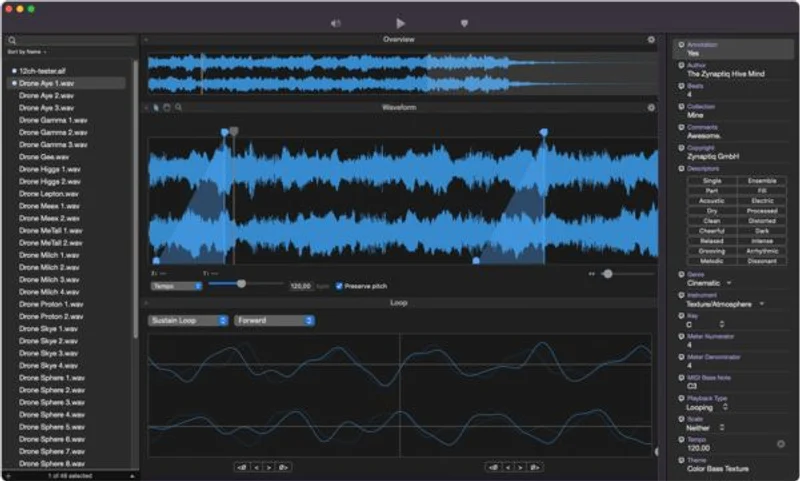
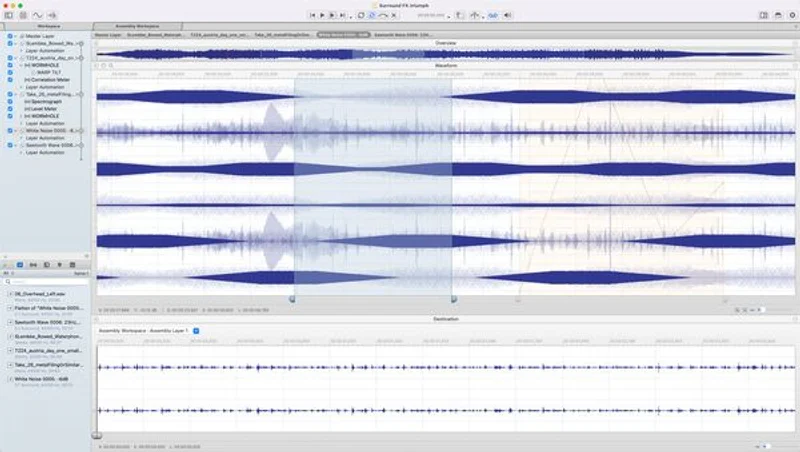
TRIUMPH 3 is the centrepiece: an audio editor with morphing, vocoding, granular processing, ZTX Pro time-stretching and pitch-shifting, AU plug-in hosting, Synced Video Playback, DDP authoring, FCPX XML import/export, CD burning, MIDI playback of pitched and sliced workspaces, and real-time metering that includes EBU-128, BBC, VU, spectral analysis, and Lissajous display. Developers say it added over 100 new features and enhancements in this version.
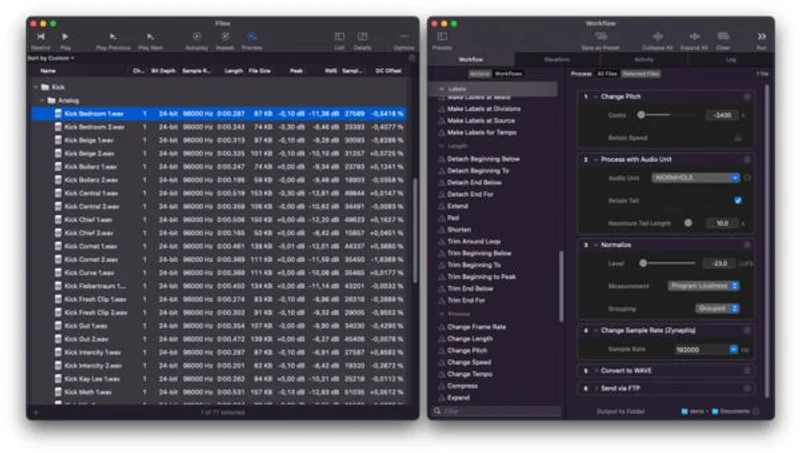
MYRIAD 4 handles batch processing: program loudness normalization, Zynaptiq's own KSRC sample rate conversion and dither, time-stretching, AU plug-in processing, flexible fades, and smart sorting by loudness, pitch, sample rate, DC offset, or BPM. It also moves files to Dropbox, SoundCloud, or FTP.
LOOP EDITOR 2 builds and edits loops with sustain and release loop support, ACIDized WAV and Apple Loops format output, metadata authoring, audio slicing, and a preview mode that lets you audition Apple Loops stretched or pitched before export.
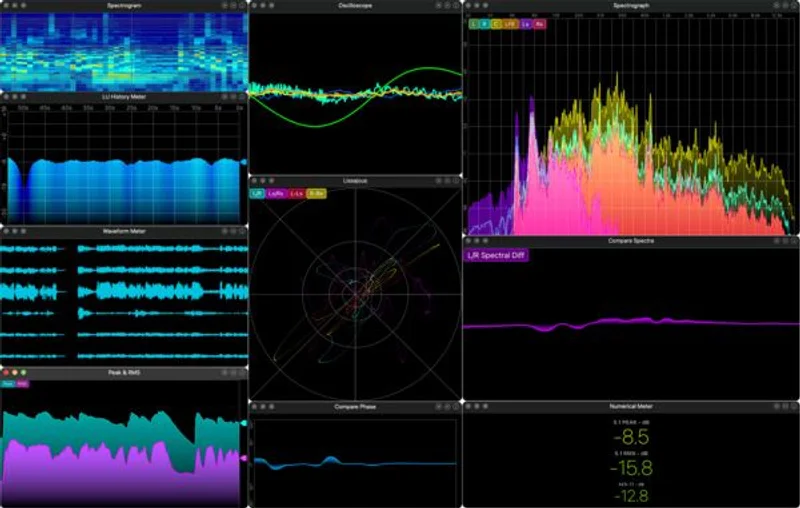
SPECTRE is a 20-meter-type analyzer covering spectrograms, analysers, and oscilloscopes. It reads from files, real-time hardware inputs, or network sources, and handles mono, stereo, and 5.1 audio internally and over the network.
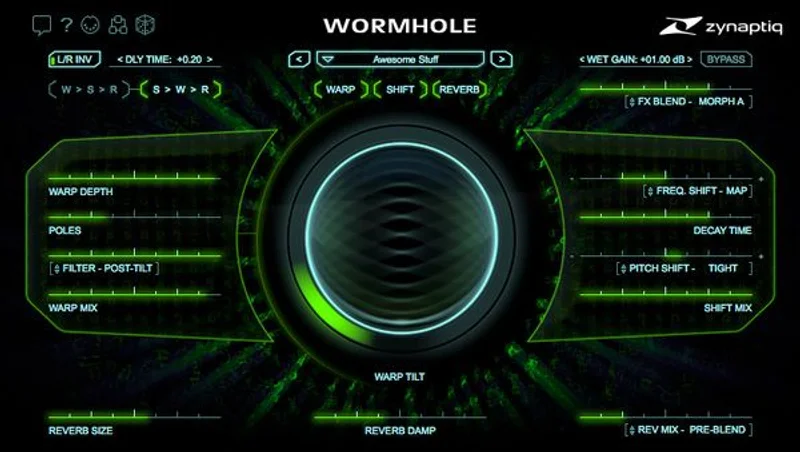
WORMHOLE is an effects plugin with ±4 octaves of pitch shift, ±4000Hz of frequency shift, spectral inversion and warping via its WARP module, three pitch/frequency shifting modes inside the SHIFT module, dual hall reverbs, and unique dry/wet morphing.
TRIUMPH 3: What It Actually Does
TRIUMPH 3 is not a DAW. It's not trying to be. Think of it as the editing and processing environment that sits outside your DAW for work that's cleaner to handle standalone: mastering prep, sound-to-picture tasks, format conversion, creative sound transformation.
The multi-layer architecture is where it earns its keep. You can stack layers that run at entirely different sampling rates and channel counts in the same session. That matters when you're working with archive material, field recordings, or stems from different projects at the same time. Your 44.1kHz location audio and your 96kHz studio stems live in the same workspace without forcing a conversion just to listen.
Format support is wide. TRIUMPH 3 imports AIFF, WAV and BWAV, Sound Designer I, CAF, AU, WAV64, MP3, M4A, Ogg Vorbis, FLAC, and DDP. If you're working with legacy sessions or delivering across formats, that list covers most scenarios without a separate conversion step. Bit depth range runs from 8-bit integer all the way to 32-bit float in both split and interleaved configurations.
Smart Edits and Source/Destination Editing
Non-destructive Smart Edits mean your original file isn't touched. You're building an edit decision list on top of the source, not rewriting the audio itself. If you've spent time in a traditional destructive editor rebuilding a botched edit, you'll appreciate this.
Source/Destination Editing with stretch-to-destination functionality is the kind of feature that sounds abstract until you need it. You mark a region in your source, mark a destination region of different length, and TRIUMPH 3 stretches the content to fill. That's a time-saving workflow for sound-to-picture work, trailer audio, or any situation where timing is locked and content needs to conform to it rather than the other way around.
Workspace Varispeed lets you shift the pitch of a whole project at once, not just individual regions. That's a rare feature at this level and it shows up in the right situations, such as when a director calls you to say the picture cut changed tempo and you need to resync everything.
Advanced DSP: Morphing, Vocoding, Granular
This is the section that separates TRIUMPH 3 from a standard audio editor. Morphing, vocoding, and granular processing are not commonly bundled into an editing application. They're usually plugins you buy separately and run inside a DAW.
Having them here means you can process a sound during the editing workflow rather than bouncing out to a different application. If you're doing sound design for picture or building sample content, that matters. Owners report finding the sound morphing capabilities genuinely interesting for creative sound design work, which tracks given what the technology lets you do: take two audio sources and blend between them spectrally.
ZTX Pro is Zynaptiq's own time-stretching and pitch-shifting algorithm. It's the same technology that powered earlier Zynaptiq products. You get it here without additional licensing or a separate plugin purchase. The pitch shift can serve purely corrective roles or push into creative territory depending on how far you take it.
Meters, Analysis, and Metering During Edits
Real-time metering directly inside an editor is something many standalone editors make you add separately. TRIUMPH 3 bakes in EBU-128, BBC, VU, spectral analyser, spectrogram, and Lissajous display. The EBU-128 and BBC meters are the standard requirements for broadcast delivery. Having them right there in the editor while you're making decisions means you're checking compliance at every stage, not just at the end.
The Lissajous display tells you about phase relationships across your stereo field. If you're working with material that came in with a wide stereo image or significant M/S processing, you'll want that at a glance before anything leaves the session.
Video, MIDI, Automation, and Format Delivery
Synced Video Playback puts TRIUMPH 3 into sound-to-picture territory that most audio editors can't reach without add-on software. If you're spotting audio to a picture cut or checking sync after a time-stretch, you work with the video in the same window rather than keeping two applications open.
FCPX XML import/export means you can round-trip with Final Cut Pro X. Bring a timeline in, do your audio work, send it back. For anyone in the macOS video production ecosystem, this is a meaningful connection.
DDP Authoring and CD burning are features that have been disappearing from Mac software for years. TRIUMPH 3 still has them. If you're mastering for physical release or preparing a DDP for replication, you don't need a separate application to finish the job.
MIDI playback of pitched and sliced workspaces is an unusual feature for an audio editor. You can trigger sliced audio events or pitched content from MIDI. That's a sound design and sample creation workflow that you don't typically expect to find outside of a sampler or a DAW.
AppleScript and Actions-based automation means repetitive tasks can be reduced to a single button press. The developer describes this as the kind of workflow where complex multi-step tasks become one keystroke. For editors who run the same processes repeatedly across large jobs, that claim is worth taking seriously.
MYRIAD 4: Batch Processing That Works Like It Should
Batch processing audio is unglamorous work. It's the kind of task where the tool is invisible when it works and infuriating when it doesn't. MYRIAD 4 is mostly the former.
The core capability is converting and processing large numbers of files without touching them one by one. Any sampling rate and channel count comes in. MYRIAD 4 uses Zynaptiq's KSRC algorithm for sample rate conversion, which is a proprietary approach to the conversion math. You also get dithering built in, so when you're stepping down from 32-bit to 16-bit or 24-bit, you're not doing it blind.
Loudness Normalization and Smart Sorting
Program loudness normalization is the feature that makes MYRIAD 4 genuinely useful for delivery. You're not just peak-normalizing; you're normalizing to program loudness targets. For streaming platform delivery, podcast export, or broadcast QC, this is the right tool for the job.
The sorting and filtering system is clever. You can organize your batch by program loudness, pitch, sample rate, DC offset, or BPM. That means before you even start processing, you can see which files are outliers, which ones need the most work, or which ones might be problem cases. It's a smarter way to manage a large library than sorting by filename and hoping.
Time-stretching is available inside the batch workflow, which saves a step if you're conforming a large library to a new tempo grid. AU plug-in processing means you can run your existing Audio Units plug-in chain across the whole batch. Flexible fades get applied during the same pass.
File Transfer: Dropbox, SoundCloud, FTP
Built-in transfer to Dropbox, SoundCloud, and FTP is a workflow feature that matters if you're delivering files to clients or posting content after processing. You finish the batch and push directly from MYRIAD 4 without opening a browser or a file manager.
This won't feel life-changing if you work solo and your clients all use a shared server you're already in. But for anyone managing multiple delivery targets or running audio for a team, it cuts steps.
The WAV Rejection Problem
Honestly? This is annoying enough to call out twice. Some WAV files that work in every other app won't import into MYRIAD 4 or Loop Editor 2. Owners have flagged it and there's no clean fix reported. The pattern isn't predictable enough to build a workaround around.
If you're running a batch of files from a known, controlled source (your own sessions, one specific sample library), you're probably fine. If you're pulling from diverse third-party sources or legacy archives, test before committing to a large batch run.
LOOP EDITOR 2: Building Loops Properly
LOOP EDITOR 2 is for the specific work of creating loops that behave correctly in samplers and loop-based applications. Not just slicing audio into pieces, but defining sustain and release loop points, embedding metadata, and exporting in formats that actually carry that information through.
ACIDized WAV and Apple Loops are both supported output formats. If you're building a sample library for Logic Pro users, Apple Loops is the format they expect. If you're building for a broader audience of DAW users, ACIDized WAV carries tempo and pitch data in a format most hosts can read.
Sustain and Release Loops
This is the detail that separates a real loop editor from a DAW that can slice audio. Sustain and release loops are the sampler's core mechanics: the sustain loop cycles while a note is held, the release loop triggers when the note is released. Getting these right is not trivial, and doing it without a dedicated tool means a lot of manual auditioning and guessing.
LOOP EDITOR 2 gives you a preview function specifically for auditioning Apple Loops stretched or pitched, so you can hear what your loop actually does inside Logic or any Apple Loops host before you commit the export. If the loop glitches at a different tempo, you hear it before it ships, not after a client finds it.
Metadata and Slicing
Metadata authoring inside a loop editor is the kind of feature that doesn't feel important until you have a library of 2,000 loops with no searchable tags. LOOP EDITOR 2 builds that information during the editing process rather than making you go back and tag files in a separate application.
Audio slicing is included. You can take a longer audio file, slice it into individual events, and work with those events in the context of loop construction. For anyone building drum loop packs or multi-shot sample content, this keeps the workflow in one place.
The same caveat applies here as with MYRIAD 4: REX format is broken on Apple Silicon. If your workflow involves REX files at any point, that's a hard limit: REX format support is not functioning on Apple Silicon in Loop Editor 2. No workaround is documented.
SPECTRE: 20 Meters in One App
SPECTRE is the analyzer in the bundle. Twenty different meter types is a wide range. The list covers spectrograms, various spectral analysers, and oscilloscopes, plus a Meter Assistant wizard that helps you set up the right display for your situation if you're not sure where to start.
Being able to save Meter Sets means your recurring setup is a single click. If you check the same combination of meters for every mastering session or every broadcast delivery, you define it once and recall it instantly.
Analysis Sources: Files, Hardware, Network
Most analyzers read from your hardware inputs or from your DAW's output. SPECTRE goes further: it also reads from files directly and from network sources. The file analysis is useful for checking a delivered master before sign-off without routing audio through a DAW chain. The network source capability matters if you're analyzing audio from a different machine or a remote source on the same network.
The internal player handles mono, stereo, and 5.1 audio files. Network support extends to stereo and 5.1 streams. If you're doing multichannel work for surround deliverables, SPECTRE covers those scenarios without asking you to downmix first.
Why a Dedicated Analyzer Matters
You might wonder why a dedicated analyzer belongs in this bundle when your DAW probably has metering. The answer is that DAW meters live inside the signal chain. SPECTRE sits outside it. When you're doing final QC on a delivered file or analyzing a client's reference track, you want an analyzer that's not affected by anything in your session chain.
Having all 20 meter types in one app also means you switch views rather than switching tools. That's a workflow consideration that adds up over a full session.
WORMHOLE: The Creative Outlier
WORMHOLE is the most unusual piece of this bundle. The other four apps are professional utilities that do what professional utilities do. WORMHOLE is a sound design tool that goes somewhere strange.
±4 octaves of pitch shift, fully aliasing free. That's a wide range and the aliasing-free claim matters: push pitch shift hard and most processors generate artifacts that smear the audio into something ugly and not in a useful way. The aliasing-free processing keeps the result usable at extreme settings.
Frequency Shift and Spectral Processing
Frequency shifting is different from pitch shifting. Pitch shifting moves every harmonic by the same ratio, so the intervals stay intact. Frequency shifting moves every partial by the same absolute amount in Hz, which breaks up the harmonic relationships and creates inharmonic, metallic textures. The ±4000Hz range here is wide. Push it gently and you get subtle detuning. Push it hard and you get something that sounds like it's been run through a ring modulator.
The 96dB/octave carrier and side-band attenuation spec is what keeps the frequency shift processing clean outside the shifted band. That's a steep filter slope. It means what you don't want to affect stays clean while the shifted content sits in its own defined space.
The WARP module handles spectral inversion and warping. Spectral inversion flips the frequency content around a centre point, turning bright content dark and vice versa. Warping stretches or compresses the spectral representation in ways that go beyond what a standard EQ or pitch processor does. These are tools for building sound effects and textures, not for corrective work.
The SHIFT Module: Three Modes
Inside the SHIFT module, three modes give you different pitch and frequency-shifting behaviors: SMOOTH, TIGHT, and DETUNE. The names suggest the character. SMOOTH blends transitions. TIGHT tracks more precisely. DETUNE introduces the kind of gentle spread that works for stereo widening or voice doubling effects.
These aren't just pitch correction modes. WORMHOLE isn't a correction tool. It's for taking a sound somewhere unexpected and doing it in a controlled way.
Dual Hall Reverbs and Dry/Wet Morphing
Dual lush randomized hall reverbs inside WORMHOLE add space to the processed signal without routing to a separate reverb plugin. The randomization means consecutive passes don't produce identical results, which helps when you're building texture content that shouldn't loop obviously.
The dry/wet morphing is listed as unique. Rather than a standard blend control, the morphing between dry and processed states shapes how the transition happens. That's a sound design tool, not a utility function.
Apple Silicon: The Native Advantage
Running natively on Apple Silicon is not a marketing claim for 2026. It's a baseline. Applications that aren't native on Apple Silicon run through Rosetta 2 translation and pay a performance tax. TRIUMPH 3, MYRIAD 4, LOOP EDITOR 2, SPECTRE, and WORMHOLE all run native. That means lower CPU overhead, faster response, and no Rosetta-related quirks during long sessions.
The REX format issue is specifically an Apple Silicon problem in Myriad and Loop Editor, which makes it more frustrating, not less. The native performance is a genuine benefit. The REX limitation is a genuine cost. Both things are true simultaneously.
System requirement is macOS 10.15.x or newer, 64-bit. If you're on a current Mac running anything from Catalina forward, you clear the bar. If you're on an older Intel machine, you can run the bundle but you won't get the native Apple Silicon performance benefit.
Automation: AppleScript and Actions
Automation in TRIUMPH 3 through AppleScript and built-in or custom Actions is the kind of feature that only makes sense if you have repetitive complex workflows. If you do the same twelve-step processing chain on every episode of a podcast, or every episode of a television series, the ability to reduce that to a single Action is worth real time.
The developer frames this as turning complex tasks into a single button press, which is a claim that only pays off if the complexity of the original task is high enough to justify the setup time. For post-production houses with standardized output specs, that setup pays for itself quickly. For someone who uses TRIUMPH 3 for occasional editing tasks, it's a feature they'll probably ignore.
AppleScript integration connects TRIUMPH 3 to other macOS applications in a broader automation chain. If your workflow involves file management, DAW communication, or system-level tasks, AppleScript lets you build that logic without a custom developer solution.
Workflow Walkthroughs: Specific Scenarios
Scenario One: Mastering a Short Film
You've got stems from a mix session at 48kHz, a music track from a composer at 44.1kHz, and an ambience bed from a field recorder at 96kHz. All of them need to end up in a sync-locked timeline with EBU-128 loudness compliance and a DDP master at the end.
Open TRIUMPH 3. Import all three files. Each layer carries its own sample rate without forcing a conversion upfront. Set your project output target. Enable Synced Video Playback and lock to your picture cut. Check EBU-128 in the real-time meters as you work. When you're satisfied, export the DDP directly from TRIUMPH 3. No separate DDP mastering application needed. No separate loudness measurement tool needed. That's one of the bundle's strongest cases.
Scenario Two: Preparing a Sample Library for Release
You've recorded 300 drum hits and loops across three sessions at different sample rates and bit depths. You need them all at 24-bit/44.1kHz with Apple Loops metadata, ACIDized WAV exports, and program loudness normalized across the whole library.
Drop them into MYRIAD 4. Sort by sample rate to see the groups. Run KSRC conversion for the sample rate changes. Apply dithering to step down to 24-bit. Normalize to your loudness target. Push the processed files to your Dropbox for client review in one step. Then open the ones that need loop points in LOOP EDITOR 2, set sustain and release loops, embed metadata, and export in both ACIDized WAV and Apple Loops formats. Preview each one at different tempos before final export. That's the two-app combination that covers what used to take three or four separate tools.
Scenario Three: Building an Unusual Sound Effect for a Trailer
You need a tension drone that sits under a 30-second trailer cut. It needs to feel vaguely vocal but not identifiably so, with a sense of movement that doesn't loop obviously over 30 seconds.
Start with a vocal recording in TRIUMPH 3. Apply granular processing to break up the temporal structure. Run it through the morphing engine blended with a synthesized tone. Export that result. Load it into WORMHOLE. Dial the frequency shift to drift the harmonics. Enable the WARP module and apply spectral warping to introduce movement. Put the dual hall reverbs behind it to add space. Use the dry/wet morphing to shape how much of the processed signal comes forward during the 30 seconds. The result is a texture that has human origins but doesn't read as a voice. That's the kind of sound WORMHOLE and TRIUMPH 3 build together.
What Owners Actually Report
The praise from owners centres on the sample rate and bit depth flexibility. Freely mixing those parameters during editing is something that frustrates users of tools that force a session-wide format. Getting past that frustration is a real productivity benefit, and owners are clear about it.
The morphing capabilities in TRIUMPH 3 get specific attention from sound designers. Users describe finding them interesting in a way that suggests genuine creative exploration rather than polite approval. That's meaningful feedback for a workflow tool.
Zynaptiq's reputation for consistent software updates is a point owners make. For a bundle at this price, the question of long-term support matters. A tool that gets updated regularly on a platform that changes as quickly as macOS has practical value beyond features alone.
The complaints are worth taking at face value. The WAV rejection issue is real. The REX limitation is real. The bundle upgrade path is a genuine structural annoyance. Owners aren't asking for things that don't matter: external editor integration like iZotope RX and vinyl mode are features that have real use cases, and their absence is a legitimate complaint rather than a wishlist.
Who Should Buy This
- ✅ Buy if you work primarily in macOS and need a full chain from editing through batch processing, loop creation, analysis, and creative sound design without assembling the toolkit piece by piece.
- ✅ Buy if you do sound-to-picture work on a Mac and need Synced Video Playback, FCPX XML round-tripping, EBU-128 metering, and DDP export in one application.
- ✅ Buy if you build and sell sample libraries and need proper Apple Loops and ACIDized WAV output with sustain/release loop editing and batch loudness normalization.
- ❌ Skip if any of your workflows depend on REX format files and you're on Apple Silicon.
- ❌ Skip if you need external editor integration with apps like iZotope RX as part of your standard chain.
- ❌ Skip if you already own most of the bundle and the upgrade path's bundle-only structure doesn't work for your situation.
Specs & Technical Details
| Category | Details |
|---|---|
| Developer | Zynaptiq |
| Price | $369 |
| Plugin Format | N/A (standalone apps; TRIUMPH 3 and MYRIAD 4 host AU plug-ins) |
| OS Support | macOS 10.15.x or newer, 64-bit (Apple Silicon native) |
| Activation | N/A |
| CPU Usage | N/A |
| Trial Available | N/A |
| Version Reviewed | TRIUMPH 3 / MYRIAD 4 / LOOP EDITOR 2 / SPECTRE / WORMHOLE (Mac Audio Apps Bundle 2) |
Score Breakdown
| Category | Score | Notes |
|---|---|---|
| Sound Quality | 4.5/5 | ZTX Pro time-stretching, aliasing-free pitch shift in WORMHOLE, and KSRC sample rate conversion are all serious DSP implementations |
| Value for Money | 4.0/5 | Five purpose-built apps at $369 covers a wide range; bundle-only upgrade path hurts repeat buyers |
| Ease of Use | 3.5/5 | TRIUMPH 3's depth takes time to learn; SPECTRE's Meter Assistant helps; unpredictable WAV rejections add friction |
| Features | 4.5/5 | Morphing, vocoding, granular, 20 meter types, batch loudness normalization, DDP authoring, Synced Video Playback: genuinely wide coverage |
| CPU Efficiency | N/A | No benchmarks available; native Apple Silicon build expected to perform well |
| Overall | 4.2/5 | A serious, Mac-native suite with real creative and professional depth, held back by REX format failure on Apple Silicon and a frustrating upgrade model |
The Verdict on Mac Audio Apps Bundle 2
Five specialized tools, one price, one platform. If that sentence describes your situation, Mac Audio Apps Bundle 2 at $369 is a smart purchase. TRIUMPH 3 is the kind of editor that takes weeks to fully understand and months before you stop finding useful corners. MYRIAD 4 handles the drudge work. LOOP EDITOR 2 does the job that most DAWs do badly. SPECTRE gives you the metering you'd otherwise scatter across three different plugins. WORMHOLE is the tool you didn't know you needed until you need a sound that nothing else produces.
The REX format failure on Apple Silicon is a real problem, not a known issue on the roadmap to dismissal. The WAV rejection behavior in MYRIAD 4 and Loop Editor is genuinely annoying and unpredictable. The bundle-only upgrade path is a business decision that benefits Zynaptiq and frustrates existing customers.
If those limits don't describe your workflow, the bundle earns its place in a Mac audio toolkit. If REX format is load-bearing for your process, hold off until there's a fix or find a workaround before committing.
This is the kind of software collection that Mac audio professionals used to spend years assembling from five different developers. Getting it from one consistent source, natively on Apple Silicon, with active update support, is worth something. We think 4.2 out of 5 is an honest number.
Frequently Asked Questions
Does Mac Audio Apps Bundle 2 work on Windows?
No. This bundle is macOS-only. It requires macOS 10.15.x (Catalina) or newer and a 64-bit system. All five applications run natively on Apple Silicon. There is no Windows version of this bundle or any of the included apps.
Can I use Mac Audio Apps Bundle 2 as a plugin inside my DAW?
The five applications are standalone tools, not plugins in the traditional sense. However, TRIUMPH 3 supports AU Plug-In Hosting, so you can run your existing AU plugin chain within it.
Why won't some of my WAV files import into MYRIAD 4 or Loop Editor 2?
Some WAV files are rejected by both applications even when they play correctly in other software. This is a known issue that owners report without a consistent explanation or fix. If you're running a large batch, test a sample of your library first, especially if the files come from diverse or legacy sources.
Does TRIUMPH 3 support REX files for time-stretched loops?
REX format support is listed as not functioning in MYRIAD 4 and Loop Editor 2 on Apple Silicon. If your workflow depends on REX files, this bundle has a confirmed limitation you need to account for before purchasing.
What is WORMHOLE and how is it different from a standard pitch shifter?
WORMHOLE combines pitch shifting (±4 octaves), frequency shifting (±4000Hz), spectral inversion and warping via its WARP module, three pitch and frequency shifting modes in its SHIFT module, dual hall reverbs, and unique dry/wet morphing. The frequency shifting capability is what sets it apart from standard pitch correction: it moves every partial by the same absolute amount in Hz rather than the same ratio, breaking up harmonic relationships and producing inharmonic, metallic textures that standard pitch shifters can't create.
Can I upgrade individual apps in the bundle separately?
No. The bundle uses a bundle-only upgrade path, meaning you upgrade all five applications together rather than purchasing individual app updates. Owners have flagged this as frustrating, particularly if they already own one or more of the included apps and primarily want access to the others. Check Zynaptiq's current upgrade pricing and policy before purchasing if this applies to your situation.