If you already claimed Temperance Lite and you work in any territory where music is more important than neutral transparency, the upgrade to Temperance Pro at $179 is worth it. The jump is not cosmetic. You're moving from a glimpse of modal reverb into the full version of the technology, and that difference shows up immediately in the spaces, the control depth, and the critical fix for Lite's latency problem.
Quick verdict: Temperance Pro earns a 4.4 out of 5. It's a reverb for composers and sound designers who want their space to respond to musical structure, not just smooth out a dry recording. The upgrade path is well-priced. The learning curve is real, and it won't replace your transparent room verb. But for what it's built for, there's nothing else sitting in this lane.
What You're Actually Getting
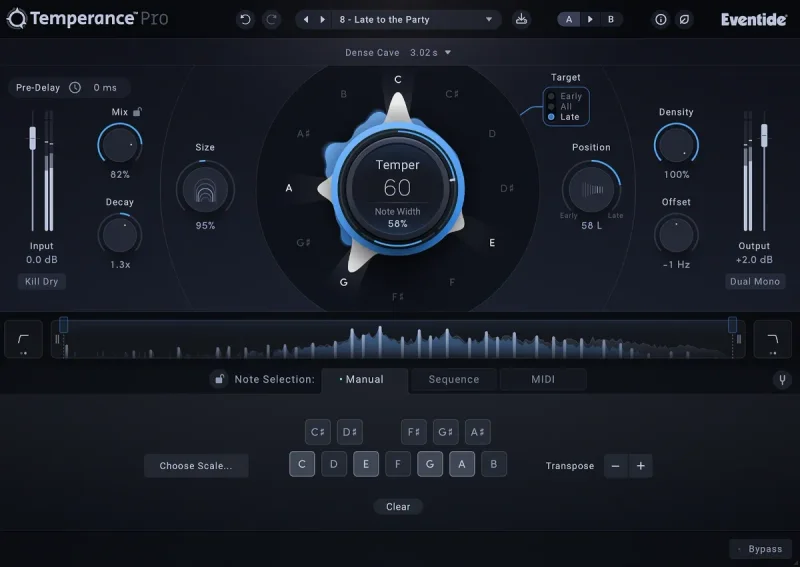
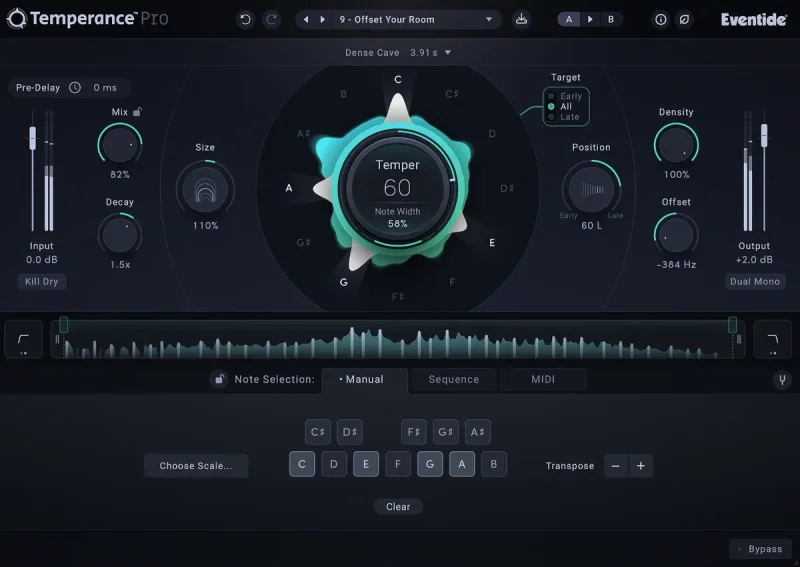
Modal reverb is not algorithmic. It's not convolution either. The concept: model a space as thousands of independent resonators, each tunable, each controllable in real-time. Temperance Pro gives you hands-on access to that system across 29 spaces, from intimate rooms to experimental synthetic environments built specifically to show the technology at its limit.
Lite gave you a window into that world. Pro opens the door fully. The expanded controls include Temper, Range, Target Select, Note Width, Density, Offset, and Position. Those aren't cosmetic additions. They change how the reverb responds to pitch, time, and harmonic content at a fundamental level.
The latency fix is the most practical improvement. Lite had real-time performance problems. Pro runs at under 1ms. That matters if you're using reverb while tracking vocals or running a live setup. You stop working around it.
Eventide used patented machine learning to convert algorithmic and convolution spaces into the modal domain. The 29 spaces include original designs and a handful created by acoustics pioneer Ralph Kesseler. The preset library runs to 60-plus patches, including 11 tutorial presets that actually teach you how the controls interact.
Who Qualifies for This Upgrade
You need to have claimed the free Temperance Lite to access the crossgrade price. That's the qualifying condition. If you skipped Lite or never activated it, the standard purchase path is the only route in.
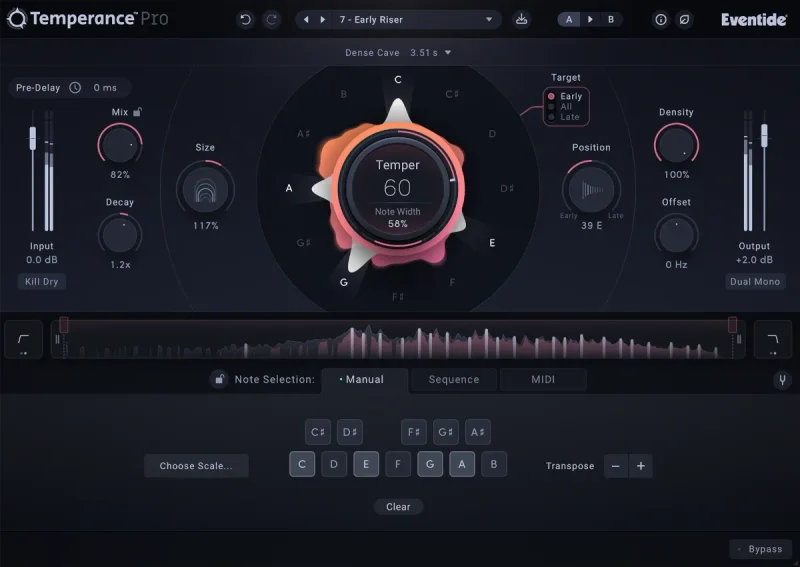
The plugin page is direct about this. No Lite claim, no upgrade pricing. So if you're reading this before grabbing Lite: go claim it first, then come back. The crossgrade saves you money and the upgrade pricing at $179 reflects that you're already in the Eventide ecosystem.
The Value Case
The crossgrade gets you 29 spaces, the full sequencer (up to 64 bars of programmable note changes), MIDI control with octave repeat, and the complete set of modal controls that Lite doesn't touch. That's not a point-one update. That's a different product.
The tutorial presets deserve a specific callout. Eleven of them are designed to walk you through the controls, not just demonstrate sounds. For a reverb this different from anything else in your session, that matters. Most complex plugins throw you a PDF. Eventide built the teaching into the preset browser.
The sequencer is where the value case gets interesting for composers. Load Temperance Pro on a pad or a held synth note. Program the note grid to follow your chord progression. The reverb tail changes tonality with the music. That's a creative move, and it's not something your stock algorithmic reverb can fake.
Eco Mode keeps CPU in check during dense sessions, though Eventide doesn't publish a specific CPU figure. Reviewers report it's not a problem in standard use. With 20-plus instances there is no published data, so test a dense session in the trial before relying on it.
At $179, the upgrade is priced fairly for what it delivers. We'd pay it. Hard to argue otherwise when you're getting the sequencer, the full spatial controls, and the latency fix in one shot.
Who Should Skip the Upgrade
Honest answer: if your reverb needs are mostly mixing rather than composing, this is the wrong tool for the main job. Temperance Pro has real character. That character is the point. But character can work against you.
Push Temper hard on a drum bus and you'll smear the transients. Reviewers report this consistently. It's not a dealbreaker for sound design work, but it is a problem if you're reaching for this as your default room send on a full mix.
High Temper settings at loud send levels can turn harsh. It's not subtle. Your room send slot is better filled by something neutral like CSR Room Reverb for transparent spaces. Temperance Pro works better in parallel with surgical control over send level and Temper amount.
There's also no gate. If you need tight, controlled tails on snare and room sounds, you'll be reaching for an external gate in the signal chain every time. Annoying for a reverb this capable in other respects.
And if you're new to reverb in general, start somewhere else. This is not a "fire it up and it sounds good" plugin. The learning curve is steeper than a traditional reverb, which makes it a poor first pick for a producer just building a plugin folder.
Three Moments Where It Earns Its Keep
Put it on a sustained string pad. Set the Sequencer to follow a four-bar chord progression. Push Note Width to 70%. The reverb tail shifts tonality as the chords change, creating movement inside the space itself. That's the moment you'll love this plugin.
Try it on a vocal with MIDI mode active. Connect a controller and tap notes in real-time during a performance. The resonant frequencies in the reverb shift under your hands. It's a satisfying way to build tension in a live arrangement or a live studio take.
Use the Offset control on a drum room send, shifted up about 200Hz from the default centre. The space takes on a specific frequency personality that sits above the kick and below the overheads. Dial it wrong and it clutters. Dial it right and it solves a frequency conflict without touching your EQ. Check the Density control at the same time: pulling it below 50% fragments the room sound into something more lo-fi and intentional. Compare this approach to Kleverb's room algorithms to see how different two room tools can feel in the same context.
How It Compares to the Rest of Your Reverb Folder
If you want a spring verb with real character, Eventide Spring is their other strong plugin this year. Different technology, different vibe, and it doesn't ask the same things of you musically.
For purely creative, character-heavy reverb with a different aesthetic, Aberrant DSP Lair earns a serious look. Where Temperance Pro is musical and structured, Lair goes darker and stranger.
If you need a transparent, detailed room reverb that behaves on every source, Clearmountain's Spaces is the reference point. That's the opposite of what Temperance Pro is doing, but both have a place.
The Verdict
Temperance Pro is a brilliant, frustrating, genuinely clever plugin that does things no other reverb in your folder does. The upgrade from Lite is worth it, clearly. The latency fix alone changes how you can use it. The sequencer and the full modal control set make it a composition tool, not just a mixer's utility.
It's not for every session. It's not a transparent mix verb. It will cause problems on drums if you push it. But in the right context, it's the reverb you'll wish you had earlier.
Upgrade if you claimed Lite and you work in sound design, composition, or ambient production. The crossgrade at $179 is a fair ask for what you're receiving.
Specs & Technical Details
| Developer | Eventide |
| Price | $179 |
| Plugin Format | VST3 / AU / AAX |
| OS Support | Mac / Windows |
| Activation | N/A |
| Latency | Under 1ms |
| Reverb Spaces | 29 |
| Presets | 60+ including 11 tutorial presets |
| Sequencer | Up to 64 bars |
| CPU Usage | Light to moderate (Eco Mode available) |
| Trial Available | N/A |
| Version Reviewed | N/A |
Score Breakdown
| Category | Score | Notes |
|---|---|---|
| Sound Quality | 4.5/5 | Modal approach is distinctive and musical; can get harsh if overdriven on sends |
| Value for Money | 4.5/5 | Crossgrade price is fair for the jump from Lite; full price harder to call without trial |
| Ease of Use | 3.5/5 | Steeper learning curve than any standard algorithmic reverb; tutorial presets help |
| Features | 4.5/5 | Sequencer, MIDI control, 29 spaces, modal controls; missing a gate for tail control |
| CPU Efficiency | 4.0/5 | Eco Mode helps; no published CPU figure, but single-instance use is reported as clean |
| Overall | 4.4/5 | Best modal reverb available for composers and sound designers; wrong tool for transparent mixing |
Related reviews: Lair
Frequently Asked Questions
Do I need Temperance Lite to buy the upgrade?
Yes. You must have already claimed the free Temperance Lite to qualify for the crossgrade pricing. If you never activated Lite, the standard purchase path is your only option. Check which version you have in your Eventide account before purchasing.
Can Temperance Pro be used as a standard mix reverb on any source?
It works on many sources, but it's not a neutral, transparent reverb. It has musical character by design. On drums with Temper pushed hard, reviewers report transient smearing. For a transparent room verb in your mix template, you'll want something alongside it, not instead of it.
What is modal reverb and why does it matter?
Modal reverb models a space as thousands of independent resonators, each tuned to a specific frequency, rather than using impulse responses or traditional algorithms. It lets you adjust the tuning and decay of individual resonant frequencies in real-time. The result is a reverb that can respond to musical pitch and structure in ways a standard algorithmic reverb can't.
Is the built-in sequencer difficult to use?
It has a learning curve, like most of Temperance Pro's deeper controls. The 11 tutorial presets in the browser cover the sequencer specifically and are worth working through before programming your own. Once it clicks, the sequencer is one of the most satisfying ways to add movement to a held note or pad in a full production.