
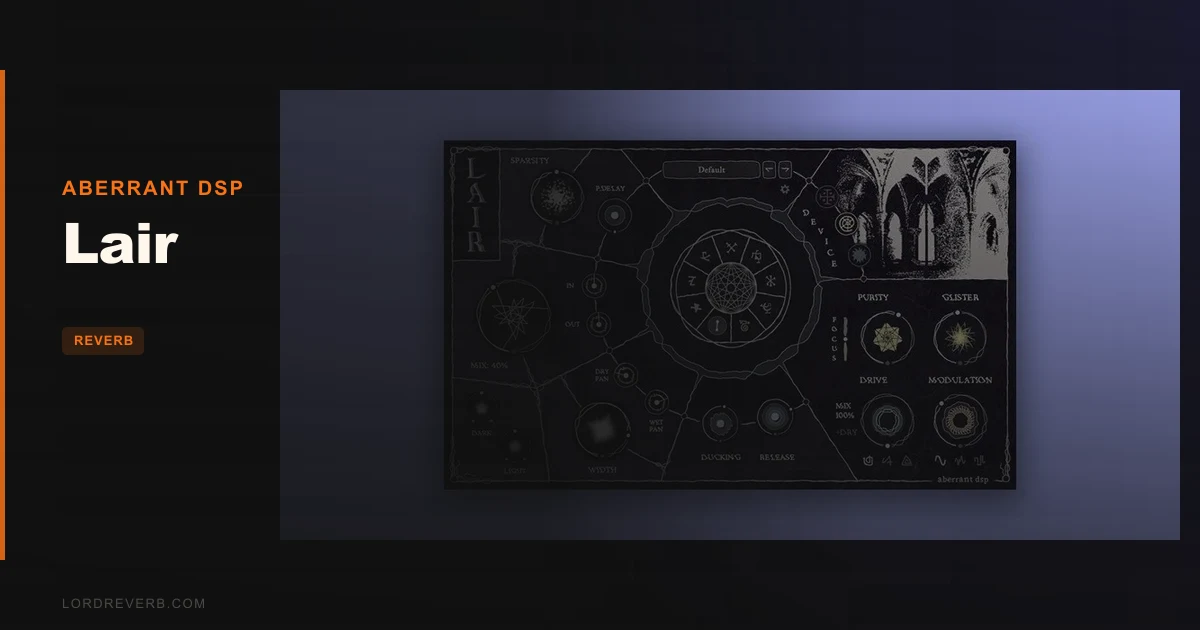
Most reverb plugins give you space. A room, a hall, a plate. You place your vocal in a believable acoustic environment and move on. The frustration sets in the moment you want something that doesn't sound like a place that exists. Something corroded, something haunted, something that sounds like a memory rather than a room. Standard reverbs either force you into a naturalistic space or push you into cheap lo-fi gimmicks. There's rarely a middle ground built for serious sonic weirdness. Lair, by Aberrant DSP, is exactly that middle ground, priced at $36. It's built for producers and sound designers who find normal reverb too polite.
The Problem Lair Exists to Solve
Here's the gap: creative reverb options tend to split into two camps. You've got the pristine algorithmic or convolution reverbs that sound brilliant but reward subtlety. Then you've got the deliberately broken, lo-fi options that commit hard to aesthetic but fall apart in a serious mix.
Lair sits between them. It's not trying to be Valhalla DSP. It's not chasing the same plate emulation that Eventide does so well. It wants to give you reverb that has narrative. Corroded spring character, metallic shimmer, unstable portal-like decay. Whether that reads as a strength or a liability depends entirely on what you're making.
If you're bouncing pop or country records, Lair is probably the wrong tool. If you're producing electronic music, film scoring, ambient, or anything where the reverb itself is part of the composition, this is the right conversation.
How Lair Actually Performs
The three modes are called Artifact, Mirror, and Rift. They're not just name variants of the same algorithm. Each behaves differently in ways that matter in the signal chain.
Artifact is the spring-adjacent mode. We ran a dry synth pad through it with Volatility dialled up to roughly 70%. The reverb time started shifting unpredictably, with a Width control spreading those variations across the stereo field. It didn't sound like a spring tank. It sounded like a spring tank left running in a room that kept changing size. Brilliant for unsettling texture. Annoying if you need consistency across a bus.
Mirror is harder to place. Aberrant describe it as "a steel plate in purgatory," which is either poetic or unhelpful depending on your patience. In practice, it's metallic and shimmering, somewhere between a plate and a resonator. The Purity control strips back the reverb to its core harmonic content, and the Glister modifier adds pitched-up harmonics that can go from subtle shimmer to outright chaos. We used it on a guitar arp at a slow decay setting, and the result was somewhere between an plate reverb comparison and a granular processor. Satisfying to dial in. Takes patience.
Rift is the strangest of the three. It pulls resonances from the reverb tail using the Attunement control, which adjusts the harmonic shade of those resonances. The Instability modifier dissolves the tail progressively into something that reviewers keep describing as "abyssal." That's accurate. Push Instability past 60% and the reverb tail loses its identity entirely. It becomes texture. Whether that's useful or just indulgent is your call.
Global controls include Mix, overall Reverberation, Sparsity, and Pre-Delay. There's a Drive unit with three distortion flavours. A modulation system with three waveform options for movement from subtle to sea-sick. Tone controls for Darkness and Lightness, stereo width for both dry and wet signals independently, and a dynamic ducking section with adjustable release. That's a lot of shaping built into one plugin, and it does reduce how much you need in your reverb signal chain setup.
CPU load is unconfirmed in Aberrant's documentation. Given the modulation, drive, and three distinct reverb engines, we'd treat it as medium-to-heavy until proven otherwise. Don't drop ten instances on a session without checking your meter first.
Strengths and Weaknesses
The strengths are real. Each reverb mode is genuinely distinct, not just a reskin of the same algorithm with different presets. The modifier system per device gives you two dedicated special effects per mode, which is clever design. You're not hunting through submenus.
The 77 factory presets do actual work. They map the plugin's range honestly. Load a few and you'll understand within minutes what Lair can and can't do. That saves time.
The weaknesses are just as real. The lore-forward naming is a deliberate aesthetic choice, and we respect it, but calling a decay control "Instability" and a harmonic resonance control "Attunement" adds friction. Experienced engineers will adapt. Newer producers may spend time confused rather than creating.
There's no clean, naturalistic room mode. If you need a reverb that sounds like a real space, Lair isn't it. Check out CSR Room Reverb for natural spaces instead. Lair is for when reality is an optional starting point, not a constraint.
We also wish the modulation depth had more defined labelling. "Sea-sick delirium" is evocative. A percentage indicator is more useful when you're trying to recall a setting six months later.
Value for the Price
At $36, Lair sits in the impulse-buy zone for most producers. That's the right price for what it is. You're not getting a Swiss Army knife reverb that covers every session. You're getting a specialised tool with a very specific sonic character.
For ambient producers, sound designers, or electronic artists who keep reaching for the same Valhalla preset and wishing it was stranger: the price is absolutely justified. For everyone else, spend the money on something that covers more ground. Lair earns its cost if you know what you're buying.
Who Should (and Shouldn't) Buy This
- ✅ Buy if you produce ambient, experimental electronic, or film score and want reverb that contributes musically rather than just placing sounds in a room.
- ✅ Buy if you're a sound designer who needs genuinely alien texture without routing through five separate plugins.
- ✅ Buy if you're bored of your current creative reverb options and want something that rewards exploration at $36.
- ❌ Skip if you need a naturalistic room or hall reverb for tracking, mixing pop, or acoustic genres. Check Clearmountain's Spaces for that job instead.
- ❌ Skip if you want fast, low-friction mixing. Lair rewards patience, not speed.
- ❌ Skip if you're a beginner looking for a general-purpose reverb to learn on. Start with something that teaches you how reverb works before you throw Instability at it.
Specs & Technical Details
| Developer | Aberrant DSP |
| Price | $36 |
| Plugin Format | VST3 / AU / AAX (64-bit) |
| OS Support | Windows 10 or later / macOS 10.13 High Sierra through macOS 14 Sonoma (Intel & Apple Silicon) |
| Activation | N/A |
| CPU Usage | N/A (expect medium-to-heavy based on feature set) |
| Trial Available | N/A |
| Version Reviewed | N/A |
Score Breakdown
| Category | Score | Notes |
|---|---|---|
| Sound Quality | 4.5/5 | Three modes with genuine sonic identity; Rift and Mirror are unlike anything else at this price |
| Value for Money | 4.0/5 | The $36 price point makes the risk low; high reward for the right producer |
| Ease of Use | 3.5/5 | Lore-forward naming adds friction; the modifier system is clever but takes time to learn |
| Features | 4.5/5 | Drive, modulation, ducking, independent stereo width, 77 presets: genuinely packed |
| CPU Efficiency | 3.5/5 | Unconfirmed, but the feature set suggests this isn't a lightweight plugin |
| Overall | 4.2/5 | A specialist creative reverb that earns its place on the right producer's hard drive |
Alternatives to Consider
If Lair's character is too far from your workflow, here are the honest alternatives.
Valhalla DSP (Shimmer, Supermassive): More controlled creative reverb with lower CPU overhead. The Shimmer algorithm covers some of the same pitch-harmonic territory as Lair's Glister modifier, but with less chaos. Good if you want unusual sounds without the steep learning curve.
Eventide Spring: If Artifact's spring-like character is what caught your attention, Eventide's tank reverb emulation is more focused and more controllable. It won't do the alien stuff Lair does, but it'll do the spring stuff better.
Klevgrand Kleverb: If you need a general-purpose algorithmic reverb that covers room, hall, plate, and chamber without creative detours, Kleverb is a cleaner, faster option at a comparable price.
None of those do what Lair does. That's the point. If what Lair does is what you need, there's no close substitute.
Buy it if you make music that lives in strange spaces. Skip it if your clients need reverb that sounds like reverb. Lair doesn't hide what it is, and at $36, it doesn't need to.
Related reviews: Equinox Crossgrade from Stratus 3D or Symphony 3D · Can the HoRNet Molla Review Justify Going Free in 2026?
Frequently Asked Questions
Is Lair suitable for mixing vocals on mainstream pop or RnB records?
Probably not as a primary reverb. Lair's three modes are built for character and texture, not for the clean, controlled space that mainstream vocal production needs. If you're chasing a subtle room or a transparent plate for a vocal, you'll fight the plugin the whole time. Use it as a parallel creative send if you want a touch of its character, but don't make it your main vocal reverb on a pop session.
What is the Sparsity control in Lair?
Sparsity is a global control that affects the density of the reverb tail. Higher Sparsity thins the reverb out, creating more space between reflections. Lower settings produce a denser, more continuous wash. It interacts differently with each of the three modes, so it's worth testing per device rather than setting it once and leaving it.
Does Lair work on Apple Silicon Macs natively?
Yes. The plugin supports macOS 10.13 through macOS 14 Sonoma on both Intel and Apple Silicon architectures. AU, VST3, and AAX formats are all available on Mac. There's no Rosetta workaround needed on M-series machines.
How does Lair's dynamic ducking work?
The dynamic ducking section reduces the reverb's wet signal when the dry input is active, then releases back to full wet when the signal drops. The release time is adjustable. It's the same principle as a sidechain compressor on your reverb bus, but built in natively. This keeps the reverb from drowning the source during busy passages, which is frustrating to fix manually in a dense mix.