LAYER IT lands somewhere between a dedicated drum layering tool and a lightweight sampler, and if you're comparing it to stacking samples manually in your DAW or using a general-purpose sampler like Kontakt or Battery, this review is going to tell you it's faster than both for one very specific job.
LAYER IT by Diginoiz is a VST sampler built for one thing: combining multiple audio files into a single drum or percussion one-shot, shaping each layer independently, and bouncing the result as a usable sample. It's currently $99 and it's aimed squarely at producers who've spent too long dragging kick samples onto separate tracks, nudging them a few milliseconds apart, and bouncing a messy bus. This review is for hip-hop, trap, and cinematic producers who design their own drums. If you're happy with preset kits, look elsewhere.
How It Compares Out of the Box
The most natural comparisons here are Battery 4, Slate's Trigger 2, and just doing it manually in Ableton with a drum rack. Battery handles layering, sure, but it's a full sampler with a complex interface built around kit building. Slate Trigger 2 is built for live drum replacement. Neither is purpose-built for what LAYER IT does.
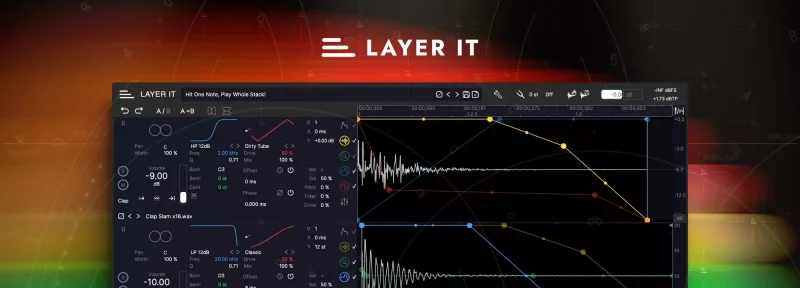
Open LAYER IT and the interface is immediately readable. Samples display as stacked waveforms, all triggered by a single MIDI note. You can see every layer's timing offset visually rather than guessing at millisecond nudges. That alone saves time on a first session. The included content is 1,300 samples and 230 presets in the full version. That's a reasonable starting library, not a jaw-dropping one.
First impression: the workflow makes sense. The focus is tight. That's a good sign.
Performance Deep Dive
We loaded six layers of kick samples simultaneously. A sub sine at the bottom, two transient-heavy top layers, one click, one room tail, one distorted body. LAYER IT handles all six without breaking a sweat at standard sample rates. CPU draw stayed modest through our sessions on an M2 MacBook Pro running Logic Pro.
The oversampling goes up to 16x, which matters when you're pitching layers up or down to tune a sub. At 16x the pitch-shifted sub sat noticeably cleaner with less aliasing than processing the same sample through Battery at default settings. We cut 3dB at 200Hz on the boxy layer using the per-layer EQ, rolled off below 60Hz on the click layer, and got a tight result fast.
The multi-stage envelope on each layer covers gain, pitch, filter cutoff, and distortion amount. Automating pitch in the envelope gives you that classic transient snap on a 808 head. Attack set to 0ms, decay around 40ms, and you hear the pitch sweep drop cleanly without artifacts. That's satisfying to dial in.
We tested FLAC and OGG imports alongside WAV. All loaded without issues. Six format support is genuinely useful for producers pulling sounds from different sources.
Where It Wins
The visual layering is clever. Stacking waveforms and dragging timing offsets visually rather than typing millisecond values is faster than any workflow we've built in a drum rack. You see phase relationships before you hear them, which cuts troubleshooting time.
Per-layer distortion shaping is underrated here. Most samplers give you a single distortion insert across the whole output. Running mild saturation on only the transient layer while keeping the sub clean is something you'd need a routing workaround to do in Battery or Kontakt. LAYER IT makes it a 10-second job.
The drag-and-drop export is brilliant for producers building sample packs or custom drum kits. You design the hit, drag it straight into your DAW or file browser, and it's done. No bounce menu. No file naming dialog. That kind of friction removal adds up across a session.
6 filter types with per-layer assignment gives you enough tonal shaping that you rarely need to reach for a separate EQ plugin for basic layering work.
Where the Competition Wins
Honesty: Battery 4 wins on depth. If you need complex round-robin, velocity layering across a whole kit, and deep modulation routing, LAYER IT's 16-layer maximum and single-note focus will frustrate you.
The Lite version is a real problem. Fifty samples, 50 presets, and a hard cap of 2 layers tells you almost nothing about what the full product does. Worse, you can't import your own samples in Lite. That's annoying because the thing most producers want to test first is whether LAYER IT handles their own kick sounds well. You can't find that out without paying, which feels like a missed opportunity. We wish Diginoiz had made sample import available in Lite with the layer cap in place instead.
Battery also wins on integration with kit-building workflows. If you're designing full kits rather than individual hits, Battery and similar full samplers still hold the advantage. LAYER IT isn't trying to replace them. But it should be honest about that.
Who Should Buy Which
✅ Buy if you spend real time designing individual drum hits from multiple source samples and hate the manual nudge-and-bounce method.
✅ Buy if you produce hip-hop, trap, or cinematic music where the kick and snare design is part of your sound identity.
✅ Buy if the drag-and-drop export workflow fits how you build sample libraries or deliver custom drum packs.
❌ Skip if you need full kit management, velocity switching, or round-robin triggering. LAYER IT isn't that.
❌ Skip if you want to test with your own samples before committing. The Lite version blocks that. Read our LAYER IT Lite breakdown first to see if the free version tells you enough.
❌ Skip if you're primarily a live drum replacement producer. BFD Player Expansion and dedicated replacement tools will serve you better.
Score Breakdown
| Category | Score | Notes |
|---|---|---|
| Sound Quality | 4.0/5 | 16x oversampling keeps pitched layers clean; per-layer processing chain is genuinely useful |
| Value for Money | 3.5/5 | At the sale price it feels fair, but the regular price is a harder sell without a discount. |
| Ease of Use | 4.0/5 | Visual waveform stacking is intuitive from the first session |
| Features | 3.5/5 | Deep per-layer control, but 16-layer cap and no kit management limit the ceiling |
| CPU Efficiency | 4.0/5 | Stayed light across six-layer builds on M2 Mac |
| Overall | 3.9/5 | Excellent at its specific job; too focused to replace a full sampler |
Alternatives to Consider
Native Instruments Battery 4 is the obvious full-sampler alternative. It handles kit building, velocity layers, and complex routing that LAYER IT can't touch. If you need all of that, Battery wins. It costs more and does more.
Slate Digital Trigger 2 if your use case is live drum replacement rather than sound design. Different tool, different job, but worth naming because producers sometimes confuse the two workflows.
Robotic Bean Portatron sits in adjacent territory for lo-fi and textural one-shot design. Our Portatron review covers whether that workflow appeals to you. Also worth a look: how vocal layer tools like Duets handle stacking if your layering needs extend beyond drums.
If you're still building your sampler plugin shortlist, our drum machine sampler guide covers the full landscape.
On sale, LAYER IT is worth it for producers who design drum hits from scratch and hate the manual DAW workaround. If that's 20% of your workflow, the price makes sense. If it's 5%, it doesn't. The one producer who should wait: anyone on the fence who wants to test their own samples first. The Lite version won't let you do that, and that's a legitimate frustration that shouldn't push you into a $99 blind buy.
LAYER IT does one thing well. Know whether that one thing is your thing before you commit.
Frequently Asked Questions
Is LAYER IT worth it at the regular $99 price?
At $99 it's a harder sell. The tool is focused and well-built, but the 16-layer cap and lack of kit management mean it's a specialist plugin, not a daily driver sampler. We'd wait for a sale. The sale price makes the value case much stronger for producers who design custom one-shots regularly.
Can you import your own samples into LAYER IT?
Yes, in the full version. You can drag in WAV, MP3, WMA, AIFF, FLAC, and OGG files. The Lite (free) version does not allow sample import, which is our biggest complaint about how Diginoiz has structured the trial experience. You genuinely can't evaluate the tool's core workflow without buying it first.
How does LAYER IT handle phase issues between layers?
The visual waveform stacking lets you see timing offsets between layers before committing to a sound. You drag layers left or right to adjust their position relative to the trigger point. It doesn't have an automatic phase correlation meter, so you're still using your ears to judge the result. That said, the visual feedback makes the process faster than nudging clips in a DAW.
What's the difference between LAYER IT Lite and the full version?
Lite gives you 50 samples, 50 presets, a maximum of 2 layers, 2 filter types, and 2 distortion types. No sample import. The full version gives you 1,300 samples, 230 presets, up to 16 layers, 6 filter types, full sample import, and oversampling up to 16x. The Lite version is useful for getting familiar with the interface, but it doesn't represent the full workflow at all.