The honest question about LAYER IT Lite isn't whether it works. It's whether a 2-layer cap and a locked sample import feature make it worth installing at all. Short answer: barely, and only in one specific situation.
LAYER IT Lite is a free-tier drum layering plugin from Diginoiz, released in March 2026. It runs as VST3, AU, and standalone (AAX is listed as coming soon). You get 50 samples, 50 presets, and a maximum of 2 simultaneous layers. That's the entire sandbox.
It's built for one type of person: the curious producer who has heard about drum layering, hasn't tried a dedicated tool for it yet, and wants to feel the workflow before spending money. If that's you, read on. If you're already layering drums regularly, skip to the alternatives section.
Does LAYER IT Lite Actually Do What It Promises?
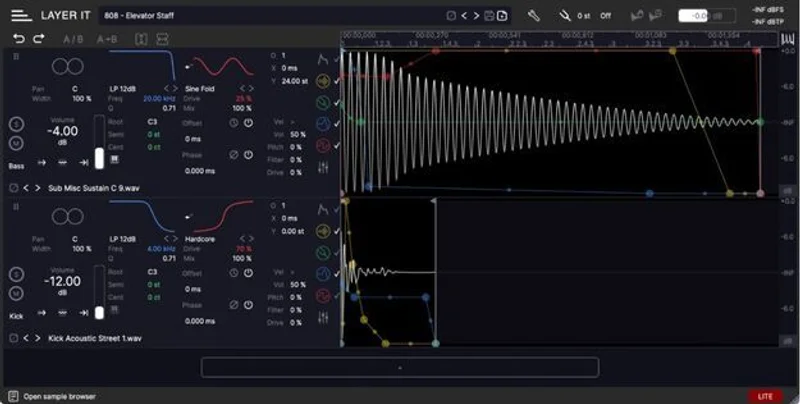
Diginoiz bills this as a "consolidated drum layering workflow" combining visual waveform feedback with MIDI control. That part is true and done well.
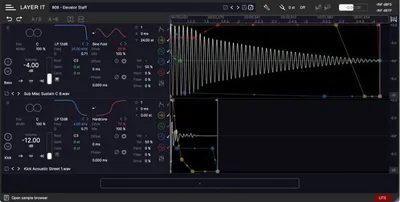
Load two samples, and the waveforms sit side by side on screen. You can see transient alignment at a glance instead of guessing. Nudge timing, adjust levels, flip phase. It takes about 90 seconds to understand the interface from cold.
We loaded a punchy 808 kick and a snappy acoustic top, aligned the transients visually, and had a working layered kick in under two minutes. The workflow is genuinely satisfying. No menu-diving, no routing headaches.
Where it falls apart is everything after that first click of success. The 2-layer ceiling means you can't add a sub tone, a room hit, or a click layer. That's not minimalism. That's an amputation of the tool's core function.
Where LAYER IT Lite Shines
The visual waveform display is the best thing here. Most producers layer drums in a drum rack, lining up clips blind and trusting their ears. LAYER IT shows you what you're doing. We caught a 12ms phase issue between samples in seconds that we would have spent ten minutes chasing by ear in Ableton's Drum Rack.
The 50 included samples are well-curated. No filler. Kicks with distinct characters: tight and transient-heavy, subby and long, dry and roomy. You can build 50 genuinely different sounds from the preset bank without touching anything manually.
CPU load is light. Running four instances across a session, we saw no measurable hit. The standalone app is a bonus: you can audition layering ideas away from your DAW without opening a project.
The 2 filter types (we'd guess low-pass and high-pass based on the full version's architecture) and 2 distortion types give you basic shaping per layer. Enough to brighten a top or thicken a sub. Not enough to do serious sound design.
Where LAYER IT Lite Falls Short
No user sample import. That's the one that stings. You cannot bring your own kicks, your own breaks, your own one-shots. You're working exclusively from the 50 bundled samples. In 2026, this is a frustrating choice that turns a creative tool into a demo.
Two layers is not drum layering. It's drum layering training wheels. The full version supports 16 layers. Real drum design, the kind where you're stacking a transient click, a mid body, a sub tone, and a room ambience, is impossible here.
No EQ. No A/B comparison. No random sample function. The full version has all three. Their absence in Lite isn't surprising, but combined with the sample lock, it means you're working with one hand behind your back before the session even starts.
AAX support is listed as "coming soon." If you're on Pro Tools, you're stuck with standalone use for now. Annoying.
How It Stacks Up Against the Competition
The obvious comparison is Ableton's Drum Rack with manual layering. Drum Rack lets you import anything, layer unlimited samples, apply per-layer effects chains, and route to individual buses. It requires more setup. LAYER IT Lite is faster to start, slower to finish.
For a dedicated layering plugin, Devious Machines Stack is the name that comes up most. Unlimited layers, user sample import, macro controls. It costs money, but it replaces the "coming soon" and "not included" notices with actual features. If your budget allows one paid tool, Stack does more.
LAYER IT Lite's unique edge is the visual waveform alignment. Neither Drum Rack nor Stack makes transient alignment this visible. That's a real differentiator. It just doesn't outweigh the 2-layer cap for anyone doing real work.
For more context on how drum layering tools fit into a broader production setup, see our complete guide to dru m machine sampler plugins.
Is the Price Fair?
LAYER IT Lite is free. At free, the value calculation changes. You're not deciding whether to spend money. You're deciding whether to spend disk space and twenty minutes of your time.
On that basis: yes, it's worth installing once to feel the visual waveform workflow. No, it won't replace anything in your signal chain.
The full version, check the Diginoiz site for current pricing, jumps to 1,300 samples, 230 presets, 16 layers, 6 filter types, and 18 distortion types. If Lite sells you on the workflow, the upgrade math is straightforward. But Lite itself doesn't solve a production problem you couldn't solve another way.
Score Breakdown
| Category | Score | Notes |
|---|---|---|
| Sound Quality | 3.5/5 | Included samples are well-chosen; output quality depends entirely on those 50 files |
| Value for Money | 3.5/5 | Free, so hard to argue, but it delivers far less than it could |
| Ease of Use | 4.0/5 | Visual waveform workflow is genuinely intuitive and fast to learn |
| Features | 2.0/5 | 2-layer cap, no sample import, no EQ: the feature list reads like a list of what's missing |
| CPU Efficiency | 4.5/5 | No measurable CPU hit across multiple instances |
| Overall | 3.4/5 | A clever idea with a workflow that works, strangled by artificial limits |
Alternatives to Consider
Devious Machines Stack: The professional answer to what LAYER IT Lite gestures toward. Unlimited layers, user sample import, macro control across the stack. If you're serious about drum layering, this is where to spend your money. The current price is shown in the buy box on this page.
Ableton Drum Rack (or equivalent DAW rack): Free if you already own Ableton. Unlimited layers, full effects chains, MIDI routing. Slower to set up than LAYER IT. No visual transient alignment. But it works on your samples, not someone else's library.
BFD Player: If your goal is quality acoustic drum sounds rather than layering control, BFD's free player with expansion packs offers a different approach entirely. See our review of the BFD Player Expansion Vintage Rock for a sense of what that ecosystem sounds like.
For producers exploring sampler-based workflows more broadly, our Portatron Preset Pack SonalSampler review covers a different angle on preset-driven sample tools.
LAYER IT Lite earns its place as a five-minute experiment, not a production tool. Download it, feel the waveform alignment workflow, then either buy the full version or open your drum rack. The version you're looking at right now is a well-built demo with the "demo" label attached to the wrong features.
Free means you've got nothing to lose by trying it. But don't uninstall anything to make room for it.
Frequently Asked Questions
What's the difference between LAYER IT Lite and the full version?
The gap is wide. Lite gives you 50 samples, 50 presets, 2 layers, 2 filter types, and 2 distortion types. The full version has 1,300 samples, 230 presets, 16 layers, 6 filter types, and 18 distortion types. The full version also adds user sample import, stack export, A/B comparison, an equalizer, and a random sample function. None of those are in Lite.
Can I use my own drum samples in LAYER IT Lite?
No. User sample import is locked to the full version. In Lite, you work exclusively with the 50 bundled samples. This is the single biggest limitation for producers who already have a sample library they want to use.
Does LAYER IT Lite work in Pro Tools?
Not yet. AAX support is listed as coming soon. Right now, Lite runs as VST3, AU, and standalone. If Pro Tools is your primary DAW, you'll need to use the standalone application or wait for the AAX release.
Is LAYER IT Lite worth downloading if I already know how to layer drums?
Probably not as a workflow tool. The 2-layer cap and locked sample import mean it can't replace your current setup. The visual waveform alignment is clever and faster than working by ear, so if that specific feature interests you, spend fifteen minutes with it. Otherwise, the full version or a competing tool will serve you better.