FilterShaper XL is Cableguys' most ambitious filter plugin, and it earns that description by building a dual-filter engine with 60 LFOs, 50 envelope followers, and 20 filter types into a single plugin that costs $49. We were building a tech-house track, a synth bassline sitting stubbornly in the 80-200Hz range, eating up headroom and refusing to breathe. We dropped FilterShaper XL across the bass bus, loaded a pulsing Warm lowpass, drew a simple four-step LFO curve over the cutoff, and the bassline started pumping against the kick in a way that three hours of sidechain compression hadn't managed. That was the moment we stopped treating this as a filter plugin and started treating it as a rhythm tool. It's built for electronic producers, sound designers, and anyone who wants filter movement that sounds like it came out of a synthesizer rather than a DAW automation lane. If you want simple EQ-style filtering, skip this. If you want something closer to a modular patch in a plugin, keep reading.
First Impressions: Two Filters, One Interface, A Lot Going On
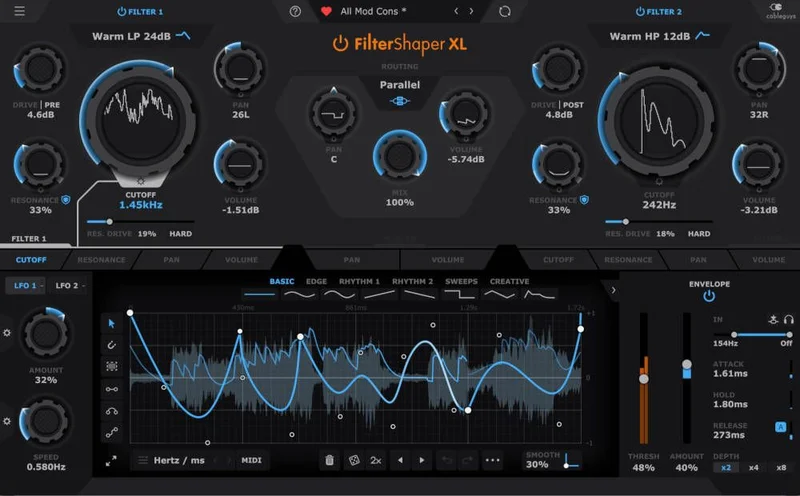
Opening FilterShaper XL for the first time is somewhere between exciting and intimidating. The interface is large, well-organized, and clearly designed by people who use their own software. Two filter stages sit at the top. Below them, the modulation section sprawls across the lower half of the screen: LFO curves, envelope follower controls, speed and amount parameters for each.
The visual design is clean without being sterile. Cableguys have kept their signature approach of making the waveform drawing tool central to the experience, and the LFO editor is genuinely the most legible part of the whole UI.
Where it gets briefly overwhelming is the sheer count of modulation slots. Sixty LFOs and 50 envelope followers sounds like marketing copy until you realize each modulatable parameter gets its own pair. That's not a pool of 60 to share. Each cutoff, each resonance, each volume and pan control has dedicated LFO and envelope follower slots waiting. It's a different mental model than most modulation systems, and it takes about 20 minutes to internalize.
Installation is painless. The Cableguys app handles everything. Native Apple Silicon support is confirmed. AAX loads clean in Pro Tools. VST3 works without drama in Ableton, Logic, and FL Studio.
Getting It Into a Real Workflow
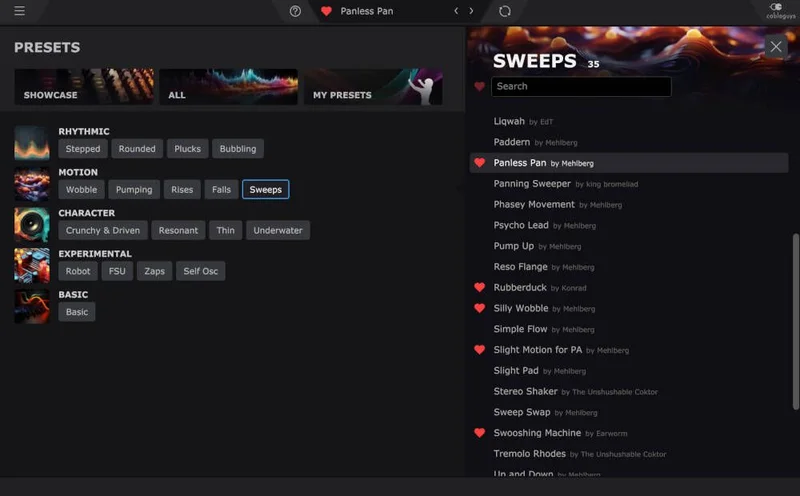
The fastest way into FilterShaper XL is the preset browser. There are 500-plus presets, categorized by style and function. Bass, Drums, Synths, FX, and a few other buckets. The organization is decent. You can find a pulsing filter for a bassline without scrolling for ten minutes.
The frustrating part is that the preset names don't always tell you what filter type is active underneath. You load "Bubbling Bass," it sounds great, and then you want to tweak the character. You need to dig into the filter panel to see whether you're working with a Warm or Clean variant, and what the drive routing looks like. It's not a dealbreaker, but it adds a step when you're trying to dial in a sound quickly under session pressure.
Dropping it across an insert is straightforward. On a send bus, it works equally well. We found the most satisfying use was on individual tracks rather than a mix bus, where the modulation interacts directly with the source material's dynamics rather than a blended signal.
Gain staging matters here. FilterShaper XL responds to input level. The Warm filters, which use internal saturation as part of their character, behave differently at higher input levels. Feed them too hot and the distortion compounds with the drive section in ways that can become muddy fast. Feed them at a sensible level and the saturation stays musical.
The workflow friction shows up most clearly when you start building custom modulation from scratch. The LFO editor is powerful and genuinely easy to draw in, but navigating between parameters to set up coordinated modulation across both filter stages takes time. You're clicking between cutoff, resonance, volume, pan, and then managing both LFO 1 and LFO 2 plus the envelope follower for each. The architecture is logical. It's just a lot of surface area to cover before you hear what you're building.
Once you've internalized the layout, sessions move fast. The second and third time you open the plugin, the modulation matrix makes sense in the way a mixing console makes sense: a lot of channels, but each channel does the same thing.
The Filter Engine: Twenty Types and What They Actually Sound Like
This is the foundation everything else is built on, so it deserves real attention.
Cableguys offers 20 filter types split between two characters: Clean and Warm. Clean filters prioritize precision and transparency. Warm filters use a Sallen-Key-inspired topology with internal saturation baked into the resonance circuit.
The Warm filters are the reason producers who've tried the plugin keep recommending it. They don't just sound different from the Clean variants in volume or brightness. They sound different in texture. There's harmonic content that appears as resonance climbs, a slight thickening in the low-mids that a clean digital filter won't produce. Reviewers have described this as "analogue character," and in this case that's not a vague marketing claim. It's measurable as additional harmonic content above the fundamental at high resonance settings.
The filter types cover the expected shapes: lowpass, highpass, bandpass, notch. But within those shapes, the variations between Clean and Warm versions are distinct enough to change a sound's personality, not just its tone. A Clean lowpass on a synth pad gives you a surgical sweep. The Warm lowpass on the same pad starts feeding back harmonics into the signal as resonance climbs, which sounds closer to a resonant analogue filter being pushed.
Zero-delay feedback algorithms underpin the entire filter engine. This matters because ZDF design eliminates the phase artifacts and stability problems that older filter topologies produce at extreme settings. At high resonance and high modulation speed, older filter designs audibly destabilize. ZDF stays coherent. You can modulate FilterShaper XL's cutoff at audio rates without the filter collapsing into noise, which is a non-trivial technical achievement.
The oversampling of the entire signal path (4x) keeps aliasing artifacts away from the audible frequency range even at extreme modulation speeds. This is why the plugin sounds clean at fast LFO rates where cheaper filter plugins produce digital grit.
Resonance compensation is another detail worth calling out. Many filter designs lose significant low-end energy as resonance increases because the filter's peak at the cutoff frequency consumes headroom that was previously distributed across the spectrum. Cableguys compensate for this, so raising resonance doesn't make your sound thin. The bass stays in the sound as the resonant peak builds above it.
Safe Mode and Resonance: The Feature That Makes Extreme Settings Usable
This is clever, and we don't use that word lightly.
Self-oscillating filters are fun until they blow a speaker, clip a master bus at +18dB, or feedback into a squealing tone that ruins a take. If you've ever cranked resonance on a hardware filter without expecting the result, you know the feeling. It's not fun.
FilterShaper XL includes a Safe mode that sets a ceiling on resonance levels before they reach the threshold of unstable feedback. With Safe mode on, you can push resonance hard without the filter going into full self-oscillation. You get the character and the texture without the danger.
Switch Safe mode off and you get the full self-oscillating behavior. At high resonance, the filter generates its own tone at the cutoff frequency. This is genuinely useful for synthesis-style sound design where you want the filter itself to produce a pitched sound. It's a legitimate creative tool.
The Warm filters add a further variable: Resonance Drive. This is saturation applied inside the resonance circuit specifically, not to the main signal path. As you push Resonance Drive, the resonant peak takes on a gritty, slightly compressed character. Cableguys call this "gritty textures and velvet-smooth resonant peaks," which is accurate. Low Resonance Drive with high resonance sounds smooth and vocal. High Resonance Drive with moderate resonance sounds like a hardware filter being pushed past its design spec. Both are useful.
There's also a Hard mode, which pushes the resonance character further still into something edgier and less predictable. We kept Hard mode in reserve for sound design sessions rather than live performance, because it introduces behavior that's harder to predict at speed.
Drive Stages: Pre-Filter vs Post-Filter and Why the Routing Matters
Each of the two filter stages in FilterShaper XL has its own dedicated drive parameter. This is not a master drive control applied at the output. The drive sits at the filter stage level, and you choose whether it sits before or after the filter in the signal chain.
Pre-filter drive changes the character of the signal entering the filter. More harmonics go into the filter, which then shapes a richer, more complex waveform. The result is a denser, more aggressive filtered tone. On a clean synth lead, pre-filter drive starts adding edge before the filter shapes it.
Post-filter drive applies distortion to the already-filtered signal. The filter shapes the waveform first, then the drive processes whatever's left. This preserves the filter's clean frequency shaping but adds saturation on top of the result. On a lowpass filter with the cutoff around 800Hz, post-filter drive adds harmonic content above that point without muddying the filter's frequency contour.
We ran a micro-story worth sharing here. We had a drum bus with a kick that needed more attack without more volume. We placed FilterShaper XL across it, ran a Warm bandpass filter centered around 3kHz, set drive pre-filter at about 60%, then used a short envelope follower tied to the kick's transient to briefly open the bandpass on each hit. The kick started punching through the mix without us touching the fader. The drive pre-filter added the harmonic bite we needed. Post-filter would have added saturation to the already-filtered tone, which was duller.
The point is that pre and post are genuinely different tools, not just different positions for the same effect. Producers who've used hardware filter modules with drive stages built in will recognize the distinction immediately.
The Modulation Framework: Sixty LFOs, Fifty Envelope Followers
This is the most ambitious part of FilterShaper XL. It's also the part that takes the longest to fully understand.
Here's the architecture. Every modulatable parameter gets its own LFO slot and its own envelope follower slot. So the cutoff of Filter 1 has an LFO and an envelope follower. The resonance of Filter 1 has an LFO and an envelope follower. Volume has an LFO and an envelope follower. Pan has an LFO and an envelope follower. Then Filter 2 gets the same set. That's where the numbers come from: 60 LFOs and 50 envelope followers isn't a pool of free-floating modulators you assign. It's a comprehensive per-parameter modulation system.
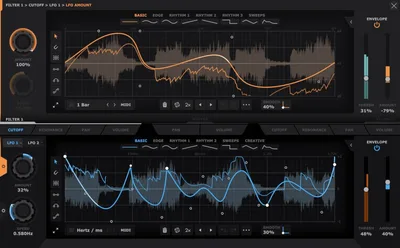
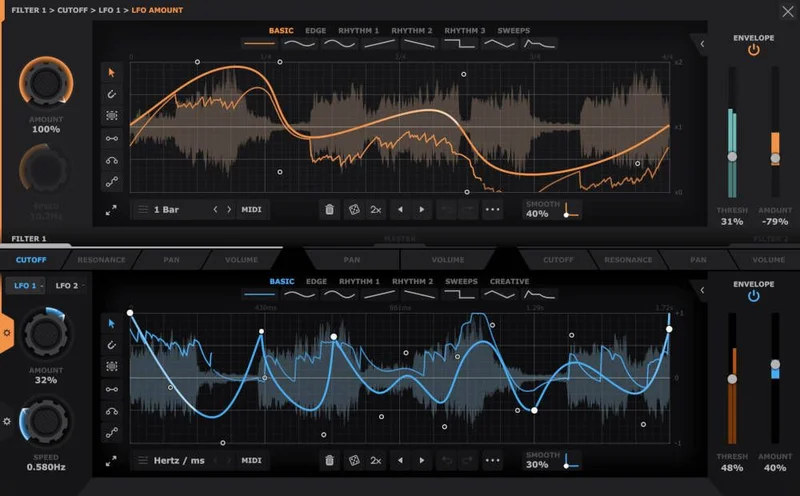
On top of this, each LFO slot has two additional LFOs layered underneath it: a Speed LFO that modulates the rate of the main LFO over time, and an Amount LFO that modulates the depth of the main LFO's effect.
The Speed LFO is where things get genuinely interesting. You draw a shape in the Speed LFO, and your main LFO speeds up and slows down according to that shape over time. A main LFO running a smooth sine wave over cutoff, with a Speed LFO set to a slow ramp, will gradually accelerate through the sweep. Over four bars, the filter movement goes from a slow, subtle pulse to a rapid, intense flutter. That kind of evolving motion is extremely difficult to achieve with automation in a DAW and impossible to achieve with a fixed-rate LFO.
The Amount LFO does the same for depth. Your main LFO sweeps cutoff between 200Hz and 2kHz. The Amount LFO causes that sweep range to contract and expand over time: sometimes a barely perceptible movement, sometimes the full range. Combined with the Speed LFO, you can create filter modulation that never quite repeats itself over a long period without needing to program every variation manually.
Reviewers have called this "incredibly complex" and noted the learning curve is real. We agree, and we think existing coverage undersells how steep it is. The first session with the modulation matrix, you'll likely build something simpler than you intended and then spend time reverse-engineering a preset to understand how Cableguys intended the system to be used. The second session, it starts clicking. By the third session, you're drawing Speed LFOs for main LFOs and feeling clever about it.
The payoff is modulation depth that goes well beyond what a standard LFO section offers. If you've patched a modular synthesizer and enjoyed the moment when two modulation sources interact unpredictably, the Speed and Amount LFO layers give you something similar inside a plugin with the stability of a DAW environment.
Drawing Your Own LFO Shapes: The Editor in Practice
Cableguys built their reputation on LFO drawing tools. The approach in FilterShaper XL is their most developed version of it.
The LFO editor is a grid with a drawable waveform area. You click and drag to draw shapes. Hold a modifier to snap to grid divisions. Click individual nodes to adjust curve handles between straight lines and smooth curves. Double-click a node to switch between curve types.
In practice, drawing a four-step staircase pattern takes about ten seconds. Drawing a smooth sweep with a sharp attack and gradual decay takes maybe twenty. The resolution is high enough to draw convincing analogue-style curves that aren't perfectly geometric.
You can also select from preset LFO shapes: sine, triangle, saw, square, and several others. These act as starting points you then modify rather than fixed options you're locked into.
The editor handles rhythmic quantization, so your LFO shape syncs to the project tempo. You set the LFO length in bars and beats, and the shape repeats at tempo. A one-bar LFO on cutoff gives you one complete filter sweep per bar. A two-beat LFO gives you two sweeps per bar. This is the standard behavior for a synchronized LFO, but the resolution at which Cableguys implement it feels tighter than some competing plugins, where sync drift becomes audible at fast tempo rates.
One limitation worth noting: you can't import external LFO shapes from MIDI or automation data. What you draw is what you get, built from scratch inside the editor. For most use cases this is fine. For producers who work from MIDI performance data and want the LFO to follow a played rhythm rather than a programmed shape, it's a gap.
Envelope Followers: Dynamics-Driven Filtering
Every parameter's envelope follower section tracks the amplitude of the incoming signal and uses that to drive the modulation target. The behavior is configurable: attack sets how fast the follower responds to a rising signal, release sets how fast it responds to a falling one.
The practical applications are extensive. The most common use is cutoff-follows-amplitude: as the source signal gets louder, the filter opens. On a bassline with rhythmic velocity variation, this makes the filter breathe in sync with the performance's dynamics rather than a programmed LFO shape. It sounds more alive than a fixed LFO because it responds to what's actually happening in the audio.
Inverting the envelope follower gives you the opposite: cutoff drops as the signal gets louder. On a synth pad with slow attack, this produces a sound that brightens as it fades, which is an interesting timbral shape for evolving pads and textures.
Envelope following on resonance rather than cutoff produces a different character. As the input signal peaks, the resonance peaks with it. On a snare drum, this means the snare's transient briefly pushes the filter into a higher resonance state before the resonance falls back. The effect is a slight synthetic ring on the transient that doesn't sustain through the tail.
We ran the envelope follower on a vocal send, using it to drive cutoff inversely so the vocal ducked the filter slightly on loud phrases and opened it on quieter ones. The result was a compression-like behavior that preserved the vocal's presence without standard compression artifacts. It's a workaround trick, not a vocal processor, but it showed how far outside conventional filter use the envelope followers push the plugin.
The Dual Filter Topology: What Two Filters Actually Gets You
Having two filter stages in series sounds like "just more filtering." It's not quite that simple.
You can configure the two filters to work in series, running the output of Filter 1 into Filter 2. You can also use them in parallel, blending the filtered and unfiltered signals. Series gives you cumulative filter slopes. Two lowpass filters in series produces a steeper roll-off than either alone, without needing to crank a single filter's slope setting to extremes.
More interestingly, you can run two different filter types in series. A highpass in Filter 1 followed by a lowpass in Filter 2 gives you a bandpass character, but with each boundary independently modulatable. The crossover point shifts as both cutoffs move independently under their own LFO and envelope follower modulation. That's a moving bandpass whose upper and lower boundaries are independently rhythmic. You won't get that from a single bandpass filter type.
Running a Clean filter in one slot and a Warm filter in the other gives you an intermediate character where both textures blend. The Warm filter's saturation adds harmonics, the Clean filter shapes them. It's a specific sound that neither filter type produces alone.
The two drive stages compound this further. Pre-filter drive on Filter 1 feeds a harmonically richer signal into a Warm Filter 1, which then feeds into a Clean Filter 2 with post-filter drive. That signal chain produces a character you'd spend significant time and money replicating with hardware. Inside FilterShaper XL, it's a few button presses.
What It's Genuinely Good At
Rhythmic filter movement is FilterShaper XL's strongest suit. Drawn LFOs synced to tempo produce filter animation that sits locked to the groove in a way that static automation rarely achieves. On electronic drum patterns, basslines, and synth arpeggios, the synchronized modulation makes the filter movement feel like part of the composition rather than an effect applied to it.
The Warm filter character at moderate-to-high resonance is genuinely satisfying to work with. It has personality without being difficult to dial in. The resonance compensation means you can push resonance aggressively without losing low-end, which solves one of the most annoying limitations of digital filters used for bass processing.
The Safe mode resonance ceiling is practically brilliant. We've used self-oscillating filters enough times to understand why Cableguys built it, and the implementation is clean. Safe mode on: extreme resonance settings are contained. Safe mode off: you take responsibility for your speakers.
The 4x oversampling of the full signal path means FilterShaper XL sounds clean at fast modulation rates. Audio-rate cutoff modulation, which some producers use for FM-like timbres, doesn't produce the digital aliasing artifacts you'd hear from a cheaper filter at the same settings.
For FilterShaper 3 owners, the free upgrade is an outstanding decision by Cableguys. It's not common for developers to upgrade a major version at no cost, and it reflects genuine goodwill toward their existing user base.
The Rough Edges
The learning curve for the modulation matrix is steep. Not unworkable, but genuinely steep. The Speed LFO and Amount LFO layers, stacked under the main LFO, require a mental model shift if you're used to standard modulation systems. Budget a full session to learn the plugin before you expect it to serve you under deadline pressure.
CPU usage is undocumented. Cableguys don't publish benchmarks. In our testing, a single instance with modest modulation was fine on a modern machine. Stack several instances with full modulation activity and the 4x oversampling starts showing up in the processor meter. We'd rate it as medium CPU weight per instance, but we're flagging the lack of published data because it means you're guessing until you test your own system.
The preset browser is large but not fast. With 500-plus presets, you want to be able to filter by filter type, not just category. Browsing "Bass" presets gives you a wide net of sounds without telling you which use Warm versus Clean filters or which have heavy drive routing. Auditioning presets takes longer than it should.
VST2 is listed as supported on Mac, but Cableguys' current focus is clearly on VST3, AU, and AAX. If you're running an older host that only accepts VST2, verify compatibility before purchasing. Most modern hosts won't be an issue.
There's no MIDI control mapping documented on the product page. Whether parameters are MIDI-learnable for hardware controller use isn't clearly specified, which is an annoying gap for producers who work with physical knobs.
Who This Is Really For
- ✅ Buy if you produce electronic music and want filter movement that sounds composed rather than automated. The LFO drawing tools and tempo sync make FilterShaper XL genuinely useful for rhythmic filter work in house, techno, drum and bass, and adjacent styles.
- ✅ Buy if you do sound design that requires modular-style interaction between modulation sources. The Speed LFO and Amount LFO layers give you evolving, complex modulation without patching hardware.
- ✅ Buy if you owned FilterShaper 3 and already know the Cableguys LFO workflow. The free upgrade means you get the new filter DSP, AAX support, and expanded modulation for nothing.
- ❌ Skip if you want a simple resonant filter for basic sweeps and EQ-adjacent work. A simpler filter plugin will do that with less complexity and lower CPU overhead.
- ❌ Skip if you're mixing in genres where filter coloration is unwanted. The Warm filters add saturation by design. A clean EQ-style filter for mastering or mixing work isn't what this plugin is built for. The VEQ-HLF does that job better.
- ❌ Skip if you need results fast with zero learning investment. FilterShaper XL rewards time spent learning it, but it won't be immediately intuitive if you've never used a modulation matrix deeper than one LFO per parameter.
Specs & Technical Details
| Spec | Detail |
|---|---|
| Developer | Cableguys |
| Price | $49 |
| Plugin Format | VST2 / VST3 / AU / AAX |
| OS Support | Mac (10.13 or later) / Windows (7, 8, 10, 11, 64-bit only) |
| Apple Silicon | Native support confirmed |
| Activation | Cableguys app (online activation) |
| CPU Usage | Medium (4x oversampling; no official benchmark published) |
| Trial Available | Yes (via Cableguys app) |
| Oversampling | 4x, applied to entire signal path |
| Filter Types | 20 (Clean and Warm variants) |
| LFOs | 60 (plus Speed LFO and Amount LFO per slot) |
| Envelope Followers | 50 |
| Presets | 500+ |
| Version Reviewed | XL (FilterShaper 4 generation) |
Score Breakdown
| Category | Score | Notes |
|---|---|---|
| Sound Quality | 4.5/5 | ZDF engine with 4x oversampling sounds clean at extreme settings; Warm filters have real character |
| Value for Money | 4.5/5 | At intro pricing with a free upgrade for existing owners, the ask is very low for this feature depth |
| Ease of Use | 3.5/5 | LFO drawing tools are brilliant; the full modulation matrix takes real time to learn |
| Features | 4.5/5 | Dual filter, dual drive, 60 LFOs, 50 envelope followers: the feature set is genuinely deep |
| CPU Efficiency | 3.5/5 | Medium-weight per instance; 4x oversampling costs something; no published data to benchmark against |
| Overall | 4.3/5 | A seriously capable filter plugin that rewards time spent learning it, priced well below its ambition |
How FilterShaper XL Fits Into the Cableguys Family
Cableguys build a specific kind of plugin: tools where the modulation system is as important as the core audio processor. FilterShaper XL sits at the top of that approach within their filter offerings, above the now-superseded FilterShaper 3.
The DriveShaper 2 shares the same LFO drawing interface and the same approach to per-parameter modulation. If you've used DriveShaper 2, the FilterShaper XL modulation system will feel immediately familiar. The filter engine is different, but the modulation philosophy is the same family.
Producers who haven't used Cableguys tools before should know that this shared modulation system is Cableguys' core competency. They've been building and refining it across multiple plugins, and FilterShaper XL benefits from that accumulated development. The LFO editor in FilterShaper XL is better than it was in FilterShaper 3, and FilterShaper 3's was already better than most competitors.
Where FilterShaper XL sits in your signal chain relative to other Cableguys tools is worth thinking about. Pairing DriveShaper 2 with FilterShaper XL gives you independent modulated distortion and independent modulated filtering. Running them in series lets you shape the tonal character with drive first, then filter and modulate the result. It's a flexible combination for sound design work.
FilterShaper XL Versus Competing Dual-Filter Plugins
The honest comparison point for FilterShaper XL's filter engine is not stock DAW filters. Those are fine for functional filtering. FilterShaper XL is built for a different purpose: filter movement as composition, not filter as surgical EQ.
FabFilter's tools are a useful reference. FabFilter Saturn 2 is a saturator with multiband filtering built in, not a dedicated filter modulation plugin. It does certain things FilterShaper XL doesn't, including multiband saturation routing. FilterShaper XL does things Saturn 2 doesn't, including the Speed LFO and Amount LFO layering on per-parameter modulation. They're not directly competitive: they serve different primary functions.
The MFilter from MeldaProduction is a closer functional comparison as a dedicated filter plugin. It offers broad filter shapes and modulation options at a competitive price. Where FilterShaper XL wins is in the depth of its LFO drawing tools and the dual-filter topology. Where MFilter wins is in simplicity and CPU footprint.
Stock DAW filters are worth acknowledging here because they're the zero-cost baseline. Ableton's Auto Filter, Logic's AutoFilter, Pro Tools' bundled filters: all of them do basic resonant filtering competently. None of them give you Warm filter character with Sallen-Key-inspired saturation, 4x oversampling of the full signal path, or a Speed LFO modulating the rate of a cutoff LFO. The gap between FilterShaper XL and stock filters is real and measurable in the complexity and character of what you can create. Whether that gap is worth $49 to you depends entirely on how much filter modulation matters in your workflow.
If filter movement is central to your production style, FilterShaper XL is one of the most capable tools available at this price. If filter modulation is something you do occasionally and simply, the stock plugin in your DAW is probably fine.
Working With the 500+ Presets in Practice
Five hundred presets sounds like a feature. In practice, the preset browser's usefulness depends entirely on how well it's organized for your workflow, and FilterShaper XL's organization is good rather than great.
The category system works. Bass, Drums, Synths, FX, and the other top-level buckets make sense. Within each category, preset names are descriptive enough that you can make educated guesses before auditioning. "Bubbling Bass" is what it says. "Stepped Resonance" gives you stepped resonance.
The frustrating reality is that 500-plus presets means a lot of audition time. There's no secondary filter by filter type, so if you specifically want a Warm lowpass preset for bass processing, you're auditioning Bass presets until you find one. Cableguys could add a filter-type filter to the browser without major UI changes, and it would meaningfully speed up the preset discovery workflow.
Saving custom presets works cleanly. You name it, assign a category, and it appears in the browser. User presets are clearly separated from factory ones. This matters because a preset library that mixes your own work with the factory sounds becomes difficult to navigate quickly.
The preset browser is good enough that it won't make you regret buying the plugin. It's not so good that it'll replace your own custom patches once you've learned the interface. Most producers who use FilterShaper XL heavily will build a small collection of their own starting-point patches and use the factory presets for inspiration rather than as daily tools.
Specific Session Moments That Defined Our Testing
We ran FilterShaper XL across three extended testing sessions covering different production contexts. Here are three moments that illustrate what the plugin actually does in practice.
First: We had a synth arpeggio in a drum-and-bass track sitting too high in the mix between drops, bright and demanding attention it didn't need to command. We loaded a Warm highpass filter, set the cutoff around 600Hz, and used a slow two-bar LFO to sweep the cutoff between 200Hz and 900Hz. With the resonance at about 40% and the Warm filter's internal saturation adding a gentle second harmonic, the arpeggio stopped fighting the lead synth and started following the groove instead. The filter movement tied it to the track's motion. That fix took under two minutes once we knew what we wanted.
Second: We were building a kick drum from a basic sine-tone sample and wanted it to have a short, aggressive pitched resonance on the attack. We ran it through Filter 2 with a bandpass filter centered around 80Hz, set a fast envelope follower on the cutoff with an attack of 0ms and a release of around 40ms. The envelope follower opened the bandpass briefly on the transient and let it close as the kick's body played out. Then we pushed Resonance Drive on the Warm filter into the high range. The kick gained a short, gritty punch on the attack that sounded like a tuned drum hit rather than a processed sample. That's the kind of sound design that usually requires hardware or a modular patch.
Third, and this is where the learning curve became genuinely annoying: we tried to set up coordinated LFO modulation across both filter stages for a specific sound where Filter 1's cutoff accelerated over four bars while Filter 2's resonance simultaneously decreased. Setting up the Speed LFO for Filter 1's cutoff LFO was straightforward once we found the right panel. Finding the equivalent resonance modulation on Filter 2 and making sure the two were coordinated but not identical took us 20 minutes of clicking between panels. The result was worth it. Getting there was a reminder that FilterShaper XL's power comes with a navigation overhead that simpler plugins don't impose.
The Technical Details Behind the "Analogue Sound" Claim
Cableguys describe FilterShaper XL as sounding "amazingly analogue." That phrase gets used a lot in plugin marketing and often means very little. Here we want to be specific about what Cableguys have actually done technically to justify it.
Zero-delay feedback filter design is the first element. Standard digital filter implementations introduce a one-sample delay in the feedback path of recursive filters. At audio rates, this is a small delay, but in resonant filters it produces phase artifacts that don't appear in analogue circuits where feedback is instantaneous. ZDF eliminates this by solving the feedback equation without introducing a sample delay, resulting in a phase response closer to an analogue circuit.
Internal saturation in the Warm filters is the second element. Real analogue filters include transistors, op-amps, or other active components whose behavior changes at high signal levels. That change produces soft clipping and harmonic distortion that's perceived as "warmth." Cableguys model this by adding saturation inside the filter structure, not just at the input or output. The saturation is frequency-dependent because it's inside the filter's gain stages.
Resonance compensation prevents the bass loss that digital filters typically produce at high resonance. In an analogue filter, the resonant peak's energy is partly drawn from the signal at the cutoff frequency, but the filter's overall gain behavior is shaped by the circuit's passive components in a way that digital filters don't naturally replicate. Cableguys compensate for this in code so the low-end stays present.
Oversampling at 4x of the entire signal path pushes aliasing artifacts above 88.2kHz or higher (depending on your project sample rate), well outside the audible range. This matters most for audio-rate modulation, where fast cutoff sweeps generate new frequency components that would alias into audible ranges without oversampling.
None of this makes FilterShaper XL identical to a hardware analogue filter. It makes it sonically closer than most digital filters while remaining a digital tool with digital advantages: perfect recall, no component drift, no calibration, no noise floor.
Alternatives to Consider
If FilterShaper XL isn't quite the right fit, here are the alternatives we'd actually recommend based on specific needs.
MeldaProduction MFilter: The MFilter is our pick if you want a capable resonant filter with modulation options but without FilterShaper XL's full complexity. It's lighter on CPU, simpler to learn, and still sounds good. You lose the dual-filter topology and the Warm filter character, but you gain approachability and lower system overhead.
FabFilter Saturn 2: If your primary goal is saturation with filtering built in rather than filtering with saturation built in, FabFilter Saturn 2 flips the emphasis. Multiband saturation with filter crossovers between bands. Different purpose, different workflow, but worth knowing about if FilterShaper XL feels like more filter than you need.
Native DAW Filters: If you're filtering audio occasionally and simply, the filter in your DAW is free and competent for basic work. Ableton's Auto Filter and Logic's AutoFilter both handle straightforward resonant filtering with basic LFO modulation. They won't give you Warm filter character or the Speed LFO system, but they won't cost you $49 either. Our guide to filter plugins covers when stock options are enough and when dedicated filter plugins earn their place.
The Bottom Line
FilterShaper XL is the filter plugin for producers who think about filter movement the way a composer thinks about melody: something to be shaped, rhythmically timed, and texturally interesting rather than set-and-forget.
The dual filter engine with Clean and Warm variants gives you real character options. The drive stages pre and post filter give you real distortion routing choices. Safe mode makes extreme resonance settings usable without danger. The LFO drawing tools with Speed and Amount sub-LFOs give you modulation complexity that rivals hardware modular patching in a plugin that recalls perfectly every time you open the session.
The learning curve is real. The preset browser could be faster. CPU usage is undocumented, which we find irritating. These are genuine criticisms, not small print.
At $49 on intro pricing, this is one of the most capable filter plugins available. For FilterShaper 3 owners upgrading free, it's genuinely a no-brainer. For producers who've never used Cableguys tools, give yourself a session to learn it before you decide whether the complexity serves your music or just adds overhead.
Buy this if filter modulation is central to your work. Skip it if you just need a resonant shelf that sits quietly in a mixing chain. Those are different tools, and FilterShaper XL is very specifically one of them.
Related reviews: Does the OD DeEdger Solve 1 Problem Too Narrowly? · TDR Elliptical Review 2026
Frequently Asked Questions
What's the difference between Clean and Warm filters in FilterShaper XL?
Clean filters prioritize precision and transparency, with a modern digital character that's accurate to the filter's frequency response curve without added harmonic content. Warm filters use a Sallen-Key-inspired topology modelled on classic semimodular synthesizer filter circuits, adding internal saturation that produces harmonic content as resonance increases. The character difference is audible and significant: Clean filters shape sound precisely, Warm filters shape and color it simultaneously.
Is FilterShaper XL a free upgrade from FilterShaper 3?
Yes. Cableguys confirmed that existing FilterShaper 3 owners receive FilterShaper XL as a free upgrade. This covers the new filter DSP, the expanded modulation matrix, AAX format support, VST3 support, and native Apple Silicon compatibility. If you own FilterShaper 3, check the Cableguys app for the upgrade notification.
What does Safe mode do to the resonance?
Safe mode sets a ceiling on resonance levels before they reach the threshold where the filter becomes unstable and begins self-oscillating. With Safe mode enabled, you can push the resonance control fully without the filter producing feedback tones or extreme volume spikes. Disabling Safe mode removes this ceiling, allowing full self-oscillation for synthesis applications where you want the filter itself to produce a pitched tone at the cutoff frequency.
How many LFOs can you actually use at once in FilterShaper XL?
The count is 60 LFOs and 50 envelope followers, but this isn't a pool of assignable modulators. Each modulatable parameter gets its own dedicated LFO slot and envelope follower slot, plus additional Speed LFO and Amount LFO layers underneath the main LFO. In practice, this means every parameter has independent, layered modulation available without sharing resources between parameters.
Does FilterShaper XL work on Apple Silicon Macs natively?
Yes. Native Apple Silicon support is confirmed. The plugin runs without Rosetta translation on M-series Macs. It's available in AU, VST3, and AAX formats on Mac, covering Logic Pro, Ableton Live, Pro Tools, and most other current Mac hosts.
Is FilterShaper XL suitable for mixing, or is it mainly a sound design tool?
It does both, but its strengths are more pronounced in sound design and creative production contexts. The Warm filters add saturation by design, which makes them unsuitable for transparent mixing applications. The Clean filters are more appropriate for mixing use, but the plugin's deep modulation system is primarily a sound design and creative processing tool rather than a mixing utility. For transparent filter work in a mix, a simpler filter plugin or a high-quality EQ will serve you better.
What's the difference between pre-filter and post-filter drive routing?
Pre-filter drive processes the signal before it enters the filter, adding harmonic content to the waveform that the filter then shapes. The filter works on a richer, more complex signal, producing a denser, more aggressive filtered tone. Post-filter drive processes the signal after the filter has shaped it, adding saturation on top of the already-filtered result. Pre-filter drive changes what the filter works on. Post-filter drive changes what comes out of the filter. Both are available independently on each of FilterShaper XL's two filter stages.