Vacuum Vintage is AIR Music Technology's monophonic tube synthesis plugin, originally built into Pro Tools and now available standalone at $29, and it earns its reputation for sounding genuinely dirty in the best possible way. We pulled it up mid-session on a lo-fi hip-hop track that was starting to feel too clean. The 808-style bass we'd been running through a saturator just wasn't doing it. Three knobs into Vacuum Vintage's Dust control and the whole bottom end started breathing. That's the pitch.
This isn't a plugin for everyone. It's monophonic, it's relatively stripped back compared to the Pro version, and the interface was designed a decade before most of us cared about dark mode. But if you're chasing that thick, slightly-wrong-sounding analog character, Vacuum Vintage gets you there faster than most of its competitors at this price tier.
Who it's for: producers who need a dedicated tube bass or lead voice, sound designers hunting analog FX textures, and anyone who's been burning CPU on Softube or FXpansion emulations and wants something lighter that still sounds like it came through real circuitry.
First Impressions: Blue, Vintage, and Immediately Usable
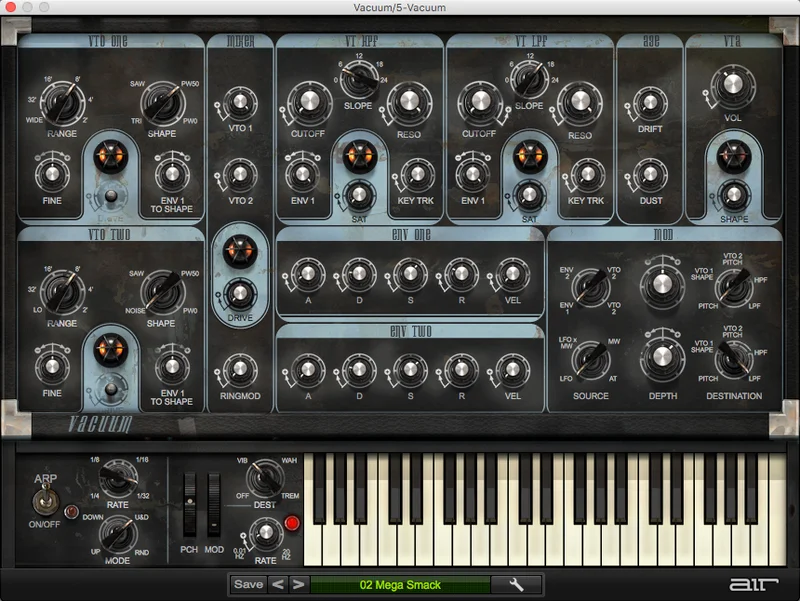
Vacuum Vintage opens with a blue-toned interface that looks like it was ripped from a 1978 instrument panel. Some people hate it. We actually love it because it's unambiguous.
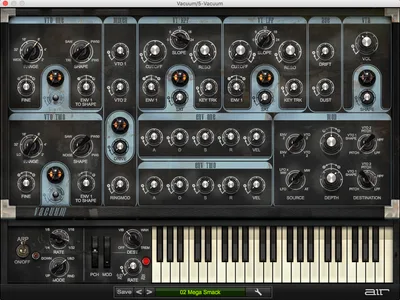
Every knob has a clear label. The oscillator section is up top, the filter and mixer section runs through the middle, and the effects and arpeggiator sit at the bottom. You can learn the layout in about four minutes of clicking around.
Installation is straightforward through the AIR Music Technology account system. AU and VST formats load without drama in Logic, Ableton, and Bitwig. There's no AAX listed on the Plugin Boutique page, which matters if you're still on a Pro Tools hardware rig for mixing. Worth checking compatibility before you commit.
Presets load fast. The library kicks in immediately with categories covering Leads, Pads, Bass, Arpeggios, Percussive, and FX sounds. We found three usable bass patches in the first two minutes. That's a good sign.
Getting It Into a Real Workflow
We ran Vacuum Vintage as a dedicated bass instrument on a send-and-return chain, with MIDI coming in from a Keystep and output going through a bus compressor before hitting the 2-bus. That's where it earns its keep: as a single-voice, always-on instrument that you set and let ride.
The friction shows up in a few specific places. MIDI learn works, but it's not elegant. If you want to automate the Dust control for a filter sweep effect, you're mapping it manually in your DAW's automation lane rather than right-clicking and assigning. For a 2026 plugin, that's annoying.
Preset organization is flat. There's no tag search, no favorites, no custom folder structure. You scroll through a list. Reviewers mention this repeatedly, and it's a legitimate gripe: when you've got 200 presets from Richard Devine, scrolling through a flat list to find the gritty bass you used last Tuesday is frustrating.
That said, the core signal chain from oscillator to filter to output is completely logical. Once you're in a patch you like, adjusting it in real time is satisfying. The knobs feel responsive, and latency from MIDI input to audio output is clean at standard buffer sizes.
We'd also flag that strict monophony affects how you route it. You can't layer two instances in the same MIDI channel the way you might with a polyphonic synth. Run a second instance on a separate track if you want multiple voices. Not a dealbreaker, but plan for it.
What Vacuum Vintage Is Genuinely Good At
The Two Tube Oscillators and Waveform Morphing
This is where Vacuum Vintage separates itself from basic subtractive synths. You get two Vacuum Tube Oscillators, and each one gives you four wave shapes: sine, triangle, sawtooth, and square. The difference is that you don't just pick one.
You morph between them. Dial the morph control from sawtooth toward square and you hear the harmonic content shift in a way that a switched oscillator simply doesn't do. It's continuous tonal movement, and it's brilliant for designing leads that have movement without needing LFO modulation.
Stack both oscillators and you're into thick territory fast. Detune them slightly and you get that beating, slightly-unstable quality that hardware players spend years chasing. We ran a synth lead patch through a mid-side EQ after, cut 3dB around 800Hz on the mid channel, and it sat in the mix like it was tracked through real gear.
The Mixer Section: Drive and Ring Mod
Before the signal hits the filters, it passes through a mixer where you can blend the two oscillators, add drive, and engage ring modulation. The drive here is the secret weapon for bass sounds.
We pushed the drive about 60% of the way up on a deep bass patch. The low end started to compress and distort in that analog-clipping way, without getting fizzy at the top. At 80% it went into territory that's more interesting than usable for melodic bass, but great for sound design FX. Ring modulation opens up clanging, metallic tones that work surprisingly well for percussive one-shots.
Filters: High-Pass, Low-Pass, and Saturation Controls
Vacuum Vintage runs both a high-pass and a low-pass filter. Each one has its own saturation control, which is a detail that a lot of competing plugins at this level skip entirely.
The filters sound smooth in their clean setting. Push the saturation on the low-pass and it adds a midrange bite that sits around 1-2kHz, giving bass sounds presence without needing to reach for a separate EQ. We liked running the low-pass at a relatively high cutoff (around 70% of the way up) with moderate saturation, then automating the cutoff down during verses and up during drops.
The filter doesn't self-oscillate, which limits some more extreme sound design moves. But for the bread-and-butter use case of a slightly gritty bass or a biting lead, it does exactly what you need.
The Age Controls: Drift and Dust
This is the feature that puts Vacuum Vintage ahead of most tube emulations in its class. The Age section has two controls: Drift and Dust.
Drift applies pitch instability to the oscillators. A small amount (around 20-30% on the dial) gives you the subtle wobble of a real oscillator that hasn't fully warmed up. Push it further and notes start wandering, which sounds wrong on a synth and right on a character instrument.
Dust is the crackling, noisy control. It simulates the surface noise and electrical interference of old hardware. Reviewers consistently flag this as the detail that makes Vacuum Vintage sound unlike a software synth.
We can confirm that. At around 25% Dust, a sustained pad patch stopped sounding digital. It started sounding like it was recorded to tape and bounced back. That's a genuinely impressive result from a single knob.
The Age section also affects keyboard triggering accuracy, introducing slight timing imperfections for extra hardware realism. It's subtle, but it matters.
Modulation, Envelopes, and the Arpeggiator
Two envelopes handle amplitude and modulation duties. Both can be set to retrigger via the settings page, which is useful for rhythmic bass patches that need tight gate behavior.
The arpeggiator is functional: up, down, up/down, and random modes, synced to host tempo. It's not a step sequencer and it won't replace a dedicated arp tool, but for quick pattern generation on a lead or bass, it works cleanly.
Modulation routing is limited compared to what you'd get in something like Arturia's MiniFreak V. There's no mod matrix, no user-assignable modulation sources beyond the two envelopes and the LFO. For sound designers who want deep modulation architecture, that's a ceiling you'll hit quickly.
The Preset Library: Richard Devine and Mark Ovenden
Having presets designed by Richard Devine is not a trivial credit. Devine's patches consistently reward editing rather than just playing them straight.
We loaded a Devine bass preset, dialed the Drift up from zero to 30%, and cut 4dB at 250Hz with a Q of 1.2 to thin out the low-mid buildup. The result was a patch that sounded like it took an afternoon to build. It took four minutes. The preset library earns its place.
Mark Ovenden's contributions lean toward pads and FX sounds that use the Dust control more aggressively. Some of those patches are underrated. Dig into the FX category before you dismiss them.
The Rough Edges
Monophony is the biggest limit. Full stop. If you want chords, layers, or polyphonic pads, Vacuum Vintage can't do it. The Pro version adds six polyphonic circuits. If that's your use case, save up or look elsewhere.
The effects section is thinner than we'd like. There's reverb and delay on board, but they're simple tools with limited control. We ended up bypassing the onboard effects almost entirely and reaching for dedicated plugins instead. Not a dealbreaker, but expect to treat this as a sound source, not a self-contained instrument.
CPU usage sits in the light-to-medium range. Multiple instances don't tax a modern session badly. But we couldn't find published benchmarks anywhere, and AIR Music Technology doesn't publish official figures. Compare that to competing emulations from AudioThing's SX1000, which publishes CPU data directly in the product spec sheet. Transparency matters.
The preset browser is a real weak point. 2026 and we're still scrolling a flat list. Frustrating.
No trial version is available, which is an annoying barrier for a purchase decision at this price point. You're committing blind unless you've already heard the demo audio.
Who This Is Really For
- ✅ Buy if you need a dedicated mono bass or lead synth with genuine tube character baked into the oscillator level
- ✅ Buy if you're a sound designer who values the Age/Drift/Dust controls for creating imperfect, analog-feeling textures
- ✅ Buy if you already own a polyphonic synth and want a complementary mono voice without spending on a second full-featured instrument
- ❌ Skip if you need polyphony. Vacuum Vintage cannot play chords. The Pro version is the right call.
- ❌ Skip if you're on Pro Tools AAX only. The AU/VST format list doesn't include AAX, which is a hard compatibility wall.
- ❌ Skip if you want a deep modulation matrix for evolving, complex patches. Look at SEM V for deeper envelope and filter architecture or Chromaphone 3 for unconventional texture work instead.
Specs & Technical Details
| Developer | AIR Music Technology |
| Price | $29 |
| Plugin Format | VST / AU |
| OS Support | Mac / Windows |
| Activation | AIR Music Technology account-based activation |
| CPU Usage | Light to medium |
| Trial Available | No |
| Version Reviewed | Current release (2026) |
Score Breakdown
| Category | Score | Notes |
|---|---|---|
| Sound Quality | 4.5/5 | Tube oscillator modeling and Age controls produce genuinely convincing analog character |
| Value for Money | 4.0/5 | Competitive at this price tier; no trial hurts the confidence of new buyers |
| Ease of Use | 3.5/5 | Interface is clear but the preset browser and MIDI learn feel dated |
| Features | 3.5/5 | Solid core set limited by monophony and a thin effects section |
| CPU Efficiency | 4.0/5 | Light footprint allows multiple instances without session strain |
| Overall | 4.0/5 | A specialist tool that does its specific job very well |
Alternatives to Consider
If polyphony is non-negotiable, the Vacuum Pro upgrade is the direct path. It adds six polyphonic tube circuits, stacking and layering, and a Doubling effect for width. It's the same character engine with more firepower. Check our coverage of comparable tube-flavored synth emulations to see how the SEM V stacks up for filter and oscillator depth.
For a different take on analog emulation with a broader modulation architecture, the ABX3 bundle from Audio Blast covers acid-style synthesis territory with more routing flexibility. It's a different sound, but worth knowing about if the Vacuum Vintage's mod ceiling feels too low.
If you want a mono bass or lead voice with more transparent character and less grit, AudioThing's SX1000 models the Italian Siel SX1000 with a very different tonal philosophy. Where Vacuum Vintage leans into dirt and imperfection, the SX1000 stays cleaner. Different tools for different sessions.
Softube's Model 72 is worth a mention for producers who need Moog-style ladder filter behavior. It costs more and uses more CPU. The trade-off is a self-oscillating filter that Vacuum Vintage doesn't have. FXpansion DCAM Synth Squad covers polyphonic territory with modeled circuit-level saturation. Neither of them has Vacuum Vintage's Age controls, and neither of them sounds quite like it either.
The Verdict
Vacuum Vintage isn't trying to be everything. It's a mono tube synth with two oscillators, waveform morphing, a pair of filters with saturation, and an Age section that does something genuinely clever with pitch drift and surface noise. That's a specific toolkit, and within that toolkit it delivers.
We'd buy it for dedicated bass and lead duties. We'd reach for it when a patch needs to feel old and imperfect rather than clean and modern. We wouldn't reach for it when a session needs polyphony, complex modulation, or a deep effects chain.
At $29, with no trial and a flat preset browser, it asks you to trust it a bit before you've heard it. Our honest advice: listen to every demo clip AIR Music Technology publishes before clicking buy. If the Dust and Drift sounds make you stop and rewind, you'll get your money's worth. If they don't move you, save the money for Vacuum Pro.
The crackle is either the whole point, or it isn't. You'll know immediately which camp you're in.
Frequently Asked Questions
Is Vacuum Vintage the same as Vacuum Pro?
No. Vacuum Vintage is the stripped-back, monophonic version with two tube oscillators, dual filters, and the Age controls. Vacuum Pro adds polyphonic tube synthesis across six circuits, stacking and layering between two full synth parts, a Doubling effect for width, and expanded effects. If you need chords or layered sounds, Vacuum Vintage won't do it. That's a Pro-only feature.
What DAWs does Vacuum Vintage work with?
Vacuum Vintage is available in AU and VST formats. That covers Logic Pro, Ableton Live, Bitwig Studio, Studio One, Cubase, and most other major DAWs. The Plugin Boutique product page does not list AAX support, so Pro Tools users on AAX-only rigs should confirm compatibility before purchasing. Always verify against your specific DAW version.
Who designed the presets in Vacuum Vintage?
The preset library was built by Richard Devine and Mark Ovenden, both professional sound designers with extensive credits across hardware and software synthesis. Devine's patches lean into modulation and movement. Ovenden's work covers pad and FX textures that make heavy use of the Dust and Drift controls. The library spans Leads, Pads, Bass, Arpeggios, Percussive, and FX categories.
What makes the Age controls different from a simple noise knob?
The Age section combines two separate controls: Drift, which introduces pitch instability to the oscillators, and Dust, which adds surface noise and crackle. Beyond those, the Age parameter also affects keyboard triggering accuracy, introducing slight timing imperfections. Together, these three behaviors simulate the combined effect of an aging analog oscillator, not just a noise layer on top of a clean signal. That distinction is what makes it sound convincingly like old hardware rather than a processed software synth.
Is there a free trial for Vacuum Vintage?
Based on the current Plugin Boutique listing, no free trial is available for Vacuum Vintage. This is one of our complaints about it at this price point. Before purchasing, we'd recommend listening to every official audio demo AIR Music Technology provides and checking for any time-limited promotional bundles that may include a trial or money-back window through specific retailers.