
The doubt you probably brought to this page is obvious: is Afroplugin actually usable, or is “free” just another word for “abandoned beta that crashes your session?” It’s usable. It’s not perfect. Here’s the honest breakdown.
Afroplugin is a free drum VST from Afroplug, a developer platform built around supporting African music producers. It ships with 120 sounds targeting Dancehall, R&B, Reggaeton, Lo-fi, and Afrobeats. It runs on Mac and Windows in both 32- and 64-bit formats. If you’re just starting out and you need genre-specific African percussion in your signal chain without spending anything, this fills that gap. If you’re a working professional who needs granular per-sound control, you’ll hit the ceiling fast.
Does It Actually Deliver What It Promises?
Afroplug’s pitch is simple: genre-specific drums, accessible tools, support for African producers globally. On the first two, Afroplugin delivers well enough to take seriously.
The 120 sounds are genuinely oriented toward the genres listed. You’ll find the kind of percussion textures that Afrobeats and Dancehall actually use: the tight, punchy kicks, the rimshots with a dry snap, the hi-hat patterns with that characteristic bounce. This isn’t a generic drum kit with “Afrobeats” slapped in the name.
The interface is clean. Load it, browse sounds, hit keys. The learning curve is close to zero.
Where it gets complicated is the beta status. Afroplug hasn’t been transparent about what a full release looks like or when the development roadmap closes. You’re using a free tool that still carries a “beta” tag, and that matters if you’re building sessions you need to maintain long-term. That said, 828 reviews on the official product page and a 4.4-star average on Plugin Boutique across 182 ratings suggests the community has stress-tested this thing at scale.
It does what it says. Just not more than that.
Where It Shines
The Sound Library Is Actually Genre-Correct
We loaded Afroplugin into Ableton and started building a 95 BPM Afrobeats loop from scratch. The kick options gave us the sub-forward thud that sits under Amapiano and Afrobeats records without needing to layer a second sample underneath. We didn’t reach for a separate sample pack. That was a genuine surprise.
The Dancehall and Reggaeton sounds hold up too. The snare options have the mid-forward crack that fits those genres. The Lo-fi category gives you detuned, dusty drum hits that sit below 10kHz and don’t fight a vinyl-filtered top end. These aren’t sounds you’d need to heavily process to make genre-appropriate. They arrive in the right place.
On-Board Processing for Quick Dial-In
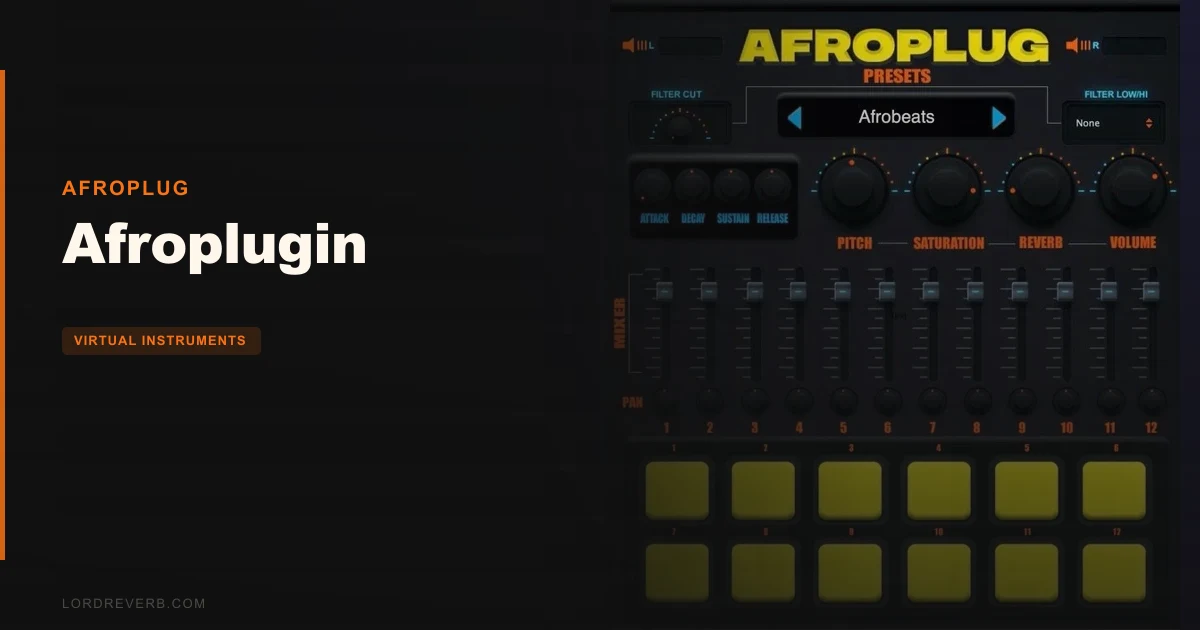
The plugin includes Lo-Pass and Hi-Pass filters, Reverb, Saturation, and a full ADSR envelope. For a free instrument, that’s a real toolkit.
We ran the Reverb on a snare hit and dialled the tail out far enough to add space without washing the groove. The saturation adds harmonic content that pushes sounds out of the “too clean” territory that sample packs sometimes land in. The ADSR control is what you want it to be: Attack shaping for transient punch, Release for tail trimming. These controls won’t replace a proper mixer insert chain, but they remove the need to reach for a separate plugin just to make basic adjustments.
Compatibility Is Genuinely Wide
VST on Windows, AU and VST on Mac, 32- and 64-bit for both. That covers every major DAW: Ableton, FL Studio, Logic, Reaper, Studio One, GarageBand. The 500MB storage requirement is modest. Reviewers consistently report clean installation with no activation hoops. No iLok. No account login. Download, install, load.
That frictionless entry point is underrated. Free plugins that require activation servers or have serial number issues waste everyone’s time.
Where It Falls Short
Here’s where we have to be honest, and this is the section most reviews skip over.
The effects are global. Every sound you trigger shares the same Lo-Pass, Hi-Pass, Reverb, Saturation, and ADSR settings. If you want a wet snare and a dry kick from the same instance of Afroplugin, you can’t do it. You’d need to run multiple instances of the plugin, route them separately, and manage that overhead yourself.
That’s a frustrating design choice. Most drum plugins at any price point let you process sounds individually. When we tried to get a reverb on the clap without it smearing the kick, we had to open a second instance. That doubled our CPU load for what should have been a basic workflow.
The preset count is thin. Ten presets for 120 sounds isn’t a lot of starting territory. Presets serve as creative shortcuts and sound-design references. With only 10, you’re exploring the library largely on your own from day one.
Reviewers also keep running into the elephant in the room: this is still in beta. The interface is stable enough for production use, but “beta” means the developer hasn’t committed to a finished feature set. There’s no published roadmap. That opacity is annoying when you’re deciding whether to build this into a template you’ll use for the next two years.
Three Moments That Show You What This Plugin Actually Feels Like
We dropped Afroplugin into a Reggaeton session running at 92 BPM. The dembow rhythm needed a specific rimshot snap. We cycled through the kit options, found a hit with the right mid-forward crack, set the attack to near-zero to keep the transient sharp, and trimmed the release so it didn’t bleed into the next beat. Total time: maybe ninety seconds. That’s satisfying.
We then tried to give that same rimshot a slight room reverb while keeping the kick completely dry. Impossible in a single instance. We duplicated the plugin, routed the second to a separate track, removed the rimshot from the first instance and built the reverb version in the second. Workable, but clunky. That was genuinely annoying.
We handed the plugin to someone newer to production. They had never used a drum VST before. They had sounds playing inside three minutes and a basic Afrobeats pattern inside ten. The UI is that approachable. For that person, this plugin is brilliant.
How It Stacks Up Against Alternatives
The most direct comparison here is free drum VST plugins like MT Power Drum Kit and Black Rooster Audio’s free offerings. MT Power Drum Kit gives you a more developed mixer section with per-instrument channels, but it targets rock and pop production, not African genres. The sounds are completely wrong for Afrobeats or Dancehall. Afroplugin wins on genre accuracy, loses on mixing flexibility.
Native Instruments’ Maschine Essentials and similar bundled drum tools offer better per-pad control, but they’re tied to hardware purchases or paid tiers. Afroplugin is free, no conditions.
For producers specifically working in Afrobeats, the realistic alternative is pulling from Afrobeats sample packs and building grooves with a sampler. That gives you more flexibility but kills the speed advantage. Afroplugin’s value is in the instant playability, not the depth.
If you need professional-level per-sound control, look at paid drum VST options instead. This plugin doesn’t compete at that level and doesn’t try to.
Is the Price Fair?
It’s free. That changes the entire calculus.
Every limitation we listed above, the global effects, the thin preset count, the beta status, carries zero financial risk. You install it, use what works, route around what doesn’t. If Afroplug never updates it again, you’ve lost nothing but 500MB of disk space.
For what it costs, Afroplugin is genuinely worth downloading. The question isn’t whether it earns its price. The question is whether it fits your workflow at all. And that’s a workflow question, not a value question.
Specs & Technical Details
| Developer | Afroplug |
| Price | Free |
| Plugin Format | VST (Windows), VST / AU (Mac) |
| OS Support | Windows 8 or later / macOS 10.15 or later (Big Sur compatible) |
| Activation | None, no serial or account required |
| CPU Usage | Light |
| Trial Available | N/A, plugin is free |
| Version Reviewed | Beta |
Score Breakdown
| Category | Score | Notes |
|---|---|---|
| Sound Quality | 3.5/5 | Genre-accurate and usable; lacks the polish of commercial libraries |
| Value for Money | 5.0/5 | Free. No asterisks. Hard to argue with that |
| Ease of Use | 4.5/5 | One of the most beginner-accessible drum plugins we've seen |
| Features | 2.5/5 | Global-only effects and 10 presets is a lean feature set by any standard |
| CPU Efficiency | 4.0/5 | Light footprint; needing multiple instances for per-sound FX inflates CPU use |
| Overall | 3.5/5 | Solid free entry point for African-genre producers; not a professional tool |
Alternatives to Consider
If Afroplugin’s limitations push you toward something more developed, here are three real options worth your time.
MT Power Drum Kit is a free VST with a genuine mixer section and per-drum processing. It’s built for rock and pop, so the sounds won’t serve your Afrobeats sessions. But if you’re working across genres and need a flexible free drum instrument, check our free drum plugin roundup where we rank it properly.
Sitala by Decomposer is another free drum sampler that loads your own samples. It gives you per-pad volume and mute controls, which Afroplugin doesn’t. You’d pair it with an Afrobeats sample pack, but you’d gain real mixing flexibility. Worth the extra setup step for more advanced producers.
DrumMic’a by Sennheiser is a free orchestral/acoustic drum VST that shows what a free plugin can do at a technical level. Wrong genre, right benchmark. If you want to see how far free instruments can go before spending money, check our virtual instruments guide for context on how these tools compare.
None of these three give you what Afroplugin gives you on genre specificity. That’s still where it stands alone.
Our Verdict
Afroplugin is the right tool for a specific person: a producer new to Afrobeats, Dancehall, or Reggaeton who needs authentic-sounding drum kits inside their DAW with zero friction and zero cost.
It is not the right tool for a working producer who needs individual sound processing, a library deeper than 120 hits, or a plugin with a clear development future.
The global effects constraint is the real limit here. It’s not a small complaint, it’s a fundamental mixing workflow issue that you’ll run into on your first serious session. We wish Afroplug would address this in the next update. Until they do, professional users will need to treat Afroplugin as a sketching tool and finish sounds in the mixer.
Download it. Use the sounds you love. Build around the limitations. For what it costs you, the ceiling is high enough to get real work done.
Just don’t build your entire template around a beta.
Related reviews: Can Wave Warper 2 Replace Pigments for Cinematic Work? · Voxmotive 2
Frequently Asked Questions
Is Afroplugin actually free, or is there a paid version?
Afroplugin is completely free. There's no paid tier, no premium upgrade, and no activation required. You download it, install it, and it works. Afroplug does have a broader marketplace platform with other products, but this plugin itself carries no cost.
Which DAWs does Afroplugin work with?
Afroplugin runs as a VST on Windows and as both a VST and AU on Mac. That covers Ableton Live, FL Studio, Logic Pro, GarageBand, Reaper, Studio One, Cubase, and most other major DAWs. It supports both 32-bit and 64-bit formats. Reviewers report clean installation across all major platforms with no compatibility issues flagged.
Why do the effects apply globally instead of per-sound?
That's a design limitation in the current beta version. The Lo-Pass, Hi-Pass, Reverb, Saturation, and ADSR controls affect every sound you play from a single instance. To process sounds individually, you need to run separate instances of the plugin and route them to different tracks. Afroplug hasn't addressed this publicly, and there's no confirmed fix on a development roadmap.
How does Afroplugin compare to buying an Afrobeats sample pack?
A dedicated sample pack gives you more sounds, more variation, and more flexibility, since you load individual hits into your own sampler and process them freely. Afroplugin's advantage is speed and playability: you open it, play the MIDI keyboard, and you're building grooves instantly. For beginners, that instant playability wins. For professionals who need depth, a sample pack paired with a sampler like Sitala or your DAW's built-in sampler is more powerful. See our Afrobeats production guide for a full comparison of approaches.
Is Afroplugin safe to use in professional sessions given its beta status?
Reviewers report stable performance across over 800 documented uses, and the Plugin Boutique rating of 4.4 stars across 182 ratings suggests it holds up in real sessions. The beta label is more of a development transparency issue than a stability warning. That said, we'd recommend keeping it as a sketching and demo tool rather than a final-bounce instrument until Afroplug formally releases a stable version. Always save a backup of any project that uses it.