The doubt most buyers carry into a Renaissance Axx search is fair: is this just a stripped-down Waves plugin they're selling to beginners who don't know better? Having spent two weeks running it across acoustic guitars, electric bass, snare busses, and room mics, our answer is no. It's a specialist tool that does one job with more nuance than its interface suggests.
Renaissance Axx is a single-band compressor built for instruments, particularly guitars and basses. It runs in VST, VST3, AU, and AAX formats, lives in Version 9, and lists at $99 but rarely sells above $35. We've seen it for less at third-party retailers.
If you track acoustic instruments, produce hip-hop with real bass, or just want one compressor that you never have to think about, it belongs in your signal chain. If you mix professionally at 96 kHz or above, stop reading here. This plugin won't open in your session.
Does It Actually Deliver?
Waves built Renaissance Axx as part of the Renaissance series launched in the late 1990s, and that lineage shows. The philosophy was transparent, musical compression without forcing engineers to memorise attack and release tables.
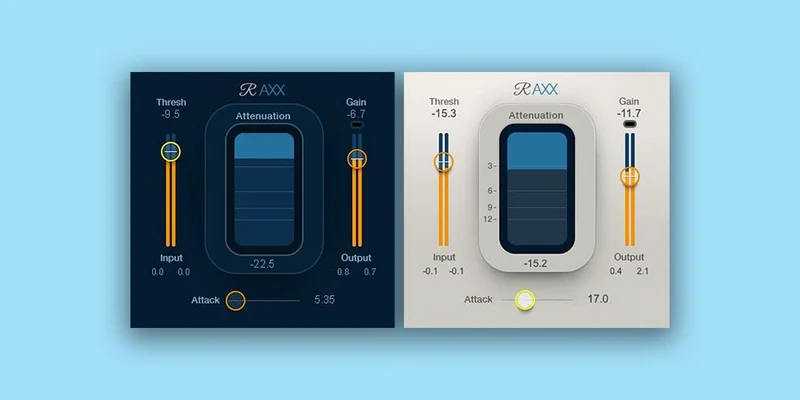
The interface gives you three controls: Thresh, Output, and Sensitivity. Sensitivity maps loosely to attack and release timing together, which sounds limiting but works surprisingly well on material with natural transients. The ratio curve is fixed, the release is automatic, and an output limiter sits at the end of the chain.
What it promises is "set it and move on." What it delivers is exactly that, with one catch: the automatic release reads the program material intelligently enough that you rarely feel the need to override it. We ran a strummed acoustic at -18 dBFS input, pushed Thresh to around -12 dB, and the result sat in the mix without any pumping or breath artifacts. That's not nothing.
Where It Shines
The strongest moment we had with Renaissance Axx was on a DI bass track. The player had dynamic range swings of roughly 12 dB between thumb plucks and finger runs. We set Thresh to -14 dB, Output to +3 dB, and Sensitivity at about 70%. The plugin knocked the peaks down without squashing the tone in the low mids. It sounded honest.
On a snare bus with four layered samples, we pushed Sensitivity to 85% and brought Thresh down to -18 dB. The snare got fatter without losing the attack transient. The "fattening" effect people describe is real: it's the auto-release catching the body of the hit and adding about 1-2 dB of apparent sustain. That's not magic. That's smart timing.
Acoustic guitar is where we'd use it on every project. Drop Thresh to -10 dB, leave Sensitivity around 60%, and the guitar levels itself without you touching it again. For content creators, demo producers, and anyone tracking acoustic instruments at home, that reliability is worth money.
Where It Falls Short
The 48 kHz ceiling is frustrating. This isn't a quirk. It's a hard wall. If your session runs at 88.2 kHz, 96 kHz, or 192 kHz, Renaissance Axx won't load. Waves hasn't updated this, and at the time of writing, there's no sign they will.
There's no sidechain input. You can't duck a guitar to a kick, filter the detection signal to ignore low-end buildup, or use it as a de-esser with a frequency-focused key. That's three workflows closed off immediately.
The fixed ratio is clever on paper but annoying in practice once you want more control. Somewhere between 2:1 and 4:1 is where it lives, which works on instruments but gives you zero flexibility when you need to limit peaks more aggressively. For parallel compression on a drum bus, you'll wish you could push harder.
It's not a bad compressor. It's a narrow one.
How It Stacks Up
CLA-76 from Waves is the honest comparison for guitar work. The 76-style limiter hits harder, gives you control over attack and release in milliseconds, and handles electric guitar with more aggression. If you want transparent leveling, Renaissance Axx wins. If you want character and crunch on a Strat, CLA-76 wins. They're not the same tool.
Against the Waves H-Comp review, the gap widens. H-Comp handles rhythmic pumping, gives you a ratio control up to 100:1, and opens in 96 kHz sessions. Renaissance Axx is simpler, lighter on CPU, and cheaper. H-Comp is the grown-up in that pairing.
For a true one-knob-style instrument compressor comparison, best compressor plugins for guitar covers the full field. Renaissance Axx sits in the middle of that pack: not the most featured, not the most characterful, but dependably transparent.
Is the Price Fair?
At $29.99, yes. At $99, skip it. The discount pricing is where this plugin makes sense
We wouldn't hesitate to recommend it at the sale price to someone building their first plugin collection. We'd tell a working professional to spend the money on something with more routing options.
Watch the Waves sale tracker and discount calendar to catch it at a lower price. It shows up there a few times a year.
Score Breakdown
| Category | Score | Notes |
|---|---|---|
| Sound Quality | 4.0/5 | Transparent and natural on instruments, auto-release reads material well |
| Value for Money | 4.0/5 | At sale price it's a fair buy; full MSRP is hard to justify |
| Ease of Use | 4.5/5 | Three controls, five minutes to learn, no manual required |
| Features | 2.5/5 | No sidechain, fixed ratio, 48 kHz ceiling kills professional versatility |
| CPU Efficiency | 4.5/5 | Light footprint, runs 20+ instances without stress on a mid-range machine |
| Overall | 3.8/5 | Brilliant for its narrow job, genuinely limited outside it |
Alternatives to Consider
Waves CLA-76: More control, more character, same price range on sale. Works best when you want the compressor to add something to the guitar rather than just tame it. See our CLA-76 review for the full breakdown.
UAD LA-2A: Optical compression with a slower response that's brilliant on bass. Requires UAD hardware or subscription, so the cost of entry is higher. But if bass is your primary concern, the LA-2A tracks low-end dynamics with more warmth than Renaissance Axx delivers.
Klanghelm DC8C: A free and paid compressor that gives you full ratio, attack, release, and sidechain control. It's ugly to look at and satisfying to use. If you're outgrowing Renaissance Axx but don't want to spend much, DC8C is the honest upgrade path. Check our best free compressor plugins roundup for more options at that price point.
Our Verdict
Renaissance Axx isn't underrated. It's correctly rated for what it is: a smart, lightweight instrument compressor that removes decisions you don't need to make on a guitar track.
Buy it at $29.99 if you track acoustic instruments, produce with real bass, or want a compressor you can drop on a channel and forget about. It earns its keep on those tasks.
Skip it if your sessions run at 96 kHz, if you need sidechain routing, or if you're already past the point where "simple" means "fast." At that stage you'll hate the fixed ratio within a month and reach for something else.
The most honest thing we can say: it's a one-trick plugin. The trick is good.
Frequently Asked Questions
Does Renaissance Axx work at 96 kHz?
No. Renaissance Axx supports 44.1 kHz and 48 kHz only. If your session runs at 88.2 kHz, 96 kHz, or 192 kHz, the plugin won't load. This is the single biggest technical limitation of the plugin and Waves hasn't updated it in the current version. If you work at higher sample rates, look at CLA-76 or H-Comp instead.
What does the Sensitivity knob actually control?
Sensitivity maps to a combined attack and release response rather than controlling either independently. Higher Sensitivity values mean the compressor reacts faster and holds on longer, which produces the "fattening" effect on snare and bass. Lower values let more transient through before the gain reduction kicks in. There's no way to decouple attack from release, which is by design.
Is Renaissance Axx good for vocals?
It's usable on vocals but not ideal. The fixed ratio and lack of a high-pass filter on the detection circuit means it can over-react to low-end buildup in a vocal performance. For transparent vocal leveling we'd push you toward the Waves Renaissance Compressor review, which gives you ratio control and a broader detection range. Renaissance Axx works in a pinch but vocals aren't its strength.
What's the difference between Renaissance Axx and Renaissance Compressor?
Renaissance Compressor is the full-featured sibling: adjustable ratio, separate attack and release controls, and a broader application across mix sources including vocals and full-program material. Renaissance Axx trades all of that for a three-knob instrument-focused interface. If you're building a plugin collection and can only have one, Renaissance Compressor is the more versatile purchase. Axx is the specialist you add later when you know you need it.