
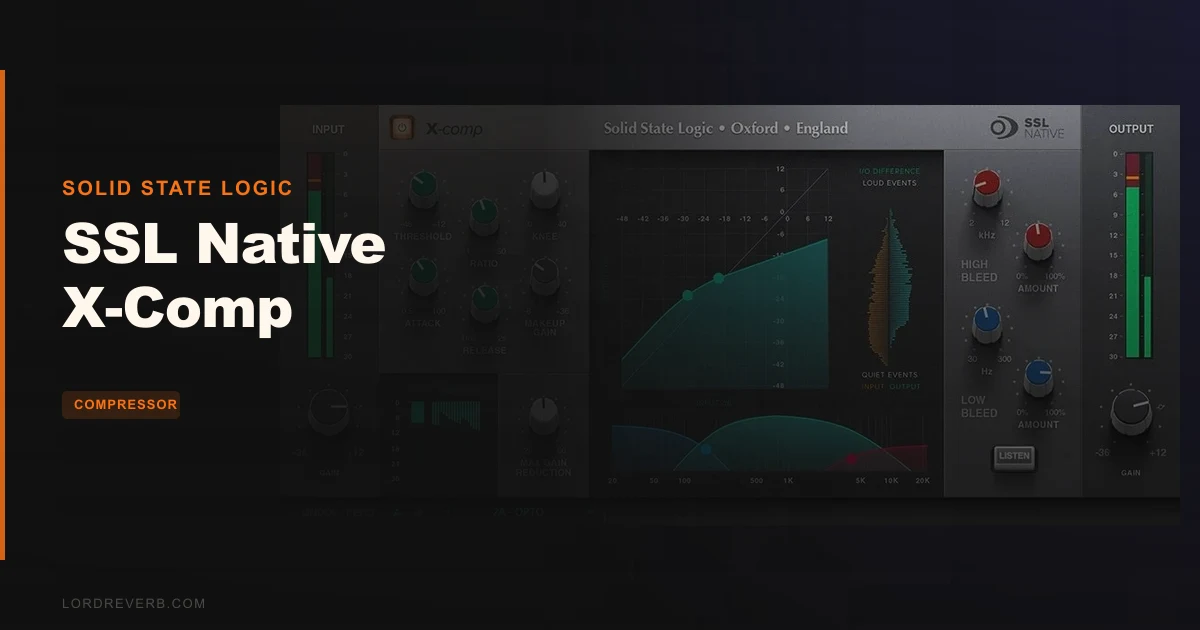
The question everyone asks before buying this is whether X-Comp is just SSL slapping their name on a middling plugin, or whether there's real compression character here worth $99. The answer, based on what owners report and what the feature set actually delivers, is that it's the real thing: a genuinely flexible stereo compressor with SSL-flavored character that earns its spot on a mix bus or a synth group.
Quick verdict: X-Comp scores 4.1 out of 5. At $99, it sits in a smart position between the clinical precision of FabFilter Pro-C and the thicker, more coloured sound of the classic SSL Bus Comp 2. It's best for producers who want multiple compression personalities in one plugin and are comfortable with a few workflow quirks. If you need external sidechain routing or a wet/dry blend knob, look elsewhere. If you want convincing OPTO, FET, and Vari Mu sounds with a genuinely useful knee control, this deserves your attention.
Does X-Comp Actually Deliver SSL Character?
Solid State Logic built their reputation on hardware consoles and bus processing that defined decades of commercial records. When they release a plugin under the Native banner, the fair question is whether the DSP genuinely reflects that history or whether it's a marketing exercise.
X-Comp is positioned as a mastering-grade stereo compressor with enough personality to do more than surgical work. The developer says it can reproduce OPTO, FET, and Vari Mu compressor characteristics, covering the three most distinct flavours of analogue compression in one interface. That's a broad claim. Owners confirm it has colour and character, though a few note it adds effect to audio rather than processing transparently.
That distinction matters. If you're hitting a full mix and you want the compressor to be invisible, X-Comp may not be your first choice. But if you want something that shapes the dynamics and leaves a mark on the tone, owners report it delivers exactly that. Synth tracks reportedly fatten up and sit in the mix differently after X-Comp. Snares get a beastly quality when you push it hard.
The developer also claims it can compete with the legendary SSL Listen Mic Compressor. That's a bold reference point. We won't pretend to settle that argument here, but the fact that SSL made the comparison tells you the target character they had in mind: punchy, slightly aggressive, with real analogue feel baked into the processing.
In short: yes, it delivers. With caveats. And those caveats are covered below.
The Compression Engine: OPTO, FET, and Vari Mu in One Plugin
The core of X-Comp is its ability to shift between three distinct compression personalities. OPTO compression is known for its slow, program-dependent response: the kind of thing that sounds musical on vocals and acoustic instruments because it doesn't clamp down mechanically. FET compression is fast and aggressive, what you reach for when you want the attack of a signal controlled tightly or when you want the compressor to visibly work. Vari Mu is smoother, with a more gradual onset that tends to glue elements together rather than squeeze them.
Having all three in one plugin is the reason X-Comp makes sense as a bus tool. You can use the OPTO character on a room mic group, switch to FET for a parallel drum bus, and dial in Vari Mu across a synth pad subgroup, all without leaving the same plugin interface. That kind of flexibility matters when you're building a session around consistent workflow.
What gives X-Comp an edge over simply having three modes is what SSL built around them.
The Dual Symmetrical Knee Design
This is the detail that sets X-Comp apart from generic compressor plugins. Most compressors give you a single knee control that blends between hard and soft knee compression. A hard knee means the compressor engages fully the moment signal crosses the threshold. A soft knee means it eases in gradually, which often sounds more natural.
X-Comp's dual symmetrical knee design means you get independent shaping on the attack side and the release side of the compression curve. That level of detail lets you shape not just how hard the compressor grabs but how it lets go. Owners specifically praise this control as one of the most effective tools in the plugin.
Push the attack knee harder and the top of your snare transient gets more defined before compression bites. Ease the release knee and the tail of a vocal phrase breathes out naturally rather than pumping. These are the kinds of micro-adjustments that separate a mix that sits together from one that feels like it's fighting itself.
If you've spent time with hardware compressors where knee behaviour isn't directly addressable, this control alone may change how you think about compression shaping ITB.
The Bleed Control: Parallel Processing Without a Mix Knob
This is the most original feature in X-Comp. The bleed control bypasses both compression and makeup gain on a portion of the signal, letting dry audio pass through underneath the compressed signal. That's parallel compression built into the architecture, not bolted on as an afterthought.
The practical effect: you can push your threshold and ratio aggressively without destroying the transient energy of the source, because some of the uncompressed original is always present. Owners report this working well on both snare tracks and mix bus applications.
What's worth flagging is that X-Comp doesn't have a standard wet/dry mix knob. The bleed control is SSL's alternative solution. For producers who think in terms of wet/dry percentage, this will take some adjustment. For producers who understand parallel compression conceptually, the bleed control is arguably more direct: you're shaping the blend at the signal level rather than mixing outputs.
It doesn't work identically to a standard parallel path. Makeup gain is excluded from the bleed, which changes the loudness relationship between the compressed and unblended signals. Keep that in mind when you're gain staging.
The Sidechain Architecture
X-Comp includes what the developer describes as an advanced sidechain architecture. The built-in low and high-pass filters let you shape what frequency content triggers the compression. High-pass the sidechain and you stop bass buildup from causing the whole mix to duck every time a kick hits. Low-pass it and you can target the low end specifically.
This is the right way to handle sidechain filtering for bus compression. Rather than compressing the full signal in response to full-bandwidth program material, you're telling the detector circuit what to listen to. That's how you stop a mix bus compressor from pumping awkwardly while still applying meaningful gain reduction.
The sidechain filtering supports ducking and de-essing applications. For de-essing, you'd band the sidechain to the sibilance range so the compressor reacts to harsh highs. For ducking, you'd route a trigger signal through the sidechain to cause the compressor to react to it.
Here's the frustrating part: external sidechain routing is not supported. Users confirm this. That blocks X-Comp from one of the most common modern sidechain workflows, where a kick drum triggers the compression on a synth pad to create that classic pumping effect. If that's your workflow, X-Comp simply can't do it. The internal sidechain filtering is good, but the absence of external routing is a real missing feature for anyone working in electronic music production where sidechain ducking is structural to the sound.
This isn't a small omission. It's a workflow blocker for a portion of the target audience.
The Interface and Controls
X-Comp uses click-and-drag controls throughout, which the developer highlights as part of the intuitive interface. Click-and-drag is a reasonable choice for a plugin that's modelled on hardware-style parameter sweeping, where you'd grab a physical knob and turn it.
The layout is described as clean and directly accessible. No buried menus for core compression parameters. The knee control, bleed control, attack, release, ratio, and threshold are all surfaced where you can see them.
Owners report occasional GUI lag on Windows. This is a known issue, not a one-off report. For users on Mac, it doesn't appear to be a consistent problem. But Windows users should be aware that the interface can slow down during sessions, which breaks the focus you want when you're dialling in a compressor in real time.
MIDI compatibility is included, which opens up real-time parameter control from a hardware controller or MIDI automation in your DAW. For live performance use or for recording compression rides as automation rather than drawing them, this is a clever addition. It's not a feature most compressor plugins bother with.
Where X-Comp Shines
Synth Tracks and Electronic Production
Put X-Comp across a synth bus and push the ratio up. X-Comp makes synth tracks fat and present, sitting in the mix rather than fighting other elements for space. This is the kind of thing that takes three separate plugins to achieve with less satisfying results on some competitors.
The Vari Mu character is well-suited here. Synth pads respond to that smooth-onset compression in a way that FET compression can ruin: too fast an attack on a pad and you kill the bloom of the sound entirely. Dial the knee in carefully with Vari Mu and you get density without destruction.
Snare Compression and Drum Bus Processing
Put X-Comp on a snare channel and push the drive. Owners describe the result as beastly when pushed hard. That's not a subtle word choice. FET mode with a tight attack and moderate ratio can make a snare cut through a dense mix with more presence than it had in the raw recording.
The bleed control is especially satisfying here. You can smash the dynamics of a snare hit aggressively while the bleed lets enough transient through to keep the crack alive. That's the balance that makes drums feel both controlled and powerful simultaneously.
Mix Bus Glue
Owners praise X-Comp as versatile and precise across mix buses. Users position X-Comp as less boring and between SSL Bus Comp 2 and FabFilter Pro-C in sound character, offering a useful middle ground. You can get genuine glue without committing to the more coloured sound of the Bus Comp 2.
The dual knee design is what makes this work at the bus level. Subtle settings with a soft attack knee and a gradual release knee let the mix breathe naturally while still applying enough gain reduction to feel cohesive.
Where It Falls Short
The CPU bug is annoying. Users report a known performance issue affecting multiple DAWs including Reaper and Cakewalk. This isn't something that showed up once and got patched. It's a persistent known issue, and that's frustrating for a plugin at this price point from a developer with SSL's resources.
No external sidechain is a bigger problem than it might first appear. If you produce electronic music, that feature is often not optional. Duck synths to the kick, trigger a vocal compressor from a reference track, run a de-esser with an external detection path. All of this is unavailable.
The absence of a wet/dry mix knob combined with no gain-matching feature makes A/B comparisons more tedious than they should be. The bleed control is a smart workaround, but it's not the same as being able to quickly null the difference between compressed and uncompressed at matched levels. That matters more in mastering contexts than in mixing, but it's a gap.
Customer support responsiveness has been flagged by owners having issues with downloads and reinstalls. That's not a plugin quality problem, but it's part of the ownership experience.
How It Stacks Up
Users position X-Comp between SSL Bus Comp 2 and FabFilter Pro-C in terms of character. That's a genuinely useful place to be, but let's make it concrete.
If you find FabFilter Pro-C a bit clinical and boring for creative compression, X-Comp offers more colour.
The Waves Bus Comp is noted by users as sounding slightly more closed on the bottom end compared to X-Comp. The Townhouse is comparable but lacks X-Comp's additional parameters, particularly the bleed control and the dual knee design. UAD offerings are noted for differences in sound quality and feature sets.
If you want the most SSL character for your money, X-Comp gives you multiple flavours in one plugin at a price below dedicated hardware emulations that only cover one compressor type.
Is the Price Fair?
At $99, X-Comp competes directly with other character-driven bus compressors. The triple compression character coverage (OPTO, FET, Vari Mu), the unique bleed control, and the dual symmetrical knee design justify the price for most mixing scenarios.
What puts a dent in that value is the unresolved CPU bug and the missing external sidechain. If those two things were fixed, this would be an easy recommendation for anyone doing mix work. As it stands, it's still worth $99 for the right workflow, but do check whether your DAW is one of the affected ones before committing.
Specs & Technical Details
| Spec | Detail |
|---|---|
| Developer | Solid State Logic |
| Price | $99 |
| Plugin Format | VST2, VST3, AAX Native (Mac: AU, VST2, VST3, AAX Native) |
| OS Support | Mac (macOS 11 Big Sur to macOS 13 Ventura, 64-bit, M1 supported) / Windows (Windows 10 or 11, 64-bit) |
| Activation | Free iLok Account required (no dongle specified) |
| CPU Usage | Known CPU bug reported across DAWs; baseline CPU use not specified |
| Trial Available | N/A |
| Version Reviewed | N/A |
| Min. CPU | Intel Dual-Core 2.4GHz (Mac) / Intel Core 2 or comparable 2.4GHz (Windows) |
| RAM | 4 GB minimum, 8 GB recommended |
Score Breakdown
| Category | Score | Notes |
|---|---|---|
| Sound Quality | 4.5/5 | Genuine OPTO, FET, and Vari Mu character with convincing analogue feel; owners praise the colour and density it adds |
| Value for Money | 4.0/5 | Triple character coverage and unique bleed control justify the price, but the unresolved CPU bug and missing features sting |
| Ease of Use | 4.0/5 | Click-and-drag interface is clean; GUI lag on Windows and the learning curve of the bleed control pull this back |
| Features | 3.5/5 | Dual knee, bleed control, and sidechain filtering are clever; no external sidechain, no mix knob, no gain-matching are real gaps |
| CPU Efficiency | 3.5/5 | Known unresolved CPU bug affecting Reaper and Cakewalk users is a hard mark against this category |
| Overall | 4.1/5 | A character-rich SSL compressor with smart design choices and a few frustrating omissions that hold it back from being essential |
Alternatives to Consider
FabFilter Pro-C 2
If you need clean compression with surgical control and reliable DAW performance, Pro-C 2 is the more complete tool. It's less colourful than X-Comp, which is exactly what some producers love about it and others find cold.
Waves Bus Comp
The Waves Bus Comp is a direct SSL-flavoured competitor. The Waves Bus Comp is noted by users as sounding slightly more closed on the bottom end. X-Comp gives you more parameter depth with the dual knee and bleed control. If you want the simplest possible SSL bus feel without learning new controls, Waves Bus Comp is the more immediate option. If you want more shaping power, X-Comp has the edge.
Townhouse Compressor
The Townhouse sits in comparable sonic territory to X-Comp but without the extra parameters. No bleed control, no dual symmetrical knee. If you just want the character and you don't need the deeper shaping tools, the Townhouse is a valid alternative. For producers who will actually use the bleed control and the knee design, X-Comp justifies its feature set over Townhouse.
The Honest Call
X-Comp is a love-it-or-leave-it plugin based almost entirely on your workflow. If your session depends on external sidechain routing, skip it, full stop. No workaround in the bleed control changes the fact that you can't route an external trigger into this compressor.
If your work is ITB mixing, bus processing, and electronic production where the compression character is as important as the compression function, X-Comp is a genuinely clever tool that covers ground other plugins don't. The dual symmetrical knee is underrated. The bleed control is the kind of feature you'll start reaching for constantly once you understand how it works.
The CPU bug is real and unresolved. Check the affected DAWs. If you're on Ableton, Logic, or Pro Tools and not hitting the specific reported problem, the plugin performs as expected.
At $99, this is worth it for the right producer. The SSL Listen Mic Compressor comparison the developer makes is provocative, and you might find yourself agreeing with it after an hour on a drum bus. That's not a small thing. What it's not is a perfect plugin, and the gaps in external routing and gain-matching mean some producers will walk away annoyed rather than satisfied.
Know your workflow before you buy. If it matches what X-Comp does well, you won't regret it.
Frequently Asked Questions
Does SSL Native X-Comp support external sidechain routing?
No. External sidechain routing is not supported in X-Comp. The plugin includes internal sidechain filtering with low and high-pass filters, which covers de-essing and frequency-conscious compression, but you cannot route an external signal to trigger the compression. This is a confirmed limitation reported by users and is a meaningful restriction for electronic music producers who rely on kick-triggered sidechain ducking.
What compression characters does X-Comp emulate?
X-Comp emulates three distinct analogue compression personalities: OPTO (slow, program-dependent, musical), FET (fast, aggressive, punchy), and Vari Mu (smooth onset, glue-style). The developer positions this range as covering everything from subtle dynamics shaping to smashed, brickwall-style limiting. All three characters are available within the same plugin interface without switching presets or modes in a disruptive way.
Is there a wet/dry mix knob on X-Comp?
No. X-Comp doesn't include a standard wet/dry mix knob. Instead, SSL built in a bleed control that bypasses both compression and makeup gain on a portion of the signal, achieving a parallel processing effect from within the plugin architecture. It's not a direct substitute for a mix knob, particularly because makeup gain is excluded from the bleed path, which changes the loudness relationship between the compressed and dry signals.
What DAWs are affected by the known CPU bug?
Users have reported the CPU bug affecting performance in Reaper and Cakewalk specifically. The issue remains unresolved as of available reports. If you're working primarily in other DAWs such as Ableton Live, Logic Pro, or Pro Tools, the bug may not affect your session, but it's worth monitoring plugin performance after installation to confirm.
Does X-Comp require an iLok dongle?
A free iLok Account is required for software authorisation. Check Solid State Logic's current authorisation requirements directly before purchasing, as this detail affects how you manage licences across machines.
Is X-Comp suitable for mastering applications?
It's suitable for some mastering scenarios but has real limitations in that context. The plugin adds colour and character rather than processing transparently, which can be a positive creative choice or a problem depending on what the mastering chain needs. The absence of gain-matching and a wet/dry mix knob also makes level comparison during mastering more cumbersome. For transparent mastering compression, FabFilter Pro-C 2 is a more appropriate tool.
How does X-Comp compare to the SSL Bus Comp 2 plugin?
Users position X-Comp as sitting between the SSL Bus Comp 2 and FabFilter Pro-C in character: more coloured than Pro-C but covering different sonic ground than the Bus Comp 2. X-Comp adds the dual symmetrical knee design and bleed control that the Bus Comp 2 doesn't have, giving it more parameter depth for shaping compression behaviour. If you want classic SSL bus sound with minimal adjustment, Bus Comp 2 may be more immediate. If you want more control over the compression curve, X-Comp has the advantage.