Particle Pie is a dual-engine FX plugin from W. A. Production that combines a spectral glitcher and granular processor into a single, cheap, occasionally brilliant, frequently chaotic creative tool.
At the introductory price (regular $39.90), it is not a serious investment. That framing matters, because it shapes how honestly you can evaluate it. This isn’t a precision tool. It’s a texture machine with a low barrier to entry. For producers who work in electronic music, experimental sound design, or anything that benefits from organised chaos, it earns its price. For anyone expecting surgical control or consistent, repeatable results, it’ll frustrate quickly.
We’ve spent time running synth pads, drum buses, and vocal chops through it. Here’s the honest breakdown.
What You're Actually Getting
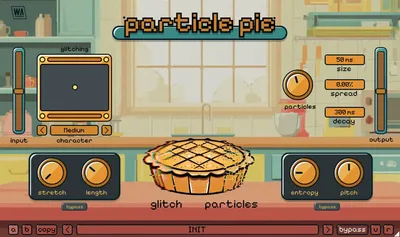
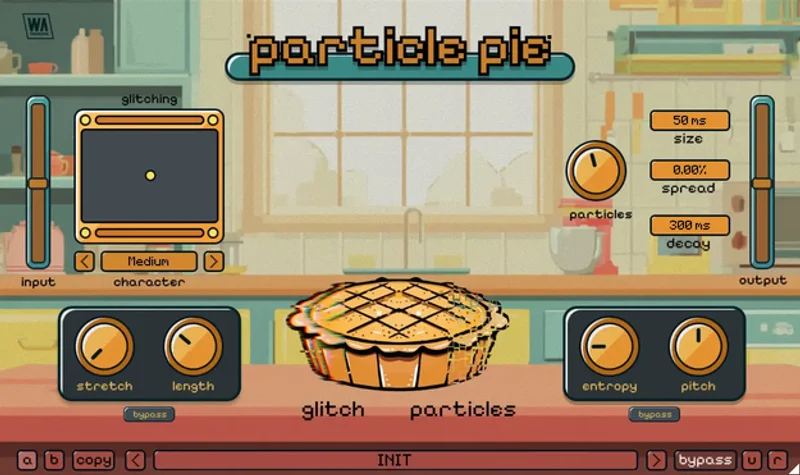
Particle Pie runs two processing engines in series. The spectral engine handles FFT-based manipulation, giving you 5 Character types that range from smooth shimmer to gritty fragmentation. An XY Pad lets you morph between Character states in real time, which is genuinely useful for automation.
The granular engine sits downstream, adding Entropy (randomisation depth) and Pitch controls that scatter and stretch the audio fragments the spectral engine produces.
You get separate Dry/Wet dials per engine, live metering, and a resizable vector interface that works across screen sizes. It ships in VST, VST3, AU, and AAX formats, covering both Intel and Apple Silicon Macs and Windows machines. Factory presets are included. The UI looks friendly. Don’t let that fool you.
The Good
The XY Pad is the best thing about this plugin. Full stop.
We ran a long, evolving synth pad through Particle Pie with the XY Pad automated across a 16-bar progression. Starting near the smooth end of Character 1 and drifting toward the gritty fragmentation of Character 4, the result was a textural shift that would’ve taken three separate plugins and twice the CPU to build manually. It sat in the mix with almost no adjustment to the Dry/Wet ratio.
The dual-engine structure is clever because the two processors feed on each other in useful ways. The spectral engine breaks the signal into fragments. The granular engine then scatters those fragments. Push the Entropy control past 60% and things get genuinely wild. Pull it back to around 20% and you get usable texture glitching without destroying the original source.
Five Character types sounds limited. In practice, the morphing between them via the XY Pad multiplies the range considerably. We got 15-20 usable tonal zones across that pad.
The resizable vector UI is a small thing that we love. It scales cleanly without pixelation.
The Not-So-Good
Repeatable results are hard. That’s not a minor issue.
We tried to recreate a specific glitch texture on a vocal chop that we’d stumbled onto during testing. Same preset, same source audio, same DAW tempo. Close, but not exact. The Entropy control introduces randomisation by design, and there’s no seed lock or snapshot feature to freeze a specific randomisation state. That’s a real omission.
W. A. Production provides zero CPU benchmarks. We noticed that two instances on separate buses in a moderately busy session pushed CPU measurably harder than comparable plugins like Looperator or iZotope Stutter Edit 2 in similar configurations. We can’t give you a hard percentage without a controlled test rig, but stacking three or more instances is not something we’d recommend without watching your meter.
The learning curve is steeper than the interface implies. The controls look simple. The interaction between the spectral and granular engines is less intuitive than it appears, and the documentation doesn’t fully explain the signal flow between them.
Annoying? Yes. Dealbreaker at the introductory price? Probably not.
Compared to the Alternatives
Looperator from Sugar Bytes (check the manufacturer’s site for current pricing) is the direct comparison for glitch-style FX. It’s more expensive and more complex, with step-sequencer-based slicing that gives you far more control over rhythmic pattern. Looperator wins for tight, programmable glitch. Particle Pie wins for spontaneous texture work where you want surprises.
Granular Thingy from Audio Damage is deeper on the granular side, with more granular-specific parameters. If pure granular manipulation is your goal, it’s the better tool. Particle Pie’s granular engine feels like a supporting cast member rather than the star.
iZotope’s Stutter Edit 2 is a stronger all-around creative FX processor with better repeatability, better documentation, and a much higher price. If budget isn’t the constraint, Stutter Edit 2 is a more professional option for creative FX plugins.
For spectral processing specifically, Sound Particles InShaper takes a completely different angle on spectral manipulation that’s worth comparing if you’re building a spect ral FX arsenal.
Who Should Buy This
- ✅ Buy if you make electronic, ambient, or experimental music and want a cheap texture generator that rewards happy accidents.
- ✅ Buy if you're building a sound design plugin toolkit and need glitch coverage at a low price point.
- ✅ Buy if you automate the XY Pad in your DAW and want evolving, morphing timbres without building complex chains.
- ❌ Skip if you need exact, reproducible results. The randomisation engine works against you here.
- ❌ Skip if you're CPU-limited. Until W. A. Production publishes benchmarks, treat it as medium-to-heavy load.
- ❌ Skip if you're new to granular concepts and expecting the UI to teach you. It won't.
Score Breakdown
| Category | Score | Notes |
|---|---|---|
| Sound Quality | 3.8/5 | Spectral textures are genuinely good; granular engine feels secondary |
| Value for Money | 4.5/5 | At this price, almost nothing competes in this creative FX space |
| Ease of Use | 3.0/5 | Interface looks friendly but the engine interaction isn't well-documented |
| Features | 3.5/5 | XY Pad and dual-engine design are strong; missing snapshot/seed lock is a real gap |
| CPU Efficiency | 3.0/5 | No official data; in-session behaviour suggests medium-to-heavy load |
| Overall | 3.8/5 | Genuinely fun at the price; too unpredictable for serious professional workflows |
Alternatives to Consider
Sugar Bytes Looperator, Step-sequencer glitching with tight rhythmic control. Far more repeatable than Particle Pie, and far more expensive. Right tool for programmable glitch patterns. Check current pricing at the Sugar Bytes site.
Stutter Edit 2 by iZotope, Our reference for creative stutter FX. Better documentation, better repeatability, significantly better CPU transparency. A professional tool at a professional price. If you’re building a serious glitch and stutter FX chain, start there.
Sound Particles InShaper, Takes a waveshaping and spectral approach that overlaps interestingly with Particle Pie’s spectral engine. Worth reading our Sound Particles InShaper review if spectral processing is your primary interest rather than glitch.
The Final Word
We’d buy Particle Pie at the introductory price. We’d think hard about it at $39.90.
It’s a satisfying, occasionally brilliant texture generator that rewards producers who treat unpredictability as a creative asset. We loved what happened when we let the XY Pad run loose across a synth layer that needed movement. We hated trying to replicate a specific result three hours later.
The missing snapshot feature is the biggest practical gap. Without it, you’re always chasing sounds rather than building them deliberately. That’s fine for inspiration. It’s frustrating for finishing records.
If you’re a sound designer building a glitch FX toolkit and you catch it at the introductory price, buy it. If you’re a mixing engineer who needs reliability, look at the iZotope options instead.
Particle Pie is a cheap ticket to somewhere weird. Just don’t expect to go back.
Frequently Asked Questions
Is Particle Pie good for beginners?
The interface looks accessible, but the plugin rewards producers who already understand spectral and granular processing concepts. If you're new to both, expect a learning curve the documentation doesn't fully cover. It is not the best starting point for someone new to creative FX plugins, but at the introductory price, the cost of experimenting is low.
Can I use Particle Pie on vocals?
Yes, and it produces interesting results on vocal chops and textures. The catch is repeatability: the Entropy control randomises output, so locking in a specific vocal glitch texture across multiple takes is difficult without a snapshot feature. We'd use it for texture layers and background vocals rather than lead vocal processing where consistency matters.
Does Particle Pie work on Apple Silicon Macs?
Yes. W. A. Production supports both Intel and Apple Silicon natively across VST, VST3, AU, and AAX formats. We'd recommend verifying the current version on their site before purchasing, as format support can change between updates.
How does Particle Pie compare to other W. A. Production plugins?
W. A. Production's catalogue covers a wide range of budget-friendly creative tools. Particle Pie sits at the more experimental end of their lineup. It's more niche than their general-purpose processors, built specifically for glitch and texture work rather than everyday mixing tasks. If you want something more broadly applicable from the same developer, check their site for their wider FX range.