You’re mixing a drum bus for something hard-hitting, say techno, industrial or aggressive electronic music, and you need to squash the kit, gate the room tails, and clamp the peaks without bolting on five separate plugins. That’s the track Complexer 2 was built for, and at $23 it’s a smart buy for producers who like to shape dynamics with a scalpel and a sledgehammer in the same window.
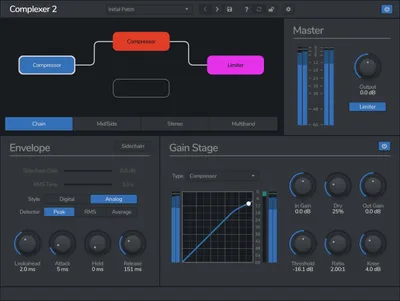
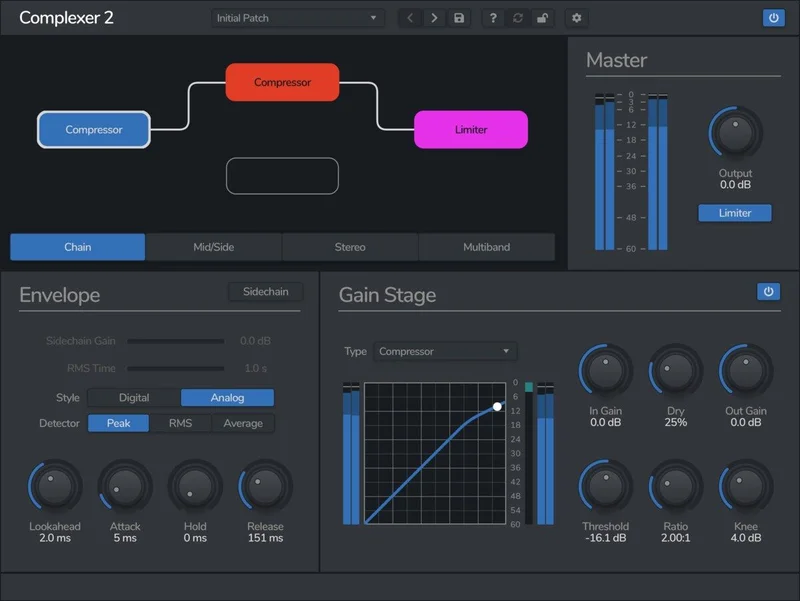
Venomode packs three independent dynamics processors into one plugin. Each runs in six modes and can be chained in series, in parallel, in stereo, in mid/side or across frequency bands.
We like the idea a lot. We like the price more.
This review is for the producer who wants control and doesn’t mind learning a deep tool. If you want a one-knob “make it glue” box with a personality, keep reading, because we’ll tell you where this one falls short.
Where It Belongs
Drums are the obvious home. Owners report it’s effective for aggressive drum processing, and the feature set explains why.
Upward and downward compression, expansion, limiting and gating live side by side, so one instance can tame a snare’s peaks, lift its ring, and gate the bleed in a single signal chain.
Electronic genres benefit most. Techno, drum and bass, industrial and hard dance all lean on tight, controlled dynamics and sometimes on dynamics pushed past polite. A plugin with a limiter, a gate and an expander on call fits that job.
It also suits the mastering-adjacent tasks. The developer points to multiband work ranging from mixing and mastering to creative effects, and multiband limiting, expanding and gating are all on the menu.
And it suits big sessions. Owners say it’s light on CPU, which matters when you’ve got forty tracks and a drum bus that already has three other things on it.
Where It Doesn't
Skip it if you’re chasing vibe. Owners say the sonic character isn’t particularly distinctive, though adequate. If you want a compressor that adds a colour, a grit or a recognisable thump of its own, this isn’t that plugin.
It’s also a poor fit for anyone who wants to open a preset, nudge one knob and move on. The preset library is minimal, and the depth that makes it powerful makes it slow for quick fixes.
Beginners who’ve never touched a gate or an expander will feel it too. There’s a learning curve, and documentation for the advanced features is thin.
Annoying? A little. Fair at this price? Mostly.
How Do The Three Processors Work Together?
Each of the three processors is independent, with its own mode, its own attack, hold, release and threshold, and its own detection setup. Think of three separate dynamics boxes sharing one window.
That independence is the whole point. You aren’t stuck with one compressor and a bolted-on gate. You build the exact chain the source needs.
Owners say the controls work intuitively without excessive tweaking. They also mention large controls and the ability to type in precise values, which beats guessing at a knob position when you’ve found a number you like.
What Do The Six Modes Actually Do?
Every processor can be set to upward compressor, downward compressor, upward expander, downward expander, limiter or gate. That’s six jobs per stage, eighteen possible stage configurations across the plugin.
Downward and upward compression
Downward compression pulls loud signals down once they cross the threshold. It’s the classic move for taming a spiky vocal or glueing a bus.
Upward compression lifts quiet material toward the threshold. Use it when you want detail and room tone brought forward without touching the peaks.
Expansion and gating
Downward expansion makes quiet signals quieter, a gentler cousin of the gate. Upward expansion pushes loud signals louder, which is a cheeky way to add punch to a transient-light sample.
The gate is the blunt tool. Put it on a tom and let the bleed vanish between hits.
Limiting
The limiter is there for catching peaks. The developer says peak detection is perfect for limiting, which matches how you’d expect to use it: fast, hard, last in the chain.
How Does Chain Mode Work?
Chain mode decides how the three stages connect. All three can run in series, or two can run in parallel with the third sitting before or after them.
Owners say Chain Mode excels at serial and parallel processing, and it’s the feature that separates this from a stack of single-purpose plugins.
Picture a kick. Stage one gates the tail clean. Stages two and three run in parallel, one squashing hard and one gentle, so you get weight without losing the transient. That whole idea lives in one instance.
Series chaining is simpler and just as useful. Compress, then expand, then limit, each stage reacting to the one before it.
The catch is planning. With this much freedom you can build a chain that fights itself, so sketch the job before you start clicking.
What About Stereo And Mid/Side Modes?
Stereo mode processes the left and right channels independently. Owners say this enables independent left and right compression for creative vibe, and that’s a fun way to make a stereo loop feel like it’s swaying.
Mid/side mode applies different dynamics to the mid and side channels. Compress the mid lightly to keep a vocal steady, then expand the sides so the width breathes.
Here’s a scene you’ll recognise. Your pad bus is wide but washy, and the centre of the mix is crowded. Duck the mid with a downward compressor and leave the sides alone. Suddenly the kick and vocal have room.
That’s the kind of surgery you’d normally need two plugins and a routing detour to do.
Is The Multiband Mode Worth It?
In multiband mode, each processor runs in its own adjustable frequency band. Low, mid and high get their own stage, and each stage can be any of the six modes.
That means multiband limiting, multiband expanding and multiband gating, not just multiband compression. Gating only the low end of a muddy room mic is a lovely trick.
The developer frames this as useful from mixing and mastering all the way to creative effects, and we agree. Treat it as a mix tool first and a sound-design toy second.
The warning from the limits list is worth repeating: complex routing and multiband setups in large sessions can push CPU use up. The plugin is light in general, but a multiband chain on every channel will cost you.
How Do Attack, Hold, Release And Threshold Behave?
All four controls are on every processor. Attack sets how fast the stage reacts, hold keeps it engaged for a set time, release sets how fast it lets go, and threshold decides where it starts.
Hold is the underrated one. On a gate, a short hold stops the stage chattering on a decaying note. On a compressor, it keeps the stage from letting go too early on a pumping bus.
Owners say these four work intuitively. That’s high praise for a plugin with this many moving parts.
What Does The Lookahead Section Do?
Each processor has an advanced lookahead section designed to catch peaks before they arrive. Lookahead lets the detector see a transient a moment before it hits the processing path.
For limiting, that’s gold. A limiter with lookahead can clamp a snare crack cleanly instead of reacting a hair too late and smearing the front edge.
For gating, lookahead opens the gate just before the hit so the attack isn’t clipped. That’s the difference between a snappy gate and one that eats the start of every note.
Lookahead adds latency, as it always does, so mind your plugin delay compensation when you track through it.
Which Detection Mode Should You Use?
There are three: peak, RMS and average. They decide how the detector reads your signal.
Peak reacts to instantaneous levels. The developer calls it perfect for limiting, and we agree. Use it when you need to stop spikes dead.
RMS reads a smoother, more ear-like level. The developer says it allows smooth detection that’s great for compression. Put it on a vocal or a bus and the gain reduction follows the performance instead of every spike.
Average sits in the same family and gives another flavour of smoothing. Try it on material where RMS feels too reactive.
Swap modes while the loop plays. The difference is obvious in seconds.
How Good Is The External Sidechain?
Each processor can be driven by an external sidechain. Owners say the plugin handles sidechaining easily, which is no small thing, since sidechain routing is where some dynamics plugins turn into homework.
Classic use: duck a bass with the kick. Set a processor to downward compression, feed it the kick, and the bass steps aside on every hit.
Because the three stages are independent, you can sidechain one stage and leave the others on the internal signal. Duck the bass with one stage, and let the second stage limit the bass’s own peaks.
That flexibility is where the value hides.
Does It Sound Good?
It sounds clean and functional. Not exciting.
Owners say the sonic character isn’t particularly distinctive, though adequate. We wish it had a little more personality, because a tool this deep deserves a signature.
But “adequate” isn’t a dealbreaker for a precision dynamics tool. Plenty of people want a transparent workhorse and reach for a character box separately.
If your mixes depend on a compressor adding colour, you’ll still want something else for that job. Complexer 2 does the surgery, not the seasoning.
How Heavy Is It On Your CPU?
Owners report it’s light on CPU and friendly to big sessions. The system requirements back that up: any dual-core system with at least 1GB of RAM will run it.
That’s a low bar. A tired laptop can run it.
The caveat is real, though. Complex routing and multiband configurations in large sessions can raise usage. So the plugin is light by default, and you can make it heavy by asking a lot of it.
Be sensible. Use the three-stage multiband chain where it earns its place, and use a single stage everywhere else.
Is It Hard To Learn?
Yes, a bit. Owners report initial complexity from the wide range of features, plus a learning curve for advanced modulation.
Documentation doesn’t help much. Deep-dive tutorials and workflow guidance for the advanced features are limited, so you’ll learn by experimenting.
That’s frustrating if you like handholding. It’s satisfying if you like discovering how a tool works by pulling every lever.
Start simple. One stage, one mode, one job. Add a second stage only when the first one is working.
What About Compatibility And Licensing?
Complexer 2 ships as VST, VST3, AU and AAX. The developer says it should work in any DAW that can run those formats.
Windows needs Windows 10 or later, 64-bit only. Mac needs macOS 10.13 or later, 64-bit only, with M1 Apple Silicon support. Ubuntu needs 18.04 or later, 64-bit only. Windows is currently on version 2.5.4.
Licensing runs through the Beatport Access portal. For Rent to Own or a Beatport Studio membership, it requires an internet connection every 30 days to validate.
That’s a small annoyance if you work offline for long stretches. Plan around it.
Is It Good Value For Money?
At $23, this is a lot of dynamics for the money. Three independent processors, six modes each, serial and parallel chaining, mid/side, stereo and multiband routing, three detection modes, lookahead and external sidechain. You’d need several separate plugins to cover the same ground.
What’s missing at that price is character and hand-holding. The sound is adequate, the preset library is thin, and the documentation won’t teach you the deep features.
So when is a cheaper or free option enough? If you only need one compressor on a vocal, a simple stock plugin does the job and you don’t need this.
When is it worth paying? When you want to build custom chains, work with mid/side or multiband dynamics, and keep your CPU in check. For that, $23 is easy to justify.
Specs & Technical Details
| Spec | Detail |
|---|---|
| Developer | Venomode |
| Price | $23 |
| Plugin Format | VST / VST3 / AU / AAX |
| OS Support | Mac (macOS 10.13+, M1 supported) / Windows (10+) / Ubuntu (18.04+), all 64-bit |
| Activation | Beatport Access portal; internet check every 30 days for Rent to Own or Beatport Studio |
| CPU Usage | Light (can rise with complex multiband routing) |
| Trial Available | N/A |
| Version Reviewed | 2.5.4 (Windows) |
Score Breakdown
| Category | Score | Notes |
|---|---|---|
| Sound Quality | 3.5/5 | Clean and functional, but not distinctive |
| Value for Money | 4.8/5 | Three full processors and flexible routing for $23 |
| Ease of Use | 3.8/5 | Intuitive controls, but a real learning curve and thin docs |
| Features | 4.8/5 | Six modes, chaining, mid/side, stereo, multiband, lookahead, sidechain |
| CPU Efficiency | 4.5/5 | Light by default, heavier with complex multiband chains |
| Overall | 4.3/5 | A deep, light, great-value dynamics toolkit with an adequate sound |
Buy It Or Skip It?
Buy it. At $23, Complexer 2 gives you a serious, flexible dynamics rig that stays light on your CPU, and that’s rare.
You get three stages, six modes apiece, and routing that bends to whatever the track demands. Drum buses, mid/side tricks and multiband gating all live in one window.
It’s wrong for you if you want colour, instant presets or a gentle tutorial. The character is plain, the preset list is thin, and you’ll learn the deep features by poking at them.
For everyone else, it’s the dynamics box you’ll quietly leave on half your sessions.
Frequently Asked Questions
Is Complexer 2 worth buying at its current price?
Yes, for producers who want deep dynamics control. At $23 you get three independent processors with six modes each, plus serial, parallel, stereo, mid/side and multiband routing. The trade-off is a plain sonic character and a learning curve.
What modes does each processor offer?
Each of the three processors offers six modes: upward compressor, downward compressor, upward expander, downward expander, limiter and gate. Each also has attack, hold, release and threshold controls.
Is Complexer 2 heavy on CPU?
Owners report it's light on CPU and friendly to big sessions. Any dual-core system with at least 1GB of RAM will run it. Complex routing and multiband setups in large sessions can raise usage, so use them where they matter.
Which plugin formats and operating systems does it support?
It comes as VST, VST3, AU and AAX. It runs on Windows 10 and later, macOS 10.13 and later (with M1 Apple Silicon support), and Ubuntu 18.04 and later. All are 64-bit only.
Can I use external sidechain with it?
Yes. Each processor can be controlled via external sidechain, and owners say it handles sidechaining easily. That makes ducking a bass from a kick quick to set up.
How does licensing work?
Licensing is validated through the Beatport Access portal. For Rent to Own or a Beatport Studio membership, it needs an internet connection every 30 days to revalidate.