Multiband compression is one of the most useful tools in mastering, and one of the easiest ways to wreck a mix. DynOne by Leapwing Audio is the plugin you reach for when you need multiband control but can't afford to sound like you used it.
The specific problem DynOne solves is this: you're mastering something delicate. A string quartet. A jazz trio recorded live to two-track. A singer-songwriter album where the vocal sits raw and exposed. The low-mids are a little thick in one section, the top end gets brittle in the chorus, and you need to address it without making the whole thing sound processed. Every standard multiband compressor you load up either pumps, colours, or just kills the life of the performance.
DynOne exists for that moment. It's a 5-band parallel multiband compressor and expander with linear-phase crossovers, built specifically for engineers who need the effect without the fingerprints. Dave Pensado and Bob Katz have both spoken about it publicly, which tells you something about the audience it's aimed at.
This review covers DynOne 3, the current version. Pricing sits at $199 for new licences. Existing owners got the upgrade free.
The Problem With Every Other Multiband Compressor
Standard multiband compressors split your audio into frequency bands, compress each band independently, and then recombine them. The issue is the crossovers. Phase issues at the crossover points, gain reduction that changes the tonal balance mid-compression, and attack/release settings that interact badly between bands. You spend 45 minutes fighting the plugin instead of finishing the master.
Linear-phase crossovers fix the phase problem, but most implementations add noticeable latency and pre-ringing. Leapwing's approach in DynOne is to run the compression in parallel. The dry signal passes through untouched. The compressed signal is blended in. You're adding compression, not applying it to replace the original. That distinction changes everything about how the plugin behaves under heavy settings.
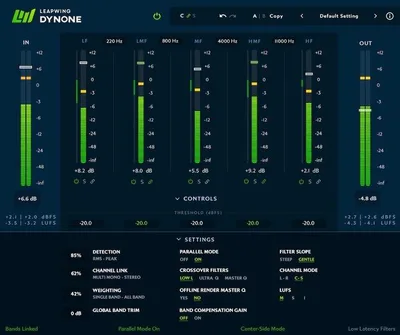
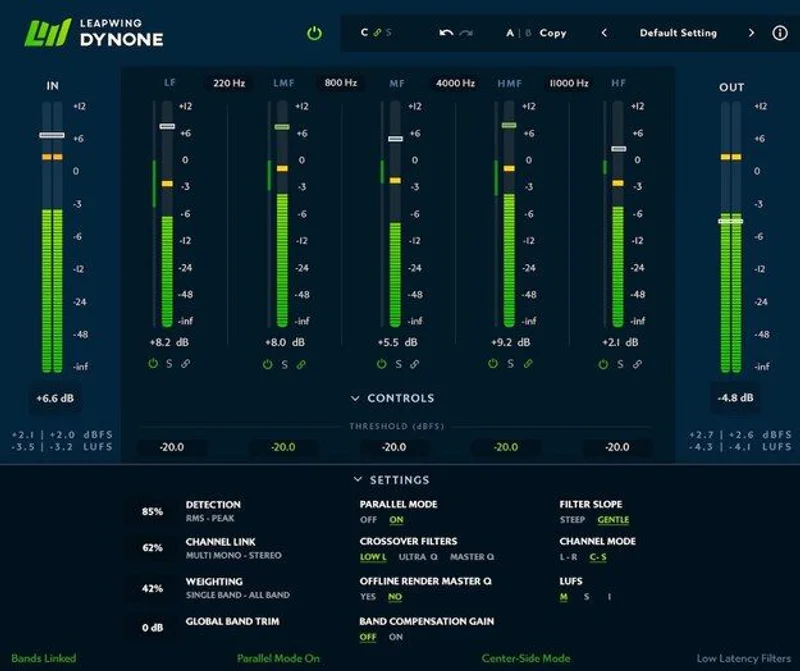
DynOne 3 extended that architecture with adjustable crossover points, a Centre/Sides separation mode, and a cleaner GUI. The crossover defaults sit at 160Hz, 800Hz, 4kHz, and 11kHz. You can move them now. That wasn't possible in the original version, which was a genuine frustration for anyone mastering content that didn't fit those fixed divisions.
How It Performs in Real Sessions
We ran DynOne 3 on a classical piano recording. The left hand was picking up room bloom below 200Hz, muddying the attack of the right-hand lines in louder passages. We set Band 1's crossover to 180Hz, pulled the threshold down until the gain reduction meter was touching 3dB in the loud sections, and blended the parallel signal to about 60% mix. The low-end bloom tightened. The room didn't disappear. The piano still felt like it was sitting in a space. That's the parallel architecture doing exactly what it's supposed to.
Attack times run from 0ms to 800ms. Release runs from 5ms to 800ms. The intelligent attack/release mode keeps settings within pre-set ranges and adjusts adaptively to the program material. We left it on for most of our testing and found it made sensible decisions on complex material. On simpler sources like a solo vocal bus, manual control gave us slightly tighter results.
We also tested it on a full mix bus alongside FabFilter Pro-MB. Pro-MB gives you more visual feedback and more parameter control. DynOne is faster to set up and, on delicate acoustic material, less audible at equivalent gain reduction. On dense electronic music, the difference narrowed. Pro-MB's real-time visual display made surgical work easier on a busy mix. DynOne wins on transparency. Pro-MB wins on visibility and flexibility.
The Centre/Sides mode in DynOne 3 lets you process the mid and side signals independently per band. It's clever. The documentation around it is thin, which is annoying given how useful the feature is. We figured it out, but it took longer than it should have.
Strengths and Weaknesses
The transparency is real. Not a marketing claim. We A/B tested at matched loudness against Waves C6 on an acoustic guitar session. C6 at 3dB of gain reduction was audible as compression. DynOne at the same reduction was not. That's a meaningful result for anyone mastering music where the performance has to survive the process.
The 384kHz support is pro-spec. Most mastering work happens at 96kHz or below, but if you're working at high sample rates, DynOne doesn't artificially cap you.
The weaknesses are real too. At 96kHz with linear-phase processing across five bands, CPU usage climbs. On an M2 Mac running Logic Pro, we hit around 12-15% CPU on a single instance at 96kHz. That's manageable on a mastering session with a low track count. Load three instances on individual buses in a busy mix session and you'll feel it. At 44.1kHz the hit drops significantly, closer to 5-6%.
The GUI, while improved in version 3, still feels conservative. You get what you need. Nothing is confusing. But next to Pro-MB's real-time spectral display or Neutron's visual feedback, DynOne feels like it trusts your ears over your eyes. We love that philosophy. We also wish there were more visual feedback on what the adaptive detection is actually doing.
Value for the Price
$199 is a serious ask for a single dynamics plugin. You'd pay that for FabFilter Pro-MB, which has a broader feature set and a steeper learning curve. You'd pay more for iZotope Neutron, which bundles more tools.
DynOne earns its price in a specific scena rio: you're mastering music where transparency is non-negotiable. Jazz, classical, acoustic folk, singer-songwriter, orchestral scoring. If that's your world, $199 is a sound investment. If you primarily mix pop, hip-hop, or EDM, you might love DynOne and still not need it at this price.
The free upgrade path for existing owners is genuinely good practice. That counts for something.
Who Should and Shouldn't Buy This
- ✅ Buy if you master acoustic, orchestral, or jazz recordings and need multiband control that doesn't announce itself
- ✅ Buy if you're a mix engineer who parallel-compresses buses and wants a cleaner, more controlled tool than a standard multiband
- ✅ Buy if you already understand multiband compression and want to work faster without sacrificing quality on delicate material
- ❌ Skip if you're new to multiband compression. The workflow assumes you know what you're doing.
- ❌ Skip if you're primarily working on dense electronic or hip-hop productions where full transparency isn't the priority
- ❌ Skip if CPU budget is tight and you're running sessions with high track counts at high sample rates
Score Breakdown
| Category | Score | Notes |
|---|---|---|
| Sound Quality | 4.8/5 | Best-in-class transparency on acoustic material at equivalent gain reduction to competitors |
| Value for Money | 3.8/5 | Justifiable for mastering engineers; harder to justify for general mix work at $199 |
| Ease of Use | 4.0/5 | Fast to dial in if you know multiband compression; Centre/Sides mode needs better documentation |
| Features | 4.0/5 | Adjustable crossovers and C/S mode in DynOne 3 fill previous gaps; still less visual feedback than Pro-MB |
| CPU Efficiency | 3.5/5 | Linear-phase at 96kHz gets expensive; fine at standard rates for mastering-style sessions |
| Overall | 4.2/5 | Brilliant at one specific job; priced for professionals who need exactly that job done |
Alternatives to Consider
If DynOne isn't the right fit, here's where we'd look next.
FabFilter Pro-MB, More visual feedback, more flexibility, and comparable pricing. It's harder to learn but covers more ground. If you work across genres and need one multiband for everything, Pro-MB is our pick. FabFilter Pro-MB review
Waves C6 Multiband Compressor, Lower cost when Waves runs a sale (which is often). The transparency doesn't match DynOne on acoustic material, but it's a workhorse on dense mixes. Good for engineers who need multiband on a tighter budget. best multiband compressor plugins
iZotope Neutron, If you want multiband dynamics bundled with EQ, transient shaping, and AI-assisted processing in one package, Neutron's Compressor module handles multiband and gives you more tools for the same price bracket. Not as transparent as DynOne, but more versatile. iZotope Neutron review
If you're specifically after parallel compression techniques without multiband, a simpler approach using your DAW's built-in compressor on a parallel bus might get you 70% of the way there for free. parallel compression explained
DynOne 3 is the right answer to a specific question: how do you apply multiband dynamics to music that can't survive sounding compressed? At $199, it answers that question better than anything else we've tested. If that's not your question, there's a better plugin for your money elsewhere. The trial exists. Use it on your hardest session first, not your easiest.
Frequently Asked Questions
What makes DynOne different from a standard multiband compressor?
DynOne runs in parallel mode by default. The dry signal passes through untouched, and the compressed version is blended in. Standard multiband compressors replace the original signal with the compressed signal, which tends to produce audible pumping and tonal shifts under heavier settings. DynOne's approach means the parallel architecture preserves the natural dynamics of the original recording while still allowing controlled band-specific gain reduction.
Is DynOne 3 a free upgrade from the original DynOne?
Yes. Leapwing Audio offered DynOne 3 as a free upgrade for existing owners. If you purchased the original version, check your Leapwing account for the updated licence. New buyers purchase DynOne 3 directly, so there's no need to start with an older version.
Can DynOne be used on individual tracks or is it only for mastering?
You can run DynOne on any channel in your signal chain, including individual tracks, group buses, and the stereo master. We've had good results using it on drum buses and mix buses to address specific frequency build-ups without compressing the full signal. It's designed with mastering applications in mind, but it's not limited to them.
How does the Centre/Sides mode work in DynOne 3?
The Centre/Sides mode lets you apply band-specific dynamics processing to the mid and side signals of a stereo source independently. This means you can, for example, compress the low-mids of just the centre image without affecting the width, or tighten a harsh top end in the sides while leaving the mono signal untouched. The feature is genuinely useful for mastering stereo material. The documentation is thin, so expect to spend some time experimenting before it clicks.