UVI Plate is a physically-modeled plate reverb plugin that simulates the EMT 140, EMT 240, and an unlimited range of plates you'd never find in a hardware catalogue, and it does it with a level of parametric depth that most plate emulations simply don't attempt.
We first opened it on a sparse R&B session: a lead vocal, a Rhodes, a snare. We dropped Plate on the vocal bus, pulled up the EMT 140-inspired preset, and set decay to 1.4 seconds. The tail spread dense and even across the top two octaves, with a natural high-frequency roll-off above 8kHz, that characteristic plate softness that keeps the verb from biting the listener. We weren't reaching for the EQ to tame harshness. That was satisfying.
Then we opened the Expanded view. That's when the session got longer than planned.
This review is for mix engineers, producers, and sound designers who want to understand plate reverb at a physical level, not just load presets and bounce. If you want the fastest route to a serviceable plate sound, there are cheaper and simpler options. If you want to actually build your plate, read on.
UVI Plate: What It Actually Models (and Where It Stops)
Plate reverb works by sending a signal through a transducer into a large, tensioned metal sheet. The vibrations travel across the surface, picked up by contact microphones. The density of those early reflections and the way the tail smears across the plate's surface is what gives plate reverb its distinctive, non-spatial quality: you're not hearing a room. You're hearing metal vibrating.
UVI Plate replicates that physical system at the component level. It simulates every component of the sound: dimensions, material, input/output positioning, modulation, and decay sculpting, while staying within the general sonic territory allowed by physics.
It uses real-time physical modeling with up to 20,000 modes to achieve depth and detail that goes well beyond the limitation of physical units. Think of modes like voices on a synth: more modes, more resolution in the tail.
What it's NOT: a convolution reverb of an EMT 140. UVI's goal was not to clone a specific hardware reverb, but to replicate the sound of many hardware reverbs and allow users to experiment with their physical characteristics, even designing their own. That distinction matters if you need the exact fingerprint of one specific vintage unit. For that, a convolution IR plugin is more honest. Plate is for anyone who wants to understand and control the physics, not just capture a snapshot.
Living With UVI Plate Day-to-Day
The workflow split into two modes and we used both constantly.
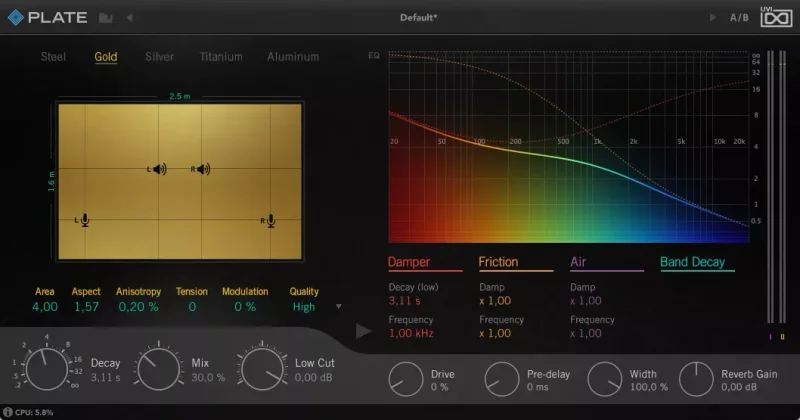
The Compact mode is perfect for quickly browsing the included presets and dialing them in to suit your input material. Load, audition, tweak decay and mix, move on. Fast enough for a mixing session where you've got 40 tracks and a deadline.
Toggling the Expanded view reveals additional controls including the visual decay editor where you can take full control over the nuts and bolts to precisely shape your reverbs sound. We spent real time here during sound design work.
You choose from multiple types of metal sheet, adjust the plate size, manually position inputs and outputs on the plate, introduce irregularities and tension to the metal, then shape your decay with simulations of the physical dampener, thermo-elastic loss, and air radiation. Moving the input transducer position left changes the stereo character of the early reflections noticeably. Increasing plate tension tightens the low-frequency tail, useful when plate is sitting under a kick with too much 200Hz buildup in the verb.
The decay and EQ sections include 3 modeled decay sections (damper, friction and air), octave-band decay, octave-band EQ, and a lowcut EQ. We cut the octave-band decay at 125Hz by about 4dB and the bass got tight without touching the character of the midrange verb. That's a move you can't make cleanly on most plate plugins.
One honest frustration: Plate runs in UVI Workstation and Falcon, not as a standalone VST3, AU, or AAX plugin. UVI Workstation is free, but it's an extra layer in your signal chain. Some engineers hate loading a sampler-host just to run a reverb. We get it. Annoying, but manageable once it's in your template.
Plate uses adaptive multi-threaded, multi-core rendering and makes use of the latest SIMD instruction sets (SSE, AVX, AVX2). At the default mode count, real-time performance on a modern Mac or PC is clean. Push it to 20,000 modes and you'll want to bounce before your final mix.
The Trade-Offs You Should Know About
The depth here is the feature and the drawback simultaneously. If you love dialing in reverb at a component level, you'll love Plate. If you're on a deadline and need plate on eight sends before noon, the Expanded view can become a rabbit hole. We lost 20 minutes adjusting thermo-elastic loss on a snare reverb and we're not proud of it.
A variable Quality control adjusts performance by changing the number of modes. The default setting provides a beautiful result in most cases, while increasing the quality can simulate up to 20,000 modes for the ultimate result, but this is best suited for offline rendering. That's the right design decision, but it means your CPU-light mixing version and your final-bounce version technically sound slightly different. Verify before you commit.
Plate also includes a preamp saturation stage, predelay, parameter locks, and wet/dry mix. The saturation stage is clever. We pushed it to about 30% on a drum bus and the plate verb gained a slight harmonic grittiness in the 2-4kHz range that glued things together. We wish it had more range. It tops out before it gets genuinely interesting for distortion-forward work.
At $79, it costs more than Valhalla Plate. That gap only makes sense if you're going to use the physical modeling controls. If you're a preset-browser who tweaks decay and mix and nothing else, the extra spend doesn't pay off.
Against the Field: Where UVI Plate Wins and Loses
Valhalla Plate: 12 algorithms, extremely light CPU, best-in-class for fast workflow. Wins on simplicity, price, and real-time performance. Loses on physical accuracy and parametric depth. If you want to sound like classic plate quickly, Valhalla wins. UVI Plate was built to let you experiment with physical characteristics and design your own, Valhalla wasn't.
Soundtoys Little Plate (also available bundled): Brilliant one-trick-pony with Infinity mode for freeze effects. Wins on character and simplicity. No physical modeling at all. Best for colour, not control.
Arturia Rev PLATE-140 (part of FX Collection, also sold standalone): Closest competitor in positioning. Built on TAE physical modeling of the EMT 140 and EMT 240. Includes gold, silver, and steel material options. Slightly more approachable UI. We'd call it a draw on sound quality, UVI wins on parameter depth, Arturia wins on immediate tactile workflow.
For synths and orchestral work, UVI Plate is underrated. The ability to dial in a smaller, faster plate (shorter dimension, higher tension) gives pads and strings a plate verb that doesn't swamp the mix the way a big room setting would. Spring reverb tends to get recommended for synths, but a tight plate at 0.8 seconds with the high-frequency damper set mid-way gives a much cleaner result. We'd push that recommendation harder. See our reverb plugins guide for when to use each type for more context.
The Real Verdict on UVI Plate
Buy it if you're the engineer who actually turns knobs. The physical modeling is the real thing, the visual decay editor is brilliant, and the results on vocals, snares, and pads are consistently professional.
Skip it if you're a preset-browser. Not because Plate is bad, it's not, but because you'll be paying $79 for controls you won't use. Grab Valhalla Plate instead and spend what you save on something useful.
Also skip it if the UVI Workstation dependency bothers you. That's a legitimate workflow objection, not a technical failing.
For mix engineers who want to understand the plate they're using, not just select one, this is the most satisfying plate plugin we've put in a signal chain.
Score Breakdown
| Category | Score | Notes |
|---|---|---|
| Sound Quality | 4.5/5 | Dense, accurate tails across all decay settings; physically credible throughout |
| Value for Money | 3.5/5 | $79 is fair for the depth on offer, but Valhalla Plate undercuts it for most users. |
| Ease of Use | 3.5/5 | Compact mode is fast; Expanded mode is a deep rabbit hole; UVI Workstation dependency adds steps |
| Features | 4.5/5 | Octave-band decay, physical material control, saturation stage, and spectral analyzer are all genuinely useful |
| CPU Efficiency | 4.0/5 | Default mode count runs clean in real time; high-mode rendering is offline-only |
| Overall | 4.2/5 | The best parametric plate plugin available, but you need to want the controls to justify the price |
Alternatives to Consider
Valhalla Plate: The fastest route to a great plate sound ITB. No physical modeling, no spectral editor, no friction, and honestly, most sessions don't need those things. See our full reverb plugins guide for which type suits your session
Apogee Clearmountain's Spaces: If your main use case is vocal reverb at the mix stage, Clearmountain's Spaces delivers a different flavour with a workflow built around famous settings. Read our Clearmountain's Spaces review
Sonible pure:verb: AI-assisted reverb that doesn't do plate specifically, but handles vocals with a different philosophy. See how it compares in our pure:verb review
For weirder spatial textures on synths and sound design, our Hippie Elephant review covers unconventional reverb territory where plate physics don't apply.
UVI Plate earns its place in the kit bag if you mix with intention. If you're still dialling in reverb by ear with decay and mix controls only, you'll buy it, enjoy the presets for a week, and quietly resent the money you could have kept. Know which engineer you are before you check out.
Frequently Asked Questions
Does UVI Plate work as a standalone VST3 or AAX plugin?
No. UVI Plate runs inside UVI Workstation or Falcon. UVI Workstation is free to download, so the cost barrier is low, but it does mean an extra host layer in your session. If your DAW is Ableton, Logic, Pro Tools, or any other standard host, you'll load UVI Workstation as a plugin and run Plate inside that. Most engineers adapt to this quickly, but it's worth knowing upfront before you buy.
Do I need a physical iLok dongle to activate UVI Plate?
No dongle required. You need a free iLok account and an internet connection for activation. Once activated, you can authorize the license to your machine or to a cloud license if you prefer not to tie it to one computer. Standard UVI licensing applies.
How does UVI Plate compare to a convolution plate reverb using EMT 140 impulse responses?
Convolution captures a fixed snapshot of a specific unit at specific settings. UVI Plate uses physical modeling, so you can change plate size, material, tension, transducer position, and damping properties in real time. Convolution wins for exact hardware fingerprint matching. UVI Plate wins for flexibility and for going beyond what any hardware unit can do. They're different tools with different philosophies.
Is UVI Plate good on drums, or is it mainly for vocals?
It works well on both. On snare, a short 0.6-0.9 second decay with the high-frequency damper set around midpoint gives a tight, dense tail that sits behind the transient without clouding the hat. On full drum bus, keep the pre-delay at 15-20ms so the plate verb doesn't smear the attack. The octave-band decay control is especially useful on kick-heavy signals, where you can pull the 63Hz and 125Hz decay time down independently to keep the tail from blooming in the low end.