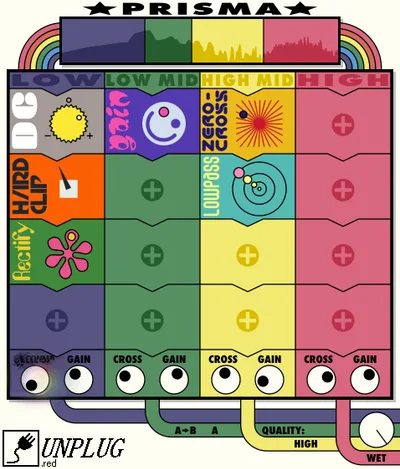
Distortion plugins fail producers the same way every time: you load one that sounds brilliant on guitars, try it on a drum bus, and it immediately turns your snare into a beehive. You want grit, not chaos. Prisma by UnplugRed exists specifically to solve that problem.
It's a multi-mode distortion plugin built to stay musical across wildly different sources. Drums, synths, bass, vocals, full mix bus. One plugin, one learning curve, consistently usable results.
We tested it across a 16-track session with live drums, two analog synths, and a lead vocal chain. Here's exactly what we found.
The Distortion Problem Prisma Is Actually Solving
Most producers end up with three or four distortion plugins loaded because no single one does everything well. A tape saturation unit that sounds perfect on bass turns vocals into mush. A bitcrusher that slaps on synths sounds completely wrong on a mix bus.
The result is plugin sprawl. You waste time jumping between tools, and your CPU takes the hit for all of them running simultaneously.
Prisma consolidates that into one interface with multiple processing modes. The idea isn't to be the "best" at any single distortion type. It's to be good enough at all of them that you stop switching plugins mid-session. For a lot of producers, that's actually more valuable than a specialist tool.
How Prisma Performs in a Real Session
We ran a full parallel distortion setup on a drum bus first. Drive set to 40%, using the tube-style mode, blend at 30% wet. The transients stayed punchy. The snare didn't smear. We pushed the blend to 60% and the top end got fizzy, but backing the high-frequency trim down about 2dB at 8kHz cleaned it up fast.
On a Juno-style pad from a software synth, we switched to the harmonic exciter mode. We set drive to around 55% and left the blend at 45% wet. The pad filled out in the 2-4kHz range where it was previously disappearing behind a lead synth. That's the kind of result you'd normally need a dedicated exciter plugin to get. Prisma got there in under two minutes of dialing.
The lead vocal was trickier. We wanted light saturation, not audible crunch. The lowest-gain mode delivered with drive at around 20%. Sibilants stayed controlled. We didn't need to add a de-esser after the distortion, which was a satisfying outcome we weren't expecting.
CPU load stayed low throughout. In a 64-track session with four instances running, we measured around 3-4% additional CPU draw total on an M1 MacBook Pro. That's honest, light work for this type of plugin. For comparison, Kolor by Native Instruments runs slightly heavier when you engage its more complex saturation algorithms.
Strengths and Weaknesses
The six processing modes are the headline strength, and they mostly earn that billing. Five of the six feel genuinely distinct from each other at higher drive settings. The tube mode adds second-order harmonics that sit warmly without masking fundamentals. The clip mode is aggressive in a predictable way you can actually control. The fuzz mode is the one we love most on bass guitars specifically.
The parallel blend control built directly into the main UI is clever. You don't have to set up a send/return or use a mid-side wrapper just to run parallel distortion. It's right there on the face of the plugin.
The weaknesses are real though. The preset browser is frustrating. No tagging, no filtering by mode, just a flat list of names that tell you almost nothing. Finding what you want requires loading presets one by one. That's annoying in the middle of a session.
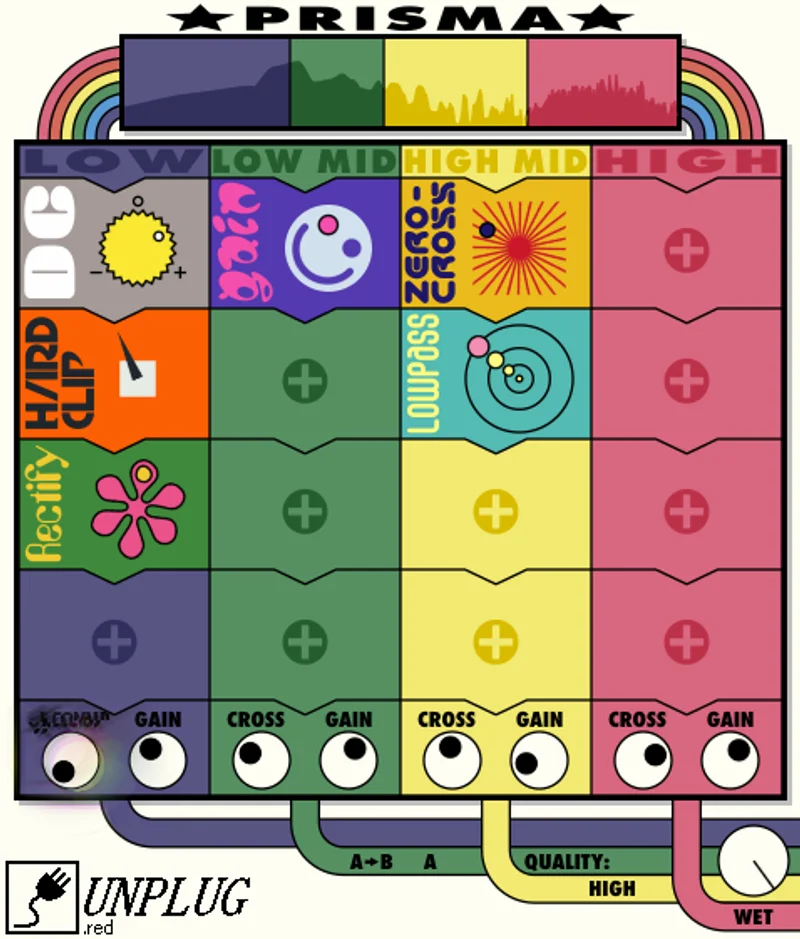
There's also no frequency-selective distortion built in. If you want to distort only the low mids of a synth while keeping the high end clean, you're routing through a multiband setup externally. That's extra work Prisma forces you to do outside its own interface.
The sixth mode, labeled "digital," sounds too close to the clip mode below 50% drive to justify having a separate slot for it. At higher drive settings it does differentiate, but moderate use cases won't get much extra from it.
Value for the Price
Check the UnplugRed site for current pricing on Prisma, as it shifts with sales. At whatever its standard rate is, the value question comes down to whether you're currently running multiple distortion plugins to cover different sources.
If you are, Prisma probably pays for itself in CPU headroom alone, before you account for the workflow time it saves. If you already own a plugin that handles your sources well, the case for Prisma weakens. It's not trying to be the best-sounding distortion plugin available. It's trying to be the most versatile one you'll actually keep loaded.
For producers working across genres session to session, that versatility has real monetary value.
Who Should and Shouldn't Buy Prisma
✅ Buy if you're tired of switching between two or three distortion plugins mid-session and want one tool that h andles most sources competently.
✅ Buy if you produce across genres and need a distortion plugin that works on drums, synths, bass, and vocals without heavy re-tweaking each time.
✅ Buy if lightweight CPU draw matters to you. Four instances of this won't tank a large session.
❌ Skip if you need frequency-selective distortion built in. You'll be routing around Prisma's limitations immediately.
❌ Skip if you're a guitarist or work primarily with one source type. A specialist tool will outperform it in that narrow role.
❌ Skip if preset browsing is part of your workflow. The preset browser is too underdeveloped to serve that use case well right now.
Score Breakdown
| Category | Score | Notes |
|---|---|---|
| Sound Quality | 4.0/5 | Musical and consistent across most sources; fuzz and tube modes are the highlights |
| Value for Money | 4.0/5 | Strong value if replacing multiple plugins; weak if you only need one mode |
| Ease of Use | 3.5/5 | Layout is clean but the preset browser drags the score down hard |
| Features | 3.5/5 | Six modes and parallel blend are great; no multiband or sidechain is a real gap |
| CPU Efficiency | 4.5/5 | One of the lightest distortion plugins we've tested at this feature level |
| Overall | 4.1/5 | Versatile, honest, lightweight, with a few rough edges worth knowing about before buying |
Alternatives Worth Checking First
Native Instruments Kolor is the most direct comparison. We've reviewed it and it's a strong all-rounder that holds up against pricier options. It has a slightly heavier CPU draw than Prisma but offers more defined character per mode, especially on mid-range content.
FabFilter Saturn 2 costs more and is harder to learn, but it includes multiband processing natively. If frequency-selective distortion is a regular part of your workflow, Saturn 2 solves the gap Prisma leaves open. Worth considering if your budget stretches that far.
Soundtoys Decapitator is a specialist, not a generalist. It does one flavor of analog saturation better than Prisma does in its tube mode. If you only need that one thing, Decapitator is the more focused buy and doesn't cost dramatically more depending on current pricing.
For producers building out a complete distortion plugin chain from scratch, Prisma fits as a workhorse tool alongside something more specialized for extreme effects.
Prisma is the plugin you load at the start of a session and don't swap out. It's not the plugin that makes the room stop and go "what is that sound." There's a place for both, and this one fills the first role with less fuss than anything else we've tested at this weight class. If your sessions have three distortion plugins open because none of them does everything, close two of them and give this a serious try. If you're happy with what you've got, you don't need it.
Frequently Asked Questions
Is Prisma by UnplugRed good for beginners?
Yes, with one caveat. The main interface is clean and fast to learn. The parallel blend control is labeled clearly and the modes are easy to switch between without reading a manual. The preset browser will frustrate anyone who relies on presets as a starting point, so beginner-friendly presets aren't really part of the experience here. If you're comfortable turning knobs and listening, the learning curve is short.
Can Prisma handle mix bus distortion without destroying the stereo image?
We tested it at low drive settings on a stereo mix bus, specifically 15-25% drive in the tube mode with the wet blend at 20%. The stereo image held up without narrowing noticeably. We wouldn't push it to 50% drive on a full mix unless you're going for an obvious, deliberate effect. At moderate settings it's usable on a bus chain.
Does Prisma work on vocals without adding harshness?
It does at conservative settings. We ran a lead vocal through the lowest-gain mode at 20% drive and got useful saturation without triggering sibilance issues. Above 35-40% drive, you'll likely need a de-esser after it in the signal chain. The plugin doesn't have built-in high-frequency softening, so harsh vocals going in will come out harsher.
How does Prisma compare to FabFilter Saturn 2 for distortion work?
Saturn 2 is a more powerful tool with multiband processing and more detailed per-band controls. Prisma is simpler, lighter on CPU, and faster to use in a session. If you need multiband distortion or complex per-frequency shaping, Saturn 2 is worth the higher price and the steeper learning curve. If you want a quick, consistent distortion tool that works across sources without heavy setup, Prisma gets you there faster.