Dist OPAMP-21 sits in the same conversation as Guitar Rig and BiasFX, and this review is going to tell you it's not trying to beat them at their own game. It doesn't want to. Dist OPAMP-21 is a focused, amp-inspired saturation and distortion plugin that strips the full-rig fantasy down to what most mix engineers actually reach for: preamp grit, cabinet colour, and a tight EQ section. Where Guitar Rig hands you a studio full of gear and BiasFX layers amp after amp, this plugin gives you one very specific thing and does it well. If you're looking for a Swiss-army distortion tool with hundreds of effects, this isn't it. If you want a go-to saturation plugin that sits in the mix without arguing, keep reading.
How It Compares Out of the Box
Pull up Guitar Rig and you're immediately managing a signal chain with stomps, amps, cabinets, effects, and routing options. BiasFX is a similar story. Both are brilliant platforms for guitarists building a full rig. But when you're dropping a distortion plugin on a drum bus at 2am, that breadth becomes friction.
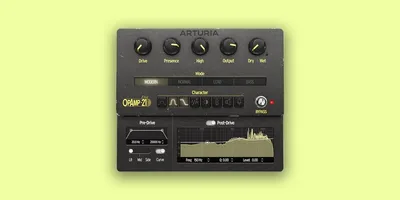
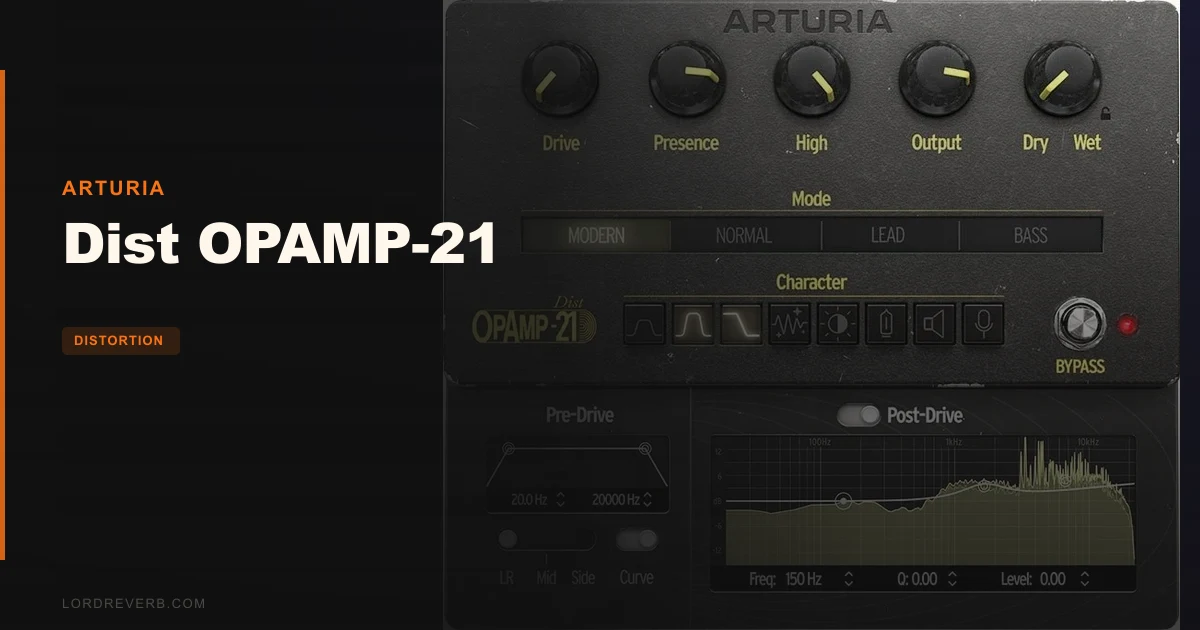
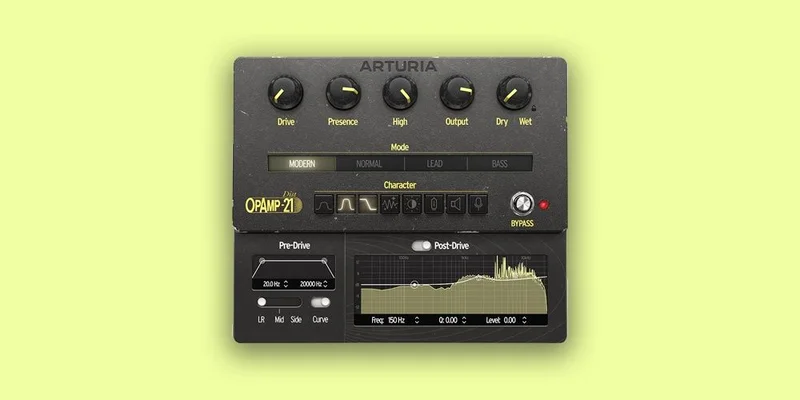
Dist OPAMP-21 opens differently. Four preamp modes. Eight character switches. A drive knob. Filters before and after. Done. A reviewer specifically noted the absence of extraneous effects compared to competitors, pointing out that amp, speaker, microphone, and EQ alone are what you get, and they sound rather good.
That restraint is either a feature or a flaw depending on what you need. For mixing contexts, it's a feature. For guitarists who want a full-signal-chain replacement, it's probably a dealbreaker. It's not competing with them directly. It's competing with the question of whether you need all that complexity in the first place.
The Tech 21 Sans Amp is the physical pedal that inspired this. That original unit is a studio staple for a reason: it's simple, it sounds like an amp without being one, and it gets out of the way. OPAMP-21 takes that philosophy into software and adds modern flexibility around it.
Performance Deep Dive
The Four Preamp Modes
MODERN, NORMAL, LEAD, and BASS are the four preamp modes, and they represent meaningfully different starting points. NORMAL draws from Mesa Boogie character: tight low-end, present mids, that slightly scooped quality that made Mesa famous. LEAD reaches toward Marshall: more aggressive upper-mid push, harmonics that feel like a cranked stack. BASS goes Fender-style, which translates to a warmer, more compliant low-end response with a more polite top.
MODERN doesn't map directly to a single hardware reference, which makes it the most flexible for production work. It's where you'd start on drums or synths, where the other three modes' amp character might feel too specific.
Each mode behaves differently under the Drive control. Push the Drive in LEAD mode and the top end turns gritty in the way you'd expect from a high-gain Marshall channel. The same Drive setting in NORMAL feels tighter, more compressed. These aren't just cosmetic label changes. The TAE® analog modeling technology is doing component-accurate work here, and it shows in how the gain staging responds.
The 8 Character Switches
This is where OPAMP-21 earns the claim of hundreds of configurations. Eight switches: Mid Boost 1, Mid Boost 2, Low Drive, Clean Amp, Bright Switch, Vintage Tubes, Speaker Edge, and Close Mikin. Combinations multiply quickly.
Mid Boost 1 and Mid Boost 2 do different things. One lifts the presence range with a relatively gentle slope. The other pushes harder and narrower. Stack them and vocals cut through mixes that would otherwise swallow them. Useful on snares too.
Vintage Tubes is the one that genuinely changes the harmonic profile. Owners describe the result as warm in a way that translates to audible even-harmonic content, the kind that makes a bus feel fuller without adding level. Clean Amp is almost a paradox in this context: it dials back the obvious distortion character while keeping the amp-circuit shaping, which is brilliant for light saturation passes where you want texture but not grit.
Speaker Edge and Close Mikin are cabinet-colouring switches. This is where the fixed-IR limitation becomes more obvious, because you can shape but you can't remove. On guitars and bass, that's usually fine. On drums or synths, the always-present cabinet character during Normal, Lead, and Bass modes limits sonic flexibility for users seeking a purely clean saturation stage.
Pre-Drive Filtering
The Pre-Drive section includes a high-pass and low-pass filter plus the Curve control for low-end emphasis. This is more useful than it sounds on paper.
Use the high-pass before drive hits and you're controlling which frequencies get saturated. Roll off below 80Hz on a bass DI and the low-end stays clean while the upper harmonics get cooked. That's a technique normally requiring two plugins and careful routing. Here it's one knob.
The Curve control adds low-end weight before the drive stage. Dial it up and the saturation takes on more body, almost like the kind of warmth you'd dial in by boosting a couple dB at 200Hz before clipping. It changes the distortion character, not just the frequency content. The filters lack a numerical readout, though the visual response is immediate.
Drive, Presence, and High Controls
Drive is the central control and it scales across the preamp mode you've selected. Presence and High work after the preamp stage to shape how the distorted signal resolves in the upper frequencies.
Presence is a classic amp-style control: it doesn't just EQ the top end, it interacts with the distortion circuit in a way that changes how harmonics stack. Lift it on vocals and you get forward, present consonants. Pull it back and the distortion feels smoother, a bit darker, which works on room mics or parallel drum compression.
High is more surgical than Presence. It's closer to a high-shelf and doesn't carry the same circuit-reactive quality. Use it to tame the fizz when Drive is pushed hard.
Stereo Mode Selector
L-R, Mid, and Side. Straightforward on paper. In practice, the Side option is the interesting one. Distort the sides of a mix element and you get a widening effect with texture, without touching the mono-compatible center. Try it on room mics or a wide synth pad. Push the Drive to about halfway in MODERN mode with the Side setting and you'll hear what this plugin can do outside its obvious guitar use case.
The Dry/Wet control enables full parallel processing, which is the correct way to use distortion on most non-guitar material. Heavy saturation in the wet path, blend it back against the clean signal. It gives you the harmonic content without the level drop and tonal shift that comes from committing hard.
The Output EQ
Three bands, post-distortion, with a visualizer. This is a useful addition. After the distortion stage has done its work, the output EQ lets you correct for anything the preamp mode introduced. If LEAD mode adds a mid-range honk you don't want, take 2dB out at 800Hz with a moderate Q and shape it back to where it needs to sit.
The visualizer shows the EQ curve in real-time. It's not a spectrum analyzer, just the EQ shape, but it's enough to work visually when you need to dial something in fast.
Oversampling and Latency
Two oversampling modes give you the choice between audio quality and lower latency. High-quality oversampling reduces aliasing artifacts, which matters when you're pushing Drive hard. The lower-latency option is there for when OPAMP-21 is in a live monitoring chain or you're tracking in real-time.
Owners haven't flagged CPU as a major complaint, which suggests Arturia has balanced the TAE® modeling load reasonably. That said, the system requirements ask for a 4-core CPU at 3.4GHz, which is a meaningful ask for budget machines.
The Preset Browser
Filtering by instrument type, genre, and production technique is a genuinely useful implementation. It's not just alphabetical scrolling. You can narrow by genre and by instrument type to get to a usable starting point quickly.
Honestly? The preset browser is a better entry point than twiddling from scratch if you're new to the plugin. The built-in tutorials also walk through the key parameters and some mixing approaches, which is a smart addition for engineers who aren't guitar amp enthusiasts by default.
A/B Comparison and MIDI Mapping
The A/B comparison feature is one of those workflow tools that sounds minor until you're deciding between two settings and need a clean reference. Load a state into A, tweak into B, flip between them. Every parameter can be mapped to MIDI controller for real-time control, which opens the door for live use or automated rides in a session.
NKS-ready integration means Native Instruments hardware controllers will recognise the plugin and surface its controls directly. If you're in a Native Instruments workflow, that's a satisfying fit.
Where It Wins
The workflow clarity is the clearest win. You open this plugin knowing exactly what you're dealing with in about 30 seconds. Four modes, eight switches, filter before and after, EQ after. There's no decision fatigue.
The Pre-Drive filtering approach is clever for production work. If you're putting this on a vocal bus, you can shape what frequency content hits the distortion before it clips. That's not standard in a guitar-pedal-style plugin. Most pedal emulations just drive whatever you give them. The ability to high-pass at 120Hz before the drive stage means your chest resonance doesn't turn into mud when you push the gain.
Owners report sonic quality that's competitive with more complex guitar amp plugins, despite OPAMP-21 having a fraction of the feature surface. That's an honest trade. If you need that quality without the complexity, this is the plugin that delivers it at $49.
The stereo processing options, specifically the Mid and Side modes, give it a genuine production tool use-case beyond guitar. Mid-side saturation on a drum bus is a professional technique. Having it built into a plugin this focused is satisfying.
The A/B comparison and MIDI mapping round out a feature set that punches above its price point in workflow terms, even if the raw feature count looks modest next to Guitar Rig.
Where the Competition Wins
Guitar Rig and BiasFX both let you bypass or swap the cabinet and microphone section freely. If you want amp-stage distortion without any IR colouring, they accommodate that. OPAMP-21 doesn't. In Normal, Lead, and Bass modes, the cabinet and microphone section is fixed in the chain and cannot be disabled. That's a frustrating limit, and it's not a minor one for engineers who want raw preamp saturation without speaker character.
A user specifically called this out: the plugin sounds really very good, but the fixed IR limitation creates a ceiling on how flexibly you can deploy it. That complaint deserves weight. For drum bus saturation, you often want harmonic content without the frequency shaping that a speaker cabinet introduces. You can EQ around it post-plugin, but it's extra work for a limit that shouldn't exist at this price.
Guitar Rig and BiasFX offer broader ecosystems for guitarists, with features like effects loops, cab swapping, and IR loading that OPAMP-21 doesn't include. Effects loops, stereo routing, cab swapping, IR loading, real-time amp channel switching. If you're building a stage rig in software, OPAMP-21 simply doesn't compete. It's not built to.
The lack of Windows ARM support is annoying in 2026. ARM-based Windows machines are increasingly common, and plugins that don't support them are already feeling dated.
Who Should Buy Which
- ✅ Buy if you want a focused saturation plugin for vocals, drums, and instrument buses that doesn't require managing a full amp-sim interface
- ✅ Buy if you're already a Guitar Rig or BiasFX user and want a dedicated, simpler plugin for non-guitar production work
- ✅ Buy if you're working in a Native Instruments ecosystem and want NKS-integrated distortion with a clear, fast workflow
- ❌ Skip if you need to bypass the cabinet section for clean preamp saturation without speaker colouring
- ❌ Skip if you're on a Windows ARM machine, because it will not run
- ❌ Skip if you're a guitarist who needs a full amp-sim replacement with cab swapping, effects chains, and multi-amp routing
Specs & Technical Details
| Spec | Detail |
|---|---|
| Developer | Arturia |
| Price | $49 |
| Plugin Format | VST, AAX, Audio Unit, NKS, Standalone |
| OS Support | Mac OS 10.13 or later / Windows 10 or later (64-bit only) |
| Activation | N/A |
| CPU Usage | N/A |
| Trial Available | N/A |
| Version Reviewed | N/A |
| RAM Required | 4GB minimum |
| CPU Required | 4 cores at 3.4GHz minimum |
| Disk Space | 1GB free |
| GPU | OpenGL 2.0 compatible |
| ARM (Windows) | Not supported |
| Oversampling | Two modes (quality / low latency) |
| Preamp Modes | 4 (MODERN, NORMAL, LEAD, BASS) |
| Character Switches | 8 |
Score Breakdown
| Category | Score | Notes |
|---|---|---|
| Sound Quality | 4.5/5 | TAE® modeling delivers amp-circuit accuracy that owners consistently describe as competitive with more complex plugins |
| Value for Money | 4.0/5 | The fixed cabinet limitation hurts versatility, but the core sound quality at this price point is hard to argue with |
| Ease of Use | 4.5/5 | Four modes, eight switches, filters, EQ: the layout is genuinely learnable in one session |
| Features | 3.5/5 | Focused feature set is a strength for workflow but the fixed IR in three modes is a real limit |
| CPU Efficiency | 3.5/5 | System requirements ask for a 4-core 3.4GHz CPU, which isn't light; no owner reports of major CPU issues |
| Overall | 4.0/5 | A focused, honest-sounding saturation plugin that knows what it is and mostly delivers it cleanly |
Alternatives to Consider
Guitar Rig
Guitar Rig is a comprehensive amp simulator with an integrated effects suite. It's the right choice if you want full rig flexibility: cabinet swapping, IR loading, stomp chains, and multi-amp routing. The cabinet section can be bypassed, which is one of the things OPAMP-21 can't do in three of its four modes. If you're a guitarist building a complete software rig, or a producer who needs total signal-chain control, Guitar Rig covers ground that OPAMP-21 doesn't reach.
BiasFX
BiasFX is a multi-amp platform with extensive effects. Like Guitar Rig, it's built around the idea of a complete guitar rig in software. The cabinet section is fully customisable, you can swap amps freely, and the effects library is wide. If you love the idea behind OPAMP-21 but need the ability to disable or swap the speaker emulation, BiasFX gives you that control. It's a bigger investment in both price and workflow complexity.
Tech 21 Sans Amp (Hardware)
The Tech 21 Sans Amp is the original physical pedal that inspired this plugin. It's a studio staple and a live touring standard for a reason. If you prefer hardware and already own one, the software version may not add enough to justify the spend. If you're hardware-first and want that specific pedal circuit sound without DAW integration, the original unit is still the reference. OPAMP-21 takes that foundation and builds modern software flexibility around it, but the soul of the thing starts on a physical pedalboard.
The Honest Take on Value
Dist OPAMP-21 is positioned as a considered purchase rather than an impulse buy, reflecting its focused feature set and sound quality. It's also not a blank cheque. The fixed cabinet situation in Normal, Lead, and Bass modes is a real constraint, and if that's a dealbreaker for your workflow, it's a dealbreaker. No amount of good sound quality changes that architectural decision.
What you're paying for is Arturia's TAE® modeling applied to a focused, guitar-pedal-inspired distortion context. Four preamp modes that genuinely sound different from each other. Eight character switches that multiply quickly into distinct configurations. Pre-Drive filtering that lets you control what frequencies get saturated before drive hits. A stereo mode selector with Mid and Side options. An output EQ with a visualizer. Built-in tutorials and a well-organised preset browser.
That's a lot of thoughtful design for the price. The question isn't whether you get value for money in a raw features sense. You clearly do. The question is whether those features map onto what you actually do.
Here it's a mode and a switch. Satisfying in the way that well-designed tools are satisfying.
The MODERN mode sidesteps it. The other three don't. You either accept the speaker shaping and EQ around it, or you route to another plugin for that specific job.
No plugin at this price does everything. The test is whether what OPAMP-21 does well covers what you need it to cover. For producers who primarily work in the box and want saturation that feels organic rather than digital, it covers a lot of ground. For guitarists who need full rig functionality, it covers almost none.
The fact that independent user data is limited at this stage matters. Only a small number of owners and reviewers have published their findings. That's not a red flag, but it's worth knowing you're working with early adopter information rather than a long-tail consensus.
The system requirements are also worth checking before you commit. A 4-core CPU at 3.4GHz and an OpenGL 2.0 GPU aren't exotic, but they're not trivial either. If your machine is under-spec, the plugin won't run. No exceptions, no workarounds mentioned in the available information.
Windows ARM users: this is a hard stop. The plugin does not support ARM processors on Windows. If that's your machine, look elsewhere.
For everyone else, this is a plugin that does its specific thing well, knows where its limits are, and asks a reasonable price for the honest exchange. If you're building a saturation toolkit for production work rather than guitar simulation, it belongs in the conversation. It earns its slot on the bus.
The inability to bypass the cabinet section in Normal, Lead, and Bass modes is the one significant limitation worth noting. An optional bypass on the cabinet section in Normal, Lead, and Bass modes would transform this from a focused-but-limited tool to a genuinely flexible one. Until that changes, OPAMP-21 sits at the boundary between brilliant and slightly maddening. Mostly brilliant. Occasionally maddening.
Frequently Asked Questions
What is Dist OPAMP-21 and what is it based on?
Dist OPAMP-21 is a stereo distortion and saturation plugin by Arturia, built on their TAE® analog modeling technology. It draws its character from guitar pedal and amplifier circuit design, with the Tech 21 Sans Amp pedal cited as a key inspiration. It's designed for both guitar-style distortion and broader production saturation tasks including vocals, drums, and instrument buses.
Can you use Dist OPAMP-21 on vocals and drums, or is it just for guitar?
It works across a wide range of sources. Arturia says it suits vocals, instrument tracks, and drum bus saturation, and owners have confirmed usable results beyond guitar. The MODERN preamp mode and the Mid/Side stereo processing options make it particularly adaptable for production work. The other three modes carry more overt amp and cabinet character, which you'd shape using the output EQ if needed.
Can you bypass the cabinet simulation in Dist OPAMP-21?
No, not in Normal, Lead, and Bass modes. The built-in cabinet, speaker, and microphone section is fixed in those three modes and cannot be disabled. MODERN mode does not carry the same cabinet character. This is one of the most commonly cited limitations and is worth factoring in if you need raw preamp saturation without speaker colouring.
Does Dist OPAMP-21 work on Windows ARM processors?
No. Arturia's system requirements specifically state that ARM processors are not supported on Windows. The plugin requires a standard 64-bit Windows 10 or later environment on a conventional processor architecture. Mac compatibility requirements are Mac OS 10.13 or later.
How does Dist OPAMP-21 compare to Guitar Rig and BiasFX?
Guitar Rig and BiasFX are full amp-simulation platforms with cabinet swapping, effects chains, and multi-amp routing. OPAMP-21 is a focused distortion and saturation tool without those extended features. The tradeoff is workflow simplicity and a lower price. If you need cabinet bypass, extensive effects, or a full guitar rig in software, Guitar Rig or BiasFX are the right choice. If you want focused saturation for production work, OPAMP-21 makes a stronger case.
What are the 8 Character switches in Dist OPAMP-21?
The eight switches are Mid Boost 1, Mid Boost 2, Low Drive, Clean Amp, Bright Switch, Vintage Tubes, Speaker Edge, and Close Mikin. They can be combined in multiple configurations, which is how the developer's claim of hundreds of distortion configurations is reached. Each switch modifies the harmonic character, frequency response, or cabinet colouring of the signal passing through the selected preamp mode.
Is Dist OPAMP-21 good for parallel saturation and mid-side processing?
Yes, on both counts. The Dry/Wet control enables full parallel processing, which is the recommended approach for non-guitar material where you want harmonic content without heavy tonal commitment. The stereo mode selector includes L-R, Mid, and Side options, so you can drive just the sides of a wide signal or just the center. That combination of parallel blend and mid-side control makes it more versatile for in-the-box production than most guitar-pedal-style plugins.