Virtual Bassist ROYAL 2 is UJAM's fingered electric bass instrument and it's one of the most convincing virtual bass plugins you can drop into a pop, indie, or singer-songwriter session without touching a real instrument. We were 45 minutes into a sparse acoustic folk track, a guitar loop sitting at 90 BPM, chord changes every two bars, and the low end was just empty. No bass player in the building. We loaded ROYAL 2, hit C on the keyboard, scrolled to a mellow fingerstyle style, and within three minutes we had a part that sat like it was recorded in the room. At $119, it's borderline ridiculous. The question isn't whether it sounds good. The question is whether you'll hit its ceiling before you hit your deadline.
First Impressions: What Loading It Actually Feels Like
The install is clean. UJAM's email-and-password authorisation is simple enough, though you do need an internet connection to activate, which is annoying if your studio machine runs offline.
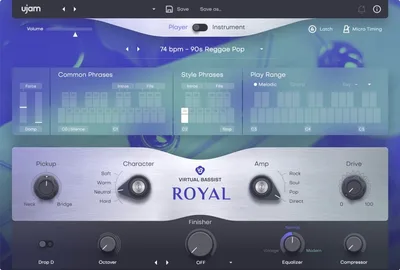
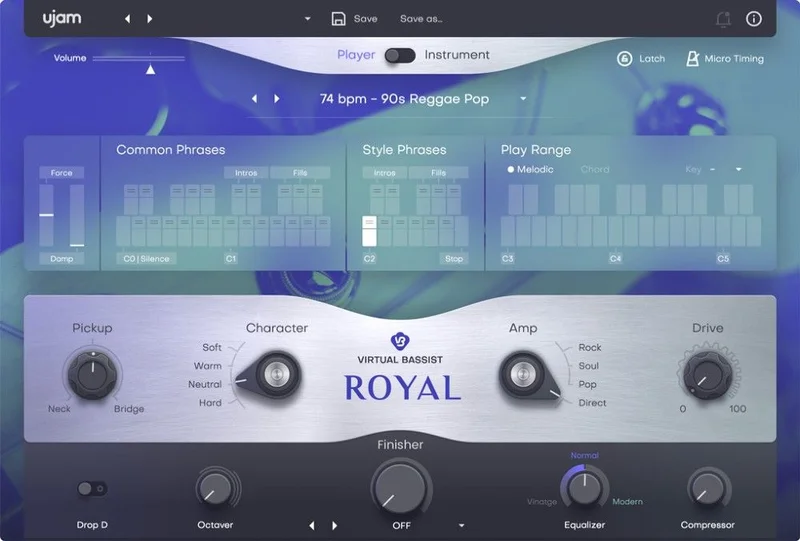
The UI opens on a tidy single-page layout. Styles on the left, EQ and dynamics in the middle, Finisher knob on the right. Nothing hidden behind submenus. We had sound in under a minute from cold open.
The 30 presets give you an immediate sense of range. From the round, thumb-muted ballad tones to the brighter, snappier indie-pop settings, ROYAL 2 doesn't make you search hard for a starting point. That's a deliberate UJAM design choice and it works.
Getting It Into a Real Workflow
Player Mode is where most sessions start. You hold a chord, press a style key, and ROYAL 2 plays back musically correct phrases that follow your harmonic input. We threw a four-chord loop at it in Dm. It tracked every change cleanly, picked appropriate articulations, and didn't throw in anything musically weird. That intelligence is genuinely satisfying.
The MIDI drag-and-drop is the feature we love most in this update. You find a phrase you like, drag it to your DAW's MIDI editor, and you own it. Edit velocities, shift notes, humanise timing. That's the difference between a loop library and an instrument.
Instrument Mode opens up the full sample set for manual playing. If you have keyboard chops, you can add dead notes and slides yourself. It's more expressive. It's also slower. For fast production work, Player Mode wins almost every time.
The one friction point: switching between modes mid-session resets some of your Finisher settings. Annoying. Save your presets before you experiment.
See how UJAM's design philosophy carries across their other instruments
What It's Genuinely Good At
The core sample is the foundation and it's excellent. UJAM recorded a real vintage electric bass through quality electronics, and the fingered tone sits in a mix without fighting anything. It's not poky or thin. It's not overblown either. Roll the tone back on the in-built EQ and you get that soft, round ballad thump. Open it up and there's enough definition for a brighter pop track.
We ran it against a competing virtual bass on the same chord loop. ROYAL 2's articulation modelling caught the subtle difference between a long note held over a bar and a short punchy quarter-note hit. The competing plugin played both with identical velocity response. That AI articulation logic is the spec that actually matters here, not the phrase count.
The 15 Finisher modes are a clever addition. We dialled the knob to about 40% on a mode that added subtle chorus and mild overdrive. The bass went from "studio clean" to "garage band tracking live." No extra plugins. No signal chain gymnastics. One knob.
At 60 styles and 1,380 phrases, you won't run out of options fast.
The Rough Edges
Instrument Mode is where the realism starts to thin out. A skilled bassist playing this plugin in real time sounds good but not great. The velocity transitions between adjacent notes lack the micro-dynamic variation a real player brings. It's not bad. It's just honest about what it is.
The plugin format situation needs flagging. The Plugin Boutique page lists VST and AU only. VST3 is now standard across Ableton, Cubase, Studio One, and Logic doesn't even use VST. If you're on a VST3-only setup, verify current compatibility on UJAM's own site before buying. The documentation is lagging behind reality.
CPU usage sits in the light-to-medium range. We saw no issues running multiple instances on an Apple Silicon Mac. Windows users on older hardware should test the trial first.
One more thing: the 7GB install footprint is not small. Plan your drive space accordingly.
Who This Is Really For
- ✅ Buy if you produce pop, indie, or singer-songwriter music and need bass that's done before your coffee cools.
- ✅ Buy if you're a non-bassist who wants harmonic-aware bass that won't play wrong notes over your chords.
- ✅ Buy if you want MIDI drag-and-drop so you can edit and own the part, not just loop it.
- ❌ Skip if you need genre-specific bass tones for metal, funk slap, or jazz upright. ROYAL 2 isn't built for those.
- ❌ Skip if Instrument Mode is your primary goal. A dedicated multi-sampled bass with round-robin and full articulation mapping will beat it there.
- ❌ Skip if you're on a VST3-only setup and haven't confirmed current format support on UJAM's site.
UJAM's full suite upgrade is worth pricing if you're already buying multiple plugins
Specs & Technical Details
| Developer | UJAM |
| Price | $119 |
| Plugin Format | VST, AU 2 (verify VST3/AAX support on UJAM's current site) |
| OS Support | Windows 8+ (64-bit), macOS 10.12 and later (64-bit) |
| Activation | Email and password via UJAM account, internet required |
| CPU Usage | Light to medium |
| Trial Available | N/A, verify on UJAM site |
| Version Reviewed | ROYAL 2 |
| RAM Minimum | 4 GB |
| Disk Space | 7 GB |
| Styles / Phrases | 60 styles / 1,380 phrases |
| Finisher Modes | 15 multi-effect modes |
Score Breakdown
| Category | Score | Notes |
|---|---|---|
| Sound Quality | 4.0/5 | Convincing fingered tone; Instrument Mode articulation thins out under scrutiny |
| Value for Money | 4.5/5 | At $119, the phrase library and AI articulation represent strong value |
| Ease of Use | 4.5/5 | One-page UI, instant sound; mode-switching resets Finisher settings |
| Features | 4.0/5 | MIDI drag-and-drop and 15 Finisher modes are the headline additions |
| CPU Efficiency | 4.0/5 | Light-to-medium draw; no issues on Apple Silicon |
| Overall | 4.0/5 | A reliable session bass that earns its place in most production workflows |
Alternatives to Consider
If you want a different character of virtual bass, these are worth your time.
Scarbee Rickenbacker Bass (Native Instruments): More expressive in Instrument Mode with deeper round-robin sampling. Works best if you play bass parts live rather than via style patterns.
IK Multimedia TONEX (bass amp capture angle): If your need is tone-shaping a real bass DI rather than a full virtual instrument, TONEX takes you further.
UJAM Virtual Bassist MELLOW: UJAM's own upright and mellow variant. If your work sits in jazz or lo-fi, MELLOW's tone suits those sessions better than ROYAL 2's electric fingerstyle.
ROYAL 2 is the right buy if you're after fast, genre-versatile electric bass that sits without fighting your mix. At $119, we'd buy this ourselves for a writing session, no hesitation. But if you're a bassist who wants to play every note manually with full expressive control, look at a deeper multi-sampled instrument. ROYAL 2 was built for producers who need a bass player to show up on time, not to be one themselves.
Frequently Asked Questions
Does Virtual Bassist ROYAL 2 work with Apple Silicon Macs?
UJAM has been updating their lineup for Apple Silicon compatibility, and we saw no performance issues running ROYAL 2 on an M-series Mac. That said, plugin format support details change faster than product pages update. Check UJAM's official site for the most current native Apple Silicon status before purchasing.
What's the difference between Player Mode and Instrument Mode in ROYAL 2?
Player Mode gives you access to all 60 styles and 1,380 pre-built phrases via MIDI key commands. The plugin follows your chords automatically. Instrument Mode opens the full sample set so you can play the bass manually with your MIDI controller, adding articulations like dead notes and slides yourself. Player Mode is faster. Instrument Mode is more expressive if you have the keyboard skills for it.
Can I edit the bass parts ROYAL 2 generates, or am I stuck with the loops?
You're not stuck. MIDI drag-and-drop is one of the key updates in ROYAL 2. Find a phrase you like, drag it directly into your DAW's MIDI editor, and the part is yours to reshape. You can edit note lengths, shift velocities, adjust timing, and export the MIDI to trigger other instruments if you want.
Is ROYAL 2 suitable for genres outside pop and indie?
It handles pop, indie, acoustic, and rock support bass convincingly. It's less strong for funk slap bass, metal-specific tones, or jazz upright, since the core sound is a round vintage electric fingerstyle and the styles are weighted toward mainstream genres. If you need heavy or highly stylised bass, a more genre-specific instrument will serve you better.