
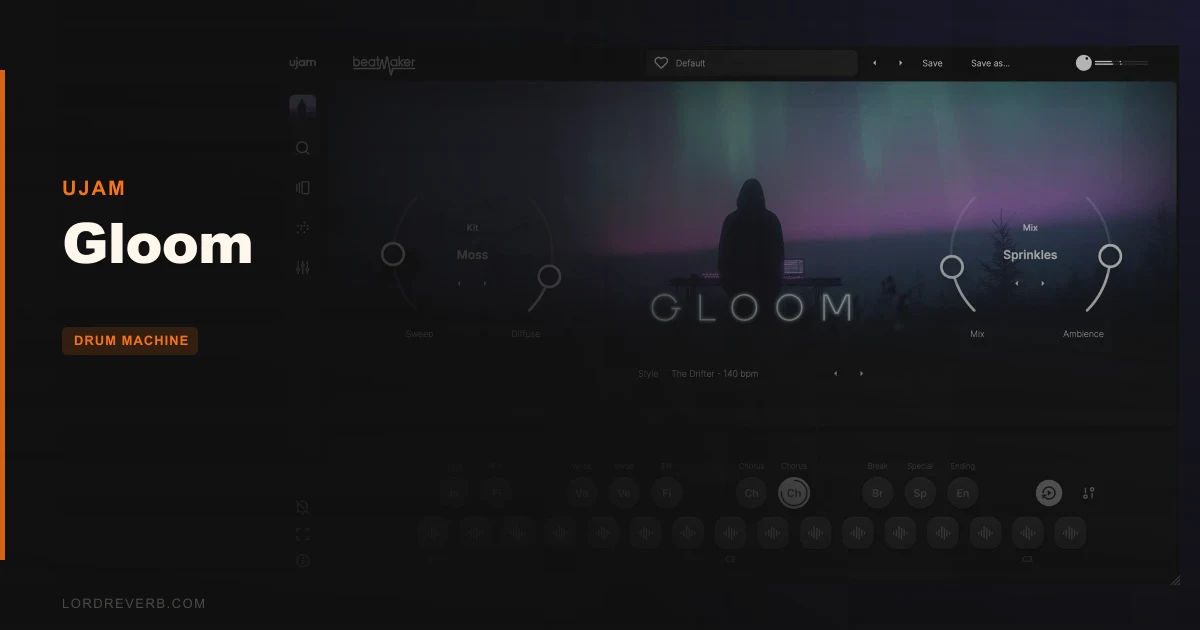
You’re forty bars into an ambient track, the pads are lovely, the bass is a slow sine, and every drum loop you drop in stomps all over it. Gloom is built for that exact problem, and our Gloom review verdict is that it depends on how much you care about the interface.
At $19, it’s UJAM’s quiet-drums instrument for minimal, ambient and textural producers. If you want soft clicks and low pulses instead of a kick that demands attention, read on.
Quick Verdict
We score Gloom 3.4 out of 5. The sound design is exactly what it promises: subtle, low-intensity rhythm that sits under a mix. The V3 interface and a handful of reported bugs pull the score down hard.
Buy it if the sounds are your priority and you’re starting fresh. Skip it if you’re a V2 user with workflows to protect, or you hate squinting at a screen.
What's In The Box
Gloom is a Beatmaker instrument. Here’s the inventory:
- 10 unique drum kits, 16 instruments each
- 20 Styles holding 460 MIDI loops in total
- 12 Mix Modes
- 75 Global Presets
- 17 Ambience Modes
- Built-in custom multi-effects
It runs as VST 2, VST 3, AU 2 or AAX, on Intel Macs, Apple Silicon and Windows. It integrates with Beatmaker 3.
The loops include intros, fills, choruses and endings. That matters more than it sounds, because a loop pack with no ending is a loop pack you’ll be fading out by hand.
Where Does Gloom Fit In Your Session?
Think of it as the rhythm layer you add after the harmony is settled. You’ve got chords, maybe a melody, and the track needs motion without a backbeat.
Drop Gloom on a new instrument track, pick a Style, and drag the MIDI loop straight into your arrangement. The drag-and-drop workflow is the part reviewers praise, and it’s the fastest way in.
The MIDI is tempo-flexible, with halftime and double time options. Your 70 BPM sketch can feel like 140 without rewriting anything.
Two catches. Gloom needs a host that handles one of the four plugin formats above. And if you play drums live from a keyboard controller, you need 37 keys or more. Smaller controllers can’t reach the drum range.
How Do The Kits And Instruments Sound?
Ten kits at 16 instruments each is 160 sounds, and the character is soft and organic. Think clicks, low pulses and evolving tones, not snare cracks.
That’s the whole pitch. UJAM says these beats sit well in a mix without dominating it, and the design backs it up. Nothing here is built to compete with your lead.
Owners praise the variety of tones across the presets. That’s the right instinct to chase: with a palette this restrained, variety lives in small differences, and it’s what keeps ten kits from sounding like one.
Put a low pulse under a sparse piano part and leave the kit alone. Resist the urge to layer a second drum track on top. The point is restraint.
Styles And MIDI Loops: 460 Patterns To Mine
20 Styles carry the 460 loops. That’s an average of 23 per Style, enough to build a full arrangement without repeating yourself.
Intros, fills, choruses and endings give you real song structure. You can map an entire track from one Style and change feel with halftime or double time.
Here’s the catch, though. Some users report pattern glitches, and some patterns that feel lifeless. That’s a fair complaint for any loop library, but with drums this subtle, a dull pattern has nowhere to hide.
Audition before you commit. If a loop feels flat at the default tempo, try halftime before you bin it. Sometimes the groove is hiding at half speed.
Mix Modes, Ambience Modes And The Multi-Effects
This is where Gloom earns its keep. The 12 Mix Modes shape the overall balance of the kit. The 17 Ambience Modes add space and atmosphere.
The built-in multi-effects are custom and run from snappy and minimal to rhythmic and atmospheric. That range is useful: one end tightens a kit for a dry, intimate track, the other turns a click into a wash.
UJAM says Gloom lets you adapt the character to your track quickly. With 75 Global Presets as starting points, that claim holds up on paper.
Load a preset, then switch Ambience Modes without touching anything else. You’ll hear the same pattern change personality fast. That’s the satisfying part.
The Rough Edges
Now the part we don’t love. Gloom’s V3 interface draws loud complaints.
Users call it a massive leap backwards for usability and clarity. One reviewer used the word “awful”, and that’s not a reviewer being gentle. If you’re coming from V2, expect frustration.
The pattern grid previews are too minimalist. The font is small, thin and light grey on dark grey. That’s annoying on a laptop and worse in a dim studio.
Compatibility with V2 is destroyed in V3. You’ll abandon previous workflows, and that’s a real cost if you’ve built projects around the old version.
The MIDI drum key layout is non-standard. Pattern triggers dropped from 24 to 10 in V3. And users report stutters or lag when switching modules.
None of this ruins the sounds. All of it makes the sounds harder to reach.
Who This Is Really For
- ✅ Buy if you make ambient, minimal or textural music and want drums that stay out of the way.
- ✅ Buy if you're new to Gloom and have no V2 projects to protect.
- ✅ Buy if you like drag-and-drop loop workflows and quick preset-driven results.
- ❌ Skip if you're a V2 owner with projects and habits built around the old layout.
- ❌ Skip if you play drums live on a controller smaller than 37 keys.
- ❌ Skip if you need heavy, aggressive drums. This isn't that instrument.
Specs & Technical Details
| Spec | Detail |
|---|---|
| Developer | UJAM |
| Price | $19 |
| Plugin Format | VST 2 / VST 3 / AU 2 / AAX |
| OS Support | Mac (Intel and Apple Silicon) / Windows |
| Activation | N/A |
| CPU Usage | N/A |
| Trial Available | N/A |
| Version Reviewed | N/A |
Score Breakdown
| Category | Score | Notes |
|---|---|---|
| Sound Quality | 4.0/5 | Soft, organic kits suit minimal and ambient work, with 10 kits of 16 instruments |
| Value for Money | 3.5/5 | A lot of content for $19, held back by the V3 problems |
| Ease of Use | 2.5/5 | Drag-and-drop is easy, but owners call the V3 interface a step back |
| Features | 3.5/5 | 460 loops, 12 Mix Modes, 17 Ambience Modes, multi-effects |
| CPU Efficiency | N/A | Reported stutters when switching modules |
| Overall | 3.4/5 | Lovely quiet drums wrapped in an interface that fights you |
Should You Buy Gloom?
Buy Gloom at $19 if the sound is what you’re after and you can tolerate a clunky V3. The drums are subtle, varied and genuinely useful under ambient work.
It’s the wrong pick for V2 loyalists, for small-controller players, and for anyone who judges plugins by how readable the screen is.
Gloom is a great whisper trapped in an awkward room.
Related reviews: Dope Loyalty Upgrade from any UJAM product · Can Tronic's 3 Modes Replace Your Full Drum Synth in 2026?
Frequently Asked Questions
Is Gloom good for ambient music?
Yes, that's what it's built for. It offers soft clicks, low pulses and evolving tones instead of high-impact drums. UJAM says the beats sit well in a mix without dominating it.
What formats does Gloom support?
Gloom supports VST 2, VST 3, AU 2 and AAX. It runs on Intel Macs, Apple Silicon and Windows, and it integrates with Beatmaker 3.
Can I play Gloom's drums on a small MIDI keyboard?
Not comfortably. Users report you need a controller with 37 or more keys to play the drums. Anything smaller limits your hardware integration.
Is Gloom V3 compatible with V2 projects?
No. Compatibility with V2 is destroyed in V3, so you'll have to abandon previous workflows. V3 also changes the pattern triggers, reducing them from 24 to 10.