CINEDREAM by UJAM is a cinematic guitar virtual instrument that gives composers and producers ready-to-play ambient guitar textures, evolving pads, and emotional underscore without a session guitarist in the room.
Quick verdict: At $129, CINEDREAM earns its keep for anyone scoring to picture or building atmospheric tracks ITB. The 30 guitar styles and 200 presets give you a real range, Player Mode is satisfying to work with on a full-sized keyboard, and the raw guitar quality is good enough that you won't feel like you're fighting the source. Two problems are worth knowing before you buy: it's CPU-hungry, and if you're on a compact keyboard, the C1–C5 range will slow you down. Score: 4.2/5. Built for film composers and ambient producers. Not for live performance or anyone on a tight CPU budget.
The Scene: It's 11pm and the Picture Is Due Tomorrow
You've got a 90-second trailer cut on your screen. The action sequence is done. But the emotional pullback, the moment where the hero stares into the middle distance and the music has to carry all of it, is sitting on a blank timeline.
You need guitar. Not strummy indie guitar. The kind that breathes, swells, and sits under strings without fighting them for space. You don't have a guitarist on call. Your acoustic recordings from last year sound dry and wrong for this. You've spent 20 minutes auditioning samples and nothing fits.
That's the exact moment CINEDREAM was built for.
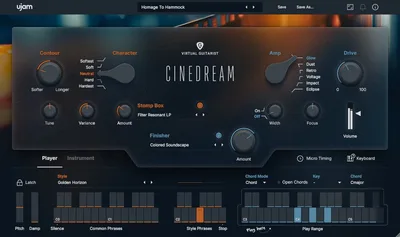
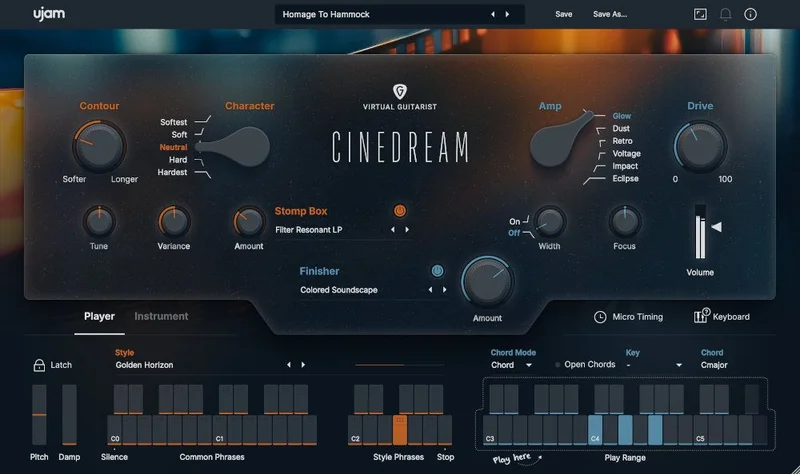
Hold a chord with your left hand. Hit Player Mode. CINEDREAM starts performing slow, cinematic guitar phrases in real time, responding to what you're playing. The Contour knob dials between slow attacks and long sustains. The amp models shift the character from clean shimmer to something with grit. The Finisher section adds ambient motion, drones, or clouds on top of that.
In maybe three minutes, you've got something that sounds like a real guitarist sat down and thought about it. That's the pitch. And for the most part, CINEDREAM delivers on it.
What It Is (and What It's Not)
CINEDREAM is a virtual instrument built around real guitar recordings, shaped by two multi-effect engines and a focused set of cinematic controls. It's not a general-purpose guitar emulation. It won't fake a convincing strummed acoustic for a pop track, and it won't replace a guitarist playing lead lines.
What it does is give you ambient guitar: slow-moving, texturally rich, atmospherically charged guitar sounds that sit in the back of a mix and do emotional work. Think underscore for drama, tension beds for trailers, or the kind of guitar-pad hybrid that sits under a synth arrangement and makes it feel warmer without demanding attention.
The 30 styles range from random fingerpicking patterns to driving rhythmic phrases, but they all live in cinematic territory. If you need a Telecaster cutting through a verse, look elsewhere. If you need a shimmering wall of guitar that evolves over eight bars and makes a director tear up, this is what you open.
It runs in VST2, VST3, AU2, and AAX formats, 64-bit only. best cinematic plugins for film composers It works on Windows 10 and 11, and macOS Monterey through Sequoia, with both Intel and Apple silicon support. AU2 is Logic-only.
Where It Fits in Your Session
Open CINEDREAM on a new instrument track and give it its own bus. It rewards that. Don't bury it in a crowded group with compression slamming everything flat.
In Player Mode, you hold a key or chord and the plugin performs phrases in real time. This is where most people will spend their time. Slow, cinematic guitar lines appear without you needing to program a single note. The phrases respond to what you hold, so you can shift chords and the performance shifts with it. It's satisfying in a way that sounds obvious once you've heard it but wasn't obvious to come up with.
Switch to Instrument Mode and you're playing individual notes, building your own phrasing note by note. This is more hands-on and requires more from you, but it gives you control that Player Mode doesn't. If you've got a specific melodic idea in your head, Instrument Mode is where you work it out.
The Contour knob sits at the heart of how notes behave. Dial it toward slow attacks and notes bloom in rather than hit. Dial toward long sustains and they hold, evolving under the hood. For a trailer cue, slow attack plus long sustain is usually where you start. For something with a bit more rhythmic energy, back the sustain off and the phrases tighten up.
Dynamics controls sit alongside Contour and shape how individual notes respond to velocity. This is where owners note that mod wheel damping adds dynamic realism beyond just applying a volume envelope after the fact. Worth assigning your mod wheel here early.
Keep your gain staging clean going in. CINEDREAM's output can get loud when the Finisher is adding ambient layers. Check your headroom before you start automating.
The 30 Styles: What They Actually Cover
Thirty styles sounds like a lot. And they do cover real ground, running from delicate random fingerpicking to driving rhythmic patterns with more motion and pulse.
At the slow, atmospheric end, you get textures that sit almost entirely in pad territory. These are the styles you reach for under strings or a piano melody when you want guitar warmth without guitar presence. They're genuinely useful. Owners report the raw guitar sounds here are excellent enough to use without additional processing, which is a compliment worth taking seriously. A lot of sample libraries make you reach for an EQ the second you load them. Not here.
The more rhythmic styles add pulse and motion. Think fingerpicked arpeggios that breathe and shift rather than lock into a strict tempo grid. These work well in trailer beds where you need energy without percussion dominating.
Honestly? Some styles will sit in your project and you'll forget they're there because they blend so well. A few will feel slightly samey if you load them back to back. The overall quality is consistent, but they're not all pulling equal weight for every cue.
The 200 factory presets map across these 30 styles and the amp and effect variations. That's a deep library. But browsing 200 presets on a deadline is its own workflow problem, and the learning curve owners mention probably starts here.
The 5 Amp Models: From Shimmer to Grit
Five amp models run from clean shimmer at one end to distorted grit at the other. This isn't a guitar amp sim trying to convince you it's a vintage head. These are character options that shift how the guitar source sits before the effects hit.
The clean end is where the ambient and pad-focused textures shine. You get shimmer without harshness, presence without bite. For underscore and emotional moments, this is probably where you'll live most of the time.
Push toward the distorted end and things change shape fast. Reviewers report playing with amps and Finisher together to transform clean guitar into harsh walls of sound. If you're scoring a villain reveal or a building tension cue, that combination is worth exploring. The grit sounds deliberate rather than just overdriven. That's not nothing.
Five options isn't huge. You won't find a dozen tonal possibilities hiding in here. But what's here is useful and each model is distinct enough to matter.
Stomp Box Section: Tone-Shaping Before the Finish
The Stomp Box section handles classic tone-shaping effects before the signal reaches the Finisher. Think of it as your pedal board sitting between the guitar and the ambient processing.
This is where you shape the core tone before the more dramatic transformation begins. Owners specifically call out the spring reverb and chorus here as standouts for creating immersive atmospheres. Spring reverb in particular adds a vintage spatial quality that sits differently from the larger ambient effects in the Finisher. It breathes.
The Stomp Box section is also where you can subtly warm or brighten the guitar before it enters the Finisher's more aggressive processing. Get this right and the Finisher sounds more intentional. Skip it and the Finisher can feel like it's fighting the source rather than extending it.
Don't overlook this section when you're building custom sounds. Most users probably reach for presets first and miss what the Stomp Box is actually doing underneath.
The Finisher: Ambient Clouds, Drones, and Motion
The Finisher is where CINEDREAM gets genuinely interesting for sound designers and composers who want more than preset browsing.
Two multi-effect engines handle pads, pulses, and ambiences. These aren't simple reverb-and-delay sends. They're designed to transform the guitar signal into something larger, more atmospheric, more cinematic in the literal sense. Push the drive up in the right Finisher setting and the top end turns gritty. Pull back and you get long, evolving clouds that sit 10 feet behind the mix.
The ambient motion here is what separates CINEDREAM from a static sample library. Things move. Pads evolve. Drones breathe. If you've ever placed a static guitar sample under a film cue and watched it die over two minutes because it has no life in it, you'll understand why this matters.
Users report the ambient effects excel at creating immersive atmospheres. That tracks. The Finisher alone is probably worth half the asking price for composers who work in this space regularly.
There is a caveat: the Finisher eats CPU. And when it's stacked with the multi-effect engines running, you'll feel it on modest systems. More on that in a moment.
Player Mode vs. Instrument Mode: Which Do You Actually Need?
This is the choice that shapes your whole workflow with CINEDREAM.
Player Mode is the fast lane. Hold a chord, get a performance. You're not programming anything. You're not building MIDI patterns. You hold notes and the plugin does the compositional heavy lifting in real time. For composers on a deadline or producers who want to sketch quickly, this is the mode you'll live in.
The phrases it generates are slow and cinematic by design. That's the point. But it also means you don't have granular control over exactly when each note hits, exactly how a phrase shapes itself over a bar. If you're the kind of producer who wants exact control over every musical decision, Player Mode will frustrate you.
Instrument Mode is the slow lane in the best way. Individual notes. Custom phrasing. You build what you hear in your head rather than what the plugin decides to play. This takes longer and demands more from you musically, but it's also the mode where CINEDREAM becomes a genuine compositional tool rather than a texture generator.
Realistically? Most sessions will use both. Sketch the mood in Player Mode. Refine a detail or two in Instrument Mode. That combination works.
The Trade-Offs
Let's be direct about the two problems that will affect real workflows.
CPU is the big one. CINEDREAM's demands are high enough that users report needing to verify their system before buying and freeze tracks during sessions. That's not a footnote. If you're on an older machine or running a dense session already, CINEDREAM will force a choice: freeze it, or watch your buffer climb. Track freezing solves it, but it adds friction to a plugin that's otherwise designed for fast, fluid creative work. The Finisher engines running alongside the guitar engine compound this.
The keyboard range is the other problem. C1 to C5 covers four octaves, which is fine on a 61-key or 88-key controller. But users with 2 to 3 octave compact keyboards report real workflow struggles. You lose control access at the bottom, phrasing range at the top, and the experience degrades noticeably. If your studio keyboard is a 25-key or 32-key portable, CINEDREAM will annoy you daily. This isn't a workaround situation. The range is what it is.
The learning curve is real too, though it's more of a medium-sized hill than a cliff. Two hundred presets and two modes and a Finisher engine take time to map in your head. The user guide and tutorials exist, but first sessions may feel slower than the marketing suggests.
None of these are reasons to skip it if you're the right buyer. But they're worth naming plainly rather than burying in a footnote.
Who Should Buy CINEDREAM (and Who Should Skip It)
Buy it if you're scoring to picture, building trailer beds, or making atmospheric music where guitar texture matters but live playing isn't an option. At $129, this is a legitimate toolkit for that work, not a toy. The sound quality is there. The Finisher opens real sound design territory. Player Mode is fast enough for deadline work.
Buy it if you've got a full-sized keyboard and a reasonably modern machine with CPU to spare. Those two conditions make the experience significantly better.
Skip it if your sessions are already CPU-maxed. Skip it if you're on a compact keyboard and can't change that. Skip it if you need convincing general-purpose guitar sounds rather than specifically cinematic ones.
And skip it if you want something you can perform live without a safety net. CINEDREAM is an ITB studio tool. That's not a flaw. It's just honest.
The Real Verdict
CINEDREAM is a well-made, focused tool that solves a specific problem well. If that problem is your problem, it's worth $129 without much debate.
The raw guitar quality is good enough to use dry. The Player Mode delivers on its promise. The Finisher section opens ambient territory that would take significant effort to build from scratch in a general-purpose reverb and modulation chain. Two hundred presets give you immediate starting points, and the Contour and Dynamics controls give you somewhere to go after the preset.
The CPU cost is real and shouldn't be minimised. The compact keyboard issue is a genuine limit. The learning curve takes a session or two to get through.
But for film composers, trailer producers, and ambient artists who want cinematic guitar in a plugin that sounds like someone actually thought about it? For that crowd, it earns its place.
Score: 4.2/5. Not perfect. Worth it for the right workflow.
Specs & Technical Details
| Developer | UJAM |
| Price | $129 |
| Plugin Format | VST2 / VST3 / AU2 / AAX (all 64-bit) |
| OS Support | Windows 10, Windows 11, macOS Monterey (12), macOS Sequoia (15) |
| Activation | UJAM App or email and password entry within the plugin |
| CPU Usage | Heavy |
| Trial Available | N/A |
| Version Reviewed | N/A |
| Min. RAM | 8GB |
| Min. Disk Space | 4GB |
| Display | 1280x768px minimum |
| Keyboard Range | C1 to C5 |
| Apple Silicon | Yes (Rosetta and native) |
Score Breakdown
| Category | Score | Notes |
|---|---|---|
| Sound Quality | 4.5/5 | Raw guitar quality is strong; Finisher adds genuine depth |
| Value for Money | 4.0/5 | Fair for the target buyer; less so if you're not squarely in the cinematic niche |
| Ease of Use | 3.5/5 | Player Mode is immediate; 200 presets and Finisher take time to map |
| Features | 4.5/5 | 30 styles, 5 amps, dual effect engines, two modes: plenty to work with |
| CPU Efficiency | 3.0/5 | Heavy demands; track freezing likely on modest systems |
| Overall | 4.2/5 | A focused, well-built cinematic guitar tool with real limits worth knowing |
The one thing we'd love UJAM to fix in a future update is the keyboard range flexibility. A transposition option that works cleanly on compact controllers would open this to a wider set of users without changing anything about what it does well. But it doesn't change the recommendation for the right buyer.
Related reviews: MODO DRUM Kit - Reference · Can Free Afroplugin Actually Handle a Real Session?
Frequently Asked Questions
What does CINEDREAM actually do that a reverb plugin can't?
A reverb plugin processes whatever you send it. CINEDREAM generates the guitar performance itself, shapes it with amp models and dynamics controls, and then applies ambient transformation through the Finisher. You're not just adding space to a dry signal. You're getting a performed, evolving guitar texture from a held chord. That's a different thing entirely.
Is CINEDREAM usable for non-cinematic music?
The 30 styles all live in cinematic territory by design. You can push the amp models toward grit and use the Finisher creatively, which opens some crossover territory for ambient electronic or post-rock contexts. But if your music is pop, hip-hop, or anything requiring bright, upfront guitar sounds, CINEDREAM isn't built for that. It's cinematic by design, not by accident.
How bad is the CPU usage, really?
Bad enough that users report needing to verify their system before buying and freeze tracks in active sessions. If you're running a modern high-core-count processor with headroom to spare, you'll manage. If your sessions are already running hot before you load a single instrument, CINEDREAM will push you into buffer overruns. Check your specs honestly before buying.
Does CINEDREAM work on Apple silicon Macs natively?
Yes. CINEDREAM supports both Rosetta and native Apple silicon. Both Intel and Apple silicon Macs are supported within the macOS Monterey to Sequoia range. If you're on an M-series Mac, native support means better CPU performance than Rosetta mode.
Can I use CINEDREAM without a MIDI keyboard?
You can trigger it from a piano roll in your DAW, so a physical keyboard isn't required. Player Mode works from held MIDI notes whether those come from a controller or a programmed chord in your sequencer. That said, the real-time feel of Player Mode is stronger with a keyboard in hand. Working entirely from a piano roll into Instrument Mode is slower but doable.
Why does the compact keyboard range cause problems?
CINEDREAM's playable range runs C1 to C5, which spans four full octaves. On a 2-octave (25-key) or 3-octave (37-key) controller, you can only access part of that range at once. You lose either the low-end control access or the upper phrasing range depending on how you transpose your controller. Owners report this creates genuine workflow friction rather than just a minor inconvenience.
How does CINEDREAM handle authorization and installation?
You install it through the UJAM App or a downloadable installer file. Authorization happens either through the UJAM App itself or by entering your email and password directly within the plugin. An internet connection is required. The AU2 version is compatible with Logic Pro X and newer only, not other AU-compatible hosts.