AMBER 2 by UJAM is the right tool if you're building singer-songwriter, indie, or contemporary pop tracks and need a convincing acoustic guitar part without booking studio time. At $29, it's a phrase-based virtual acoustic guitar plugin with 30 styles, over 350 phrases, 30 stomp box emulations, and 60 Finisher FX chains, built for in-the-box producers who want results in seconds, not hours. It won't turn you into a guitarist. But it will put a believable acoustic in your session before the track even has a name.
This is not a tool for everyone. If you're after expressive lead playing, free improv, or anything that needs to breathe the way a real player breathes, you'll hit a wall. But if your workflow lives in the box and your songs need a strummed or picked acoustic that sits quietly behind the vocal, AMBER 2 earns its place and its price.
Where Does AMBER 2 Actually Belong?
Picture this: you've got a pop ballad at 92 BPM, the vocal is tracked, and the production feels thin. You need an acoustic guitar. Not a solo, not a riff. Just a steady, warm strummed part that fills the mid-range and anchors the chorus.
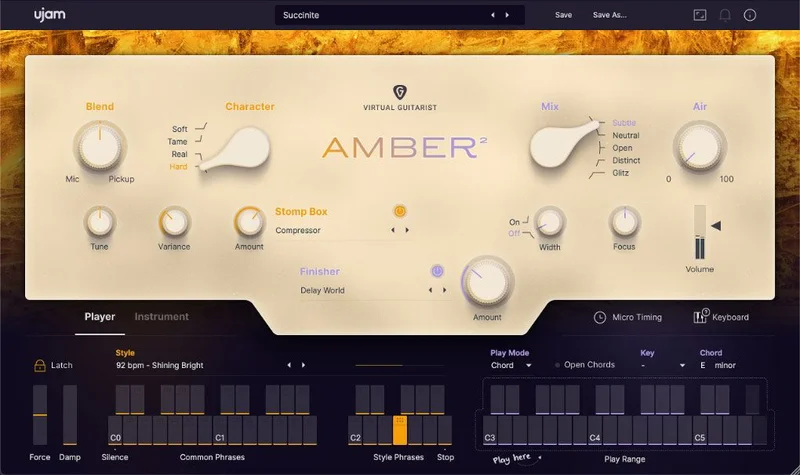
That's exactly the job AMBER 2 was built for. The 30 styles cover singer-songwriter, indie, contemporary pop, and rock, so if your track lives anywhere in that zone, you'll find something that fits. The Open Chords feature adds variety beyond basic major and minor voicings, which is satisfying when you're trying to push a chord progression past the obvious.
The picking support on top of strumming is a clever touch. You can layer both articulations to create parts that feel more complex than a single looped phrase. Combined with keyswitch-controlled phrase swapping, you can build a full song structure, verse, pre-chorus, chorus, bridge, without ever leaving the plugin.
The MIDI Drag & Drop control is the feature owners keep coming back to. Being able to drag a phrase's MIDI directly into your DAW is uncommon in this category and genuinely useful for arranging. You can see what the plugin is playing, then edit it, or use it as a rhythm reference for other instruments.
Where AMBER 2 Falls Short
Live performance is out. Full stop. AMBER 2's strength is preset phrases and structured production. It's not designed to respond to your playing the way a traditional sample library or a real guitar would.
You'll also feel the limits if you want AMBER 2 to carry a track rather than support it. As a lead or featured instrument, it needs expression mastery to avoid sounding mechanical. That's a real investment of time, and at $29, you need to know upfront that the out-of-the-box result is a solid background part, not a headline performance.
The 64-bit-only requirement isn't a problem for most modern setups, but it's worth flagging. And macOS support stopping at version 13 means users on newer systems may hit compatibility issues sooner than they'd like. Annoying, especially if you bought it to use long-term.
How To Get The Most Out Of It
Start with style selection before you touch the effects. With 30 styles and 350+ phrases, the temptation is to open the Finisher FX and start shaping the sound. Resist that. Find the phrase and groove first. The effects are there to fit the guitar into your mix, not to define what it is.
When you're in a verse, pick a sparser phrase. Save the fuller strummed patterns for the chorus and use keyswitch transitions to make the change. That alone will make your song structure feel intentional rather than looped.
Use the stomp box emulations to place the guitar in space. If the acoustic is sitting too close to the vocal, a touch of room reverb from the built-in chain pulls it back. If it's fighting the low-mids, the compression options can tighten the dynamics without you reaching for a separate compressor.
The MIDI Drag & Drop is worth your time. Drag the phrase into your DAW, look at the rhythm pattern, and check that it lines up with what your kick and snare are doing. If the guitar strums are landing on beats that clash with the drum hits, shift the phrase or choose a different style. This is the step most producers skip, and it's why some mixes feel like the acoustic is floating rather than sitting.
If the part sounds stiff, don't add more effects. Go back to the phrase library and find one that's more dynamic in its own right. The expressiveness lives in the recorded performances, not in the processing chain.
The Verdict
At $29, AMBER 2 is a genuinely smart buy for the producer who records ITB and needs acoustic guitar parts that are convincing enough to disappear into a pop or indie mix. The phrase library is wide, the MIDI Drag & Drop is the kind of workflow detail you love once you've used it, and the built-in effects mean you're not hunting for a third-party reverb to finish the sound.
It's wrong for you if you need a live performance tool, an expressive lead instrument, or a guitar that responds to nuanced playing. But if your sessions are structured, your songs fit the singer-songwriter and pop lane, and you want a session player on call without the session player rate, this is a satisfying answer at $29.
Specs & Technical Details
| Developer | UJAM |
| Price | $29 |
| Plugin Format | VST / AU |
| OS Support | Windows 7 or later (64-bit) / macOS 10.14 to 13 (64-bit) |
| Activation | Internet connection required, authorised via ujam.com account |
| CPU Usage | N/A |
| Trial Available | N/A |
| Version Reviewed | AMBER 2 |
Score Breakdown
| Category | Score | Notes |
|---|---|---|
| Sound Quality | 4.0/5 | Recorded with selected mics and pickups; convincing in a supporting role, less so as the featured instrument |
| Value for Money | 4.5/5 | 350+ phrases, 60 Finisher FX chains, and 30 stomp emulations at this price point is a lot of content |
| Ease of Use | 4.0/5 | Frustration-free for preset-based production; expression mastery takes more time investment |
| Features | 4.0/5 | MIDI Drag & Drop and keyswitch phrase swapping stand out; 30 styles covers the target genres well |
| CPU Efficiency | N/A | No data available |
| Overall | 4.0/5 | Confident, well-stocked acoustic guitar plugin that earns its price in the right workflow |
Some technical issues and download difficulties show up in owner reports with enough frequency to flag them. It's not universal, but if you're buying ahead of a session deadline, give yourself time to get it installed and authorised before you need it. Crashes are frustrating at any price, let alone one you're trying to justify to a client.
The macOS cap at version 13 is a real limitation if you upgrade your system regularly. UJAM will need to extend that support or AMBER 2 will quietly become unusable on newer machines. That's the kind of thing that turns a good buy into a regretted one over time, so check the current compatibility list before you commit.
At $29, though, the honest answer is this: if the genre fits, buy it. If it doesn't, it won't bend to suit you.
Frequently Asked Questions
Is AMBER 2 suitable for live performance?
No. AMBER 2 is built for in-the-box production using preset phrases and structured arrangements. It doesn't respond to live playing the way a traditional sample library or instrument would. Keep it in the studio, not on stage.
What genres does AMBER 2 cover?
The developer targets singer-songwriter, indie, contemporary pop, and rock. The 30 styles and 350+ phrases cover a wide range within those categories. If your productions sit outside that lane, you'll find the library less useful.
Does AMBER 2 work on the latest version of macOS?
AMBER 2 supports macOS up to version 13. If you're running a newer version of macOS, check UJAM's current compatibility page before buying. The cap could become an issue as Apple pushes system updates.
What makes the MIDI Drag & Drop feature useful?
It lets you drag the MIDI pattern of a phrase directly into your DAW, which is uncommon in virtual acoustic guitars. You can then edit the rhythm, check it against your drum parts, or use it as an arrangement reference for other instruments. Owners flag it as one of the standout workflow features in the plugin.