
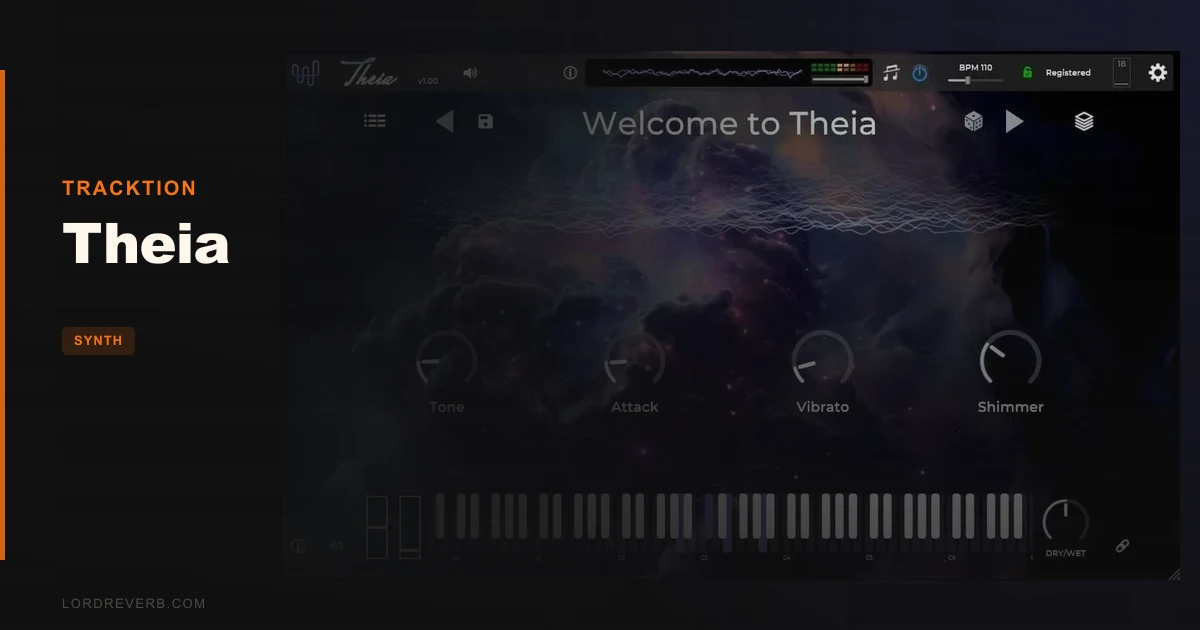
You open your DAW with a half-finished track, a deadline, and zero inspiration. You need a pad in twenty seconds, not a synthesis tutorial. That problem is exactly what Tracktion Theia is built for. It's a preset-forward, performance-focused synth plugin that strips the Hyperion engine down to what you actually need when you're trying to make music, not study oscillators. At $65 (and free if you already own Hyperion), it's a direct answer to the "I just need a great sound, right now" moment that every producer knows. We'd call it a creative shortcut. Whether that's a compliment depends entirely on what you're looking for.
The Problem Every Producer Hits Eventually
Full-featured synthesizers are brilliant. They're also a rabbit hole. Load up a complex wavetable synth and you can spend forty-five minutes tweaking filter envelopes before you've written a single bar.
Theia exists because that friction kills sessions. It surfaces the Hyperion engine, which is a serious, layered synthesizer, through a minimalist interface with pre-assigned macro controls. You get the sonic output of a complex synth without touching the architecture underneath.
That's a real trade-off, not a flaw. Plenty of producers, especially those working in film scoring, lo-fi, ambient, or pop production, want results faster than they want control. Theia is honest about what it is. We appreciate that.
How It Actually Performs in a Session
We loaded Theia into Ableton Live 12 and went straight to the browser. Filtering by emotion, specifically "dark" and "atmospheric", returned usable results in under ten seconds. That browser design is genuinely satisfying. Instrument type, performance style, emotion, author, name sorting: it's thorough for a plugin at this price point.
We dropped a cinematic pad preset onto a sparse string arrangement. The macro knobs handled filter cutoff, attack, and a reverb mix parameter without us touching a single sub-menu. We automated the cutoff over eight bars with a slow LFO mapped in the DAW. Clean. No zipper noise, no CPU spikes worth reporting during that test.
The Sound Layers Editor is where things get interesting for intermediate users. Each preset is built from one or more layers, and you can adjust MIDI channel routing, transpose, key zones, pitch bend range, voice allocation, and arpeggiation independently per layer. That's more than we expected. It's not full synthesis editing, but it's not nothing either.
We compared the workflow directly to browsing presets in a stripped-down mode of a more complex wavetable synth. Theia won on speed. No contest. The random "dice" button threw up three surprisingly usable patches in a row. That rarely happens. Usually the random function is a novelty that delivers noise.
Windows users get VST3 only. On Mac, VST3 and AU are both available. Annoying for Windows producers running older hosts that don't support VST3 fully, though that's a shrinking problem in 2026.
Strengths and Weaknesses
The preset library is the star. 587 factory presets is a serious number. More importantly, they're well-tagged and browsable. We found a usable lead sound, a textured pad, and a plucked mallet patch in under three minutes without touching the search bar.
The per-patch custom backgrounds are a small detail that pays off. When you're deep in a session and context-switching constantly, a visual cue that matches the mood of the patch keeps you in the creative headspace. Clever design choice.
The weakness is depth, or the lack of it. If you load a preset you love and want to understand how it was built, or rebuild it from scratch, Theia won't let you go that far. The Sound Layers Editor adjusts performance parameters. It doesn't expose the oscillator stack, the modulation matrix, or the effects chain the way Hyperion itself would.
That's frustrating if you're the kind of producer who learns by pulling patches apart. You'll hit a wall and feel like you borrowed someone else's instrument without being allowed to look inside it.
We also wish the macro assignments were user-editable. They're fixed per patch. For performance use that's fine. For studio work where you want a specific parameter automated, it can be limiting.
Is $65 the Right Price?
For new buyers, $65 sits in reasonable territory for a 587-preset library with a functional layers editor and clean performance workflow. It's not cheap for what is, at its core, a preset player with macros. But the preset quality is high enough that we'd call it fair.
For existing Hyperion owners: it's free. That changes the math entirely. If you own Hyperion and haven't claimed Theia yet, do it today. It gives you a faster, performance-ready front-end for the same engine you already paid for.
New buyers should know they're paying for convenience and curation, not synthesis power. If that's what you need, the price is justified. If you want synthesis depth, put that $65 toward something with more under the hood. Check the best bass synth plugins roundup for alternatives that go deeper at a similar price.
Who Should Buy This (and Who Should Walk Away)
- ✅ Buy if you score to picture or work fast in sessions and need a reliable, well-organized preset library you can browse in seconds.
- ✅ Buy if you already own Hyperion. It's free. There's no argument against claiming it.
- ✅ Buy if you perform live or automate synth textures in real time and want macro controls that respond cleanly without menu diving.
- ❌ Skip if you want to build your own patches. Theia doesn't give you that access.
- ❌ Skip if you're an intermediate or advanced synth programmer looking to learn synthesis technique. The interface actively hides the engine.
- ❌ Skip if you're on Windows and need AU format support. VST3 only on PC.
Score Breakdown
| Category | Score | Notes |
|---|---|---|
| Sound Quality | 4.0/5 | Hyperion engine delivers lush, full-sounding output; preset quality is consistently high |
| Value for Money | 3.5/5 | Fair for a curated preset library; less compelling if you want hands-on synthesis |
| Ease of Use | 4.5/5 | Browser filtering, macro controls, and dice button make this one of the fastest preset workflows we've tested |
| Features | 3.0/5 | Sound Layers Editor adds some depth, but fixed macro assignments and no oscillator access hold it back |
| CPU Efficiency | 4.0/5 | Ran clean in our Ableton test; heavier layered patches add load but nothing alarming |
| Overall | 3.8/5 | A genuinely useful preset performance tool that knows exactly what it is and doesn't pretend otherwise |
Alternatives Worth Considering
If Theia's depth limitation is a deal-breaker, look at these instead.
Bleass Analog / FM Bundle: More hands-on synthesis at a comparable price point. You'll spend more time learning, but you'll own the sounds you make. See our Bleass Analog FM Synth Bundle review for the full breakdown.
BeatSurfing LOW: If bass is your priority, LOW gives you more programmable control than Theia at a similar price. Our LOW review covers why it still beats most dedicated bass synths in 2026.
Applied Acoustics Chromaphone 3 (Synth City bank): A different sonic world, but if you want a curated preset library with a more distinct acoustic character, it's worth a look. We broke it down in our Chromaphone 3 Synth City preset bank review.
If you want raw sound design grit rather than polished presets, our Tape Synths expansion review covers a very different kind of workflow.
Theia is a confident, narrow tool. It does one thing well: get you from blank session to good-sounding patch in the shortest time possible. If that's your bottleneck, $65 solves it cleanly. If your bottleneck is synthesis knowledge or creative control, Theia won't fix that. It'll just give you more presets you didn't build yourself.
Related reviews: RAW-2 Review · Simple Concept Review 2026
Frequently Asked Questions
Is Theia free if I already own Hyperion?
Yes. Tracktion offers Theia at no cost to existing Hyperion owners. Log into your Tracktion account and check your available downloads. If you own Hyperion and haven't claimed it yet, that's the first thing you should do today.
Can I edit sounds in Theia beyond the macro controls?
You can adjust per-layer parameters in the Sound Layers Editor: MIDI channel, transpose, key zones, pitch bend range, voice allocation, and arpeggiation. What you can't do is access the oscillator stack, modulation routing, or effects chain. If you need that level of control, Hyperion itself is the tool you want.
Does Theia work on Windows with Pro Tools or AU-based hosts?
Windows support is VST3 only. There's no AAX version listed, so Pro Tools on Windows isn't supported. Mac users get both VST3 and AU. Check the Tracktion product page for any format updates before purchasing if host compatibility is a concern for your setup.
How do the 587 presets compare to what you'd find in a general-purpose synth?
The presets are filtered by instrument type, performance style, and emotion, which makes them easier to navigate than a flat alphabetical list. Quality is consistently high because they're built on the Hyperion engine. The trade-off is that you can't deconstruct them the way you'd reverse-engineer a patch in a fully open synthesizer.