A Vocal Chain, Three Plugins In, and a Question Nobody Wants to Ask at 2am
The APX 351 is a neural network-modeled emulation of the Ampex 351 recorder's preamp front end, and it's genuinely useful on the right material. But it's not the sure thing Tone Empire's marketing wants you to believe.
We were three plugins deep into a vocal chain at around 2am. Light compression, a bit of air at 12kHz, and the vocal still felt like it was sitting behind glass. We dropped the APX 351 in Soft mode, pushed the drive to about 60%, and the transformer character arrived. That particular forwardness the Ampex circuit is known for. The vocal moved up. It sat.
Then we noticed a faint fizzing artifact on the sibilants. That's where the testing started in earnest.
This review is for producers and mix engineers who want analog preamp color ITB without running full tape emulations. It's especially relevant if you're working in the Stax or vintage soul aesthetic, or if you just want something to glue a dry recorded source without reaching for heavy saturation.
First Impressions
Installation is clean. VST3, AU, and AAX all showed up correctly in our test rigs running macOS Ventura and Windows 11. M1 and M2 compatibility worked without Rosetta. No issues there.
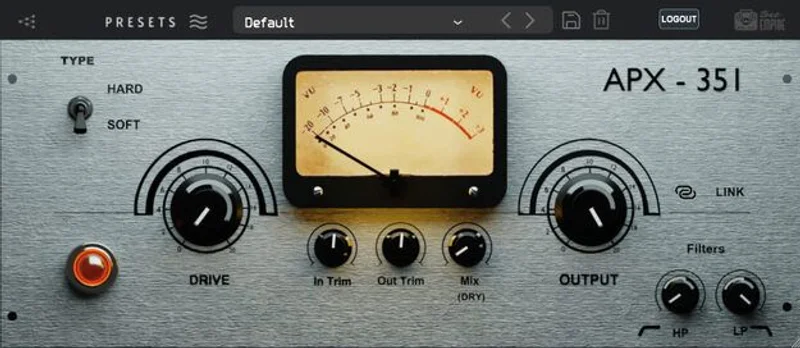
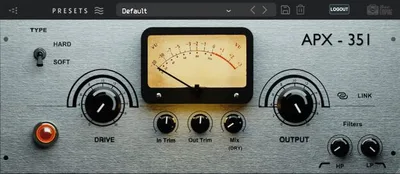
The interface is small. A single drive knob, the Soft/Hard mode toggle, the Ultra-x switch, and an output level control. That's basically it.
It looks like a plugin someone built to scratch an itch. The skeuomorphic styling is understated, not ugly, but it won't win any design awards. The knob resolution feels a little coarse on fine adjustments. We'd love a right-click option to type in exact values. There isn't one.
First sound: on a dry DI bass, Soft mode at 40% drive added a low-mid body that sounded like the signal had been recorded through something real. Satisfying start.
Getting It Into a Real Workflow
We tested the APX 351 across four sessions: a vocal production with a lot of close-mic presence, a drum bus with significant transient energy, a DI electric bass, and an acoustic guitar double-track.
On the vocal, Soft mode between 45-65% drive was the sweet spot. Below that, the effect is barely audible. Above 70%, the top end started to compress in a way that felt less like tape color and more like a bad preamp clip.
On the drum bus, Hard mode is where things get interesting and annoying in equal measure. The aggression of Hard mode at 50% drive added a satisfying bite to the snare attack. But during gain automation sweeps, we hit aliasing spikes. High-frequency artifacts, sharp and digital-sounding, appeared on transient peaks. Activating Ultra-x mode fixed this completely. The frustrating part: Ultra-x isn't on by default. You have to remember to engage it. Every session.
On the acoustic guitar, the APX 351 added a mild presence bump that we'd roughly estimate around 3-5kHz. The transformer-coupled character showed up as a slight low-end rounding on the body frequencies. It's a subtle thing. On a full mix, you'd barely notice it solo but the track locked in better.
One friction point worth flagging: we had two project reloads in Logic Pro 11.1 where the plugin state didn't recall correctly. The mode switched back to Soft when we'd saved it in Hard. That's a reliability issue, not just an annoyance.
What It's Genuinely Good At
The neural modeling on the triode saturation is the real story here. Where some preamp plugins add harmonic content that sounds like distortion layered on top of the signal, the APX 351's Soft mode adds even-order harmonics that feel like they're part of the signal.
We compared it directly against a competing plugin from Kush Audio on the same vocal recording. The Kush had more tonal shaping options. But the APX 351 sounded less processed at similar drive levels. Sometimes you want a plugin that does one thing and disappears.
CPU draw is light. We ran 12 instances across a mix on an M2 MacBook Pro without a measurable performance hit. For comparison, some Class-A emulation plugins we've tested hit 3-4x the CPU draw per instance at equivalent sample rates.
Vocals. That's where this plugin earns its place. A breathy female vocal we'd been fighting for two sessions locked into the mix in under 30 seconds with Soft mode at 55%. The transformer compression on the low-mids stopped the track from wandering.
We'd also call out its performance on room mic recordings. Add it to a distant room mic at moderate drive and it thickens the ambience without making it sound processed. That's a clever use most people won't read about on the product page.
The Rough Edges
The aliasing issue in Hard mode without Ultra-x active is the biggest problem. This should be baked in, not a toggle.
The DAW stability issues we mentioned aren't consistent enough to call a dealbreaker, but they're documented in user forums for Cubase and Logic specifically. We saw it twice in Logic across eight sessions. That's not a rate we'd accept on a mission-critical mix.
There's no input metering. You're flying blind on gain staging unless you drop a meter plugin before it in the chain. On a saturator, gain staging is everything. Th is feels like a real oversight.
No mid/side mode. On a stereo bus, you get full stereo processing or nothing. If you want to saturate only the mid signal to add warmth without widening the sides, this plugin won't help you. The Kush Omega 485A handles this. The APX 351 doesn't.
At $19, these gaps are harder to overlook. At the lower intro price it launched at, most people would shrug and patch around them.
Who This Is Really For
- ✅ Buy if you work primarily on vocals and want quick transformer color without a steep learning curve.
- ✅ Buy if you're after light preamp saturation on room mics, acoustic instruments, or synths that need grounding.
- ✅ Buy if you're on an M1 or M2 Mac and need something CPU-efficient that doesn't require Rosetta.
- ❌ Skip if you need reliable parameter recall across DAW sessions. The state-recall bug is real.
- ❌ Skip if you want a full-featured preamp emulation with mid/side control or input metering. This isn't that.
- ❌ Skip if you're going to use Hard mode without Ultra-x. The aliasing artifacts on transient-heavy sources are not acceptable at any price point.
Score Breakdown
| Category | Score | Notes |
|---|---|---|
| Sound Quality | 3.8/5 | Soft mode sounds genuinely good; Hard mode needs Ultra-x on or it introduces digital artifacts |
| Value for Money | 3.5/5 | Solid at the launch price; feels slightly overpriced at full price given the feature gaps |
| Ease of Use | 4.0/5 | Dead simple interface, but no input metering and Ultra-x not defaulting on hurts usability |
| Features | 3.0/5 | Two modes and a drive knob. No M/S, no metering, no per-channel control on stereo |
| CPU Efficiency | 4.5/5 | One of the lightest-loading preamp emulations we've tested at this tier |
| Overall | 3.8/5 | A genuinely useful vocal and acoustic tool held back by stability issues and missing basics |
Alternatives to Consider
If the APX 351's feature gaps bother you, these are worth the comparison.
Kush Audio Omega 485A: More tone-shaping options, mid/side capable, and no aliasing issues on transient material. It costs more, but the engineering is tighter. Works best for mix engineers who need full-spectrum preamp color rather than a single sweet spot. Kush Audio preamp plugins
NoiseAsh Neve Pre Trilogy: Three Neve-flavored preamp emulations in one license. If you want British coloring rather than American Ampex character, this is the better direction. Also handles drums without aliasing problems. best preamp plugins for mixing
Universal Audio Manley VOXBOX or Tube Preamp: If you're already in the UA ecosystem, the Manley Tube Preamp review gives you more analog depth and better reliability, though it's locked to UAD hardware.
The APX 351 is a one-trick pony. The trick is genuinely good, specifically on vocals and acoustic instruments in Soft mode with Ultra-x active. But a plugin that requires you to remember to turn on an aliasing filter to sound acceptable, has no input metering, and occasionally drops its state on reload isn't a plugin you want to forget about in the chain.
At $19, we'd hesitate. At the lower intro price, we'd buy it and patch around the rough edges. If you're primarily a drum programmer or bus processor, we'd point you somewhere else entirely.
Some plugins you use once and uninstall. This one stays in the folder, but it doesn't lead the session.
Frequently Asked Questions
What exactly does the APX 351 emulate?
It models the preamp front end of the Ampex 351 reel-to-reel tape recorder, specifically the Class-A gain stage with transformer-coupled input and output. Tone Empire used neural network training on a high sample rate capture of the original hardware circuit. It's the preamp character, not a full tape emulation. You won't get wow and flutter or tape compression from this plugin.
Should I always use Ultra-x mode?
Yes. Always turn it on. Ultra-x removes the aliasing artifacts that appear during gain changes, especially in Hard mode on transient-heavy material like drums. There's no scenario where leaving it off sounds better. The fact it defaults to off is a design decision we'd call a mistake.
Is the APX 351 good for drums?
Hard mode can add bite to snare and room mics. But you must have Ultra-x active, and we'd be cautious about using it on the main drum bus without careful metering. Soft mode is gentler and safer for overhead or room mics. For heavy parallel drum saturation, the Kush Omega 485A handles the job more cleanly. best saturation plugins for drums
Does the APX 351 work on Apple Silicon Macs?
Yes, it runs natively on M1 and M2 chips. No Rosetta 2 required. We tested it on an M2 MacBook Pro under macOS Ventura and it installed and ran correctly across Logic Pro and Reaper. CPU draw was light across all tests, which is one of the plugin's genuine strengths.