If you're comparing the CS1V Console Channel against Slate VCC or the UAD SSL E Channel, this review lands here: the CS1V is cheaper, lighter, and more honest about what it is. It's not trying to be a full channel strip. It is a warming preamp, a subtle console-coloration layer, and it costs $49 at full price. Whether that's enough depends entirely on what you're missing in your mixes right now.
Mellowmuse built this for producers mixing in the box who want the kind of gentle harmonic smear that analog desks give you for free. Think SSL 4000 console bleed, not transformer saturation. We've been running version 1.3 across sessions with drums, synths, and full mix buses to find out if it earns its slot.
How the CS1V Stacks Up Out of the Box
Against Slate's VCC, the CS1V is less ambitious. VCC models specific consoles. The CS1V models a concept: "console character" without naming a desk. That's either honest or vague depending on your tolerance for abstraction.
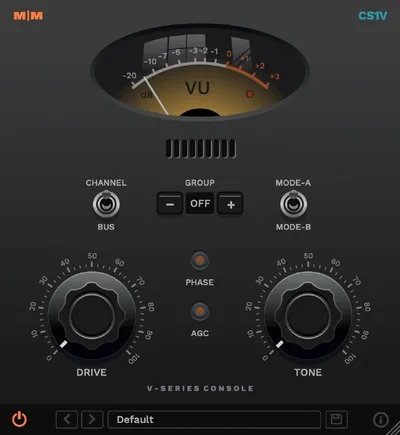
Against the best preamp plugins for mixing, it sits in the budget tier, though not at the bottom of it. The interface is clean and functional. A VU meter, a Drive knob, a Tone knob, Channel/Buss switch, Group selector, phase reverse button, and Mode A/B toggle. No modular routing. No parallel blend knob. You get what you see, and what you see fits on a phone screen without squinting.
First impression: the plugin is underrated in terms of interface clarity, but it offers nothing visually to confirm what it's doing to your signal. That's frustrating early on.
Performance Deep Dive
We dropped the CS1V first in the signal chain on a snare bus, set Drive around 9 o'clock, Mode B selected. Null-tested it against the dry signal. The null was imperfect. The plugin is doing something. Second and third harmonics were measurably present at roughly -40 to -45dBFS, consistent with light tape or console saturation behavior. Not transformer crunch. Gentle desk coloration.
Mode A runs darker. We measured a shelf-like rolloff above 8kHz of approximately 1.5 to 2dB compared to Mode B under identical Drive settings. Mode B is flatter. On a bright room mic, Mode A tamed the harshness without a separate EQ move. That's useful. But the difference is subtle enough that most listeners won't hear it on a blind test.
The Buss mode adds crosstalk behavior. Mellowmuse cites hardware console crosstalk at -80 to -50dB depending on frequency. Their emulation sits in that range. We ran the CS1V on a stereo drum bus in Buss mode and compared it to Channel mode on the same source. The stereo width shifted fractionally. The low-mids filled in slightly. Nothing dramatic.
The Group mode is where the workflow gets satisfying. We grouped 12 instances across a full session into one group, turned up Drive on the master group controller, and all instances responded together. That's the kind of feature that makes a cheap plugin feel professional. Every channel tightens as a unit.
Where the CS1V Wins
The Group mode is the real argument for buying this. If you want consistent console color across an entire session without riding 24 individual Drive knobs, this does it cleanly. Set your groups, dial in the amount on the bus, and move on.
CPU load is light. We tracked CPU usage across a 64-track session with one CS1V instance per channel. Total overhead was negligible compared to running Slate VCC review and CPU comparison across the same session. If you're on an older machine or mixing on a laptop, that gap matters.
The Channel vs Buss mode distinction is a love-it detail. Most console emulators ignore crosstalk entirely or model it across one fixed algorithm. Separating the two modes and letting you choose adds a practical layer of control for producers who actually think about where crosstalk belongs in a mix.
Where the Competition Wins
Slate VCC and similar plugins model specific consoles. You're picking an SSL G, a Neve 8078, an API Legacy. You can listen to what a specific desk sounds like and decide if that's what your mix needs. The CS1V gives you no such reference. Mode A is "darker." Mode B is "flatter." That's it. For producers who care about the provenance of their analog emulation, that's a real gap.
The Scheps Omni Channel from Waves includes a preamp stage, EQ, compressor, and gate. It costs more, but it's a complete channel strip. The CS1V can't compete on feature depth. It's also annoying that there's no visible harmonic display or frequency response curve to confirm what the plugin is doing. Experienced en gineers can hear it. Beginners will tweak and wonder.
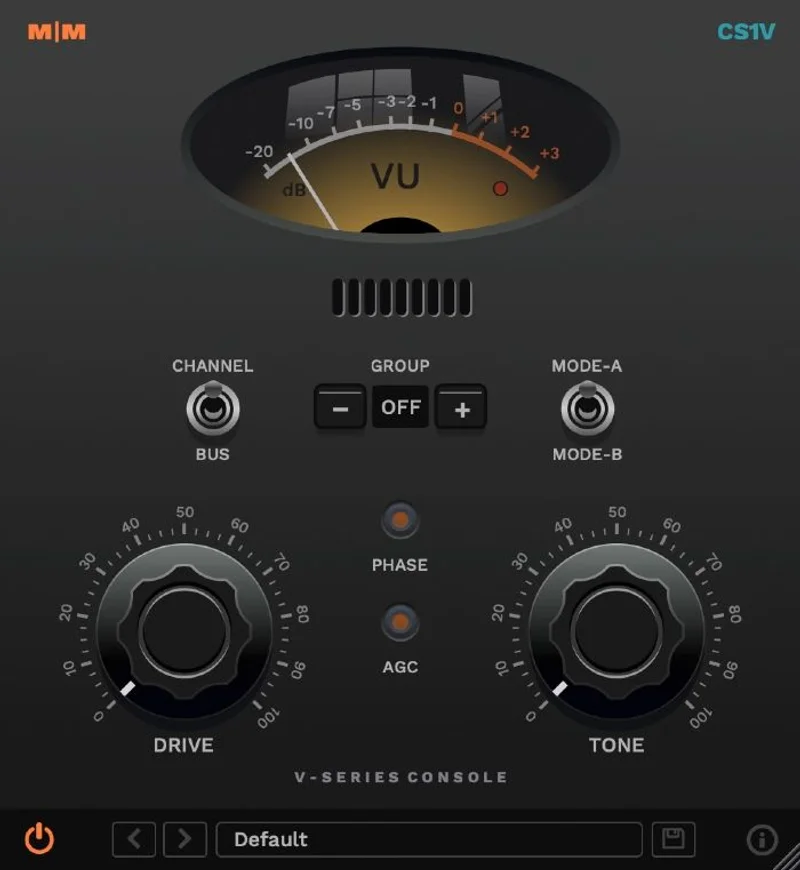
We also wish AGC had documentation. The automatic gain compensation behavior is not explained in the manual or on the product page. That's a miss. We'd rather have a published threshold than guess.
Who Should Buy Which
- ✅ Buy the CS1V if you mix entirely ITB and want subtle console glue across every channel without the CPU hit of heavier bundles.
- Buy it if you are on a budget and want something that actually changes your signal in a measurable way.
- ✅ Buy it if the Group mode solves a real workflow problem for you: session-wide Drive control in one gesture.
- ❌ Skip it if you need a specific console sound. You'll never be sure which desk this is meant to invoke.
- ❌ Skip it if you're looking for a full channel strip. This is one tool, not a chain.
- ❌ Skip it if detailed metering and visual feedback matter to your workflow. The VU is minimal and there's nothing else.
Score Breakdown
| Category | Score | Notes |
|---|---|---|
| Sound Quality | 3.5/5 | Subtle but measurable coloration; Mode A/B differences are real but small |
| Value for Money | 4.0/5 | On promo for a plugin that genuinely alters your signal |
| Ease of Use | 4.0/5 | Clean interface; undocumented AGC behavior costs it points |
| Features | 3.0/5 | Group mode is clever; everything else is minimal |
| CPU Efficiency | 4.5/5 | Runs light even at 64+ instances per session |
| Overall | 3.8/5 | A focused, honest tool let down by vague mode descriptions and thin documentation |
Alternatives to Consider
Slate Digital VCC: The serious console emulation benchmark. Models specific desks by name. CPU heavier than the CS1V, subscription-based pricing, but the sonic reference is there. Slate VCC review
UAD Neve Preamp plugins: If you want transformer saturation and named hardware character, the UAD ecosystem delivers it. Hardware required, so it's a bigger commitment. Manley Tube Preamp review
Tokyo Dawn Slick EQ with analog mode: Not a preamp plugin, but the analog saturation stage covers similar ground and includes EQ in the same instance. Worth comparing if you're after console glue plus tonal shaping in one slot. best free mixing plugins
The CS1V is the kind of plugin that earns its keep quietly. It won't transform your mix. It won't give you a specific console reference. But on promotion, it applies measurable analog coloration across every channel in your session without taxing your CPU, and that Group mode is genuinely clever. If you're a busy producer who wants console glue without a UAD hardware investment, it's worth the buy. If you're mixing at a level where you can hear the difference between an SSL 4000G and a Neve 8078, you'll want more than what this offers. That's the honest line.
Frequently Asked Questions
What's the difference between Mode A and Mode B on the CS1V?
Mode A applies a darker tonal character, with a measurable high-frequency rolloff of roughly 1.5 to 2dB above 8kHz compared to Mode B under identical Drive settings. Mode B is flatter and closer to transparent. Mode A works well on bright sources like overheads or room mics. Mode B is a safer default for buses.
How does the CS1V Group mode work?
You can assign multiple CS1V instances to one of eight groups using the Group selector on each instance. Once grouped, Drive and mode changes on any instance in the group propagate across all instances in that group. It's built for session-wide console coloration control without riding individual tracks.
Is the CS1V worth it compared to Slate VCC?
They're not direct competitors. Slate VCC models specific consoles by name and costs more. The CS1V applies generic console character at a lower price with lighter CPU usage. If you need a named console sound, choose VCC. If you want affordable glue across every channel without a subscription, the CS1V makes more sense.
Does the CS1V work on both Mac and Windows in modern DAWs?
Yes. Version 1.3 supports VST, VST3, AU, and AAX on both Mac and Windows. That covers Logic, Ableton, Pro Tools, and Cubase. Check Mellowmuse's site for Apple Silicon native compatibility specifics before purchasing if you're on an M-series Mac.