
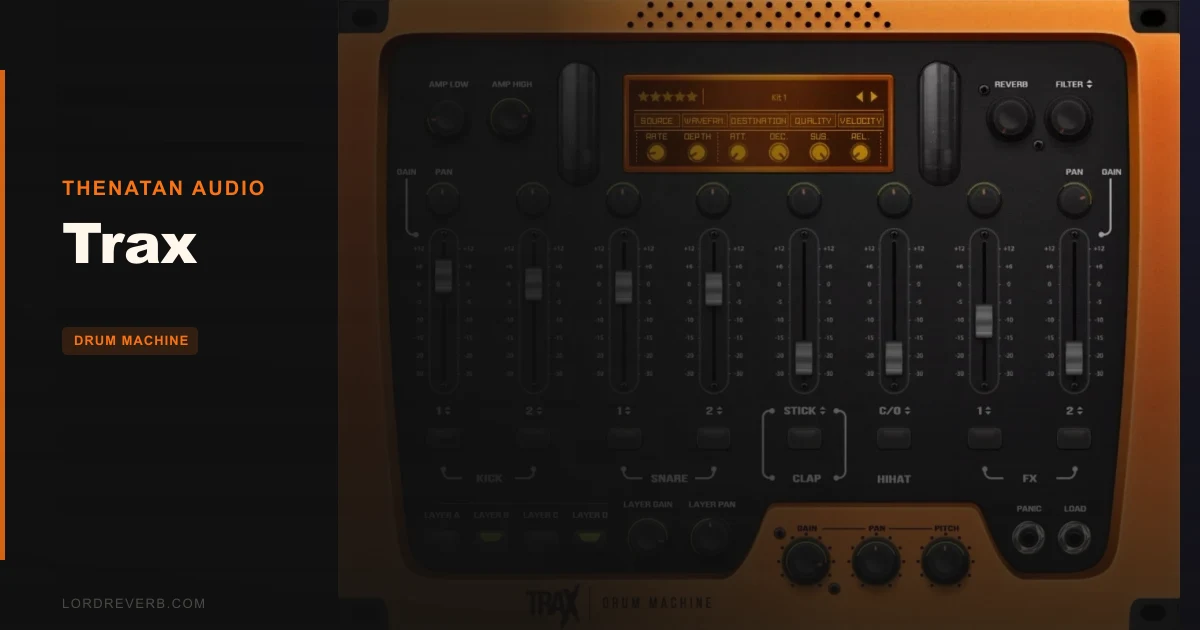
Thenatan's Trax is a $10 beat-starter drum machine that does exactly what it promises: get you from a blank session to a banging trap pattern in under five minutes, without touching a single routing cable.
We loaded it into Ableton on a mid-spec MacBook Pro, dropped the "Dark Nights" kit, and had a 16-step pattern locked in before the coffee had cooled. That's the whole pitch. That's who this is for.
If you're a bedroom hip-hop or trap producer who wants a plug-and-play drum tool with a serious-sounding library baked in, Trax delivers. If you're producing techno, drum and bass, or anything that needs deep step-sequencing logic, keep scrolling.
Trax by Thenatan: A Drum Machine Built for Speed, Not Surgery
Trax is a sample-based drum machine VST built for modern hip-hop, trap, R&B, and EDM. It ships with over 400 pre-EQ'd drum samples spread across 50 complete kits, with an 8-channel mixer sitting front and centre in the interface.
That mixer gives you volume, pan, pitch, reverb, and FX layer control per channel. There's built-in analog-style reverb, distortion, and a set of lo-fi colour options: hiss, noise, crackle, and cassette tape saturation. Each channel also has Attack and Release controls for basic transient shaping.
What it's not: a deep sound design tool. You can't draw your own samples in, there's no synthesis engine, and the step sequencer won't win any awards for pattern complexity. Trax is a beat-starter, not a beat-finisher.
Pro Tools users can stop reading here. No AAX. No workaround. Full stop.
Living With Trax Through a Full Week of Sessions
Day one felt clever. The interface is clean, the hardware rack aesthetic is satisfying to look at, and patch loading is genuinely fast. We switched between five kits in under 30 seconds without a single hang.
The lo-fi FX stack is where things got interesting. We ran a snare through the cassette effect with the crackle blended in at about 30% wet. The result was a smeared, tape-worn snap that sat beautifully at around 200Hz without muddying the kick underneath. Satisfying. That's a free mix texture worth twice what the plugin costs.
Day three is when the frustration started. We tried building a more syncopated pattern with ghost notes and velocity layering. The step sequencer maxed out fast. There's no per-step probability, no humanise function, no micro-timing offset. Every step is either on or off, with a single velocity value. For trap with intentional swing and ghost hits, you'll end up bouncing to MIDI clips and finishing the work in your DAW anyway.
The 16 stereo outputs are a legitimately brilliant feature at this price. Each of the 8 channels sends its own stereo pair, which means you can route kick to one bus, snare to another, and handle compression and EQ separately outside the plugin. That's real mixing flexibility that many pricier plugins skip.
CPU sat at around 2-3% on a single instance in Ableton 12 on an M2 MacBook Pro. Clean. On a Windows laptop running an i5 with 8GB RAM, the number nudged up to roughly 5%. Both are fine.
The Trade-Offs You Need to Know About
The value proposition is strong on paper. Fifty kits, 400+ samples, built-in FX, individual outs, Apple Silicon native, all for $10. That's hard to argue with.
The trade-off is depth. The samples are pre-treated, which means they load ready to use but also means you're stuck with Thenatan's processing decisions. Want a totally dry, unprocessed kick you can shape from scratch? You won't find it here. The EQ and saturation are already baked into the sample. You're seasoning a pre-cooked meal.
The genre focus is also narrow. We love trap and hip-hop kits that sound this sharp at this price. But the 50 kits are almost entirely trap-adjacent. There's nothing here that points toward house, jungle, or live-feeling acoustic kits. If your music lives outside the trap-to-R&B corridor, this library won't serve you.
Monthly kit expansions are a clever idea and do add real mileage. Whether those kits keep diversifying or stay in the same trap lane is worth watching before committing.
Against the Field: How Trax Stacks Up
For context, let's name the realistic competition.
XO by XLN Audio wins on sound design depth and a cleverly organised sample browser that adapts to your existing library. If you're already sample-heavy and want intelligent curation, XO is the smarter buy. It's also more expensive. The current price is shown in the buy box on this page.
Slate Digital's Trigger 2 wins if you need sample replacement or live drum reinforcement. Different use case entirely, but worth mentioning if your sessions involve acoustic drums.
Drum Synthesizer-type plugins like Arturia's Spark win on programmability and sound shaping. Trax wins on immediate gratification and ease of entry.
For a broader look at where Trax sits in the category, our full guide to drum machine sampler plugins covers the full range from free to pro-level.
Trax beats all of them on one metric: time from install to first useful beat. Nothing else in this price bracket is faster.
The Real Verdict on Trax
Buy Trax if you make trap, hip-hop, or R&B, you're tired of spending 20 minutes finding a decent kick, and $10 is a comfortable spend. It earns its price in the first session.
Skip it if you need deep sequencing, want fully dry samples to shape yourself, work in Pro Tools, or produce outside the hip-hop/trap lane. It'll annoy you before it helps you.
The ceiling is real. You'll feel it within a week. But the floor is high enough that beginners and beat-starters will spend a lot of time below that ceiling before they hit it.
Score Breakdown
| Category | Score | Notes |
|---|---|---|
| Sound Quality | 4.0/5 | Pre-treated samples sound polished and ready-to-use; limited raw/dry options for custom shaping |
| Value for Money | 4.0/5 | 50 kits, 400+ samples, built-in FX, and individual outs at $10 is a fair deal for the target user |
| Ease of Use | 4.5/5 | Fastest install-to-beat time in this price bracket; minimal learning curve by design |
| Features | 3.0/5 | Mixer and lo-fi FX are strong; step sequencer lacks velocity layering, probability, and micro-timing |
| CPU Efficiency | 4.5/5 | 2–5% CPU on tested systems; runs cleanly on budget laptops and Apple Silicon alike |
| Overall | 3.5/5 | Solid entry-level drum machine for trap and hip-hop; outgrown quickly by intermediate producers |
Alternatives to Consider
XO by XLN Audio is the upgrade path when you outgrow Trax's preset-driven approach. It reads your existing sample library and organises sounds by sonic similarity. More powerful, more expensive. The current price is shown in the buy box on this page. See how drum machine plugins compare in our drum machine sampler plugins guide.
Drum Broker's sample packs loaded into your DAW's stock sampler is worth considering if you want Trax's sound library flexibility without the plugin overhead. Less convenient, but more control.
Roland's SRX Dance Trax plugin is a completely different beast genre-wise, aimed at house and dance rather than trap. If you produce in that lane, it's worth comparing: SRX Dance Trax review.
If you're unsure which drum tool fits your workflow, our guide to drum machine sampler plugins breaks the whole category down by use case and budget.
Trax costs $10. It sounds like it should cost more. But it thinks like a plugin that costs less. That's the whole story. If you're early in your production journey and making trap beats, buy it without guilt. If you've been producing for two years or more, you'll probably want something deeper within a month.
Frequently Asked Questions
Does Trax work with Pro Tools?
No. Trax by Thenatan Audio is available in VST, VST3, and AU formats only. There is no AAX version, so it won't load in Pro Tools. If Pro Tools is your main DAW, you'll need a different drum machine plugin entirely.
How many drum kits and samples does Trax include?
Trax ships with 50 pre-mixed drum kits and over 400 drum samples, all pre-EQ'd and treated for immediate use. Thenatan also offers monthly expansion kits that add new sounds and matching GUIs, which extends the library over time.
Is Trax good for genres outside trap and hip-hop?
Honestly, not really. The 50 included kits are heavily focused on trap, hip-hop, and R&B sounds. If you produce house, drum and bass, or live-feel acoustic styles, the sample selection won't serve you well. You'd be better looking at a more genre-neutral drum plugin or a dedicated sample library.
Can I route each drum channel to a separate track in my DAW?
Yes. Trax supports 16 stereo outputs covering all 8 mixer channels, so you can send each drum element to its own DAW track for individual compression, EQ, and processing. This is one of Trax's standout features at its price point, and it works cleanly in Ableton, Logic, FL Studio, and other major DAWs that support multi-output instruments.