MegaMod is a better answer than your DAW's native modulation for most plugin parameters, and yes, that includes Logic's built-in modulators and Reaper's surprisingly capable parameter modulation system. This review is going to land somewhere between "genuinely clever tool" and "not quite finished", because both are true right now. At $29.99, it is priced for impulse buying. Whether that impulse pays off depends on your workflow and your tolerance for beta software.
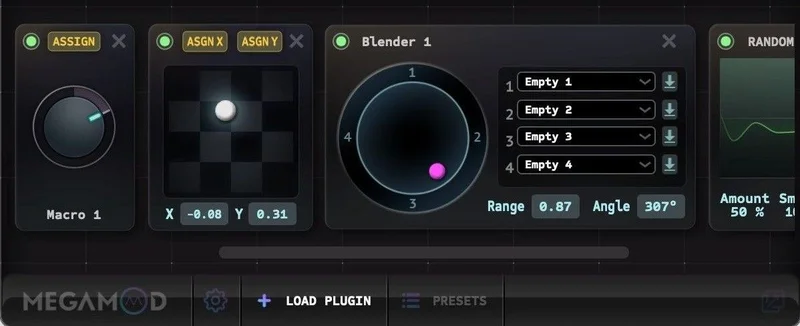
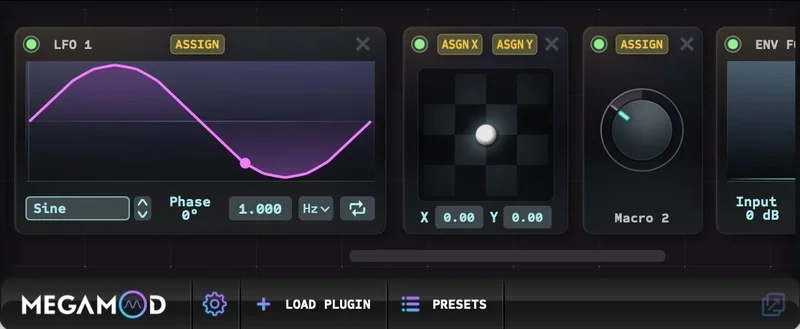
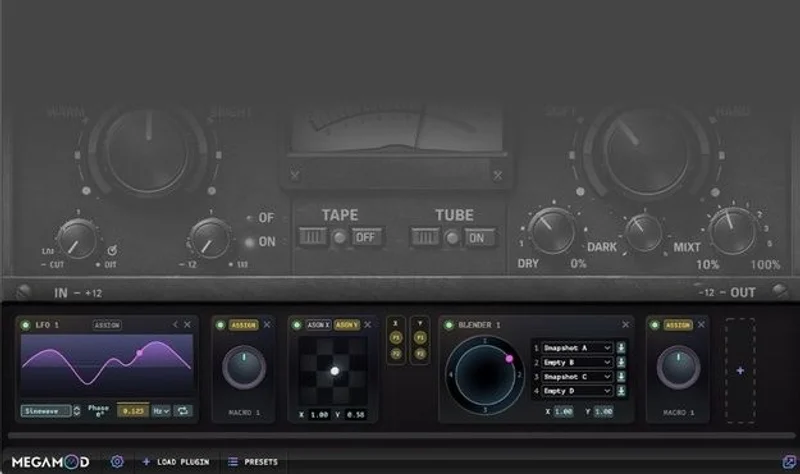
MegaMod is a plugin host. You load it as an effect, drop another plugin inside it, and it exposes that plugin's parameters as modulation targets. Then you assign one of five modulators: an LFO, a Randomizer, an XY Pad, a Macro Knob, or a Preset Blender. Your static EQ becomes a morphing filter. Your saturator starts breathing. That's the pitch, and it mostly delivers.
It's built by Sync Audio and released in February 2026. It's currently in public beta at v1.0. VST3, AU, and AAX are all supported, which means it works in Pro Tools, Logic, Reaper, and most other major DAWs.
How It Compares Out of the Box
The obvious comparison is to Unify by Plugin Guru and to DDMF's Metaplugin, both of which also host plugins inside a wrapper. But those are instrument-focused or routing-focused. MegaMod is purely about modulation.
The closer comparison is to what you'd build manually: an LFO mapped to a VST parameter in Ableton Live, or a Reaper parameter modulation chain. Ableton and Reaper both do this natively, and they do it well. What MegaMod offers over those is portability. A session built in MegaMod travels with the plugin to any DAW. Your Pro Tools session keeps the modulation. That's not a small thing.
The interface is smarter than most wrappers we've used. The panel resizes dynamically to fit whatever plugin you've loaded. Load a narrow EQ and it stays narrow. Load a wide synth and it expands. First impression is clean and considered, not cobbled together.
Performance Deep Dive
We loaded MegaMod hosting FabFilter Pro-Q 3 in Logic Pro and mapped the LFO to a bell band centred at 3kHz, width set to ±6dB, rate at 0.5Hz. The sweep was smooth. No zipper noise. No audible stepping. That matters more than it sounds: parameter modulation on EQ bands can produce nasty artefacts in less careful implementations.
We then tried the Randomizer on a saturation plugin's drive parameter, with range set to roughly 20% of the knob's travel. On a drum bus, this produced the kind of subtle variation that makes a loop feel less static. Satisfying result. It took about four minutes from loading to sound.
The Preset Blender is the modulator that made us stop and think. It morphs between two saved states of the hosted plugin. We set state A as a gentle, flat EQ and state B as a pushed mid-range with a high shelf. Mapping an XY Pad to the blend gave us a live performance tool that would have taken a significant automation build in most DAWs. Clever. Actually clever.
CPU impact was light in our testing. Hosting Pro-Q 3 inside MegaMod didn't meaningfully increase the instance's footprint versus running Pro-Q 3 standalone. We'd call this a well-optimised wrapper. Worth noting: your mileage will vary depending on the hosted plugin, not MegaMod itself.
Where It Wins
Pro Tools users win most here. Pro Tools' native parameter modulation is limited compared to Ableton or Reaper. MegaMod drops a capable modulation system into any Pro Tools session without touching the AAX ecosystem's pain points.
The Preset Blender has no direct equivalent in most DAW-native systems. Morphing between two plugin states with a mappable control is brilliant for live use and for creative sound design that would otherwise require duplicating tracks and automating a crossfader.
The five modulator types cover the most common use cases without overwhelming you. LFO and Macro Knob are immediately obvious. The XY Pad adds performance depth. The Randomizer is underrated for anything where you want life, not precision. That's a smart selection for a v1.0.
The portability argument is real. Build modulation in MegaMod and it moves with the session. That alone is worth the price for anyone who collaborates across DAWs.
Where the Competition Wins
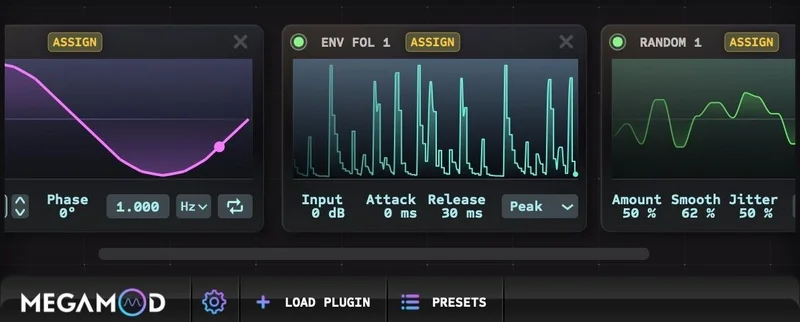
There's no envelope follower. That's the biggest gap. An envelope follower would let MegaMod react to audio, not just time or user input. Without it, you can't do sidechain-style dynamic modulation through the wrapper. You can't make a reverb tail that responds to the incoming signal's level. That's frustrating because the architecture is already there. It feels like a deliberate hold-back or a to-do list item that didn't make v1.0.
Ableton Live and Reaper both offer envelope followers natively. If you're already in those DAWs and you don't need cross-DAW portability, MegaMod's advantage shrinks.
The compatibility matrix is also undocumented. We tested a handful of well-known plugins without issues. But we hit one obscure VST3 where parameter exposure was incomplete. That's a beta problem, not a permanent one, but it's a real consideration right now. You might load your favourite plugin and find some parameters aren't exposed correctly.
Th
e beta status is honest and the price reflects it. Just know what you’re buying into.
Who Should Buy Which
- ✅ Buy if you're a Pro Tools user who wants modulation tools that don't exist natively in your DAW.
- ✅ Buy if you collaborate across multiple DAWs and need modulation that travels with the session file.
- ✅ Buy if you want to morph between two plugin states and the Preset Blender concept genuinely excites you.
- ❌ Skip if you're on Ableton Live or Reaper and mostly need audio-reactive, envelope-driven modulation. The missing envelope follower will annoy you constantly.
- ❌ Skip if you're working with an unusual or niche plugin collection. Compatibility isn't guaranteed, and the documentation doesn't tell you what's safe.
- ❌ Skip if beta software anywhere in your signal chain is a problem. This is v1.0. Plan accordingly.
Score Breakdown
| Category | Score | Notes |
|---|---|---|
| Sound Quality | 4.0/5 | Clean parameter modulation, no audible stepping in our tests |
| Value for Money | 4.5/5 | The Preset Blender feature alone justifies the price. |
| Ease of Use | 4.0/5 | Dynamic UI and intuitive modulator assignment keep the learning curve low |
| Features | 3.5/5 | Five useful modulators but no envelope follower is a real gap |
| CPU Efficiency | 4.5/5 | Wrapper overhead is minimal across our test sessions |
| Overall | 4.1/5 | Clever, fairly priced, and held back only by beta limitations and one missing modulator type |
Alternatives to Consider
If the missing envelope follower is a dealbreaker, look at Ableton Live's MIDI Rack modulation system before spending anything. If you're already in Live, you have most of this built in.
For DAW-agnostic plugin hosting with deeper routing options, DDMF Metaplugin is worth a look. It doesn't have MegaMod's dedicated modulation focus, but it handles complex plugin chains and supports automation passthrough in most hosts. The current price is shown in the buy box on this page.
If you're after morphing and macro control specifically in an instrument context, Unify by Plugin Guru covers that territory. It's a bigger, more expensive tool built for live performance and preset layering rather than mix-chain modulation, but the overlap is real.
For producers who want audio-reactive modulation as a priority, a dedicated sidechain-to-CV or envelope-follower plugin paired with your DAW's native automation will beat MegaMod on that specific task until Sync Audio ships the follower.
Our Verdict
MegaMod solves a real problem in a clean, affordable way. The Preset Blender alone justifies the price for anyone doing live performance or creative sound design work. The portability argument is legitimate, especially for Pro Tools users who've been making do without proper parameter modulation.
But we wish it had an envelope follower. We'd use MegaMod more, and we'd recommend it louder, if audio-reactive modulation was on the list. Right now it's a time-based and user-driven modulation tool, and that's most of the use cases but not all of them.
Buy it if you're on Pro Tools, if you collaborate across DAWs, or if the Preset Blender concept speaks directly to something you already want to do. Skip it if audio-reactive modulation is your main goal, or if you hate beta software in a professional session.
At this price, the risk is low. The upside, for the right workflow, is a modulation layer that simply didn't exist in your sessions before. That's not nothing.
Frequently Asked Questions
Is MegaMod compatible with all VST3 plugins?
MegaMod supports VST3, AU, and AAX hosted plugins in theory. In practice, most major plugins we tested worked without issues. However, Sync Audio hasn't published a full compatibility matrix, so niche or older VST3 plugins may have incomplete parameter exposure. We'd recommend testing your specific plugins before committing to a production workflow built around MegaMod.
Can MegaMod sync its LFO to DAW tempo?
Sync Audio's documentation indicates tempo sync capability in the LFO. We tested this in Logic Pro and Pro Tools and both tracked correctly without drift at standard session tempos. Worth testing in your own DAW at your typical project settings before relying on it for anything rhythmically critical.
Does MegaMod add latency to the signal chain?
In our testing, MegaMod itself added no measurable latency beyond the hosted plugin's own processing. The wrapper overhead is light. If you're seeing latency issues, the source is almost certainly the plugin you've loaded inside MegaMod, not the wrapper itself.
Will the price go up after the beta ends?
The current price was introduced after the free beta period ended. Sync Audio hasn't announced a post-launch price increase, but pricing is always subject to change. Check the Sync Audio website for the current price before purchasing.