
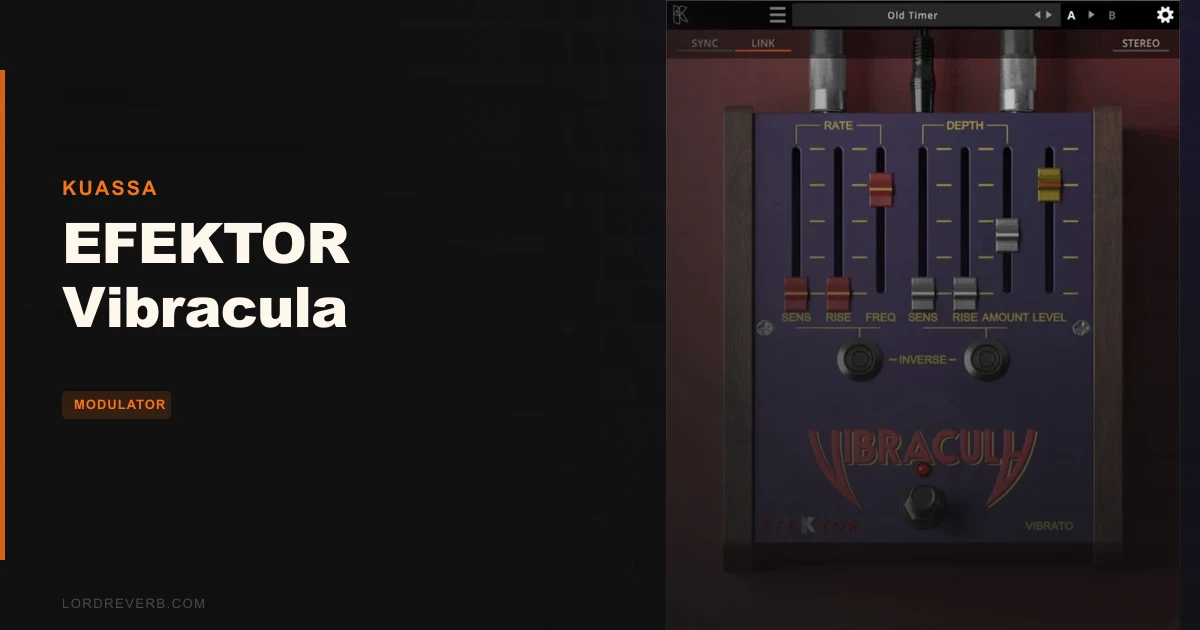
EFEKTOR Vibracula is a focused vibrato plugin from Kuassa that does one thing: modulate pitch in a way that references classic analog hardware, and it sells for $19. That's the whole pitch. No multi-effects chain, no sixty-preset browser to wade through. Just vibrato, a handful of controls, and a clean signal path built for players and producers who need the effect without the overhead.
At $19, it's a budget buy. It's built for guitarists who want auto-vibrato without a physical arm, for producers layering that vintage synthesizer wobble, and for anyone who wants the effect fast with no routing headaches. Whether it earns that price depends on what you need from it. Read the rough edges section before clicking buy.
What's Actually Inside This Plugin
EFEKTOR Vibracula runs on Windows 7 or later (64-bit) and Mac OSX 10.11 or later (64-bit). Mac users on M1 and M2 get native Apple Silicon support, which is good news for anyone still waiting for their older plugin stack to catch up.
Format coverage is solid. On Mac you get VST, VST3, and Audio Units. On Windows, VST and VST3. AAX for Pro Tools 11 or later is available on both platforms. It also runs as an Amplifikation 360 module if you're already in Kuassa's ecosystem.
The core feature set is tight. You get an auto vibrato engine that simulates a guitar's vibrato arm, precise pitch modulation across a range from subtle to aggressive, and Sweep and Detune controls as your primary shaping tools. Stereo mode lets you link the left and right channels. The interface is a single screen. That's the list.
Minimum specs are a Core2 Duo or AMD Phenom II X4 with 4GB RAM. Kuassa recommends at least a current Intel i3 or AMD Ryzen on Windows, or a current Intel i3 on Mac. No CPU load figures are published, so you'll need to check that yourself against your session.
Where Vibracula Sits In A Real Session
Drop it on a guitar track after your amp sim and before your reverb send. That's the most natural position. Vibrato belongs in the chain where pitch is still dry and unsmeared, so placing it pre-reverb keeps the modulation clean and lets the tail settle around the moving note rather than fighting it.
On a synth pad bus, try it as a send rather than an insert. Push the Depth up and you'll get that wobbling, organic character Kuassa describes. Keep the Rate low for slow waves. Push it and the pitch fluctuations become more aggressive, closer to the "insane intensity" end of the plugin's own range description.
Users have found a clever use case: running guitar through it in real-time to produce polyphonic fake-synthesizer sounds. The low-latency processing makes that viable without the timing drift that kills live performance tricks. If you play live or record direct into a session, that's worth knowing.
The stereo channel-linking option matters if you're on a wide stereo source. Unlinked, the left and right channels can modulate independently. Linked, they move in unison. For a mono-compatible mix, linked is usually the safer call. For a wider, more hypnotic effect, unlinked can be interesting, though how far you can take that depends on the source material.
What it won't do is respond dynamically to a MIDI expression pedal. If your workflow involves riding Rate or Depth in real-time from a controller, that's off the table here. That's a real workflow limit, and we'd be doing you a disservice to bury it.
What Vibracula Is Genuinely Good At
The auto vibrato simulation is the strongest argument for buying this. A guitar's vibrato arm is a physical thing: it bends pitch smoothly, returns to centre, and responds to playing dynamics in a way that feels alive. Vibracula simulates that behaviour in the pitch modulation engine. Owners describe the result as low-latency enough for real-time use, which is the most demanding test for any modulation plugin.
The 1970s synthesizer association one reviewer made isn't accidental. That era's analog pitch modulation was slightly imprecise, organic in its drift, and slightly asymmetric in its return. Vibracula's pitch modulation lands in that territory. Push the Sweep control and you hear that drift open up. It's satisfying on the right source.
The polyphonic fake-synth trick is underrated. Run a clean guitar chord through it with a mid-range Rate and noticeable Depth, and the pitch modulation starts to sound less like an effect and more like an instrument. Owners report doing this without latency problems, which makes it genuinely useful rather than a novelty.
Single-screen interfaces save time. There's no menu-diving, no hidden pages. You set the controls, you're done. For a $19 plugin doing a specific job, that's exactly the right call.
M1 and M2 native support is a real practical win for anyone on Apple Silicon who's been burned by Rosetta translation overhead.
The Rough Edges You Need To Know About
The most frustrating limitation is the MIDI expression pedal situation. If you're performing with a vibrato arm simulation and want to ride the Rate or Depth live from a pedal board, you can't. The controls aren't set up for flexible, variable MIDI-expression-pedal control. For a plugin that sells itself on simulating a vibrato arm, that's a frustrating gap.
The synthetic quality some owners notice is worth taking seriously. Vibrato on real hardware has small imperfections: the modulation isn't perfectly sinusoidal, the return isn't always centred, the depth changes slightly with pick attack. Vibracula's pitch modulation is described by at least one reviewer as sounding somewhat synthetic. Without an HP filter to clean the bottom end or ADSR controls to shape the modulation envelope's attack and release, you can't push past that character if it bothers you.
There's also a practical information gap. Only one substantive independent review is publicly available, and no CPU benchmarks are published. Load it into a trial session on your machine before committing to a larger project to confirm performance on your hardware.
None of these are dealbreakers at this price point. But if you need MIDI-controllable modulation or a more complex sound-shaping toolkit, this isn't the plugin. Honest.
Comparing Vibrato Options At This Level
What we can do is frame the decision.
Vibracula sits in a category of focused, single-function modulation plugins. The trade you're making at $19 is simplicity over flexibility. If you need a vibrato plugin with MIDI expression pedal control over Rate and Depth, you'll need to look beyond this one. If you need ADSR shaping over the modulation envelope, same answer. If you want to route complex LFO shapes into the modulation path, you're in the wrong plugin.
What Vibracula trades those features for is speed. Open it, set Sweep and Detune, done. No patch management, no modulation matrix to navigate. For a producer who drops vibrato on a track once a session, that's a genuinely clever design call. For a live guitarist who wants real-time expressive control, it's a real miss.
The polyphonic synthesizer use case is where Vibracula earns its space. Most vibrato plugins don't advertise that as a feature. The low-latency processing that enables it is a real differentiator, even if Kuassa doesn't publish benchmark numbers to back it up.
Who This Is Really For
Three situations where it makes sense. Three where it doesn't.
- ✅ Buy if you need a low-latency vibrato for real-time guitar performance and a hardware vibrato arm isn't an option.
- ✅ Buy if you want to layer vintage synthesizer-style pitch wobble on guitar or keyboard parts and you want to do it fast without a complex signal chain.
- ✅ Buy if you're already in Kuassa's Amplifikation 360 ecosystem and want a modulation module that integrates without friction.
- ❌ Skip if you need MIDI expression pedal control over Rate and Depth. This plugin won't give it to you.
- ❌ Skip if you're chasing an organic, imperfect analog character. The synthetic edge some users describe is a real thing, and there's no HP filter or ADSR to shape around it.
- ❌ Skip if you need a modulation workhorse with LFO routing, multiple waveform shapes, or complex envelope control. That's a different plugin category. best modulation plugins for producers
Specs & Technical Details
| Developer | Kuassa |
| Price | $19 |
| Plugin Format | VST / VST3 / AU / AAX |
| OS Support | Mac (OSX 10.11+, M1/M2 native) / Windows 7+ (64-bit) |
| Activation | N/A |
| CPU Usage | N/A (no published benchmarks) |
| Trial Available | N/A |
| Version Reviewed | N/A |
Score Breakdown
| Category | Score | Notes |
|---|---|---|
| Sound Quality | 3.0/5 | Convincing for vintage wobble; the synthetic edge is a real limit without additional shaping options |
| Value for Money | 4.0/5 | A focused tool at a low entry point; the missing MIDI control keeps it from scoring higher |
| Ease of Use | 4.5/5 | Single-screen GUI with a small control set; you're up and running in under a minute |
| Features | 2.5/5 | Sweep, Detune, stereo linking: functional but thin compared to category alternatives |
| CPU Efficiency | 3.5/5 | Low-latency processing reported by owners; no published benchmarks to verify against |
| Overall | 3.5/5 | Good enough for its lane; frustrating if you push against its limits |
The Verdict On EFEKTOR Vibracula
At $19, EFEKTOR Vibracula is a straightforward trade: you get a clean, fast, low-latency vibrato plugin with an interface that takes about thirty seconds to understand, and you give up MIDI expression control, ADSR shaping, and filter options in the process.
If you're a guitarist who wants to simulate a vibrato arm in software without the mechanical mess, or a producer who layers vintage pitch wobble on keyboard and guitar parts occasionally, this is a love-it-or-leave-it tool. It does its specific thing well. The polyphonic synthesizer trick is clever and the M1/M2 support is genuinely welcome.
But if you're a live performer who needs to ride Rate and Depth from a pedal, or you find the synthetic character of the modulation annoying and want to sculpt around it, this plugin will frustrate you. The gap where an HP filter and ADSR controls should be is real. It's not a design flaw so much as a design limit. Know the difference before buying.
The short version: smart buy for producers who want vibrato fast and cheap. Wrong buy for performers who need expressive real-time control. That's not a complicated decision. Make it.
Related reviews: Big Swarma Review
Frequently Asked Questions
Does EFEKTOR Vibracula work on Apple Silicon Macs?
Yes. Kuassa supports M1 and M2 processors natively. You don't need Rosetta translation to run it on current Apple Silicon hardware, which keeps overhead down and compatibility clean.
Can I control Rate and Depth with a MIDI expression pedal?
No. This is one of Vibracula's real limits. The plugin doesn't offer flexible, variable MIDI expression pedal control over the Rate or Depth parameters. If live expressive control is central to your workflow, you'll need a different plugin.
What formats does EFEKTOR Vibracula support?
On Mac: VST, VST3, and Audio Units. On Windows: VST and VST3. AAX for Pro Tools 11 or later is available on both platforms. It also runs as an Amplifikation 360 module within Kuassa's broader suite.
Is EFEKTOR Vibracula usable for live guitar performance?
Owners report low-latency real-time processing that makes it viable for live use, including polyphonic playing without noticeable timing drift. The lack of MIDI expression control over parameters is still a limitation for performers who need dynamic real-time adjustment of the effect's intensity.
What's the difference between the Sweep and Detune controls?
Sweep shapes the modulation movement and Detune sets the pitch shift range. Check Kuassa's manual for the precise parameter definitions.
How does EFEKTOR Vibracula compare to a hardware vibrato unit?
Reviewers describe the character as leaning toward 1970s analog synthesizer territory, which suggests a slightly synthetic edge rather than a perfect analog replica. It's close enough for production use but won't fool a player who's spent years with a real vibrato arm. The auto vibrato simulation is the closest the plugin gets to that mechanical feel.