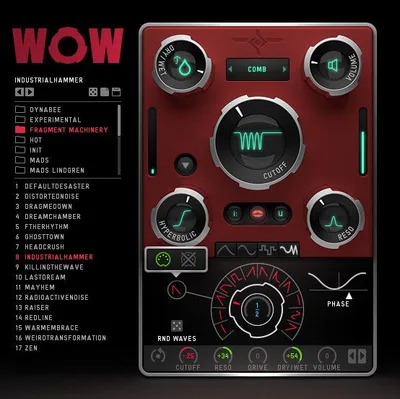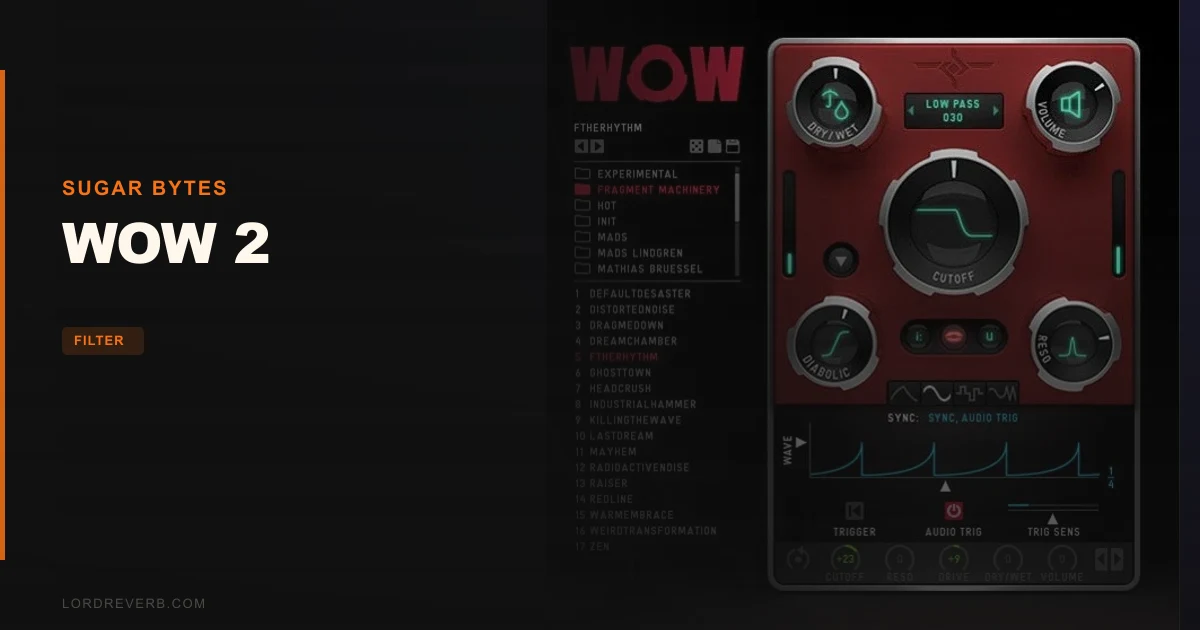
WOW 2 by Sugar Bytes is a filter and modulation plugin that earns its place in certain sessions and doesn't belong in others, and knowing which is which will save you both money and frustration. At $49, it sits at an interesting crossroads: deep enough for sound designers who want modular-level complexity, immediate enough for producers who just want that classic dubstep wobble without routing a carrier signal through three separate devices. If you're the kind of producer who already knows what a Comb filter does to a bassline, or who finds most filter plugins too shallow once you've pushed past the preset layer, WOW 2 is worth your attention. If you mostly want a clean, surgical EQ-style filter to tuck elements into a mix, there are better tools for that job and you should probably stop reading here.
What This Plugin Actually Is (And What It's Not)
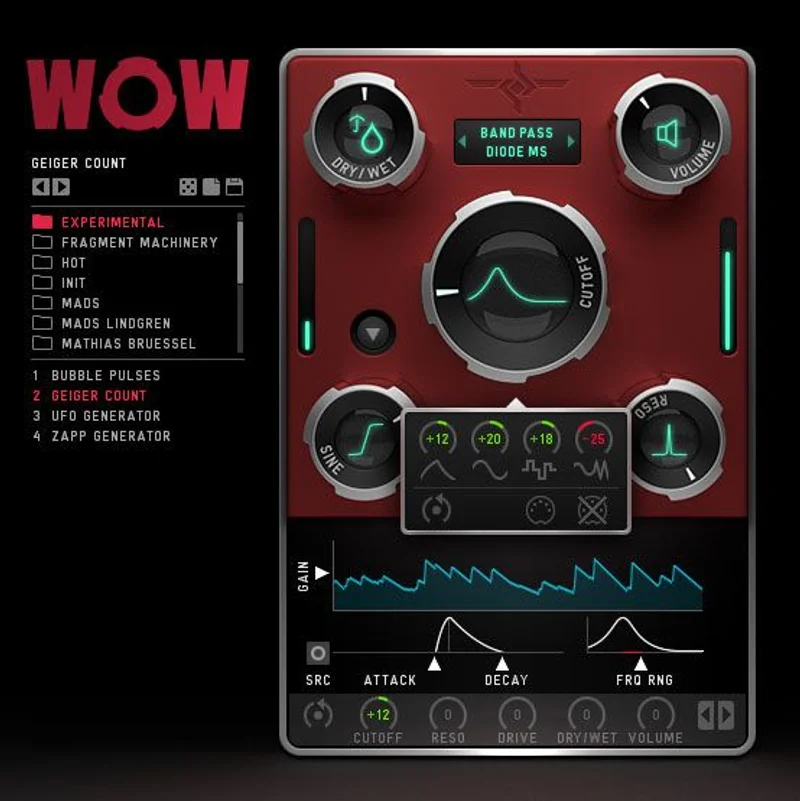
WOW 2 is not a mixing tool. That's not an insult. It's a sound-design and performance filter, built for movement, mutation, and character. Its 21 filter types, Wobble Generator, Talkbox, 16-step sequencer, envelope follower, and two-position distortion unit are all pointed in the same direction: getting audio to do interesting, animated, often extreme things.
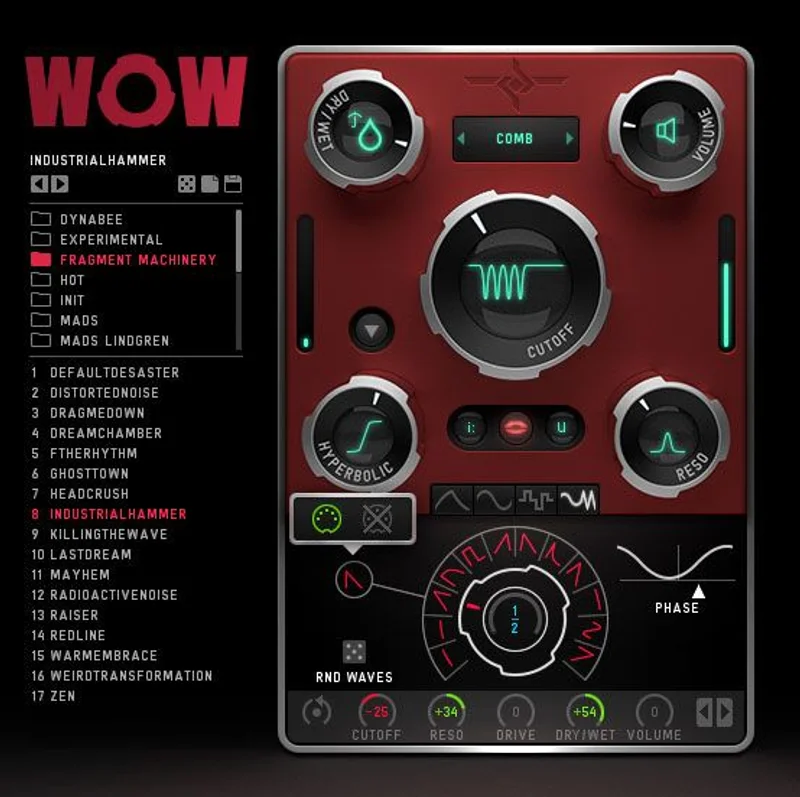
What it's not: a transparent filter for carving your mix bus or gently rolling off a hi-hat. The persistent high-frequency attenuation that runs across all filter types makes it unsuitable when you need surgical precision or a clean, uncoloured pass. Some users specifically note that the extreme high end always gets shaved, regardless of which of the 21 filters you've chosen. That's a design decision, not a bug, but it matters depending on your use case.
It's also not a straight upgrade from WOW 1 for everyone. Owners who loved the original report difficulty recreating specific tones, and some find the original's character more appealing for certain applications. If you're upgrading expecting a one-to-one improvement, that's not guaranteed.
What it is: a creative filter engine with more modulation depth than most producers will ever fully explore, sitting at $49.
The Scene You're In When You Reach for WOW 2
You've got a reese bass sitting in your session. It's doing its job, low and gritty, but it's static. You want it to breathe, to shift, to feel like something is physically moving through it. You pull up a basic filter plugin and throw an LFO on the cutoff. Fine. Generic. Every wobble bass sounds like that.
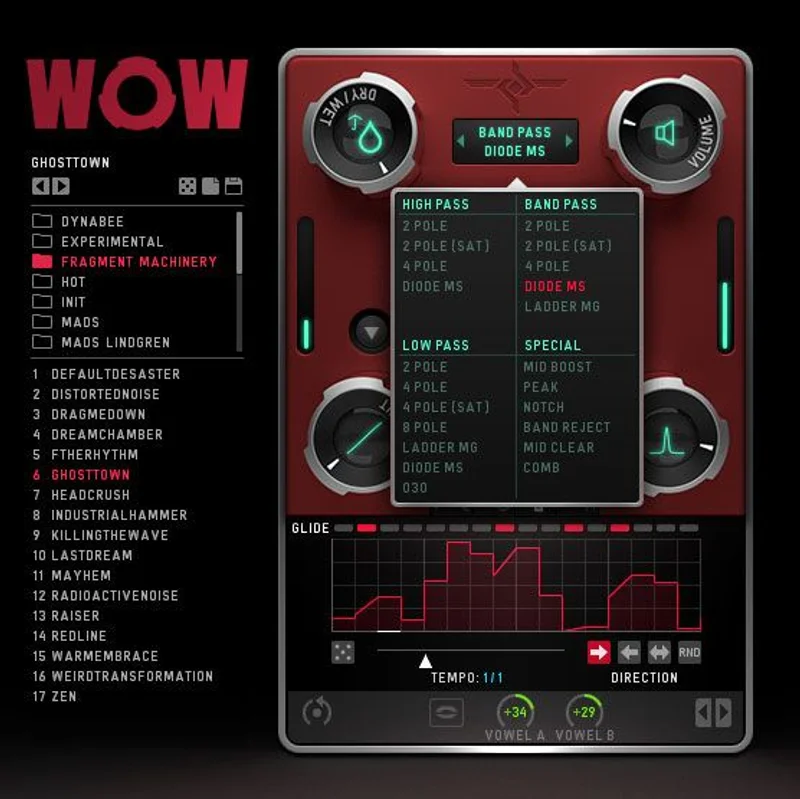
That's the exact moment WOW 2 makes sense. Instead of a single LFO sweeping a single cutoff point, you're now looking at a system where the LFO's rate can be modulated by the envelope follower, while the resonance is being shaped by the step sequencer, and you've got a Diode MS filter selected instead of a standard lowpass. You switch to Vowel Mode and suddenly your bass is halfway between a filter sweep and a human voice.
Push the drive unit after the filter. The fourfold oversampling keeps distortion from sounding digital and cheap even at high drive levels, with owners reporting results ranging from subtle warmth to aggressive grit across the seven distortion algorithms.
That's the scenario WOW 2 was built for. It's not about one insert doing one thing. It's about one insert doing six things simultaneously, in a way that feels alive rather than mechanical.
Drop it on a lead synth and let the step sequencer hit in 16ths. Put it on a vocal send and dial the Talkbox into the [ɑ] to [o] vowel transition. Use it as a standalone application to process hardware. The common thread is movement. If your source material needs to move, WOW 2 gives you a lot of ways to make it happen.
The Filter Engine: 21 Types and What That Number Actually Means
21 filter types is a large number. The question is always whether the variety is real or just incremental tweaks dressed up as separate modes. With WOW 2, the range is genuine.
The 8-pole Lowpass is the first one worth calling out. Standard lowpass filters cut at either 12dB or 24dB per octave. An 8-pole design cuts at 48dB per octave. That's steep. On a bass, the developer describes it as producing a bubbly, smacking quality. What that actually means: the resonance piles up hard at the cutoff frequency before the signal falls away almost vertically. It hits differently from a 4-pole Moog-style filter and it's suited for a different kind of movement.
The Comb filter is worth separate attention. Comb filtering creates a series of peaks and troughs spaced evenly across the frequency spectrum. When you sweep a comb filter, you get a metallic, flanging, almost vocal quality that's hard to replicate with a standard resonant lowpass. Sugar Bytes describes this one as "singing," and that's accurate in the sense that formant-like peaks move through the signal as you sweep the cutoff.
The Diode MS filter is a circuit emulation type. Diode ladder filters differ from transistor ladder designs in harmonic content: they tend to clip asymmetrically and produce even-order harmonics that some producers find more harmonically complex. The 030 filter type is another circuit-modelled option.
All 21 filters work in Vowel Mode. That's not a small thing. It means you can take any filter's character and add formant shaping on top of it. The Talkbox section lets you pick two vowels from nine choices: [i:], [e], [æ], [y], [ə], [ɑ], [ɔ], [o], [u]. You set the two endpoints and modulate between them. Put that on your Comb filter and the result is stranger and more specific than anything a simple resonance sweep produces.
The consistent high-frequency rolloff across all filter types is frustrating if you want an open, full-bandwidth sound. It's one of the most common complaints from owners. Worth knowing before you spend $49 expecting a transparent result at extreme settings.
The Wobble Generator: Where the Dubstep Connection Lives
The Wobble Knob is lifted directly from Sugar Bytes' Cyclop synth. That should tell you something about its origins.
The Wobble Generator has 16 waveforms and 12 tempo-synced rates. What it does is drive the filter cutoff with rhythmic, tempo-locked movement. The 16 waveforms aren't just standard LFO shapes. Some are more complex rhythmic patterns that create stutter-style filter movement rather than smooth sweeps.
At slower rates, it's the classic wobble bass effect that defined a large stretch of dubstep production. At faster rates, you're into trance-gate and stutter territory. The 12 tempo-synced rate options give you enough division choices that you can lock the wobble to eighth notes, sixteenth notes, triplets, or dotted values without manually calculating a frequency.
Pair it with the step sequencer and things get more complex. The sequencer has 16 steps and can run at its own rate against the Wobble Generator. When those two modulators are out of phase with each other, you get filter movement that sounds less mechanical than a single LFO would. That polyrhythmic texture is where WOW 2 pulls ahead of simpler filter tools.
The Modulation System: Modulators Modulating Modulators
This is where WOW 2 either wins or loses you, depending on your workflow.
The core modulation sources are the LFO (13 waveforms), the 16-step step sequencer, and the envelope follower with frequency detection. Standard stuff so far. Where it gets interesting: the modulators themselves are modulatable. You can point the envelope follower at the LFO's rate. You can have the step sequencer control the depth of another modulator. That layering is what the developer means when they say "the modulation system multiplies possibilities to modular level."
Owners confirm this is real and report that the ability to modulate modulators adds genuine depth. When your bass hits a transient, the envelope follower can tighten the LFO rate automatically. That kind of responsive, signal-dependent modulation is what separates expressive filter movement from static wobble.
The envelope follower also has frequency detection. This means it can respond not just to overall amplitude but to specific frequency content in the input signal. Practically: you can set it to track kick drum transients even when other elements are present, without the follower responding to everything equally.
The honest downside: owners report that the new interface makes precise modulation value settings harder than WOW 1. If you need a specific modulation depth of exactly 30%, getting there is less straightforward than in the original. It's the price of a more visual, gesture-driven interface. Annoying if you work numerically. Fine if you work by ear.
The LFO Section: 13 Waveforms and What to Do with Them
13 LFO waveforms is enough that you'll never need an external modulation source for most applications.
Beyond the standard sine, triangle, square, sawtooth, and reverse sawtooth, the extra shapes include more complex forms that produce stepped, random, or compound movement. Random waveforms in the LFO create an organic, unpredictable filter movement that's harder to replicate with a programmed step sequence. It's the difference between a wobble that sounds programmed and one that sounds like something is physically oscillating.
When you route the LFO to filter cutoff and set it to a random or sample-and-hold waveform at a 16th-note rate, you get a filter pattern that changes on every step without repeating at a predictable interval. Put that on a pad or a synth lead and it creates the kind of texture that keeps a listener's ear engaged without drawing attention to the effect itself.
The LFO can also be a modulation destination, not just a source. That's the system working as intended. The LFO's rate becomes a parameter that something else controls, and the results can go from subtle breath to full-on filter chaos depending on how much depth you assign.
Distortion Unit: Seven Algorithms Before or After
The placement choice alone makes this worth talking about.
WOW 2's distortion unit can sit before or after the filter section. That's not a small detail. Distortion before the filter means the harmonics get shaped and partially removed by the filter that follows. You get a warmer, more contained sound where the grit is filtered and controlled. Distortion after the filter means the harmonic content you just shaped gets further saturated. The results are nastier, louder in character, and less predictable.
The seven algorithms cover a wide range: Parabolic, Bit Crusher, Sine, and Diabolic are among the named types. Parabolic is the softer end, adding harmonic content in a smooth, curved way. Sine waveshaping produces odd harmonics in a specific pattern that can read as tube-like warmth at low drive settings. Bit Crusher reduces bit depth, introducing quantisation noise and a crunchy, digital quality. Diabolic is the extreme end.
The fourfold oversampling in the distortion unit matters. Distortion without oversampling introduces aliasing artifacts: false harmonic frequencies that sit at mathematically wrong intervals and create an unmusical, fizzy quality. Fourfold oversampling processes the signal at four times the sample rate before converting back, which pushes aliasing artifacts above the audible range. Owners confirm the result: seven distortion types that move from subtle warmth to aggressive grit with no aliasing reported.
Volume stability at high distortion levels is something the developer specifically calls out, and owners don't contradict it. When you push Diabolic hard, the output level doesn't explode unpredictably. That's a practical consideration if you're automating distortion amount in a live context or during a mix pass.
The Talkbox and Vowel System: Formant Shaping Without a Carrier
The Talkbox in WOW 2 operates on the dry signal directly. You pick two vowels from nine options and set the transition point between them.
The nine vowels are phonetically specific: [i:], [e], [æ], [y], [ə], [ɑ], [ɔ], [o], [u]. That range covers front vowels (high tongue position, brighter formants) through back vowels (lower tongue position, darker formants). The [i:] to [u] transition is the classic "wah" movement, moving from a bright front vowel to a rounded back vowel. The [æ] to [ɑ] transition is more subtle: a slight shift in the first formant frequency that sounds less like a wah and more like a vowel mutation.
What makes WOW 2's Talkbox different from a standard formant filter is that all filters work in Vowel Mode. So you're not just applying vowel shaping. You're applying vowel shaping through an 8-pole lowpass, or a Comb filter, or a Diode MS circuit. The filter's character and the formant shape compound each other.
Put this on a chord stab and automate the vowel transition over eight bars. The result is a chord progression that feels like it's speaking. It's one of those features where the first time you hear it working, you understand immediately why it's there.
Love this feature. It's one of the cleverer design choices in the plugin and it separates WOW 2 from simpler wah-pedal emulations.
Presets, Randomize, and Getting Started Fast
WOW 2 ships with more than 250 presets. For a plugin this deep, that's a generous starting point.
The presets are more than demonstration material. Because WOW 2's architecture is complex, a preset gives you a working modulation map that you can then adjust rather than building from zero. If you're new to modulator-modulating-modulator routing, loading a preset and studying why it sounds the way it does is genuinely instructive.
The randomize function is there for when you've hit a creative wall. It generates a new configuration instantly. It's not always musical, but it's often surprising, and surprise is sometimes what a session needs at hour four.
The interface itself is described by owners as intuitive, which matters given the depth of the system underneath. Getting from a preset to a modified version of that preset is reportedly straightforward. Building from scratch is where the precision complaint surfaces: the new interface makes precise modulation settings harder than WOW 1.
The Trade-Offs Worth Thinking About
The strengths and weaknesses here aren't evenly spread. The filter engine and modulation depth are genuinely impressive for the price point. The problems are specific and real, and for some workflows they're disqualifying.
The Pro Tools situation is the biggest practical concern. Owners report crashes on audio and instrument tracks in version 2.1.3, with AudioSuite mode being the only stable working method in that environment. If Pro Tools is your primary DAW and you're not working in AudioSuite mode, this is a serious issue. It may have been addressed in a later version, but as of the reported version, it's a real problem that matters.
The fixed interface size is frustrating on high-resolution displays. Many producers work on 4K or Retina monitors where a fixed-size interface renders small and forces you to lean in. It's not a dealbreaker but it's annoying, and it's the kind of thing that accumulates over a long session.
WOW 2 always attenuates extreme high frequencies regardless of filter type, which is the most audible consistent limit. If you want your signal to pass through WOW 2 and emerge with the same high-frequency energy it went in with, that won't happen. For filter-heavy bass music, the rolloff is part of the sound and you'll embrace it. For anything else, it restricts where the plugin is usable.
The WOW 1 comparison is real too. Some owners specifically report preferring the original's character, and some tones from the first version are reportedly not achievable in the second. That's a legitimate creative concern, not just nostalgia.
Against those: the filter range is genuinely wide, the modulation depth is real, and the distortion unit's handling of aliasing is clean enough that owners confirm it. The price of $49 is reasonable given what's here when it works.
Against the Field
Filter plugins exist on a spectrum from surgical precision to creative chaos. WOW 2 sits toward the chaos end, and the alternatives should be understood in that context.
FabFilter has been mentioned by owners as a comparison point for filter work. FabFilter's filter tools are precision instruments with clean, alias-free processing and extremely detailed visual feedback. Where FabFilter wins: mixing applications, precise frequency work, transparent operation. Where WOW 2 wins: character, modulation depth, Talkbox integration, and the kind of animated, living filter movement that FabFilter's cleaner approach doesn't naturally produce. Different tools for different intentions.
Tone2 and FXpansion are also mentioned as comparison points for filter work. Neither gets specific detail from owners beyond the comparison mention, so we're not making claims about those products beyond the fact that producers compare them when evaluating WOW 2.
LFOtool is the main comparison for modulation depth. Where LFOtool specialises in precise rhythmic modulation of volume and filter frequency in a workflow-efficient way, WOW 2's modulation system goes deeper in terms of modulator-to-modulator routing but is more complex to dial in precisely. LFOtool wins for quick, precise rhythmic movement. WOW 2 wins when you need the modulation system itself to be expressive and reactive.
WOW 2
Deepest filter character and modulation layering for sound design
FabFilter
Cleaner, more precise option for mixing and surgical filter work
The Real Verdict
WOW 2 is the right plugin if your session regularly has bass that needs to move, leads that need to speak, or any source material that needs filter animation beyond what a basic LFO-on-cutoff setup delivers. The 21 filter types are genuinely varied, the modulation depth is real, and the distortion unit handles extreme settings without falling apart sonically.
It's the wrong plugin if Pro Tools is your DAW and you haven't checked whether the crash issue in v2.1.3 has been resolved in your version. It's also wrong if you're a WOW 1 owner who loved specific tones from the original and expected this to reproduce them exactly.
At $49, the value is there for producers in the right genre. Outside of bass music, sound design, and anything that benefits from animated filter movement, the persistent high rolloff and interface limits start to feel less acceptable.
Specs & Technical Details
| Developer | Sugar Bytes |
| Price | $49 |
| Plugin Format | VST2 / VST3 / AU / AAX / Standalone (Mac); VST2 / VST3 / AAX / Standalone (Windows) |
| OS Support | macOS 10.12 or higher (64-bit, Apple Silicon M1 supported) / Windows 7 or higher (64-bit) |
| Activation | N/A |
| CPU Usage | N/A |
| Trial Available | N/A |
| Version Reviewed | 2.1.3 (crash reports on this version in Pro Tools) |
Score Breakdown
| Category | Score | Notes |
|---|---|---|
| Sound Quality | 4.0/5 | Filter character and anti-aliasing distortion are strong; persistent HF rolloff limits versatility |
| Value for Money | 3.5/5 | Competitive price for the feature count, but Pro Tools stability issues reduce practical value for some users |
| Ease of Use | 3.0/5 | Interface is intuitive for preset work; precise modulation values are harder to set than in WOW 1 |
| Features | 4.0/5 | 21 filters, 7 distortion algorithms, Talkbox, step sequencer, and modulator-of-modulator routing is a serious feature set |
| CPU Efficiency | N/A/5 | Dynamic oversampling is noted; no specific CPU figures available |
| Overall | 3.5/5 | Deep creative filter tool that earns its price in the right genre, with real limits in professional DAW stability and interface flexibility |
Alternatives to Consider
FabFilter Volcano 3
Mentioned directly by WOW 2 owners as a comparison for filter work. Where it wins: precision, visual feedback, transparency, and mixing applications where you need a filter that leaves the signal's character intact. Where it loses to WOW 2: modulation depth of the modulator-on-modulator kind, and filter character. If your filter needs are more surgical than expressive, this is the stronger choice.
LFOtool
The comparison WOW 2 owners raise for modulation. LFOtool is a tighter, more workflow-efficient option for rhythmic cutoff and volume modulation. It's brilliant for sidechain-style effects and precise rhythmic gating without the complexity of WOW 2's full system. If you want the wobble effect specifically and don't need the filter variety or the Talkbox, LFOtool is a faster route to a working result.
Sugar Bytes WOW 1 (Legacy)
Some owners report preferring WOW 1's character and find specific tones unavailable in WOW 2. If you can still find the original legitimately, it's worth noting that some producers use both and treat them as complementary rather than sequential. Not an upgrade for everyone. That's an honest summary of what the owner community reports.
If sound-design-first filter processing is your primary need, the choice between FabFilter and WOW 2 comes down to whether you want precision or character. WOW 2 gives you character. A lot of it. All the time, whether you want it or not.
The plugin that earns its keep on bass-heavy sessions and becomes a liability the moment you need a clean, wide-bandwidth, stable-in-Pro-Tools filter: that's WOW 2 exactly. Know your session type before you buy it.
Frequently Asked Questions
Is WOW 2 compatible with Apple Silicon Macs?
Yes. WOW 2 supports Apple Silicon M1 natively on macOS 10.12 or higher in 64-bit format. It runs on both VST2, VST3, AU, and AAX formats on Mac, plus as a Standalone Application.
Does WOW 2 work in Pro Tools?
WOW 2 supports AAX format on both Mac and Windows. However, owners report crashes on audio and instrument tracks in version 2.1.3, with AudioSuite mode being the only stable workflow in that version. Check whether your version of WOW 2 has resolved this before committing to it as your primary filter tool in Pro Tools sessions.
What is the Wobble Generator in WOW 2?
The Wobble Generator is lifted from Sugar Bytes' Cyclop synthesiser. It drives the filter cutoff with 16 waveforms and 12 tempo-synced rates, producing the rhythmic filter movement associated with dubstep and bass music.
Can you modulate the modulators in WOW 2?
Yes. This is one of WOW 2's distinguishing features. The modulation sources (LFO, step sequencer, envelope follower) can be routed as modulation destinations for each other. You can point the envelope follower at the LFO's rate, for example, so the LFO speed responds dynamically to your input signal's amplitude. Owners confirm this adds real depth to the filter movement.
How does the Talkbox in WOW 2 work?
WOW 2's Talkbox doesn't require a carrier signal. It operates on the dry input directly and lets you select any two vowels from nine phonetically specific options: [i:], [e], [æ], [y], [ə], [ɑ], [ɔ], [o], and [u]. You set the two vowel endpoints and modulate between them. It works across all 21 filter types, so the vowel shaping compounds with whichever filter character you've selected.
Is WOW 2 worth upgrading to from WOW 1?
Not automatically. Owners report that some specific tones from WOW 1 are difficult or impossible to recreate in WOW 2, and some find the original's character preferable for certain applications. WOW 2 offers more filter types, a deeper modulation system, and better distortion handling. But if you built workflows around specific WOW 1 sounds, treat the upgrade as a different tool rather than a straight replacement and test before committing.