PanMan goes up against Cableguys Pancake 2 more than anything else, and that's the comparison we're going to settle here. Pancake 2 is free, sounds clean, and does the job for 80% of producers. PanMan costs real money and asks more from your CPU. So either Soundtoys justifies the price gap with character, depth, and workflow tools you'll actually use, or you close this tab and go download Pancake 2. Our answer: PanMan justifies it, but only if you're doing more than basic stereo bounce on a pad. For producers who want vintage hardware behaviour, beat-synced step sequencing, and saturation baked into the pan movement itself, PanMan is the one to reach for. If you just want a sine wave sweeping left to right, it isn't.
How It Compares Out of the Box
Pancake 2 opens and you're moving audio across the stereo field in 30 seconds. PanMan takes a few extra minutes to understand. That's not a complaint, it's just honest.
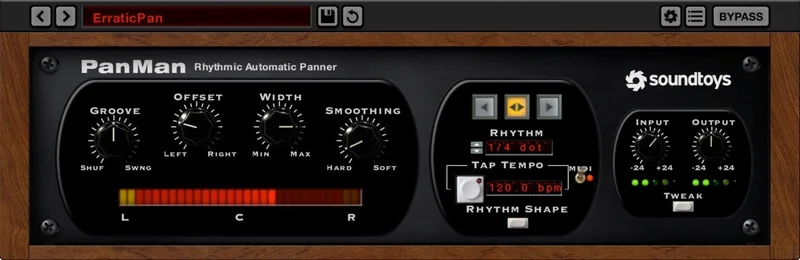
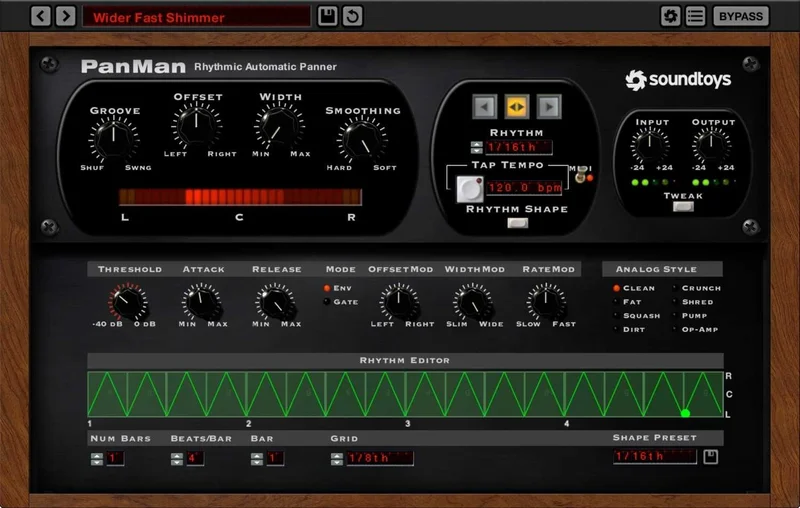
The interface pulls from three specific pieces of hardware: the Electrodyne PanScan, the Cyclosonic FS-1, and the Electrospace Spanner. Each model has a different character. The FS-1 emulation pushes harder into the centre channel before sweeping out. The Spanner model feels smoother and sits wider at the extremes.
MeldaProduction's MAutoPan sits closer to PanMan in complexity. It has more modulation routing options and a deeper modulation matrix. But it doesn't have the analog saturation baked into the movement. That's PanMan's actual edge, and we'll get into what that means in practice below.
Performance Deep Dive
We loaded PanMan on a stereo synth pad in Ableton Live at 128 samples buffer, 44.1kHz. Step Mode, eight steps, synced to 1/8 notes at 120 BPM. No latency issues. The movement locked to the grid cleanly.
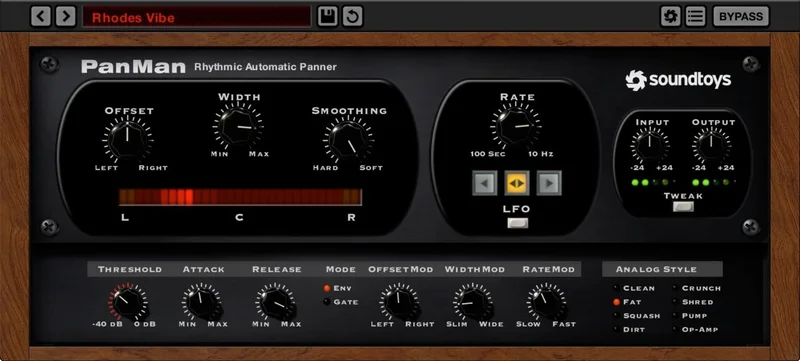
Switch to Shape Mode and you draw a custom pan curve freehand. We drew an asymmetric sweep, heavy on the left, brief flick right, back to centre. It tracked perfectly across a 4-bar loop without drift.
The Dynamic threshold trigger is the feature we kept coming back to. Set the threshold to around -18dB and PanMan only triggers a pan step when the incoming signal crosses that point. We ran a drum bus through it: kick triggers a hard left pan, snare triggers right. The result is a performance-style pan that follows the dynamics of the track rather than a fixed clock. That's not something Pancake 2 does at all.
The Trigger Divider, borrowed directly from the vintage PanScan, lets you set how many trigger events pass before the pan position advances. Set it to 2 and every other kick hit moves the stereo position. Satisfying when it clicks into place.
CPU load sits at roughly 2-3% per instance on an Apple M2 at 44.1kHz/256 samples. That's not heavy by any measure, but Pancake 2 runs at under 1% in the same session. Over six or eight instances across a mix, the difference adds up.
Where It Wins
The hardware emulation isn't cosmetic. Run a signal through the FS-1 model with saturation pushed to 60% and you'll hear low-order harmonics added to the signal as it moves. The pan isn't just position change, it's tonal change through the sweep. That's the thing we love about PanMan and that no free alternative touches.
Step Mode with the Trigger Divider is genuinely clever for rhythmic work. We used it on a hi-hat loop, setting the divider to 3 so every third hit triggered a position advance. It created a polyrhythmic stereo effect that felt composed, not automated.
The three hardware models give you three genuinely different sonic characters to choose from. This isn't the same algorithm with three skins. We A/B'd them through a Neve console emulation and the differences held up at mastering volume.
Format support covers VST2, VST3, AU, and AAX Native in 64-bit. Version 5.0.4 runs clean on both Mac OS X 10.12 and Windows 7 or later.
Where the Competition Wins
Pancake 2 is free. That's not a small thing. For a student or a producer on a tight budget, that argument ends the conversation before it starts.
MAutoPan has a deeper modulation matrix. If you need to route pan movement to an envelope follower, a pitch detector, or a custom LFO shape with multiple breakpoints, MAutoPan does that. PanMan's Shape Mode is expressive but it's not a full modulation engine.
The iLok requirement is annoying. You don't need a dongle, but you need an iLok account, and for some producers that's a dealbreaker on principle. We get it. It's an extra step that competitors don't ask for.
Pancake 2 also wins on visualisation. Its real-time stereo field display is cleaner and more immediate than PanMan's feedback. When you're dialling in a subtle pan movement, that visual feedback matters.
Who Should Buy Which
- ✅ Buy PanMan if you want vintage hardware character and saturation as part of your pan movement, not just as a separate processor.
- ✅ Buy PanMan if yo
u’re doing rhythmic, beat-synced panning and need the Step Mode Trigger Divider for polyrhythmic stereo work.
- ✅ Buy PanMan if you're in a professional session where AAX support and a polished UI are non-negotiable.
- ❌ Skip PanMan if you need basic stereo sweeps on a pad or vocal. Pancake 2 covers that for free.
- ❌ Skip PanMan if you run dense sessions with 10+ instances. The CPU cost compounds quickly versus lighter alternatives.
- ❌ Skip PanMan if the iLok account requirement genuinely disrupts your workflow.
Score Breakdown
| Category | Score | Notes |
|---|---|---|
| Sound Quality | 4.5/5 | The three hardware emulations are distinct and the saturation modes add genuine tonal character |
| Value for Money | 3.5/5 | Justifiable if you use the depth; overpriced if you only need basic auto-pan |
| Ease of Use | 4.0/5 | Intuitive once you understand the two mode structure; takes a session to settle into |
| Features | 4.0/5 | Step Mode, Shape Mode, Dynamic trigger, Trigger Divider, and 7 saturation modes cover serious ground |
| CPU Efficiency | 3.5/5 | Clean on low instance counts, less competitive across large sessions versus free alternatives |
| Overall | 4.1/5 | Strong creative tool with real hardware roots; price and iLok hold it back from a higher mark |
Alternatives to Consider
Cableguys Pancake 2 is free and covers the fundamentals well. Clean LFO-driven panning, good visual feedback, zero CPU overhead worth mentioning. If you're doing simple stereo movement on synths or pads, download it now and spend your money elsewhere. Cableguys plugin guide
MeldaProduction MAutoPan wins on modulation depth. The routing matrix is more complex than PanMan's, and if you need pan movement triggered by pitch detection or linked to multiple LFO shapes simultaneously, MAutoPan handles that. It's a more technical tool and less characterful. MeldaProduction plugins overview
Serato Hex FX takes a different angle entirely, treating spatial movement as a live performance tool rather than a mix processor. Can Serato Hex FX Replace Soundtoys in 2026? If your workflow is performance-first or you're doing live sets, it's worth comparing the two before you commit.
For broader stereo field work beyond just panning, check out best stereo widening plugins to see where PanMan fits into a full spatial chain.
PanMan earns its price when you use all of it: the hardware emulation, the saturation, the Step Mode trigger logic. If you're paying for it to do a basic LFO pan sweep, that's an expensive sine wave. Buy it for the Trigger Divider and the FS-1 saturation, use it on drums and basslines where the movement becomes part of the sound, and it'll earn back the cost inside a session. If that's not your workflow, Pancake 2 is still free, and free is hard to argue with.
Frequently Asked Questions
Does PanMan require a physical iLok dongle?
No, you don't need a physical dongle. PanMan requires an iLok account for activation, but the license can sit on your computer or in the cloud. The extra step is annoying for producers who prefer simple serial-number activation, but it's not a hardware requirement.
What's the difference between Step Mode and Shape Mode in PanMan?
Step Mode gives you a fixed number of discrete pan positions that advance in sequence, synced to your DAW's tempo. You set how many steps, where each step lands in the stereo field, and how the Trigger Divider spaces them out. Shape Mode lets you draw a freehand pan curve, so the movement follows a custom waveform you design rather than a stepped sequence. Use Step Mode for rhythmic, grid-locked panning. Use Shape Mode when you want fluid, non-linear sweeps.
Which hardware units does PanMan emulate?
PanMan models three vintage auto-panners: the Electrodyne PanScan, the Cyclosonic FS-1, and the Electrospace Spanner. Each has a different character in terms of how it handles the centre channel and the extremes of the stereo field. The PanScan model includes the Trigger Divider feature that lets you control how many pan steps occur per trigger event.
How does the Dynamic threshold trigger work in practice?
When you activate the dynamic trigger, PanMan listens to the level of the incoming signal and only advances to the next pan position when the audio crosses a threshold you set. This means the panning responds to the performance or the dynamics of the source material rather than the DAW clock. On a drum bus, for example, louder hits can trigger position changes while quieter ghost notes pass through without moving the stereo field.