Space Controller Standard is most often stacked against Sound Particles' own earlier tools, the Energy Panner and Brightness Panner, and the short answer is this: it beats both for hands-on spatial control, and it beats the Dolby Panner for anything that isn't already locked inside an Atmos renderer. At $34, it sits in a niche that's genuinely underserved, and we think it earns its spot there, with a couple of real frustrations worth naming before you buy.
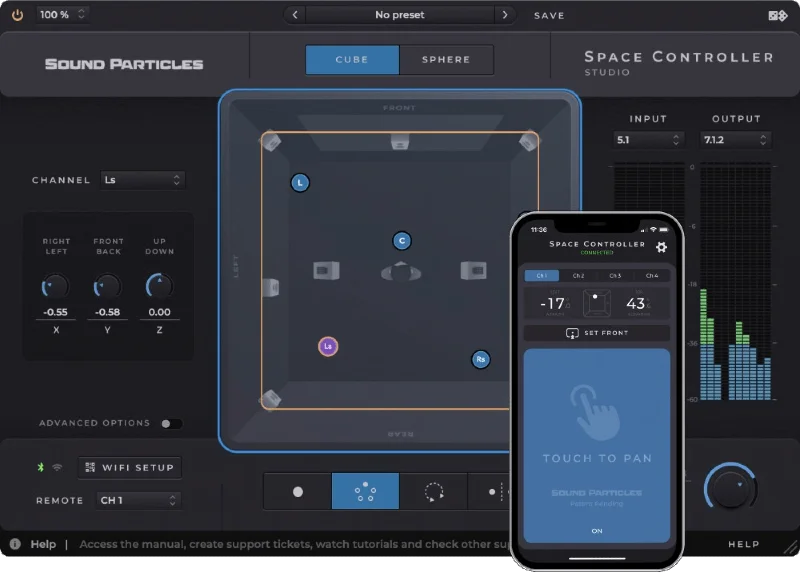
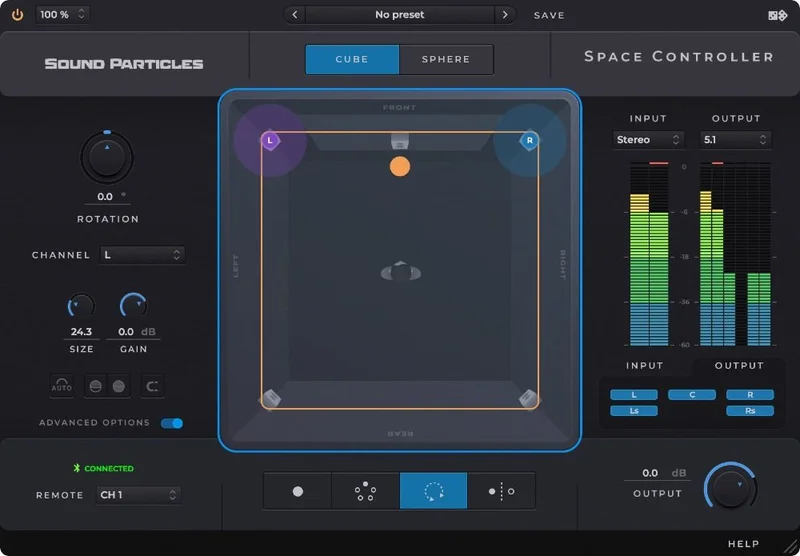
What Sound Particles built here is a motion-based panning plugin. You connect a mobile device over Bluetooth, tilt or rotate it, and your audio moves through a surround or immersive field in response. It's a physical, embodied way to work with space, and owners consistently say it makes the transition from stereo to spatial audio feel intuitive rather than terrifying.
This review is for composers, post-production engineers, game audio designers, and anyone who's stared at a surround panner and thought "there has to be a better way than clicking dots." If you're still mixing in stereo, Space Controller Standard is not your next plugin. If you're pushing sounds through 5.1, 7.1, or Atmos, read on.
How It Compares Out of the Box
Pull up the Sound Particles Energy Panner or Brightness Panner and you're working with clever multichannel panning tools, but they're parameter-driven. You type or draw. Space Controller Standard does something different from the moment you launch it: it wants you to pick up your phone.
That's the split right there. Energy Panner and Brightness Panner are surgical tools you operate with a mouse. Space Controller Standard is a physical performance tool you operate with your body. Neither approach is wrong. They're built for different moments in a session.
Against the Dolby Panner inside Atmos renderers, Space Controller Standard can't natively output to Dolby Objects, but it does let you copy and paste automation across to Dolby Atmos Objects. That's a workflow step the Dolby Panner skips. For some sessions it's fine. For others it's annoying enough to change how you plan your routing.
First impressions from owners land consistently in the same place: the GUI is intuitive, mobile calibration kicks in immediately, and the binaural output on headphones sounds convincing. That's a solid out-of-box experience for a spatial tool.
The Four Panning Modes: What They Actually Do
Space Controller Standard gives you four modes: Mono, Dual, Rotation, and Symmetric. These aren't just preset flavours. They change how your signal moves through the speaker field in genuinely different ways, and picking the wrong one for a sound type wastes time.
Mono Mode
Mono places a single sound at one position in the surround field. You tilt and rotate the mobile device and the sound follows. It's the starting point, and it's exactly what it sounds like. Simple. Useful for discrete sound placement in post-production or game audio.
But "simple" doesn't mean limited. With Cube or Sphere geometry behind it and Size control shaping how many speakers the sound reaches, even a single Mono placement becomes a decision with layers.
Dual Mode
Dual runs two independent positions simultaneously. Think of a sound that you want to exist in two places at once, a wide choir, a split reverb tail, an ambience layer that wraps from front to back. Dual handles that without you needing two instances of the plugin.
It's clever. And it's one of those features that sounds niche until you're in a session and suddenly you need exactly that.
Rotation Mode
Rotation puts a sound in continuous movement through the field. You set the axis and speed, the sound orbits. For designing motion-heavy audio, sci-fi effects, or anything that needs to circle a listener, this is the mode that makes Space Controller Standard feel different from a static panner.
Imagine dropping a helicopter rotor into Rotation Mode and automating the axis tilt through a scene. That kind of movement used to mean careful breakpoint automation. Here it's a tilt of your phone and a few parameter locks.
Symmetric Mode
Symmetric mirrors positions across a chosen axis. You move one side, the other follows in a reflected relationship. For music mixing, this is satisfying in a way that's hard to describe without hearing it. Push a sound left-front and its mirror appears right-front. It keeps the field balanced without you babysitting both sides.
It's the mode that makes the most sense for music production workflows moving into immersive audio. Spatial width stays coherent while you perform the panning live.
Cube vs. Sphere: Geometry Matters More Than You'd Think
This is where Space Controller Standard shows some genuine depth. You're not just placing sounds in a flat field. You're choosing whether that field has corners or curves.
Cube Mode maps your speaker layout to a cube geometry. Sounds move along the planes and corners of that shape. The result is a panning character that respects hard edges and room boundaries. For post-production work where your mix needs to match a specific room geometry, this is the mode that makes sense.
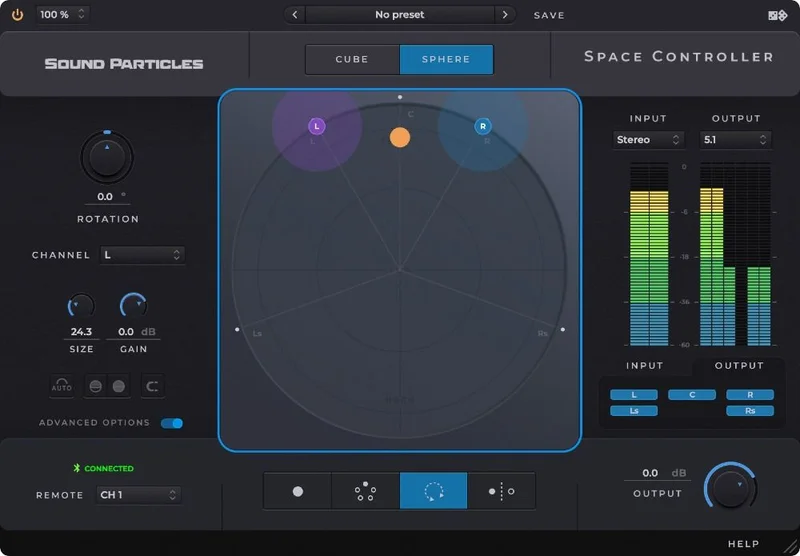
Sphere Mode wraps the field in a smooth, continuous curve. Movement feels fluid and organic. For music, for ambiences, for any audio that's supposed to feel like it exists in an open acoustic space, Sphere is where owners spend most of their time. The binaural output that gets praised in owner reports is almost always referencing Sphere Mode playback through headphones.
Switching between them mid-session is fast. It's not buried in a menu. And the difference in perceived space is audible and meaningful, not cosmetic.
The Size Control and What It's Actually Solving
Size is one of those controls that sounds abstract until you use it in context.
What it does: it adjusts the width of a positioned sound by controlling how many speakers it reaches. A small Size value concentrates the sound at a single speaker or a tight cluster. A large Size value spreads it across more of the array, making it feel physically bigger in the room.
Say you're placing a room tone in a 7.1.4 session. You want it omnidirectional, surrounding, filling the whole field. Push Size toward its maximum and it reaches across the full speaker array. Now you've got a sound that sits inside the room rather than arriving from one wall.
Flip that for a spot effect, a door knock, a gunshot, something that needs precise localization. Pull Size down and the sound snaps tight. It arrives from a point, not a region.
This is the control that connects Space Controller Standard to real spatial audio thinking, not just surround panning. It's the difference between placing a sound and placing a sound with a physical presence in the room.
The Locks Feature: Holding Position Under Live Performance
This is the feature that makes Space Controller Standard a serious tool rather than a novelty.
When you're performing panning live with a mobile device, you're going to accidentally move on axes you didn't mean to. You're recording a slow left-to-right sweep and your wrist tilts slightly forward. Without Locks, that becomes an unintended height movement baked into your automation.
Locks lets you hold individual position-related parameters in place. Lock Z while you sweep X and Y. Lock X while you rotate on the vertical axis. It's parameter-by-parameter, which means you can be expressive on two axes while staying precise on the third.
Owners report that precise automation still requires practice to master, and that's honest. But Locks is what makes practice productive rather than frustrating. Without it, motion-based panning on a 3D field would be close to unworkable for anything you need to repeat or refine.
Output Format Range: This Is the Spec That Justifies the Price
Let's list what Space Controller Standard outputs to, because this is not a minor point.
Quad, 4.0, LCR, LCRS, 5.0.2, 5.1.2, 5.0.4, 5.1.4, 7.0.4, 7.0.6, 7.1.6, 9.0.8, 9.1.8, and 11.1.8. That's fifteen output configurations.
That's fourteen output configurations. From basic surround up through 11.1.8, which is a speaker array that most people will never mix for but that's sitting there if you need it. At $34, having that range in a single plugin is the kind of spec sheet that makes you do a double-take.
Input formats cover Stereo, Binaural, FOA, and 5.1. So you can feed it a standard stereo bus, a binaural mix, a first-order Ambisonics signal, or a 5.1 print and it handles the routing. That flexibility matters in real sessions where your stems don't all arrive in the same format.
The 128-link maximum for simultaneous communication connections between devices and outputs is worth noting in large-format sessions. If you're running a complex setup with multiple controllers addressing multiple output buses, Space Controller Standard is built to scale in a way that simpler tools aren't.
Bluetooth vs. Wi-Fi: The Connectivity Question Owners Keep Raising
The plugin connects your mobile device over Bluetooth. That's the designed workflow. But owners consistently report that Wi-Fi proves more stable for sustained sessions.
This matters if you're planning to record long automation passes. A Bluetooth dropout mid-take means a re-record. If your studio has a solid Wi-Fi network and you can route the connection over it, do that. The plugin supports it.
The Bluetooth option is real and it works. But it's the kind of thing where you want to test your connectivity setup before you're in the middle of a critical session rather than discovering its limits under pressure.
An iPod touch works as a dedicated controller, which is a clever solution if you want to leave your main phone free. Keep a spare iPod touch in the studio and you've got a dedicated motion controller that doesn't have notifications interrupting your takes.
The Randomize Problem: One Genuinely Annoying Limit
The randomize feature randomizes X, Y, and Z simultaneously. All three axes. No constraints.
If you're working in a format where height channels are relevant, that's fine. But the moment you're mixing for a format where vertical movement doesn't serve the material, or you want randomized variation only in the horizontal plane, you're stuck. The plugin won't let you tell it "randomize X and Y, leave Z alone."
This is the kind of limit that sounds minor until you hit it in a creative session. You want the generative, chance-based movement that randomize promises, but you need it constrained to two dimensions. Right now that's not possible.
It's not a dealbreaker. It's a workflow frustration. But it's a real one, and it's worth knowing before you build a creative process around the randomize feature.
No Custom Speaker Layouts: Who This Actually Affects
Space Controller Standard doesn't support custom speaker layouts. You get the fourteen formats listed in the output spec, and that's your menu.
For most immersive audio work, that's enough. The standard formats cover the major theatrical, broadcast, and streaming delivery targets. But if you're designing audio for an installation with a non-standard speaker array, or mixing for a venue that doesn't match one of the preset configurations, you'll hit a wall.
This isn't a problem the developer hides. It's just a constraint of the tool's current scope. If custom layouts are a core requirement for your workflow, Space Controller Standard isn't the right fit. For everyone working inside standard delivery formats, it's a non-issue.
Automation Into Atmos: The Copy-Paste Workflow
Getting automation out of Space Controller Standard and into a Dolby Atmos session is possible, but it's not seamless. The workflow involves performing panning, recording the automation, then copying and pasting it to Dolby Atmos Objects.
That's a step. If you're doing a full Atmos mix with dozens of objects, that step multiplies. It's not a broken workflow, but it's also not the native Dolby Panner experience where everything stays inside the renderer.
What you get in return is a more expressive, motion-based performance tool for capturing the automation in the first place. Whether the extra copy-paste step is worth that expressiveness depends entirely on how you work. For composers who want to perform spatial placement and then drop it into an Atmos session, it's a reasonable trade. For engineers doing technical Atmos delivery work, the Dolby Panner's native integration probably wins that specific argument.
Performance Deep Dive
System requirements ask for a minimum 2-core CPU and 4GB RAM, with recommendations of 4-core and 8GB. For a spatial audio plugin working across formats up to 11.1.8, those requirements are modest.
The 600MB disk footprint is reasonable. It's not a lightweight install, but it's not competing with large sample libraries for drive space either.
Mac support covers macOS 10.12 and higher, 64-bit only, across Intel and M1 Apple Silicon. Windows support runs from Windows 10 SP1 upward, 64-bit. The Apple Silicon native support matters: running spatial audio processing under Rosetta 2 is workable but adds latency at the worst possible moment in a live performance workflow. Native M1 support removes that concern.
Plugin formats hit AAX Native, AU, VST, and VST3 on Mac, with AAX Native, VST, and VST3 on Windows. AU is Mac-only, which is standard, but it covers Pro Tools, Logic, Cubase, Ableton, and every major DAW without format gymnastics.
Owners report panning feels smooth and responsive, and the binaural output produces a believable immersive experience on headphones. "Believable" is doing real work there. Binaural immersive audio is easy to get wrong. When it works, you hear the field opening around you. When it doesn't, it sounds like a phase experiment gone bad. The consistent owner praise on this point is a signal worth taking seriously.
Where It Wins
The core argument for Space Controller Standard over its competition is embodied control.
The Energy Panner and Brightness Panner are precise, parameter-driven tools. They're brilliant at what they do. But they don't feel like performance. Space Controller Standard does. That physical relationship with spatial placement changes how you think about moving sound through a field.
The output format range is a real competitive advantage. Fourteen formats at $34 is generous. Tools that reach 9.0.8 and 11.1.8 at this price point are not common.
The four panning modes mean you're not reaching for a second plugin when you need mirrored movement or continuous rotation. Everything's in the one instance. That's a workflow efficiency that adds up across a long session.
And the binaural monitoring story is strong. If you're working on headphones or reviewing headphone deliverables, Space Controller Standard's binaural output earns consistent praise from owners. That's not trivial for a tool that covers this range of formats.
Where the Competition Wins
The Dolby Panner wins on native Atmos integration. No copy-paste step, no workflow detour. If your work is primarily Atmos delivery and you're inside the renderer all day, that native object integration is genuinely convenient in ways that Space Controller Standard's copy-paste workaround doesn't fully match.
The Energy Panner and Brightness Panner win on parameter precision. If you need surgical, repeatable placement that you can dial in by numbers rather than by feel, those tools give you that control more directly. Motion-based panning is expressive. It's also harder to repeat exactly.
And the custom layout absence is a real gap. Niche use case? Yes. But if you're in that niche, the competition covers ground Space Controller Standard doesn't.
Who Should Buy Which
- ✅ Buy if you're composing for film, TV, or games and want to perform spatial panning as a live, physical action rather than drawing breakpoints.
- ✅ Buy if you're transitioning from stereo to immersive audio and want a tool that makes the spatial field feel intuitive rather than technical.
- ✅ Buy if you're working across multiple surround formats and want one plugin that covers everything from 5.1 to 11.1.8 without switching tools.
- ❌ Skip if your work is exclusively Atmos object-based delivery and you need native object integration without extra workflow steps.
- ❌ Skip if you need custom speaker layouts for installation or non-standard venue work.
- ❌ Skip if precise, repeatable numerical placement is more important to your workflow than expressive physical performance.
Specs & Technical Details
| Spec | Detail |
|---|---|
| Developer | Sound Particles |
| Price | $34 |
| Plugin Format | AAX Native, AU (Mac only), VST, VST3 |
| OS Support | macOS 10.12+ (64-bit, Intel & M1) / Windows 10 SP1+ (64-bit) |
| Activation | N/A |
| CPU Usage | Minimum 2-core; recommended 4-core |
| RAM | Minimum 4GB; recommended 8GB |
| Disk Space | 600MB |
| Mobile Connectivity | Bluetooth (Wi-Fi also reported stable) |
| Output Formats | Quad, 4.0, LCR, LCRS, 5.0.2, 5.1.2, 5.0.4, 5.1.4, 7.0.4, 7.0.6, 7.1.6, 9.0.8, 9.1.8, 11.1.8 |
| Input Formats | Stereo, Binaural, FOA, 5.1 |
| Max Communication Links | 128 |
| Trial Available | N/A |
| Version Reviewed | N/A |
Score Breakdown
| Category | Score | Notes |
|---|---|---|
| Sound Quality | 4.5/5 | Binaural output consistently praised; smooth panning with no reported artifacts |
| Value for Money | 4.5/5 | Fourteen output formats and four panning modes at this price is hard to argue with |
| Ease of Use | 3.5/5 | GUI is intuitive but precise automation and mobile integration take real practice |
| Features | 4.0/5 | Four modes, Cube/Sphere geometry, Locks, and Size control are genuinely useful; randomize constraint missing |
| CPU Efficiency | 4.0/5 | Modest minimum requirements for the format range it covers |
| Overall | 4.2/5 | A strong spatial panning tool with one workflow frustration and one missing spec that won't affect most buyers |
Alternatives to Consider
Sound Particles Energy Panner is the earlier multichannel panning tool from the same developer. It's a parameter-driven approach rather than motion-based, which means more precise numerical control and easier repeatability. If you hate the idea of performing panning with a physical device and just want to dial in positions with mouse and keyboard, Energy Panner is the more surgical option.
Sound Particles Brightness Panner also comes from Sound Particles and also takes a parameter-based approach to multichannel panning. Like Energy Panner, it trades physical expressiveness for precision. If your workflow is more edit-based than performance-based, either of these earlier tools may fit more naturally.
Dolby Panner in Atmos renderers is the obvious alternative for anyone doing Atmos-specific work. The native object integration it offers is a real workflow advantage for pure Atmos sessions. Where Space Controller Standard pulls ahead is the physical performance dimension and the broader output format coverage. If you're only ever working in Atmos and never anywhere else, the Dolby Panner's integration might make more sense for your specific pipeline.
The Honest Verdict on Space Controller Standard
If you're mixing in surround or immersive audio and you've been fighting with static panners and breakpoint automation, Space Controller Standard addresses a real problem. The physical, motion-based approach to panning isn't gimmicky once you understand what it's solving: it makes spatial performance feel like performance, not parameter management.
Imagine you're placing a sound design element, something that moves through a 7.1.4 field in a game cutscene. You could draw automation in your DAW. You could click dots. Or you could pick up a device, tilt it through the arc you want, record the pass, and lock off the axes you didn't mean to touch. The Locks feature exists precisely for that moment, and owners say it works.
The randomize frustration is real. You're in a creative session, you want chance-based spatial movement, you trigger randomize, and Z shoots somewhere you didn't want it because there's no way to constrain the axis. That's the kind of thing you work around once and then start planning for, but it shouldn't require a workaround. It should just be a checkbox in the interface.
The Atmos copy-paste workflow is worth thinking through before you buy. If your whole pipeline runs inside an Atmos renderer and you need objects to behave natively, Space Controller Standard is not natively integrated and the copy-paste step adds workflow overhead. If you're using Space Controller Standard for the performance and dropping automation into Atmos as a secondary step, it's fine. Know which situation you're in.
What's not in question is the format range and the price. At $34, covering output configurations from basic LCR up through 11.1.8, with four panning modes and Cube/Sphere geometry built in, the value is hard to dismiss. This isn't a tool you'll outgrow quickly as your surround and immersive work scales up.
Sound designers who hate the idea of never leaving their mouse, skip it. Everyone else moving into immersive audio who wants to feel their way through spatial placement rather than calculate it: this is the tool that makes that possible, and it's priced like Sound Particles actually wants you to buy it.
Frequently Asked Questions
What is Space Controller Standard used for?
Space Controller Standard is a spatial audio panning plugin that uses motion sensors on a connected mobile device to control sound placement in surround and immersive audio formats. You tilt and rotate the device and your audio moves through the speaker field in response. It's built for composers, post-production engineers, and game audio designers working in formats from 5.1 up to 11.1.8.
Does Space Controller Standard work with Dolby Atmos?
It doesn't integrate natively with Dolby Atmos Objects the way the Dolby Panner does inside an Atmos renderer. What it does support is copying and pasting automation from Space Controller Standard to Dolby Atmos Objects, so you can still use it in an Atmos workflow. It's an extra step, but it works.
What output formats does Space Controller Standard support?
The plugin supports fourteen output configurations: Quad, 4.0, LCR, LCRS, 5.0.2, 5.1.2, 5.0.4, 5.1.4, 7.0.4, 7.0.6, 7.1.6, 9.0.8, 9.1.8, and 11.1.8. Input formats include Stereo, Binaural, FOA, and 5.1. That range is wide enough to cover most professional surround and immersive delivery targets.
Can I use Space Controller Standard without a mobile device?
The plugin's core control method is motion-based via a connected mobile device over Bluetooth or Wi-Fi. Without a connected device, you lose the physical performance aspect that defines the workflow. An iPod touch works as a dedicated controller if you want to keep your main phone free during sessions.
Is Wi-Fi or Bluetooth better for connecting the mobile device?
The plugin is designed around Bluetooth connectivity. However, owners consistently report that Wi-Fi proves more stable for sustained sessions, reducing the risk of dropouts during long automation passes. If your studio has reliable Wi-Fi, it's worth testing that connection method before committing to critical recording.
What are the main limits of Space Controller Standard?
Three limits come up consistently. First, the randomize feature can't be constrained to specific axes, so it always randomizes X, Y, and Z together. Second, custom speaker layouts aren't supported, so you're locked to the preset output configurations. Third, precise automation and mobile device integration take practice to get right, especially for complex spatial movement.
How does Space Controller Standard compare to Sound Particles Energy Panner?
Energy Panner is a parameter-driven multichannel panning tool from the same developer: you work with numbers and mouse control. Space Controller Standard adds physical, motion-based performance using a mobile device. Energy Panner gives you more precision and repeatability; Space Controller Standard gives you expressiveness and a more intuitive physical relationship with spatial placement. They're complementary rather than direct replacements for each other.